Nativescript: border-radius CSS property not applying properly to image on Android
border-radius seems to be applying on iOS fine, but on android you can see that it's behind the image itself and not applying to the image
Using the following CSS:
.header-image{
  margin: 15px 0 0 15px;
  border-radius: 30;
  border-color: gray;
  border-width: 0.5;
  height:60;
  width:60;
}
Produces (iOS):

and produces (android):

Note that you can see a couple of pixels to the left of the image, which I assume is the border-radius.
 lscown
All 18 comments
Hi,
Just tested with latest version of {N} and default new project + your css sample and it works properly.
Can you give us more details: {N} CLI version, {N} runtimes version, steps to reproduce or sample project, version of Android device where you reproduce the problem.
 dtopuzov
on 11 Aug 2015
dtopuzov
on 11 Aug 2015
Hey @dtopuzov,
So both our CLI is on 1.2.2 and runtimes are at version 1.2.0. The android is: Nexus 5, platform 5.1.1, API 22
The way we have implemented it is with and image tag and a binding:
<Image cssClass="gravatar" horizontalAlignment="center" src="{{ gravatar_url }}"/>
It's a child of a StackLayout too. But that's really it.
If you require any more information, let me know - if for example, other elements could have effect on these.
Cheers
lscown
on 12 Aug 2015
Hi @lscown,
Unfortunately I still can not reproduce it with following steps and code:
Steps:
npm install -g [email protected]
tns create BorderApp
tns platform add [email protected] --path BorderApp
tns emulate android --avd Api22 --path BorderApp
Code is visible on the screenshot.

Can you please send us a project.
dtopuzov
on 14 Aug 2015
Hi @lscown,
We managed to reproduce the issue and we are looking into it.
Cheers
 vakrilov
on 14 Aug 2015
vakrilov
on 14 Aug 2015
Awesome, great to hear you have replicated it guys :-)
lscown
on 17 Aug 2015
Fixed in master branch - it is going to be part of our upcoming 1.3 release.
 vchimev
on 21 Aug 2015
vchimev
on 21 Aug 2015
This still does not work for me in newest version.
  "dependencies": {
    "@angular/common": "2.4.5",
    "@angular/compiler": "2.4.5",
    "@angular/core": "2.4.5",
    "@angular/forms": "2.4.5",
    "@angular/http": "2.4.5",
    "@angular/platform-browser": "2.4.5",
    "@angular/platform-browser-dynamic": "2.4.5",
    "@angular/router": "3.4.5",
    "@angular/tsc-wrapped": "^0.5.0",
    "email-validator": "1.0.4",
    "moment": "2.13.0",
    "nativescript-angular": "1.4.0",
    "nativescript-google-places": "0.0.3",
    "nativescript-iqkeyboardmanager": "1.0.1",
    "nativescript-loading-indicator": "^2.1.0",
    "nativescript-telerik-ui-pro": "next",
    "nativescript-toolbox": "^1.48.0",
    "nativescript-unit-test-runner": "0.3.3",
    "nativescript-web-image-cache": "^3.4.0",
    "reflect-metadata": "~0.1.8",
    "rxjs": "~5.0.1",
    "tns-core-modules": "^2.5.1",
    "nativescript-toolbox": "1.48.0"
  }
 blaur
on 13 Mar 2017
blaur
on 13 Mar 2017
Hey guys
I'm trying to put an image inside a StackLayout that has round borders looking as a circle. But I have the same issue as everyone else, the image gets displayed outside the circle, it only happens in android. This is my code:
<StackLayout class="avatar">
  <StackLayout class="circle-wrapper">
    <Image [src]="item.user.avatar"></Image>
  </StackLayout>
</StackLayout>
CSS:
.avatar{
  background-color: #ffffff;
  width:50;
  height: 50;
  margin-right: 15;
}

.circle-wrapper{
  background-color: #666666;
  border-radius: 100;
  width: 100%;
  height: 100%;
}
I also tried using clip-path instead of border-radius but I get the same result. Any suggestions?
Thank you
 viniciodeltoro
on 16 Mar 2017
viniciodeltoro
on 16 Mar 2017
Any ideas?
Thanks
viniciodeltoro
on 28 Mar 2017
@viniciodeltoro
Instead of applying a border to your inner stack-layout, you can directly apply it to the image itself. This way the inner stack is not necessary and the whole structure will be lighter.
e.g. using your CSS settings this way will produce a rounded image
<StackLayout class="avatar" >
        <Image src="res://icon" class="circle-wrapper"></Image>
</StackLayout>
 NickIliev
on 28 Mar 2017
NickIliev
on 28 Mar 2017
Thank you @NickIliev that worked!
viniciodeltoro
on 28 Mar 2017
Running on Android v7, using TNS 3.1.1
<Image src="res://image" width="50" borderRadius="100"></Image>
<Image src="res://image" width="50" borderRadius="100"></Image>
doesn't seem to apply border radius to any of the images...
 jogboms
on 6 Jul 2017
jogboms
on 6 Jul 2017
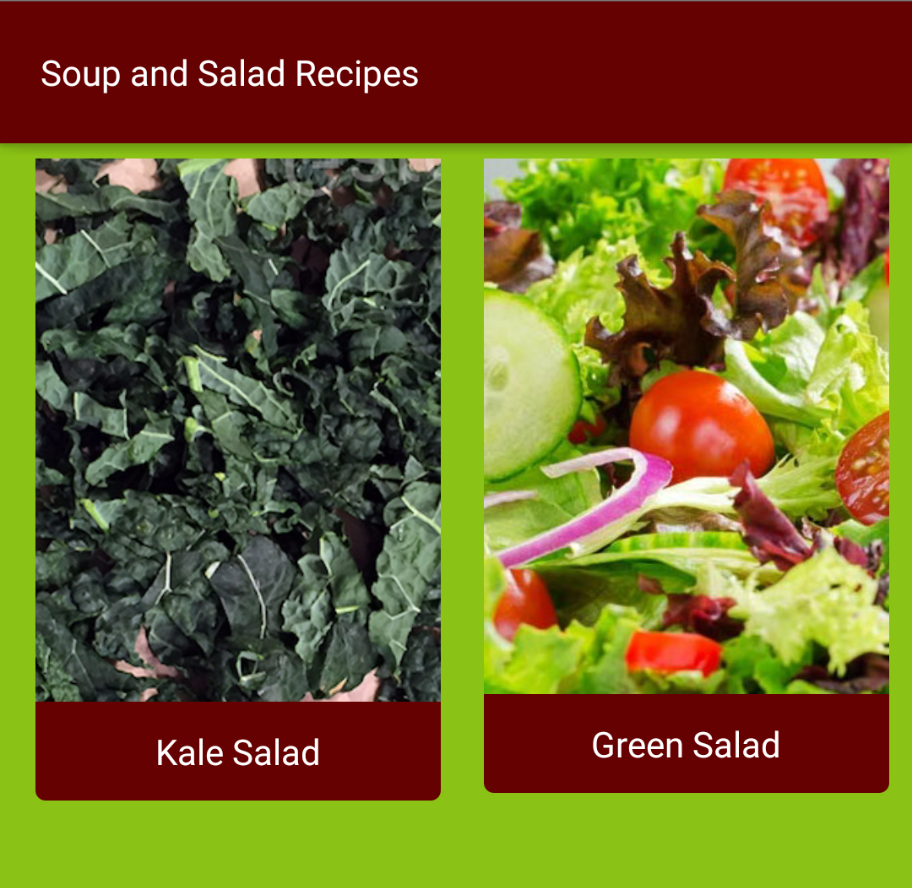
hi, I'd like the border radius on Android to apply to the StackLayout if at all possible. Right now I have a standard card layout that I use for a lot of my apps, which is a wrap layout with a stack layout for each card, as I need to put several items into each card like a stacked image and label. So on Android, the image corners won't round as they do on iOS. Any way we can fix this? thanks!
Here's what this looks like on Android (partial screenshot):

 jlooper
on 24 Aug 2017
jlooper
on 24 Aug 2017
@jlooper A weirder example of this border-radius bug: https://cl.ly/mISa
Border radius works on <Image> when theres one of the image. But if it repeats, the performance is wonky. Notice when scrolling, border radius will toggle back and forth randomly. It works fine for one image, but there a few places in my app where the same image is repeated. Heres an example,
In this feed with one item, the border radius works: https://cl.ly/mHvF
But when I add another event, another content block is displayed with the same image, but now neither have a border radius: https://cl.ly/mImd
Also worth noting, border-radius doesnt work at all on images created with the plugin nativescript-web-image-cache. They are displayed by namespacing in XML and then doing something like
<IC:WebImage class="authorimg" width="30" height="30" stretch="aspectFill" verticalAlignment="top" src="{{user.profile_photo ? user.profile_photo.sizes.tiny_square : 'res://nouserpic'}}"></IC:WebImage>
border-radius works on those elements in iOS, but not on android.
 davecoffin
on 1 Sep 2017
davecoffin
on 1 Sep 2017
@jlooper @davecoffin @jogboms @viniciodeltoro @blaur The issue is resolved with tns-core-modules3.4.0 and above.
Tested with 3.4.0 via this Playground demo.
Tested with 4.0.0 via this demo application.
Border radius is working as expected on Image and on StackLayout
NickIliev
on 19 Feb 2018
Hey @davecoffin
I have tested the scenario with multiple images (both local and remote) with different borders here. As @NickIliev concluded - it look like the issues are resolved.
I'm closing the issue for now. If you are still having problems - can you please post a repro-project that we can use for investigating the issue.
About using nativescript-web-image-cache - probably the reason is that in Android the borders are included in the images during native rendering (check out BorderDrawable). I haven't dig into the plugin and cannot tell why it is not working though - maybe you can open issue there. One thing that I noticed is that there is a rounded property implemented for android in the plugin - so it might be useful in your case.
vakrilov
on 23 Mar 2018
@jlooper
Did you get an answer to your issue with the image contained inside a StackLayout with borderRadius not being rounded?
I have the same issue, but it doesn't appear to have been addressed here.
Colin
 cfoulkes
on 19 Jul 2018
cfoulkes
on 19 Jul 2018
This thread has been automatically locked since there has not been any recent activity after it was closed. Please open a new issue for related bugs.
![lock[bot] picture](https://avatars1.githubusercontent.com/in/6672?v=4&s=40) lock[bot]
on 26 Aug 2019
lock[bot]
on 26 Aug 2019
Related issues
 nirsalon
·
3Comments
NickIliev
·
3Comments
nirsalon
·
3Comments
NickIliev
·
3Comments
 yclau
·
3Comments
yclau
·
3Comments
 guillaume-roy
·
3Comments
guillaume-roy
·
3Comments
 hshristov
·
3Comments
hshristov
·
3Comments
Most helpful comment
@jlooper A weirder example of this border-radius bug: https://cl.ly/mISa
Border radius works on
<Image>when theres one of the image. But if it repeats, the performance is wonky. Notice when scrolling, border radius will toggle back and forth randomly. It works fine for one image, but there a few places in my app where the same image is repeated. Heres an example,In this feed with one item, the border radius works: https://cl.ly/mHvF
But when I add another event, another content block is displayed with the same image, but now neither have a border radius: https://cl.ly/mImd
Also worth noting, border-radius doesnt work at all on images created with the plugin nativescript-web-image-cache. They are displayed by namespacing in XML and then doing something like
<IC:WebImage class="authorimg" width="30" height="30" stretch="aspectFill" verticalAlignment="top" src="{{user.profile_photo ? user.profile_photo.sizes.tiny_square : 'res://nouserpic'}}"></IC:WebImage>border-radius works on those elements in iOS, but not on android.