Nativescript: FontAwesome icons not showing on OxygenOS 11
Environment
✔ Getting NativeScript components versions information...
⚠ Update available for component nativescript. Your current version is 7.0.10 and the latest available version is 7.0.11.
⚠ Update available for component tns-core-modules. Your current version is 6.5.20 and the latest available version is 6.5.21.
✔ Component tns-ios has 6.5.3 version and is up to date.
✔ Component tns-android has 6.5.3 version and is up to date.
Describe the bug
I'm experiencing an issue with FontAwesome on version 11 of OxygenOS. It works great on OxygenOS 10 and iOS.
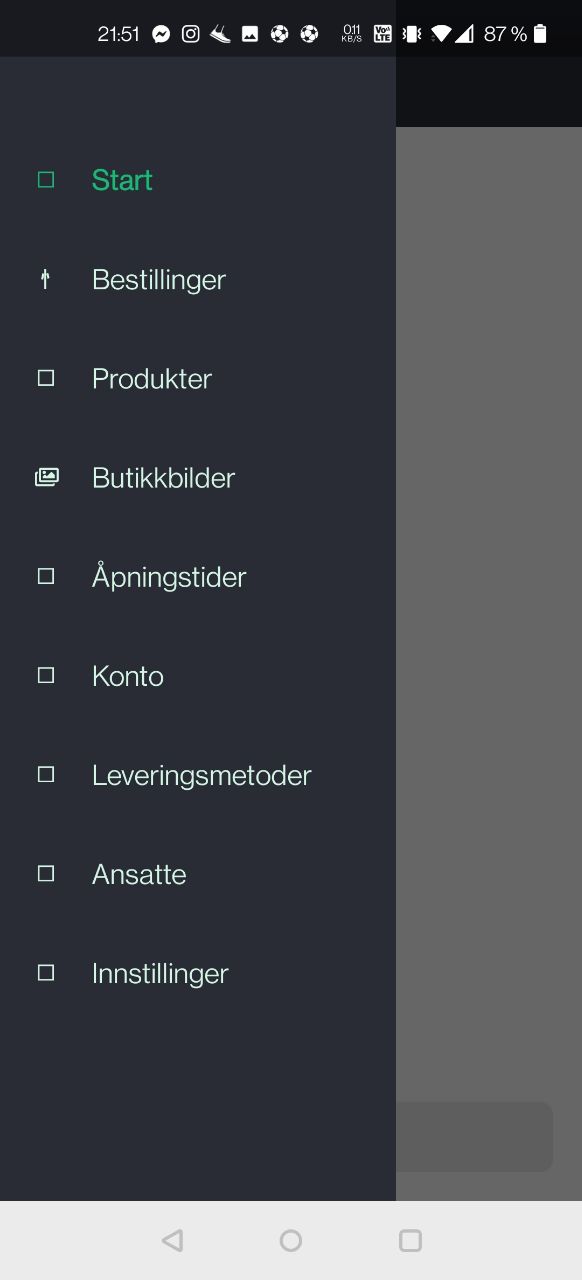
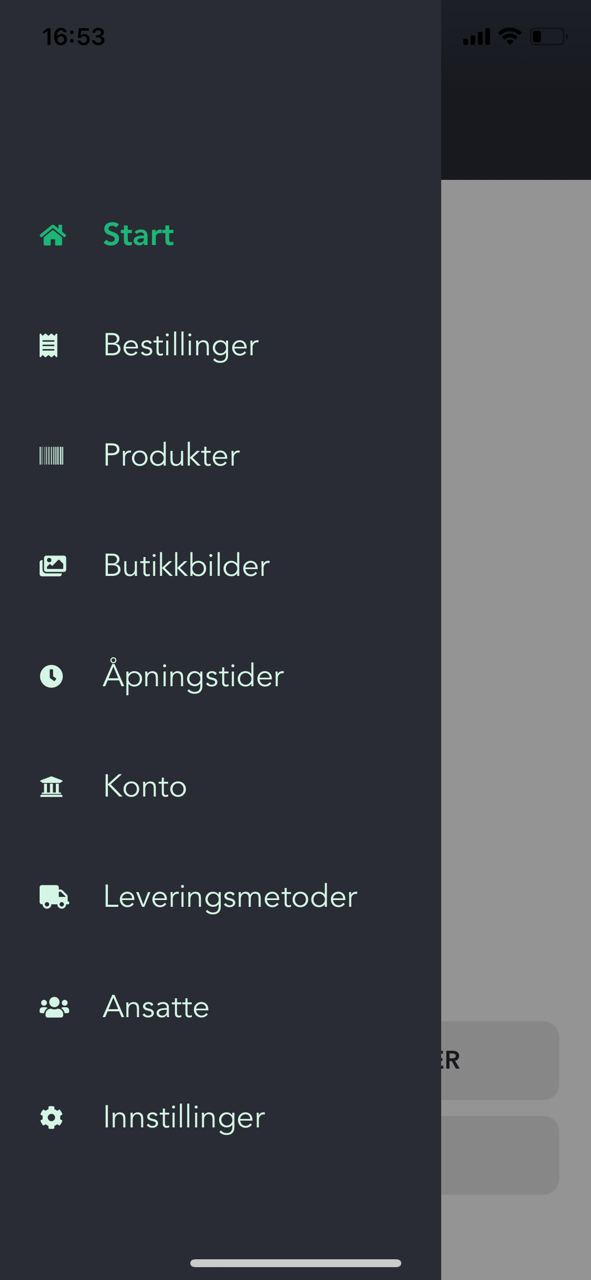
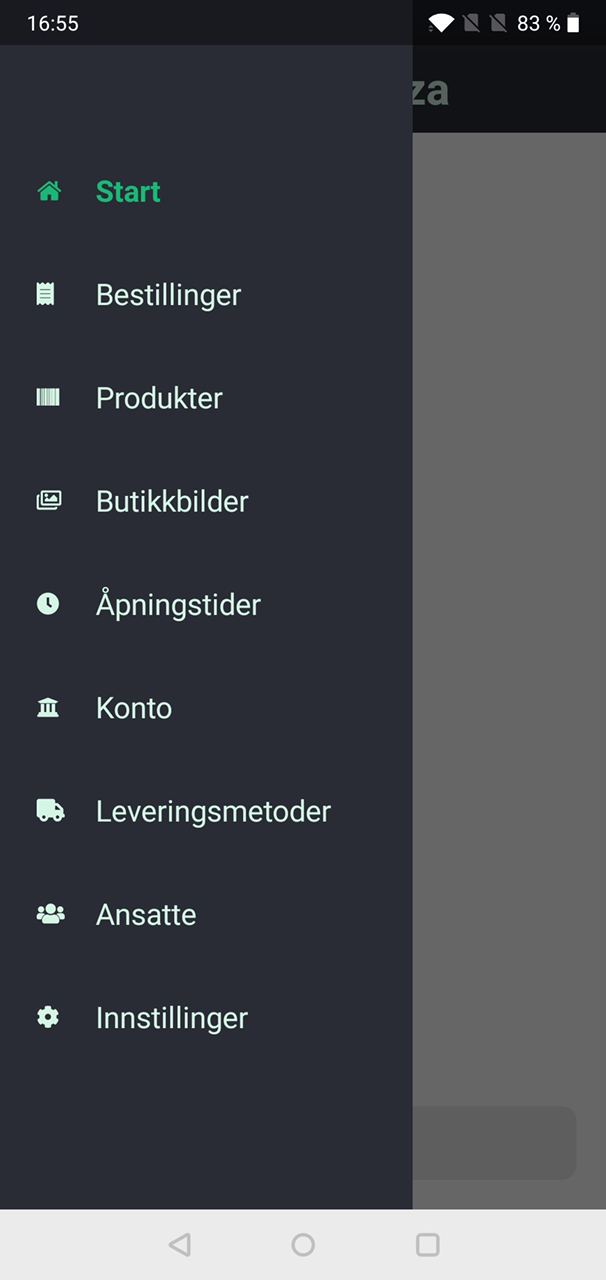
Icons from the "fas" class isn't shown correctly anywhere in my apps. In the example image below, the one icon that is showing has class "far", and the rest "fas" My setup is:

Example of how it looks:
| OxygenOS 11 (wrong) | iOS 14 (correct) | OxygenOS 10 (correct) |
 |
 |
 |
To Reproduce
Try running these examples on OxygenOS 11:
<Label text.decode="" class="nt-icon fas" />
<Label text.decode="" class="nt-icon fas" />
Expected behavior
Icons to be shown
Sample project
I can give access to my project if needed
 asharghi
All 32 comments
We had two user reports so far with missing icons, both Huawei devices with OxygenOS. I assumed it has to do with OxygenOS because all other tested devices are fine (real devices and simulator).
 jessorlisa
on 16 Nov 2020
jessorlisa
on 16 Nov 2020
Great to hear that it's not all Android 11 devices. I tested with OnePlus 8T on OxygenOS 11.
asharghi
on 16 Nov 2020
@asharghi I tested our app (using FontAwesome 5.14.0) on some Android 11 Emulators and on my Google Pixel 3a with Android 11 and all icons (regular and solid) are working as expected.
So I guess @jessorlisa is right, it might be related to OxygenOS users... at least it does not seem to be a general Android 11 problem.
 felixkrautschuk
on 16 Nov 2020
felixkrautschuk
on 16 Nov 2020
Thanks for confirming. I have updated the title and description of this issue
asharghi
on 16 Nov 2020
Seems to be a known issue nothing to do with N https://forums.oneplus.com/threads/font-issue-in-oxygenos-10-3-0.1161212/
 farfromrefug
on 16 Nov 2020
farfromrefug
on 16 Nov 2020
Hi @farfromrefug. I don't think this is the same issue because it works on OxygenOS 10. Any suggestions on what I can do next?
asharghi
on 16 Nov 2020
@asharghi do you have one of those phone? The best thing to do would be to test a very simple native android app testing the font there. That way we could say for sure if it is a N issue or an OS issue.
In both case it would also be good to test with another custom font, especially a smaller one. I know big icons use characters that could fail on some system.
farfromrefug
on 16 Nov 2020
It was actually my friends phone, but I can test that this weekend. When you say "smaller" do you mean in filesize? In my example above that is true. The only icon showing is from "fa-regular-400.ttf" (40kb), where the others that's not showing are from "fa-solid-900.ttf" (209kb).
asharghi
on 16 Nov 2020
@asharghi Yes i mean smaller in size(less icons)
farfromrefug
on 17 Nov 2020
Recently we got report from our user about this problem too. Vivo vivo device and Asus device mostly. On Android 9.0, Android 8.1 and Android 10. So we should optimize the size of the icon files?
 anmaitrannguyen
on 17 Nov 2020
anmaitrannguyen
on 17 Nov 2020
@anmaitrannguyen not yet. First we need to make sure:
- devices it happens on
- font used
- know if any other icon font is working on those devices
farfromrefug
on 17 Nov 2020
List of device reported so far:
Vivo vivo 1920 (Android 10)
Vivo vivo 1906 (Android 9)
Vivo vivo 1804 (Android 10)
Vivo vivo 1806 (Android 10)
Asus ZenFone 4 Max (Android 8.1)
I'm trying to get these device.
anmaitrannguyen
on 17 Nov 2020
Has anybody figured out the culprit here?
jessorlisa
on 7 Dec 2020
I haven't been able to get hold of a phone with this os and version yet. Anyone else?
asharghi
on 7 Dec 2020
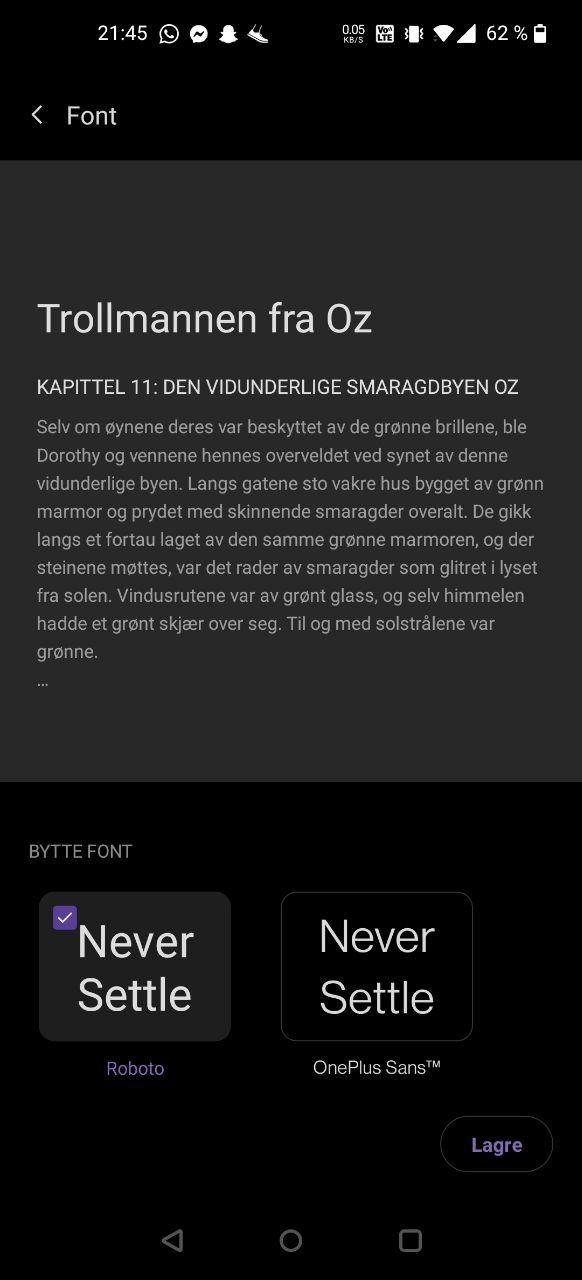
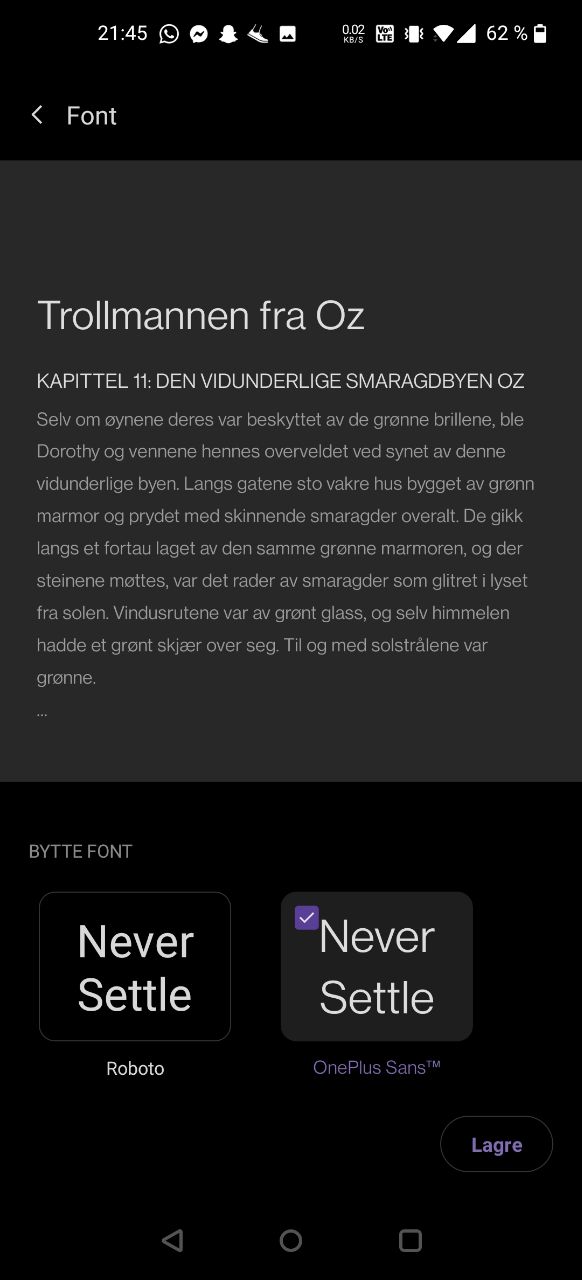
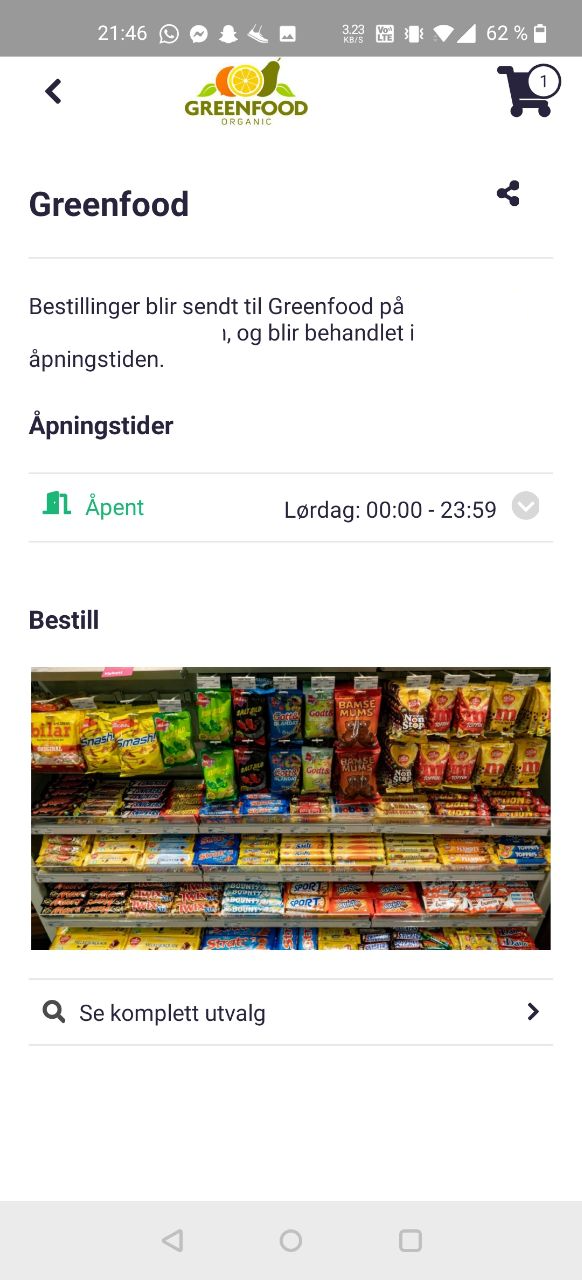
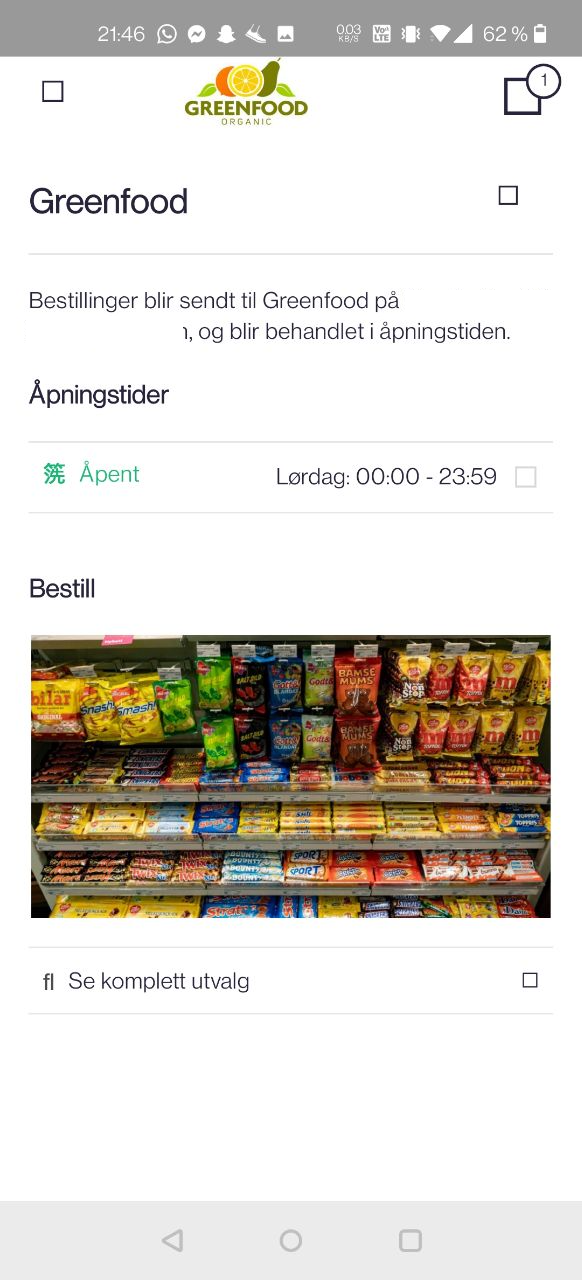
I got to test this out some more today. Found out it has to do with selected font in the OS. It only happens on "OnePlus Sans". Works with "Roboto", even on OxygenOS 11.
| OxygenOS 11 with Roboto (works) | OxygenOS 11 with OnePlus Sans (not working) |
 |
 |
 |
 |
asharghi
on 12 Dec 2020
+1 can confirm that its related to the selected font
 saschaarthur
on 13 Dec 2020
saschaarthur
on 13 Dec 2020
Have you tried copying the "OnePlusSans" font to another device and seeing it the same issue occurs? If we can duplicate the issue we might be able to find a work around...
 NathanaelA
on 13 Dec 2020
NathanaelA
on 13 Dec 2020
if you tell me where to find this font, im willing to share it
saschaarthur
on 14 Dec 2020
Hi @NathanaelA. These are preinstalled fonts in OxygenOS, with the possiblity to switch between them in the OS settings. To reproduce the bug, you could just create a new NS project with a Label showing a FontAwesome icon:
<Label text.decode="" class="nt-icon fas" />
Then go to the phone settings and change from Roboto to OnePlus Sans.
If you ment something else by "duplicate the issue", then the font can be downloaded from here https://drive.google.com/file/d/1qCUYxHUsr_X6f3XU8rxia_EJJ1d251BL/view?usp=sharing
asharghi
on 14 Dec 2020
@asharghi - Hi Andre, I don't have a device with OxygenOS, so my thought was if it could be duplicated on a different device (or even better yet, emulator) using the OnePlusSans's font as the default font on it, then perhaps a fix could be figured out how to work around it...
NathanaelA
on 14 Dec 2020
@NathanaelA just tried OnePlusSans on my samsung device. No issue, icon fonts works perfectly.
I think it is an OxygenOS issue. You can easily find forums posts about this on the web.
farfromrefug
on 14 Dec 2020
I suspect they "force override" the font system wide - causing icon fonts to be overridden to OnePlusSans.
 rigor789
on 14 Dec 2020
rigor789
on 14 Dec 2020
Thanks for the response guys. So I guess there isn't a workaround or anything else we can do?
asharghi
on 14 Dec 2020
@asharghi you could try to set a font llike roboto or all labels buttons....
farfromrefug
on 14 Dec 2020
you could try to set a font llike roboto or all labels buttons....
Are we not doing exactly that by setting up our FontAwesome css classes and applying them to labels/buttons?
jessorlisa
on 15 Dec 2020
I dont think you are using font awesome for all labels/buttons. Would have only icons. It is those others I am talking about. Though I really doubt it would work
farfromrefug
on 15 Dec 2020
On my Pixel 3a with Android 11 it is working as expected, but we got some reports that the FontAwesome Icons are not shown anymore after upgrading to Android 11 on some devices.
In our case, some Samsung devices are affected, as one example the _Samsung S20 Ultra_. The user mentioned that he switched from the default font to one of the other pre-installed fonts like "SamsungOne", "Gothic Bold" or "Cool Jazz" and they were working fine with all the FontAwesome icons we use. After upgrading Android 11, some of the icons are shown the wrong way or are not shown at all anymore. When switching back to the default system font, it is working fine again.
felixkrautschuk
on 15 Dec 2020
We have another (non OxygenOS) report as well:
- Samsung Galaxy S20+ with Android 11
- Custom font: "SamsungOne"
jessorlisa
on 15 Dec 2020
@jessorlisa @felixkrautschuk could you try to reproduce it in an android 11 emulator? If you do then you can share a repro example and we can take a look at finding a solution/workaround
farfromrefug
on 15 Dec 2020
I downloaded the ttf file here but now I do not know how to install the font in the emulator. I found some old instructions but they do not work.
felixkrautschuk
on 15 Dec 2020
@asharghi do you see the same effect using another font like Material design icons or is this only related to FontAwesome?
I am still not able to install the SamsungOne font on emulator, actually I have not that much time to try it again.
felixkrautschuk
on 5 Jan 2021
@felixkrautschuk I have only tried with FontAwesome. Wasn't able to find out how to install fonts on Android emulators when I googled either sadly.
asharghi
on 5 Jan 2021
Related issues
 OscarLopezArnaiz
·
3Comments
OscarLopezArnaiz
·
3Comments
 Leo-lay
·
3Comments
Leo-lay
·
3Comments
 tsonevn
·
3Comments
tsonevn
·
3Comments
 nirsalon
·
3Comments
nirsalon
·
3Comments
 rLoka
·
3Comments
rLoka
·
3Comments
Most helpful comment
@jessorlisa @felixkrautschuk could you try to reproduce it in an android 11 emulator? If you do then you can share a repro example and we can take a look at finding a solution/workaround