Nativescript: Android dark theme and background/border color
Environment
Provide version numbers for the following components (information can be retrieved by running tns info in your project folder or by inspecting the package.json of the project):
- CLI: 6.2.0
- Cross-platform modules: 6.2.3
- Android Runtime: 6.2.0
Describe the bug
When using the dark theme introduced in Android 10, background and border colors are different than what they are supposed to be.
To Reproduce
Use the following test app - https://play.nativescript.org/?template=play-ng&id=P7tcdd
The background color of the StackLayout and the text color of the Label should be the same. Using the light theme in Android 10 you cannot read the text. If you switch to the dark theme, the background color changes and you can see the difference
Expected behavior
Background color set in CSS does not change when you change the OS theme.
Sample project
https://play.nativescript.org/?template=play-ng&id=P7tcdd
 lini
lini
All 7 comments
I've been looking at the exact same issue. Many yellows are brown etc. I styled my button with yellow but it looks more like a 5% yellow transparent button, as it appears so dark.
 msegers
on 2 Jan 2020
msegers
on 2 Jan 2020
Would love to know if there's a workaround to this. I'd love to make some element colors static, while others change according to Light/Dark mode
 rizmanhariz
on 11 May 2020
rizmanhariz
on 11 May 2020
Based on a post I found elsewhere (I can't remember where) I tried setting <item name="android:forceDarkAllowed">false</item> in App_Resources/Android/src/main/res/values-v29/styles.xml. This stopped yellows from turning brown. The background color still gets switched if the device is in dark mode but at least button colors get left alone.
 hazardv
on 11 May 2020
hazardv
on 11 May 2020
Hi,
I am experiencing the same issue of @msegers.
I have tried @hazardv trick and the elements in yellow are getting the right yellow now, but after I navigate back and forth in a page with the dark mode background, it changes from dark background to light (white) background and because of that, the text doesn't appear (white text of dark mode).
I am attaching a gif to show the issue:
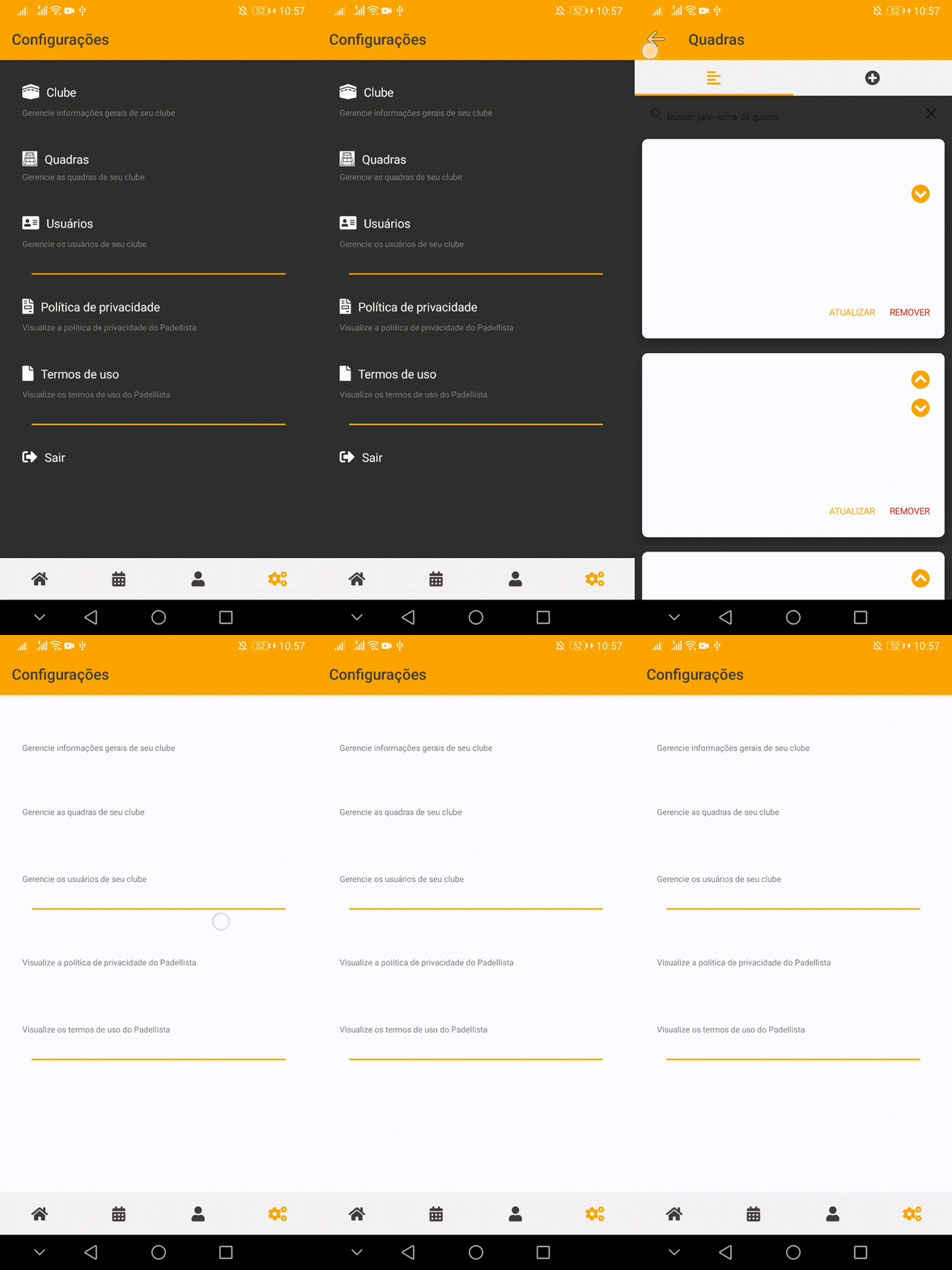
Notice the white cards on "Quadras" page and the white background on the "Configuracoes" page after navigating over the pages of the app.
Anyone has a workaround for this?
Or how can I fix the yellow color of the dark mode (this is the best solution, since all dark mode is working as expected).
Thanks in advance.
 giulianimartini
on 8 Jul 2020
giulianimartini
on 8 Jul 2020
I would say that this is the biggest issue in nativescript right now, but actually it isn't; the developers seemingly ignoring this issue is.
 daaniiieel
on 20 Jul 2020
daaniiieel
on 20 Jul 2020
I would say that this is the biggest issue in nativescript right now, but actually it isn't; the developers seemingly ignoring this issue is.
You got downvoted by @rigor789 which just proves your point lol.
 dmyers
on 1 Oct 2020
dmyers
on 1 Oct 2020
No, down thumbing it means a developer saw the issue; didn't ignore it, he actually stated he disagreed with your assessment of the importance. We just currently have much bigger fish to fry as their are ways to work around this...
- You can just disable dark mode support (which eliminates the issue)
- You can manually handle it yourself by using something like ns-themes to swap themes automatically/manually.
- You can manually change the CSS so that when in dark mode the text is set to black. (I believe this would also work???)
In addition
- You can actually become a contributing member, and spend the time looking into what is causing the issue or how to work around the issue. This is a OPEN source project, meaning it survives on people of the community actually contributing to it.
OR - You can sign up for a support agreement; so that bugs fixes like this are actually _funded_ and would get priority based on tickets you raise for your app, so if you think this is a priority -- you raise a internal support bug and it would get fixed because you choose to financially support the project.
But if all you want to do is complain, that isn't helpful to any open source project...
 NathanaelA
on 1 Oct 2020
NathanaelA
on 1 Oct 2020
Related issues
 fmmsilva
·
3Comments
fmmsilva
·
3Comments
 yclau
·
3Comments
yclau
·
3Comments
 kn9ts
·
3Comments
kn9ts
·
3Comments
 NordlingDev
·
3Comments
NordlingDev
·
3Comments
 valentinstoychev
·
3Comments
valentinstoychev
·
3Comments
Most helpful comment
No, down thumbing it means a developer saw the issue; didn't ignore it, he actually stated he disagreed with your assessment of the importance. We just currently have much bigger fish to fry as their are ways to work around this...
In addition
OR
But if all you want to do is complain, that isn't helpful to any open source project...