Nativescript: webview cannot find css file in development build but can in production build?
Environment
nativescript-vue: 2.4.0
nativescript: 6.2.2
tns-core-modules: 6.2.3
tns-android: 6.0.0
tns-ios: 6.0.1
iPhone Xs 13.1.3
Describe the bug
I cannot access files in a webview while in development on a physical device. However, building for production is fine.
Below shows the code I am using to create the absolute path which includes encodeURI.
const fileSystemModule = require("tns-core-modules/file-system");
...
currentApp(path) {
    return encodeURI("file:///" + fileSystemModule.knownFolders.currentApp().path + "/" + path);
},
...
/*
INPUT:
this.currentApp('assets/webview/basic.css');

Output:
file:////var/mobile/Containers/Data/Application/3D7C3732-1C06-4844-AE7F-981591082961/Library/Application%20Support/LiveSync/app/assets/webview/basic.css
*/
Expected behavior
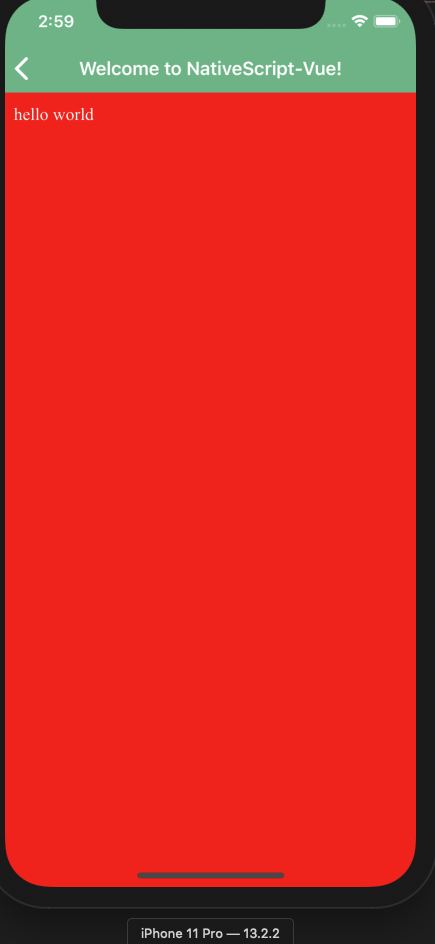
The css file should be accessible in the webview and the webview background should be red with white text.
Sample project
https://github.com/7ammer/nativescript-webview-resource-issue
Additional context
I have noticed that the production and development builds show different paths. The development path contains a space (Application%20Support) which is encoded to %20 while the production build does not have any spaces in the path. I would have thought the encoded path would work but I guess not.
The issue does not appear on android devices.
Thanks :)
 7ammer
All 7 comments
@7ammer I've tried the provided demo project on iOS 13 simulator (iPhone Pro) and on my side everything is working as expected.
 NickIliev
on 4 Dec 2019
NickIliev
on 4 Dec 2019
Thanks for the response @NickIliev,
I am also able to get it to work on a simulator. However, this does not work on a physical device when running tns run ios.
Cheers :)
7ammer
on 4 Dec 2019
@7ammer the thing is that in production the white space is stripped while this is not happening in development. However, it seems that the problem is in the native web view (WKWebView) which is not properly reading the encoded URI (where the white space is replaced with %20). One way to deal with it is to directly read the CSS (e.g., with readSync method) and provide it as a style string within a <style> tag in the HTML
NickIliev
on 4 Dec 2019
Hey @NickIliev,
I've managed to get your suggested workaround to work and have updated my example app with the changes below :)
        readSync(path) {
         let file = fileSystemModule.knownFolders.currentApp().getFile(path);
         return file.readTextSync();
        },

        <style>
             ${this.readSync('assets/webview/basic.css')}
        </style>
However, seeing as the original method that I used does not work can we consider this issue a bug or is there nothing that can be done via Nativescript?
In any case I can now progress on my project with this work around so thanks for your help :)
7ammer
on 4 Dec 2019
@NickIliev I've just realised that this fails to work when trying to include an external asset in a css file like a font-face or an image as the url path will not work.
I guess I might be able to do a search and replace on the file to change the url's the path but it makes things rather fiddly.
7ammer
on 4 Dec 2019
@NickIliev it seems that urls to external assets with absolute paths in a css file also fail to work on a physical device but does work in a simulator :(
ie
@font-face {
    font-family: 'DM Sans';
    font-style: normal;
    font-weight: 400;
    src: url('file:///var/mobile/Containers/Data/Application/910335BD-197A-4AAF-89A8-3EC8EAE698F5/Library/Application%20Support/LiveSync/app/fonts/DMSans-Regular.ttf') format('truetype');
    unicode-range: U+0100-024F, U+0259, U+1E00-1EFF, U+2020, U+20A0-20AB, U+20AD-20CF, U+2113, U+2C60-2C7F, U+A720-A7FF;
}
This does work in a production build though.
7ammer
on 4 Dec 2019
@NickIliev it seems that urls to external assets with absolute paths in a css file also fail to work on a physical device but does work in a simulator :(
That is expected as iOS has a strict policy on what you can access on a physical device. Most of the paths are either different or inaccessible on a device (compared to a simulator).
NickIliev
on 5 Dec 2019
Related issues
NickIliev
·
3Comments
 fmmsilva
·
3Comments
fmmsilva
·
3Comments
 kn9ts
·
3Comments
kn9ts
·
3Comments
 hshristov
·
3Comments
hshristov
·
3Comments
 rogangriffin
·
3Comments
rogangriffin
·
3Comments