Nativescript: GridLayout allocate wrong height after open external app on iOS
Environment
- CLI: 6.1.2
- Cross-platform modules: 6.1.2
- Android Runtime: 6.1.2
- iOS Runtime: 6.1.0
- Plugins:
- nativescript-permissions: 1.3.8
- nativescript-contacts: 1.6.2
- nativescript-ui-listview: 7.1.0
- NativeScript-Angular: 8.2.2
- Angular: 8.2.11
Describe the bug
On iOS, after open a third party app from the app (contacts, camera, ...), the GridLayout at the root (in `app.component.html) letting 2 children overlap each other.
To Reproduce
On iOS, App has a nav bar at the bottom.
<!-- app.component.html -->
<GridLayout class="page" rows="*, auto">
  <StackLayout row="0">
    <page-router-outlet></page-router-outlet>
  </StackLayout>
  <StackLayout row="1">
    <navbar></navbar>
  </StackLayout>
</GridLayout>
In a page with a full page list:
- Open an external app from the app. i.e. contacts,...
- Back to the list
- Scroll the list to the bottom.
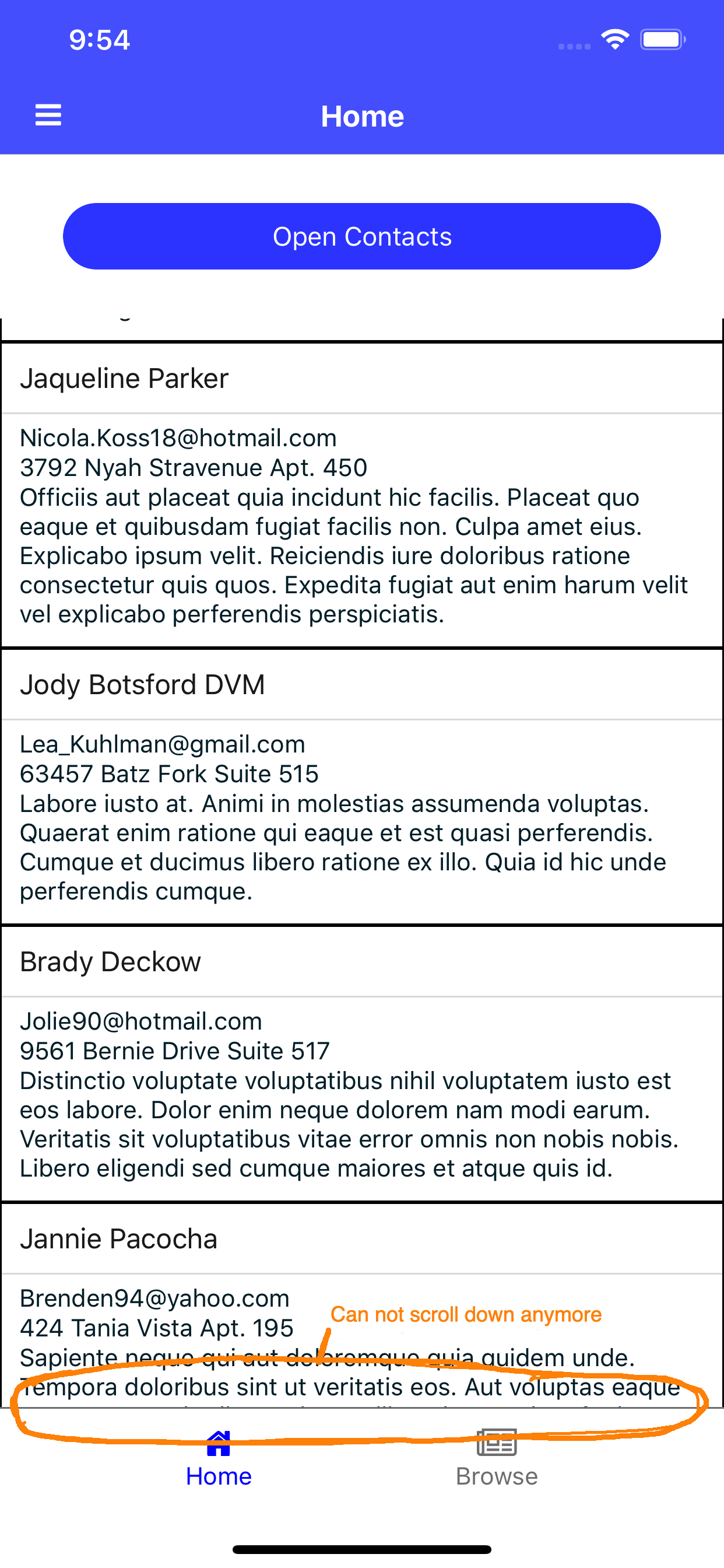
=> The last item is partly overlapped by the nav bar.
Expected behavior
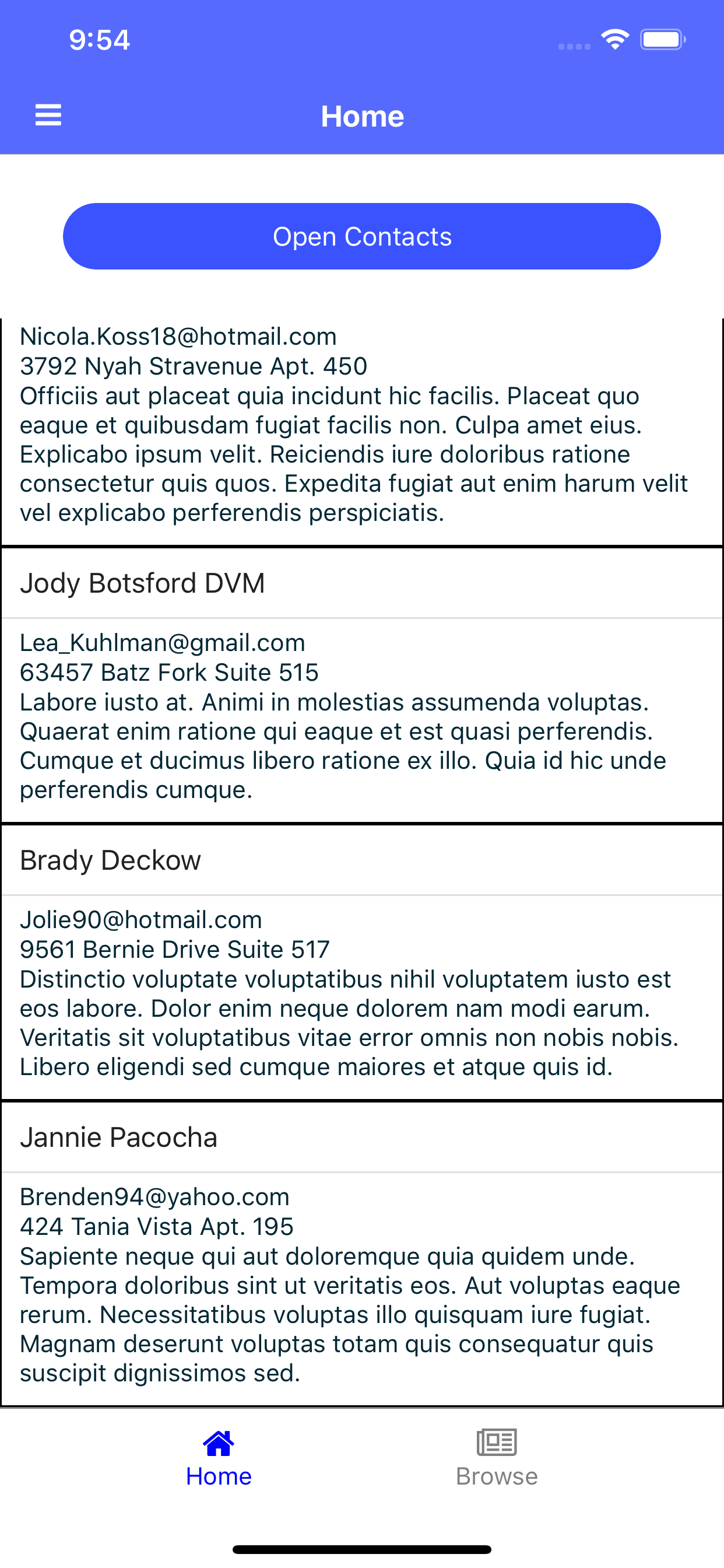
- The last item is fully above the navbar.
Sample project
https://github.com/tr1et/nativescript-bug-break-layout
Additional context
- tns-doctor result:
✔ Your ANDROID_HOME environment variable is set and points to correct directory.
✔ Your adb from the Android SDK is correctly installed.
✔ The Android SDK is installed.
✔ A compatible Android SDK for compilation is found.
✔ Javac is installed and is configured properly.
✔ The Java Development Kit (JDK) is installed and is configured properly.
✔ Xcode is installed and is configured properly.
✔ xcodeproj is installed and is configured properly.
✔ CocoaPods are installed.
✔ CocoaPods update is not required.
✔ CocoaPods are configured properly.
✔ Your current CocoaPods version is newer than 1.0.0.
✔ Python installed and configured correctly.
✔ The Python 'six' package is found.
✔ Xcode version 10.3.0 satisfies minimum required version 10.
✔ Getting NativeScript components versions information...
✔ Component nativescript has 6.1.2 version and is up to date.
✔ Component tns-core-modules has 6.1.2 version and is up to date.
✔ Component tns-android has 6.1.2 version and is up to date.
⚠ Update available for component tns-ios. Your current version is 6.1.0 and the latest available version is 6.1.1.
- I've had this issue since Nativescript 5. Didn't try Nativescript 4.
- Tested and reproduced this bug on simulator, iPhone 6, X, XS.
 tr1et
tr1et
👍1
>All comments
Hi @tr1et,
I was able to recreate the problem within a non-Angular project on iOS 12 simulator. I will mark this as a bug and we will investigate it further. I am also attaching my test project as a reference.
Archive.zip
 tsonevn
on 22 Oct 2019
tsonevn
on 22 Oct 2019
👍2
Was this page helpful?
0 / 5 - 0 ratings
Related issues
 pocesar
·
3Comments
pocesar
·
3Comments
 rogangriffin
·
3Comments
rogangriffin
·
3Comments
 Pourya8366
·
3Comments
Pourya8366
·
3Comments
 Leo-lay
·
3Comments
Leo-lay
·
3Comments
 rLoka
·
3Comments
rLoka
·
3Comments
Most helpful comment
Hi @tr1et,
I was able to recreate the problem within a non-Angular project on iOS 12 simulator. I will mark this as a bug and we will investigate it further. I am also attaching my test project as a reference.
Archive.zip