Nativescript: CSS: classes not applied as expected / margins do not work
Environment
Provide version numbers for the following components (information can be retrieved by running tns info in your project folder or by inspecting the package.json of the project):
- CLI: 5.4.0
- Cross-platform modules: 5.4.0
- Android Runtime: 5.4.0
- iOS Runtime: 5.4.0
- Plugin(s):
Describe the bug
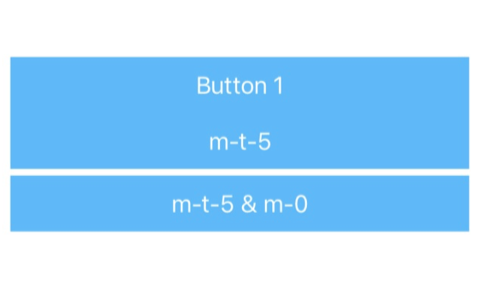
The NativeScript theme provides some nice helper classes for margin and padding. I wanted to apply a margin-top of 5 to my button. I've used m-t-5 which simply did not work on my button. When I've checked, we've already specified margin: 0 for our button (.btn) class. So first I thought it might be a problem of the the order the classes are applied but I could move them around without any success. For some reason I came up with a solution by adding m-0 to the button as well which does not make any sense for me but it works.
To Reproduce
CSS:
.btn {
    margin: 0;
}
Layout:
<StackLayout class="home-panel">
    <Button class="btn btn-primary" text="Button"></Button>

     <!-- Expecting here a margin of 5 at the top, but does not work -->
     <Button class="btn btn-primary m-t-5" text="m-t-5"></Button>

      <!-- This is working for some reason, by adding 'm-0' as additional class, but
         that doesn't make sense since '.btn' has also 'margin: 0' defined -->
      <Button class="btn btn-primary m-t-5 m-0" text="m-t-5 & m-0"></Button>
 </StackLayout>
Expected behavior
My expectation: m-t-5 (or m-t-N) should overwrite the margin: 0 of the .btn class we specified. The current solution is actually something I'd say is incorrect - since m-0 should overwrite m-t-5
Sample project
I've created a pretty simple playground to demonstrate the problem:
https://play.nativescript.org/?template=play-ng&id=ad5EUa&v=3
Only needed to add the css as described above and changed the layout in the home component.
Want to back this issue? Post a bounty on it! We accept bounties via Bountysource.
 mikaelkalt
All 8 comments
@mikaelkalt the Button element is using android.widget.Button and UIButton and both have a default theme and design where the margin can't be set to 0 (due to native implementation details).
You could easily overcome this by changing the Button with Label (but then you will lose the ripple effect). For example, see this Playground
 NickIliev
on 22 May 2019
NickIliev
on 22 May 2019
@NickIliev I think you missed @mikaelkalt point :) The problem is not that margin: 0 can't be applied. The bug it that it doesn't work as expected without doing so.
And th bug happens in combination with Buttons, using Labels is not an valid workaround.
Can you re-evaluate? :)
 madmas
on 22 May 2019
madmas
on 22 May 2019
@madmas thanks - I see what you mean... reopening the issue.
NickIliev
on 22 May 2019
Ok @madmas @mikaelkalt on second thought I can confirm that indeed this doesn't make much sense so marking this one as a bug.
Revised Playground (added more margin) to better illustrate the case.
NickIliev
on 22 May 2019
@madmas @mikaelkalt it seems the issue is strictly related to the nativescript-theme classes (e.g. like m-0 and m-t-0) and the order in which they are respected related to the local CSS classes (e.g. in the playground the .btn class is locally overwritten)
The same scenario but using entirely our own CSS classes is working as expected. Here is a Playground demonstration
NickIliev
on 22 May 2019
Thanks @madmas for your support. You're absolutely right that was my point. And as @NickIliev figured out, it is related to the theming support classes somehow and the order they're applied.
But interestingly when I've checked the generated output css the order of the classes are:
- classes from the theme (like e.g.
m-0m-t-5) - my classes
So first I thought the problem is that I overwrite the margin since my .btn class was after the margin classes but adding my own margin class as in your example (@NickIliev) they were also before my .btn class in the generated output... so I don't understand the way the css is applied to the components and if it matters in which order the classes are used in the class tag of a component.
mikaelkalt
on 22 May 2019
Another thing I've been noticing with this is that the "header classes" (.h1, .h2, ...) also conflict with some margin classes, mainly the bottom one
In this case, the bottom margin will not appear
<Label
class="h3 m-x-25 m-t-20 m-b-25"
text="Choose your fighter :"
></Label>
However, removing h3 will fix this issue
<Label
class="m-x-25 m-t-20 m-b-25"
text="Choose your fighter :"
></Label>
 AnthonyLenglet
on 24 Apr 2020
AnthonyLenglet
on 24 Apr 2020
I fixed this for the time being by importing the _spacing.scss filter after the core theme in _app-common.scss
@import '@nativescript/theme/core';
@import '@nativescript/theme/scss/core/primitives/_spacing';
Related issues
 tsonevn
·
3Comments
tsonevn
·
3Comments
 yclau
·
3Comments
yclau
·
3Comments
 rLoka
·
3Comments
rLoka
·
3Comments
 Pourya8366
·
3Comments
Pourya8366
·
3Comments
 dxshindeo
·
3Comments
dxshindeo
·
3Comments
Most helpful comment
I fixed this for the time being by importing the _spacing.scss filter after the core theme in
_app-common.scss