Nativescript: Back Navigation icon has changed
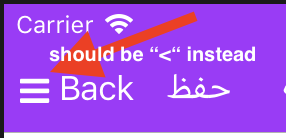
Back button has changed from < to the hamburger icon, & can't figure out how to revert back.
 ryanzaatari
All 7 comments
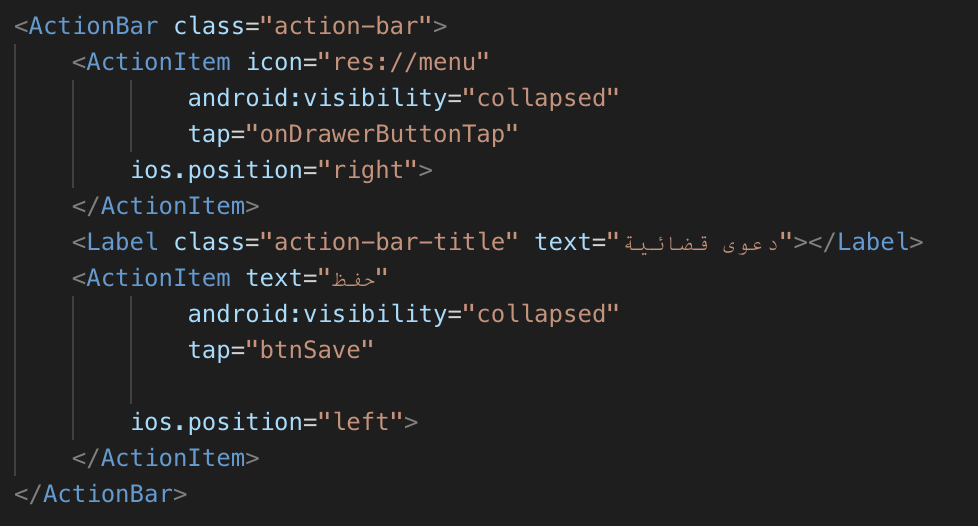
@ryanzaatari - What does your markup look like.
 NathanaelA
on 3 May 2019
NathanaelA
on 3 May 2019
@NathanaelA no explicit nav icon setting, here's my ActionBar markup
ryanzaatari
on 3 May 2019
What happens if you actually quit the application on the phone, and then start it back up. Does the icon go back to what you expect?
If so, then the reason this is occurring is probably because of LiveSync, when it is syncing any of your update to the pages to the phone it navigates to the update. Which causes you to be on a different page; meaning it thinks their is a page to go back to... This "issue" would only be seen while you are in developing your app...
NathanaelA
on 3 May 2019
Thank you @NathanaelA I quit the app, uninstalled, & reinstalled it again & the icon is back to "<" again.
ryanzaatari
on 3 May 2019
You shouldn't have to uninstall/re-install. Just force the app to quit; so that when you restart it -- it is a fresh session. :grinning: (i.e. go to the list of running apps; then swipe the app off the screen (or hit the X) depending on the OS version -- then restart the app.. )
NathanaelA
on 3 May 2019
HI @ryanzaatari,
I noticed that you were able to solve your case thanks to the @NathanaelA. In my opinion, we can close the issue. On that matter, I would also suggest testing NativeScript HMR option. This option will restart more precisely the application state, and the above-described scenario should be resolved as well.
 tsonevn
on 6 May 2019
tsonevn
on 6 May 2019
This thread has been automatically locked since there has not been any recent activity after it was closed. Please open a new issue for related bugs.
![lock[bot] picture](https://avatars1.githubusercontent.com/in/6672?v=4&s=40) lock[bot]
on 6 May 2020
lock[bot]
on 6 May 2020
Related issues
tsonevn
·
3Comments
 rLoka
·
3Comments
rLoka
·
3Comments
 vtisnado
·
3Comments
vtisnado
·
3Comments
 NickIliev
·
3Comments
NickIliev
·
3Comments
 pocesar
·
3Comments
pocesar
·
3Comments