Nativescript: IOS: Tabbar Translucent broken with no actionbar (content falls behind the tabbar)
Environment
- CLI: 5.2.2
- Cross-platform modules: 5.2.2
- Android Runtime: 5.2.1
- iOS Runtime: 5.2.0
- Plugin(s): N/A
Describe the bug
Different layouts fall behind the tabbar with the actionbar hidden. (Page.actionbarHidden)
I have a feeling the change that was made with: https://github.com/NativeScript/NativeScript/issues/6891 has to do something with it.
To Reproduce
Please check the home component of how its set-up. Once build, just start it up and scroll all the way down in the scrollview, you will see that the scrollview falls behind the tabbar.
Please do test it on different devices (with and without safearea's) and different IOS versions.
Expected behavior
setting the tabbar translucent to falls should work for any kind of setup (with actionbar/flat or no Actionbar at all.) it should work with and without safearea as well.
Sample project
I could not recreate this issue with playground as i Needed the platform-declarations in dev dependencies.
tabviewtest.zip
Want to back this issue? Post a bounty on it! We accept bounties via Bountysource.
 btaluy
All 11 comments
Hi @btaluy,
Thank you for the provided sample project.
I reviewed it, however, was unable to find a problem with the TabView component. I tested the project on iPhone SE and iPhone X (both with iOS 12.1 ), while setting this.tabviewElement.ios.tabBar.translucent = false; and this.tabviewElement.ios.tabBar.translucent = true;. For your convenience, I am attaching a GIF file.
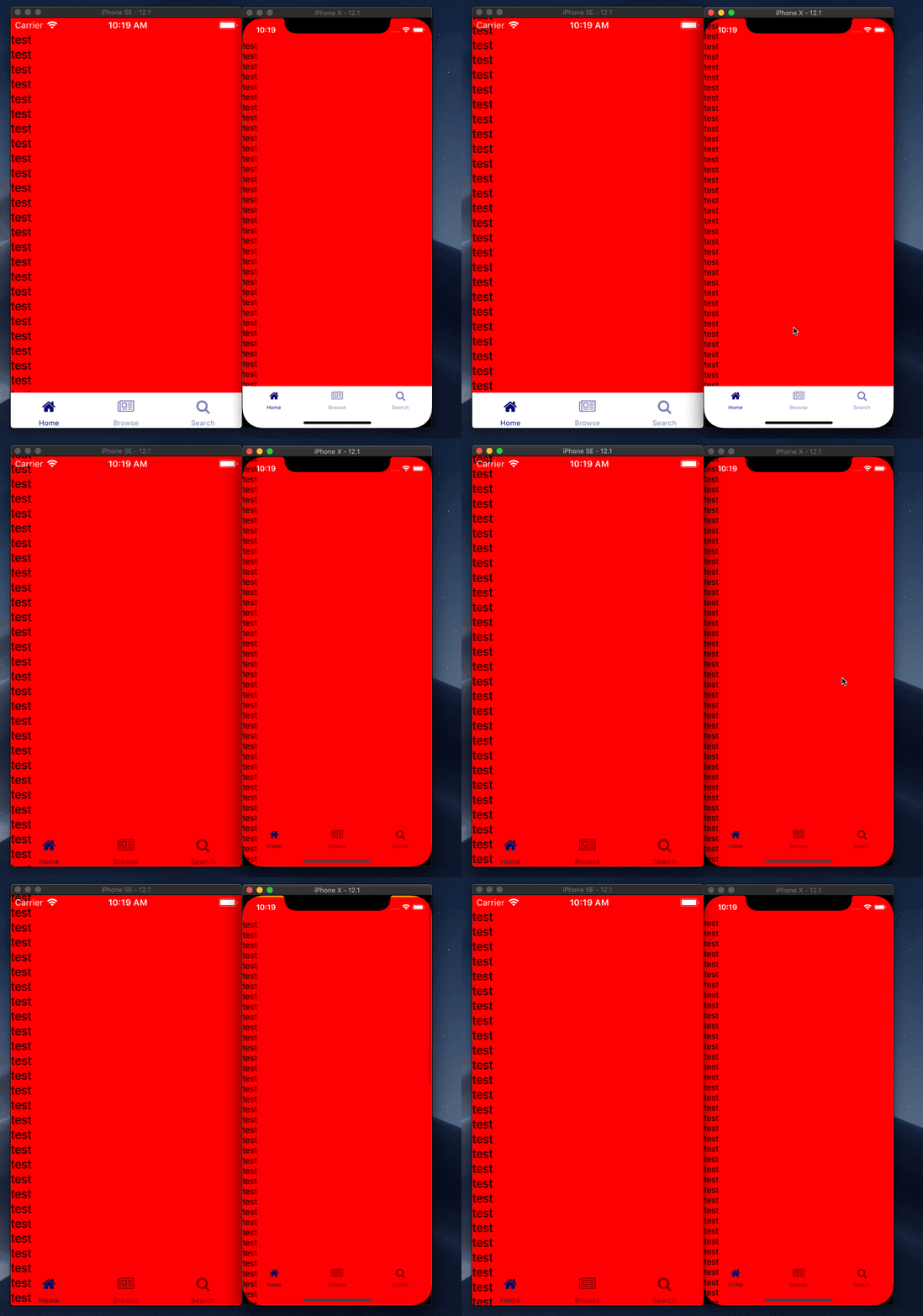
You can see in the GIF that, in both cases, the ScrollView content will smoothly pass behind the bar. The only difference is that when we make the bar transparent, we will see the items through the bar, which is expected.
Can you provide some more info about the problem and steps, that can be used for recreating?
 tsonevn
on 14 Mar 2019
tsonevn
on 14 Mar 2019
The problem appears when translucent is disabled. You can see that the content falls behind the tabbar, which shouldn't happen. It works fine when translucent is enabled as the content should indeed fall behind the tabbar.
I cant really see whats happening while translucent is false in your GIF.
Issue is that with actionbar being disabled (hidden) the content falls behind the TABBAR which shouldn't happen when translucent is disabled.
btaluy
on 14 Mar 2019
Screen Recording Tabview test.zip
@tsonevn It's hard to see on a gif so i've recorded my screen with quicktime to show you what happends. this is on IOS 12.1 with an Iphone 6 Simulator.
btaluy
on 14 Mar 2019
I have this same issue!
The issue is a bit difficult to see because the content is just repeating the same string over and over again, but the bottom few rows of "test" are hidden behind the tabbar, right?
 Johanneke
on 14 Mar 2019
Johanneke
on 14 Mar 2019
I have this same issue!
The issue is a bit difficult to see because the content is just repeating the same string over and over again, but the bottom few rows of "test" are hidden behind the tabbar, right?
Thats exactly whats happening. :)
btaluy
on 14 Mar 2019
Hi @btaluy,
I was able to recreate the problem on my side. I will mark the issue as a bug and we will investigate it further. I would suggest enabling the safe area. This will add some extra space at the bottom of the ScrollView, that will allow showing all items above the bar. For example:
<ActionBar title="Title" icon="" class="action-bar">
</ActionBar>
<GridLayout columns="*" rows="*" class="page page-content" backgroundColor="orange" iosOverflowSafeArea="true">
   <ScrollView>
       <StackLayout backgroundColor="blue">
           <StackLayout *ngFor="let item of items" backgroundColor="red">
               <Label text="test"></Label>
           </StackLayout>
       </StackLayout>
   </ScrollView>
</GridLayout>
@tsonevn Thanks for replying, the iosOverflowSafeArea should be enabled by default right? this was just an example, we don't disable this anywhere in our code. :) Thanks for marking this issue as a bug hopefully this gets resolved as soon as possible, as styling the tabbar is important for us.
btaluy
on 14 Mar 2019
@tsonevn This issue is comes back with every upgrade, when can we expect a fix for this issue?
btaluy
on 26 Jul 2019
HI @btaluy,
Excuse me for the late reply.
The issue is still under review. Have you tried the above-given solution?
I am also attaching an updated project, where the problem can be reproduced.
Reported via t. 1432289 as well.
Archive.zip
tsonevn
on 2 Oct 2019
Hi @tsonevn
Yes, we've tried that but unfortunately it did not work. For now as my colleague has mentioned in a ticket we do a short term solution by doing some calculations in the page.ios.js
Of course this is not the solution we are looking for and hope we can see a permanent fix in the near future.
btaluy
on 2 Oct 2019
Hi @btaluy,
I will discuss the case with the dev team again. Meanwhile, can you send us the project in the ticket? We will review it and will check for a solution that might work on your scenario.
tsonevn
on 4 Oct 2019
Related issues
 vtisnado
·
3Comments
vtisnado
·
3Comments
 nirsalon
·
3Comments
nirsalon
·
3Comments
 Pourya8366
·
3Comments
Pourya8366
·
3Comments
 pocesar
·
3Comments
pocesar
·
3Comments
 kn9ts
·
3Comments
kn9ts
·
3Comments