Nativescript: ListView separatorColor="transparent" doesn't delete separator on Android
Environment
- CLI: 5.1.1
- Cross-platform modules: 5.1.0
- Android Runtime: 5.1.0
- iOS Runtime: 5.1.0
- Plugin(s): nativescript-ui-listview: 5.0.1
Describe the bug
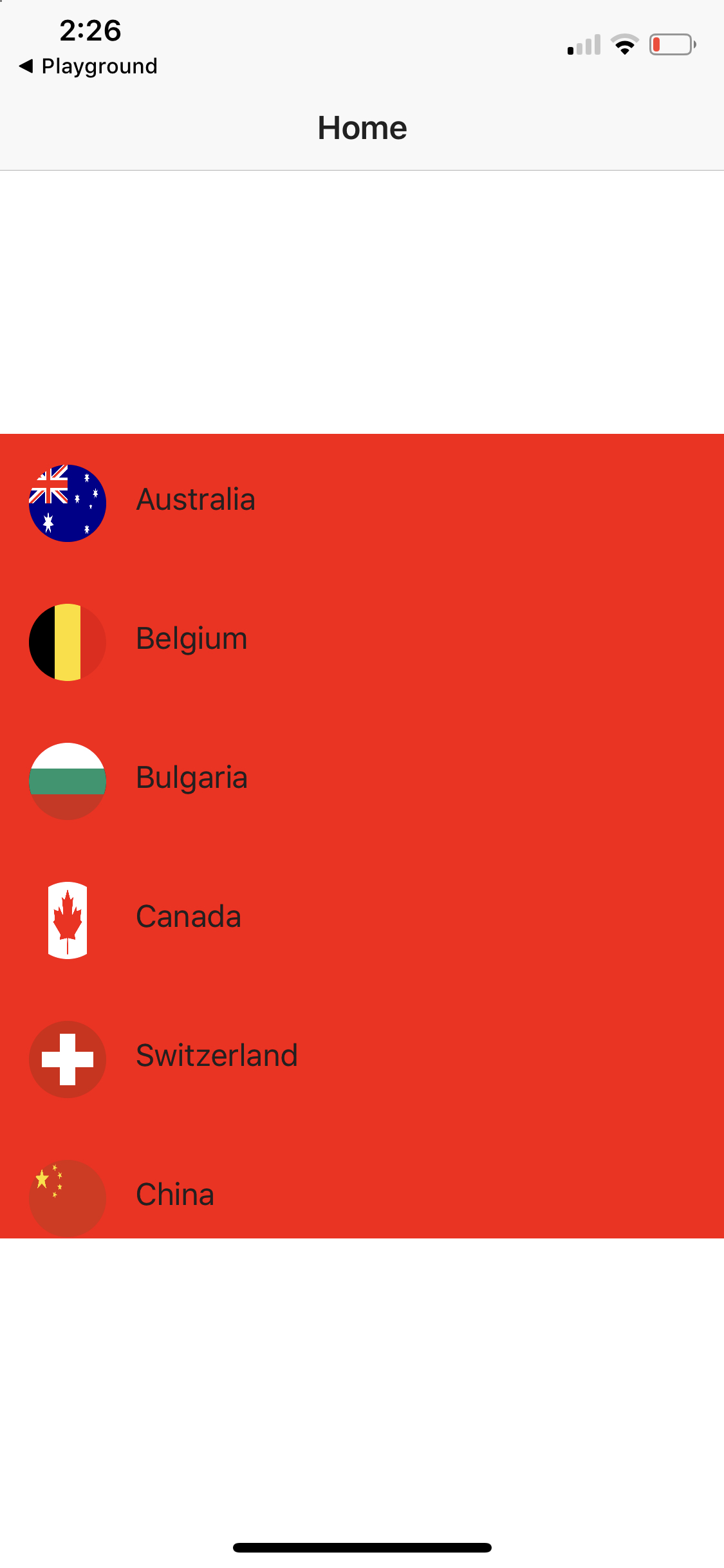
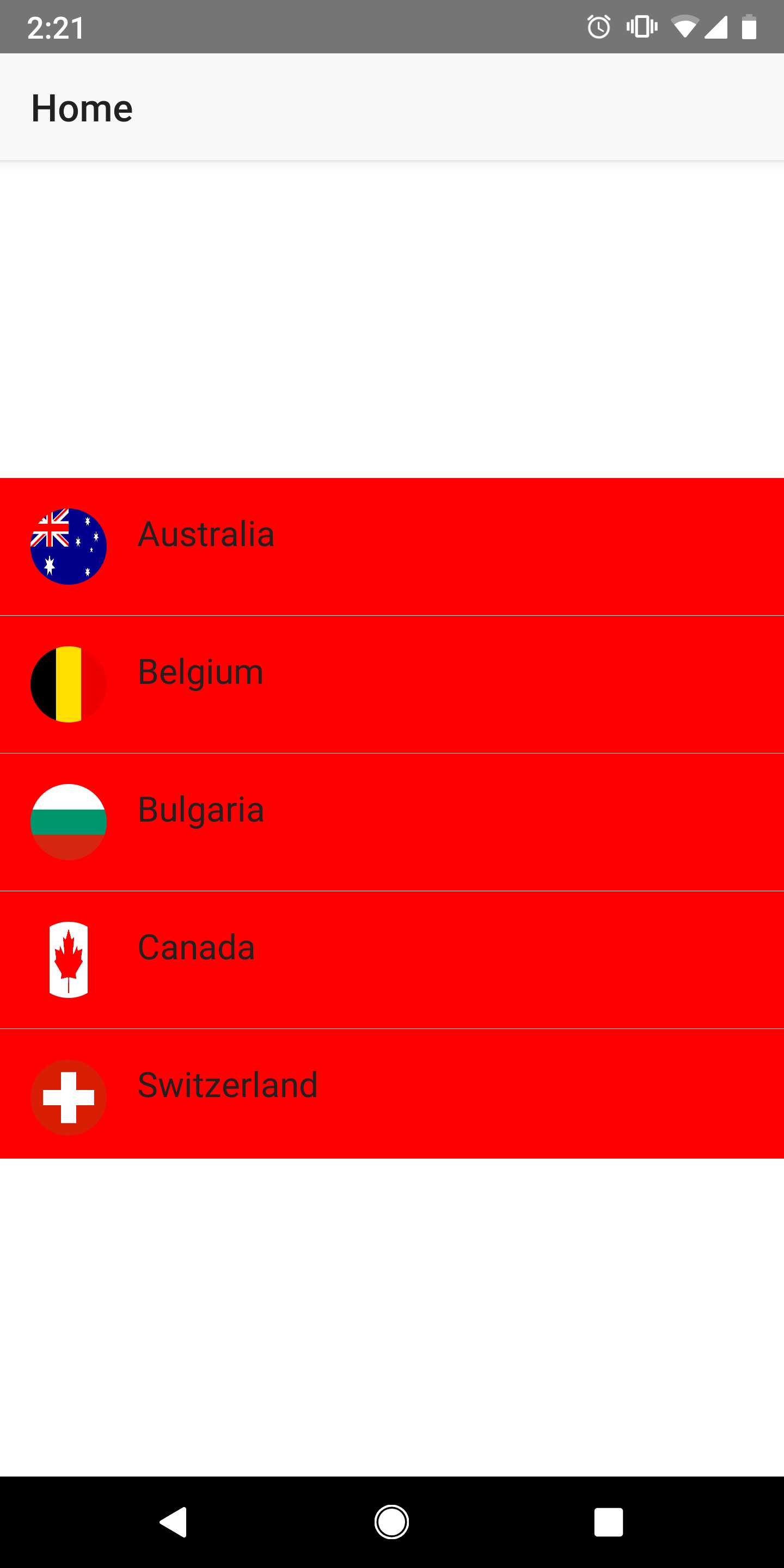
ListView separatorColor="transparent" doesn't delete separator on Android (Pixel 2XL) but works fine on iOS (iPhone X)
To Reproduce
Just run the sample project
Expected behavior
No separator between ListView items
Sample project
Playground
Additional context
Screenshot from iOS:
Screenshot from Android:
Want to back this issue? Post a bounty on it! We accept bounties via Bountysource.
 krgolovan
All 6 comments
The issue seems to be reproducible only in Vue based project.
 NickIliev
on 8 Feb 2019
NickIliev
on 8 Feb 2019
Still an issue in {N} core in iOS but its intermittent; have also tried forcing that with CSS ListView { separator-color: white; }but every so often the separator turns up (sorry I haven't been able to find a pattern).
CLI: 5.2.4
tns-core-modules: 5.2.2
iOS Runtime: 5.2.0
Plugin(s): nativescript-ui-listview: 6.0.0
 chrisbekas
on 25 Mar 2019
chrisbekas
on 25 Mar 2019
Its not just in vue. I'm facing the same issue in my vanilla js project with {N}6
 VeeK727
on 24 Feb 2020
VeeK727
on 24 Feb 2020
I've tried to apply android:listSelector="@android:color/transparent" and separatorColor="transparent" to my ListView but nothing changed.
Also tried programmatically add this.yourListView.nativeElement.setDivider(null); but it breaks the list.
nativescript-ui-listview: 8.2.0
 lblase
on 16 Jul 2020
lblase
on 16 Jul 2020
If you apply a background to the items, the separator shows even if it's set to transparent, because it's a gap between the items and not actually a colored line. To confirm this, move style="background-color: red" to the ListView, and the gaps will no longer be visible. https://play.nativescript.org/?template=play-vue&id=hj3162
 rigor789
on 16 Jul 2020
rigor789
on 16 Jul 2020
Alright, I have figured out what my problem is. After I have installed RadDataForm component into my nativescript app, the separators lines are always visible on any ListView. If I remove RadDataForm any workaround on ListView works.
Really I don't understand what is going on. Seems RadDataForm rewrite ListView styles...
lblase
on 16 Jul 2020
Related issues
 hshristov
·
3Comments
hshristov
·
3Comments
 rogangriffin
·
3Comments
rogangriffin
·
3Comments
 guillaume-roy
·
3Comments
guillaume-roy
·
3Comments
 Pourya8366
·
3Comments
Pourya8366
·
3Comments
 valentinstoychev
·
3Comments
valentinstoychev
·
3Comments
Most helpful comment
Still an issue in {N} core in iOS but its intermittent; have also tried forcing that with CSS
ListView { separator-color: white; }but every so often the separator turns up (sorry I haven't been able to find a pattern).CLI: 5.2.4
tns-core-modules: 5.2.2
iOS Runtime: 5.2.0
Plugin(s): nativescript-ui-listview: 6.0.0