Nativescript: Custom component inside a ListView: how to manage multiple custom parameters
As far as I know while learning NS (core) the most robust way to build components that work correctly with ListView, is to write them in full JS (see also #6042), but... there are more problems.
I need to pass more than one custom parameters to the component:
 <ListView items="{{ items }}" .... >
     <ListView.itemTemplates>
         <template key="NEW_MERCHANT">
             ...
             <MyComp:MyComp id="{{ itemId }}" template="tmpl1" context="{{ $value }}" />
             ...
         </template>
         ...
So in JS side each custom parameter is handled through a custom class property (get/set) that manages a correspondent variable, for example:
    _id: string;
    get id() {
        return this._id;
    }
    set id(value) {
        this._id = value;
        this.render();
    }
Of course the component build its view when ALL parameters are received consistently. Unfortunately parameters are received separately (AFAIK) and so it's required to check, before to build the view (through render() method), that all parameters have been received!
This is not elegant, it would be better to receive all parameters in block, possibly in the constructor, don't know if there is another way.. anyway...
There are more problems: when the view is recycled, component is recalled, but at this point internal parameters values can be still set respect to the previous place and that produces an inconsistent view. To prevent this problem i set undefined all properties after the view was build.
But sometimes it may happen that NOT ALL custom parameters are passed and that also produce an inconsistent view, no workaround right now.
Conclusion, it seems to me very, very farraginous at least... so my questions are:
Am I doing right with this stuff?
Is there a better way to make such kind of components or is it the only way ?
Other than the official doc I've read various references in the net about building component but I found nothing for this scenario.
Thanks a lot for any suggestion or reference.
 drmistral
All 15 comments
@drmistral as far as I understand one of the main issues you are trying to resolve is that not all of your parameters will be passed and thus you will need different UI based on the number of passed parameters.
If that is the case, then perhaps you could rely on the list view item templates (and the related template selector function) to render different UI based on the number and type of parameters received. This way you won't be botthered that the UI will break when the items are recycled and the new context comes with diofferent number of params.
For example (pseudo code)
<template key="one-param">
    <!-- Load one param custom component -->
</template>
<template key="two-params">
    <!-- Load two params custom component -->
</template>
 NickIliev
on 23 Jul 2018
NickIliev
on 23 Jul 2018
Hello @NickIliev, thanks for your reply.
Let me better explain, I can't render different UI depending on the number of parameters passed.
The final rendering is correct only when all parameters are passed complete and consistent. Problem arises when component needs >1 parameters...
drmistral
on 23 Jul 2018
@drmistral not exactly sure if I understand the issue - wouldn't the templates resolve even that case (render a template for a case where no params are passed and having different templates for all that cases ). The ListView is recycled and virtualized so reusing items with dynamic content that differs in means of structure might not be the best solution - perhaps you could either flatten the received data or rethink if the list-view is the proper way in your case to organize the UI.
I guess you have a specific scenario that can be best illustrated with a sample application or Playground - let me know if you can share with us a test codebase.
NickIliev
on 23 Jul 2018
Ok @NickIliev, I'll try to explain my scenario because produce a code example is too complicate and probably useless because focus on specific detail while we are talking about possible rethink.
My scenario is very common: think about the Facebook main feed page.
I have a very similar page, a list (ViewList) of news, from about 20 different kind of news. Each one (ListItem) have a different style (template) and they are unrolled as the data income scrolling the list using the loadMoreItems mechanism.
Now, such different kind of news may have common widgets as for example like button, like counters, follow button, view counters and so on. Each of such widgets is a custom component because manages its own data logic and style/shape, based parameters (1 to 3 depending on component, but all required).
The component is full-js, not xml-based, to avooid the other problem #6042.
When a ListItem is recycled, the custom component is correctly recalled with its parameter and it rebuild itself respect to the new context after recycle.
Note that parameters are required to map a context property to formal parameter of the component.
Everything works fine with 1 parameter, problems start with components requiring 2 or more parameters.
Can't see better alternatives to implement in this scenario.
drmistral
on 23 Jul 2018
@drmistral I am probably missing something but again it seems that you could create different custom components for the different-parameters scenarios and load them based on item template selector (multiple item templates). And the template selector function will check the number of passed parameters and load the related template/custom components. This way the recycling won't bother your different cells.
NickIliev
on 23 Jul 2018
@NickIliev probably I'm missing something as well from your suggestion :)
Anyway now I'm trying another solution that seems to work: just pack all component parameters into a single json object that is the only parameter in the call.
Here is the original call for a component:
<TagCount:TagCount tagType="TAG_LIKE" tagValue="{{ dealLikes }}" tagRefEntityId="{{ itemId }}"/>
Above call becomes:
<TagCount:TagCount data="{{ jsonPack('tagType', 'TAG_LIKE', 'tagValue', dealLikes, 'tagRefEntityId', itemId) }}" />
That renders the following like icon with a related counter.

It's a bit ugly but seems it works correctly with recycling!
drmistral
on 23 Jul 2018
@drmistral the best way to illustrate the issue would be to provide the basic scenario in a sample application or Playground. I've created this demo which demonstrates using a custom component with a different item template (which are styled differently based on the number of types of parameters).
Please use the demo to demonstrate your own case so I could investigate further.
NickIliev
on 24 Jul 2018
Thanks @NickIliev I'll check your code asap.
drmistral
on 24 Jul 2018
Hi @NickIliev, thanks for your help, the structure of your test is the same I use.
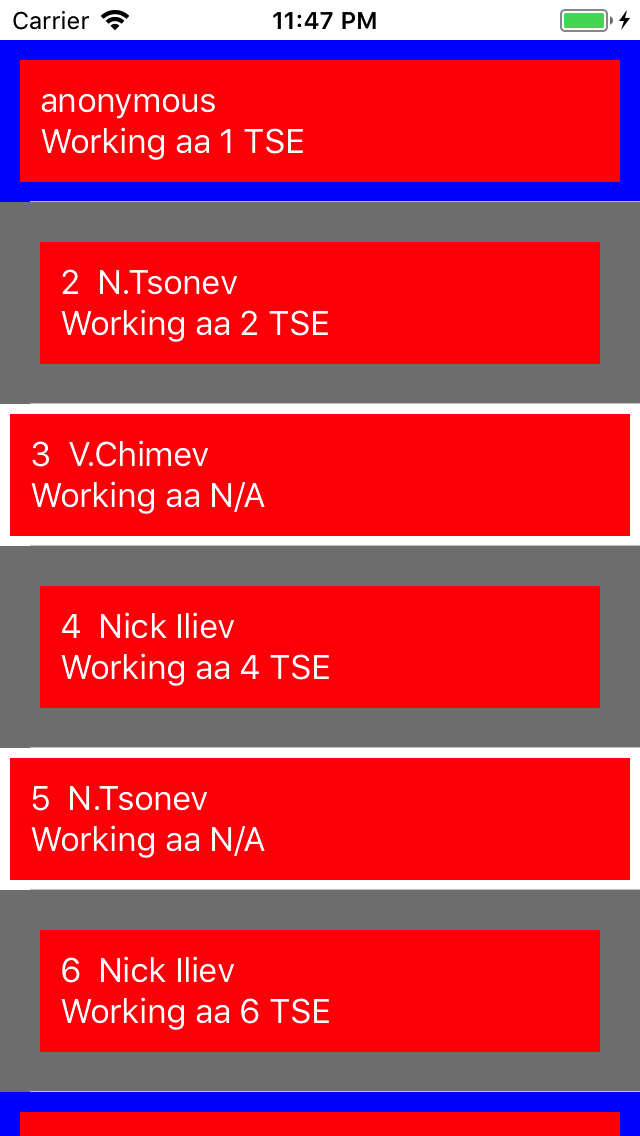
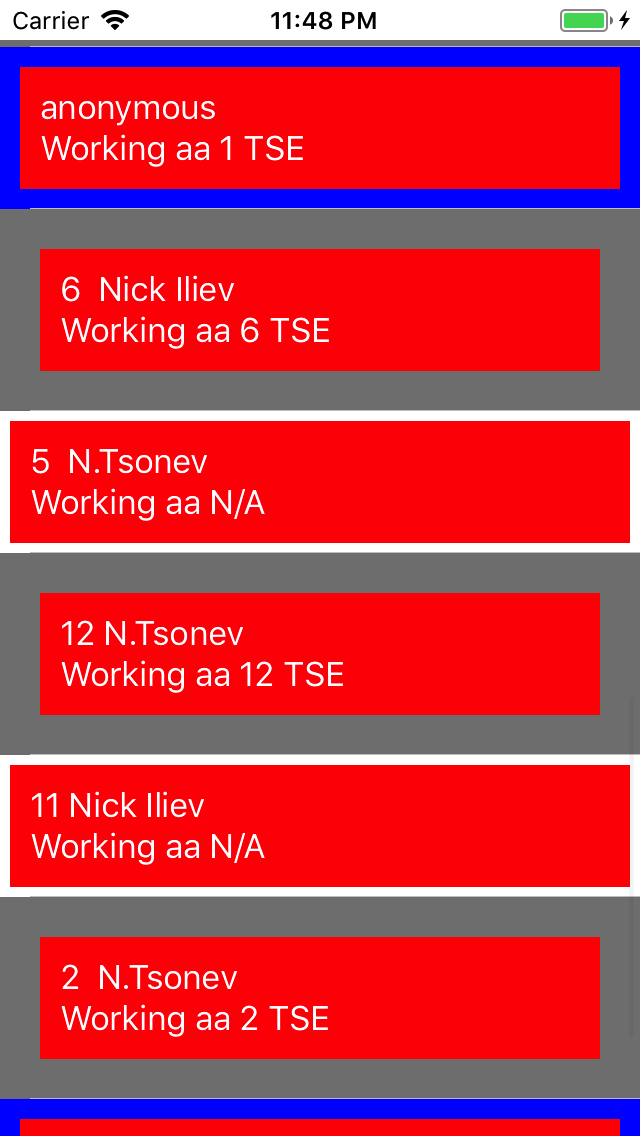
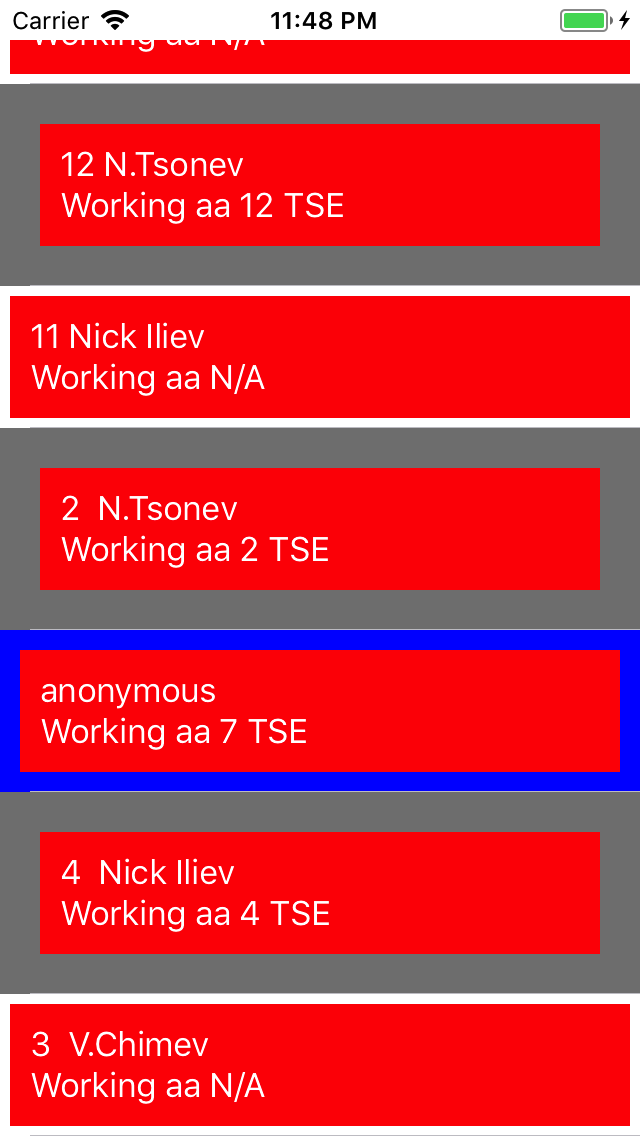
I just made a quick test and I can confirm both #6100 and #6042 problems on iOS emulator. Here is how to reproduce.
First of all I put numbers in items "someName" and "someJob" fields corresponding to their order, just to check quickly:
    let items = [
        { someName: "1  Nick Iliev", someJob: "1 TSE", id: 1 },
        { someName: "2  N.Tsonev", someJob: "2 TSE", id: 2 },
        { someName: "3  V.Chimev", someJob: "3 Dev", id: 3 },
        { someName: "4  Nick Iliev", someJob: "4 TSE", id: 1 },
        { someName: "5  N.Tsonev", someJob: "5 TSE", id: 2 },
        { someName: "6  Nick Iliev", someJob: "6 TSE", id: 1 },
        { someName: "7  N.Tsonev", someJob: "7 TSE", id: 2 },
        { someName: "8  V.Chimev", someJob: "8 Dev", id: 3 },
        { someName: "9  Nick Iliev", someJob: "9 TSE", id: 1 },
        { someName: "10 Nick Iliev", someJob: "10 TSE", id: 1 },
        { someName: "11 Nick Iliev", someJob: "11 TSE", id: 1 },
        { someName: "12 N.Tsonev", someJob: "12 TSE", id: 2 },
        { someName: "13 V.Chimev", someJob: "13 Dev", id: 3 },
        { someName: "14 N.Tsonev", someJob: "14 TSE", id: 2 },
        { someName: "15 V.Chimev", someJob: "15 Dev", id: 3 },
        { someName: "16 Nick Iliev", someJob: "16 TSE", id: 1 },
        { someName: "17 V.Chimev", someJob: "17 Dev", id: 3 },
        { someName: "18 Nick Iliev", someJob: "18 TSE", id: 1 },
        { someName: "19 N.Tsonev", someJob: "19 TSE", id: 2 },
        { someName: "20 V.Chimev", someJob: "20 Dev", id: 3 },
        { someName: "21 V.Chimev", someJob: "21 Dev", id: 3 },
    ];
As you can see in following attached screenshots, the problem described in #6042 is present (note as items are mixed because component does not receive update event after recycle) and as well the problem of this issue: note the various "Anonymous" and "N/A" printed when relative parameter is undefined.
Page 1
Page 2

Page 3
Page 4
drmistral
on 25 Jul 2018
@drmistral I've updated the test project so that it will make more visual differences for the three templates. Still, I am unable to see any misbehaviour when the list items are scrolled up and down (recycled)
One thing I want to notice:
- I am using the same custom component and the
N/Aandanonymouswill show when the received argument isundefinedbecause of this logic ingreeter.ts
container.bindingContext = {
    myName: args.object["name"] || "anonymous",
    myJob: args.object["job"] || "N/A",
};
Removing the pipes will remove the default values and print undefined
container.bindingContext = {
    myName: args.object["name"] ,
    myJob: args.object["job"] ,
};
The above is expected. I was demonstrating that you could have three different custom components (e.g. something like greeter, greeter2 and greeter3) and use any of them depending on the number of received arguments/ So instead of checking if the index of the items is divisible by 2 or divisible by 2 and 3 (itemTemplateSelector="$index % 2 === 0 ? ($index % 3 === 0 ? 'supereven' : 'even' ) : 'odd'").. in the item selector function you could check for the number of received arguments and load the needed custom component.
In the updated application I've also used the $index argument of ListView to list the different items and on scrolling, they are all rendered as expected.
- The once that are corresponding to the condition of
superevenare always blue and with horizontal alignment to the right, - The 'even' ones are always white and aligned in the centre
- The
oddones are pink and aligned to the left
NickIliev
on 25 Jul 2018
Hi @NickIliev, let's starts from the end:
In the updated application I've also used the $index argument of ListView to list the different items and on scrolling, they are all rendered as expected.
The once that are corresponding to the condition of supereven are always blue and with horizontal alignment to the right,
The 'even' ones are always white and aligned in the centre
The odd ones are pink and aligned to the left
All this stuff is working correctly because both index and styling settings are driven from the xml where everything is in sync. The problem is with data managed from components, that again comes out messed.
I am using the same custom component and the N/A and anonymous will show when the received argument is undefined because of this logic in greeter.ts
No dubt, anyway it show my first problem (#6042) i.e.: update event is not triggered in this scenario. I'know this is by design and thats why I moved from xml-based to full-js component where I found the other problem (present Issue).
I was demonstrating that you could have three different custom components (e.g. something like greeter, greeter2 and greeter3) and use any of them depending on the number of received arguments/ So instead of checking if the index of the items is divisible by 2 or divisible by 2 and 3 (itemTemplateSelector="$index % 2 === 0 ? ($index % 3 === 0 ? 'supereven' : 'even' ) : 'odd'").. in the item selector function you could check for the number of received arguments and load the needed custom component.
That's the point I can't get. If I've understood your proposal, there are various points that are unpracticable for me:
- In general if I have ONE component with _n_ parameters I should handle _2^n_ combinations of received/unreceived parameters. What if I have to use _m>1_ components on each list item?
- Should be responsibility of the component what to render not from an external logic, otherwise component would be useless.
- A component may need all parameters to render correctly.
- Another point is the fact that recycled parameters are not always simply "undefined", _they can be defined but with wrong value_ (cache) so you cannot decide! Check this pic from your last code, where I marked with ordered numbers the fields: as you can see at index 5 I get stuff from index 11)

drmistral
on 25 Jul 2018
@drmistral thank you for your patience and detailed explanation! I was finally able to understand the issue you are dealing with when passing multiple parameters for a custom component in a listview template. I will need some additional time to investigate the case and will post any related information here
NickIliev
on 25 Jul 2018
@NickIliev Great! At the moment best solution i found for this issue is to pass all needed parameters as single json object (see above), and write comps in full-js to prevent #6042.
drmistral
on 25 Jul 2018
@drmistral marking the above issues as bug in https://github.com/NativeScript/NativeScript/issues/6042 and closing this one as related. Will post any related info in the linked issue.
NickIliev
on 25 Jul 2018
This thread has been automatically locked since there has not been any recent activity after it was closed. Please open a new issue for related bugs.
![lock[bot] picture](https://avatars1.githubusercontent.com/in/6672?v=4&s=40) lock[bot]
on 26 Aug 2019
lock[bot]
on 26 Aug 2019
Related issues
 rLoka
·
3Comments
rLoka
·
3Comments
 guillaume-roy
·
3Comments
guillaume-roy
·
3Comments
 Leo-lay
·
3Comments
Leo-lay
·
3Comments
 fmmsilva
·
3Comments
fmmsilva
·
3Comments
 NordlingDev
·
3Comments
NordlingDev
·
3Comments