Nativescript: W ExifInterface: at com.tns.Runtime.callJSMethodNative(Native Method)
I am getting this when calling imageSource.fromFile(~/assets/my_image.png);
The picture is showing.
12-26 01:03:10.055 5858 5858 W ExifInterface: at com.tns.Runtime.callJSMethodNative(Native Method)
12-26 01:03:10.055 5858 5858 W ExifInterface: at com.tns.Runtime.dispatchCallJSMethodNative(Runtime.java:1088)
12-26 01:03:10.055 5858 5858 W ExifInterface: at com.tns.Runtime.callJSMethodImpl(Runtime.java:970)
12-26 01:03:10.055 5858 5858 W ExifInterface: at com.tns.Runtime.callJSMethod(Runtime.java:957)
12-26 01:03:10.055 5858 5858 W ExifInterface: at com.tns.Runtime.callJSMethod(Runtime.java:941)
12-26 01:03:10.055 5858 5858 W ExifInterface: at com.tns.Runtime.callJSMethod(Runtime.java:933)
Which platform(s) does your issue occur on?
iOS/Android/Both
CLI: 3.4
tns-android: 3.4
 bori87
All 14 comments
@bori87 do you have an image called my_image.png located in app/assets folder?
I have created this demo project demonstrating fromFile usage. Please do let me know if you have further information on how to reproduce your issue (you can create and share demo NativeScript project here)
 NickIliev
on 26 Dec 2017
NickIliev
on 26 Dec 2017
Yes i have and image is showing.
bori87
on 26 Dec 2017
I launched the demo you provided and i am still geting same warnings.

bori87
on 26 Dec 2017
@bori87 using the test project linked above is not reproducing the issue - let me know if you have a sample code or application that can reproduce the error.
NickIliev
on 28 Dec 2017
@NickIliev could You check this sample?
bori87
on 30 Dec 2017
@bori87 the provided project has version mismatch (using runtime and modules 3.4.0 while using nativescript-angular 4.4.1) - please try to migrate the project to nativescript-angular 5.x.x as described here
NickIliev
on 2 Jan 2018
Same problem here, I updated native-angular to 5.0.0.
  "dependencies": {
    "@angular/animations": "~5.0.0",
    "@angular/common": "~5.0.0",
    "@angular/compiler": "~5.0.0",
    "@angular/core": "~5.0.0",
    "@angular/forms": "~5.0.0",
    "@angular/http": "~5.0.0",
    "@angular/platform-browser": "~5.0.0",
    "@angular/platform-browser-dynamic": "~5.0.0",
    "@angular/router": "~5.0.0",
    "nativescript-angular": "^5.0.0",
    "nativescript-facebook": "^2.1.0",
    "nativescript-fonticon": "^1.1.1",
    "nativescript-google-maps-sdk": "^2.4.3",
    "nativescript-ngx-fonticon": "^4.0.0",
    "nativescript-theme-core": "~1.0.2",
    "reflect-metadata": "~0.1.8",
    "rxjs": "^5.5.0",
    "tns-core-modules": "^3.4.0",
    "zone.js": "^0.8.4"
  },
  "devDependencies": {
    "babel-traverse": "6.26.0",
    "babel-types": "6.26.0",
    "babylon": "6.18.0",
    "lazy": "1.0.11",
    "nativescript-dev-typescript": "^0.6.0",
    "typescript": "~2.4.2"
  }
 rmaugusto
on 11 Jan 2018
rmaugusto
on 11 Jan 2018
@rmaugusto can you share a sample project or demo code snippet demonstrating the issue and also let us know what API level you are testing.
@rmaugusto @bori87 I have updated the test project but I am still unable to reproduce the issue (tested on Android APIs 17, 19, 21 and on real device API 27)
You can also try demonstrating the issue by creating NativeScript Playground demo as this one here
NickIliev
on 12 Jan 2018
I think this problem is from nativescript-facebook plugin because only happens with alert() function on callback error.
        Facebook.login((error, fbData) => {
            if (error) {
                alert("Error during login: " + error.message); **// THIS GENERATES ERROR**
            } else {
                console.log(fbData.token);
            }
        });
Let me try change dependencies and make more some tests.
rmaugusto
on 14 Jan 2018
@rmaugusto have you managed to reproduce the issue - I have tested with the demo application from nativescript-facebook but was not able to reproduce the case.
NickIliev
on 19 Jan 2018
Yes, I created a new project with tns 3.4.0 and I could reproduce it.
I am debugging directly on my phone (Galaxy S7 Android 7.0).
The error raises when plugin can not connect to Facebook account and app try to show alert().
I changed the facebook app id to force the error.
My simple sample is in attachment.
face-login.tar.gz
rmaugusto
on 23 Jan 2018
@rmaugusto I am successfully interacting with the facebook login from the provided project.
However, on my side the alert is simply not showing and instead I got a custom Facebook modal page like the following one:
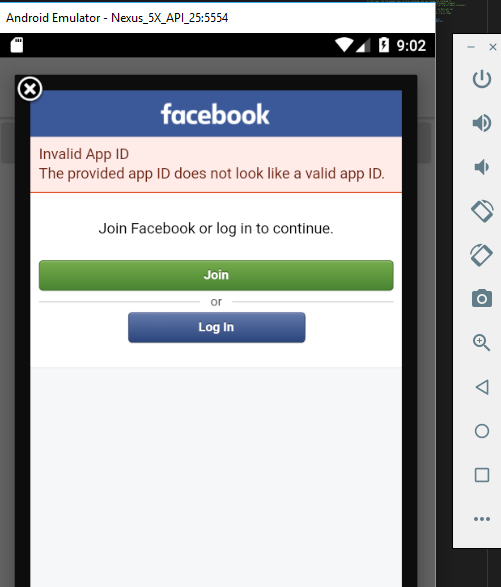
So perhaps remove the alert dialog and try the Facebook login with its own error modal page.
NickIliev
on 23 Jan 2018
Closing the issue as not reproducible.
NickIliev
on 31 Jan 2018
This thread has been automatically locked since there has not been any recent activity after it was closed. Please open a new issue for related bugs.
![lock[bot] picture](https://avatars1.githubusercontent.com/in/6672?v=4&s=40) lock[bot]
on 27 Aug 2019
lock[bot]
on 27 Aug 2019
Related issues
 dhanalakshmitawwa
·
3Comments
dhanalakshmitawwa
·
3Comments
 fmmsilva
·
3Comments
fmmsilva
·
3Comments
 valentinstoychev
·
3Comments
valentinstoychev
·
3Comments
 nirsalon
·
3Comments
nirsalon
·
3Comments
 rLoka
·
3Comments
rLoka
·
3Comments
Most helpful comment
I launched the demo you provided and i am still geting same warnings.
