Nativescript: Bug : Incorrect `///<reference` path values
When doing tns create MyApp --ng ,
project is created with
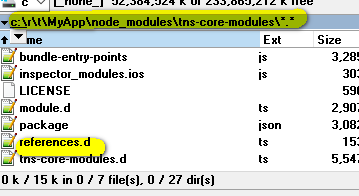
And that file contains :
/// <reference path="./node_modules/tns-platform-declarations/ios.d.ts" />
/// <reference path="./node_modules/tns-platform-declarations/android.d.ts" />
Now this is incorrect value.
becuase triple slash starting with ./ are relative and there is no such files there. ( io.d.ts etc...)
this is causing problems like the one I've asked aboutr :
https://stackoverflow.com/questions/47757276/reference-path-to-node-modules-is-not-found
 RoyiNamir
All 16 comments
@RoyiNamir thank you for reporting this issue - to temporary resolve the issue remove the references.d.ts file from your node_modules/tns-core-modules folder.
Logging this one as a bug. Steps to reproduce:
- create sample application
- in tns-core-modules there is a references.d.ts file causing some IDEs to fail with TS error
TS6053: File 'c:/NS/pre-dev/NS-developmentGroceriesV2/node_modules/tns-core-modules/node_modules/tns-platform-declarations/android.d.t.s' not found
 NickIliev
on 12 Dec 2017
NickIliev
on 12 Dec 2017
@NickIliev Oh my god. I thought it was a problem on my side. I've spent 3 hours on this :-)
Good thing to know that my environment was ok. ( some suggested me to switch to vscode ) hahaha
Thank you - like always.
RoyiNamir
on 12 Dec 2017
@RoyiNamir indeed the thing is that WebStorm is making its checks which are leading to the TS error.
In VSCode this error is not reproducible because the IDE is not making custom check but respecting the project's tsconfig.json file where the node_modules folder is excluded from TypeScript transpilation.
I have no idea why WebStorm is not respecting this option so switching to VSCiode is indeed an option.
NickIliev
on 12 Dec 2017
@NickIliev But this value : <reference path="./node_modules/tns-platform-declarations/ios.d.ts" /> is wrong.
BTW - it only works(compiles) if I move those two lines into the root references.d.ts
So transpilling or not - there is no way to resolve that relative path ( unless it's on the root). Right ?
RoyiNamir
on 12 Dec 2017
@RoyiNamir you are right, and this is still a bug (the references.d.ts file should not be located in tns-core-modules).
Just pointing out that this won't be a stopper if your tsconfig.json is respected by the IDE (the difference between VSCode and WebStorm) and you have the following in this file:
"exclude": [
    "node_modules",
    "platforms",
    "**/*.aot.ts"
]
As the file (node_modules/tns-core-modules/references.d.ts) is actually never used the error is only observed during the TypeScript transpilation and won't lead to runtime errors. So in your case WebStorm is causing the build time error as it is not respecting the above option in <project-name>/tsconfig.json
NickIliev
on 12 Dec 2017
I think that there is another related bug :
When I installed both tns-platforms and declarations : NONE of the installations added those two lines (which is mandatory) to the root references.d.ts:
https://i.imgur.com/WLr4QjJ.jpg
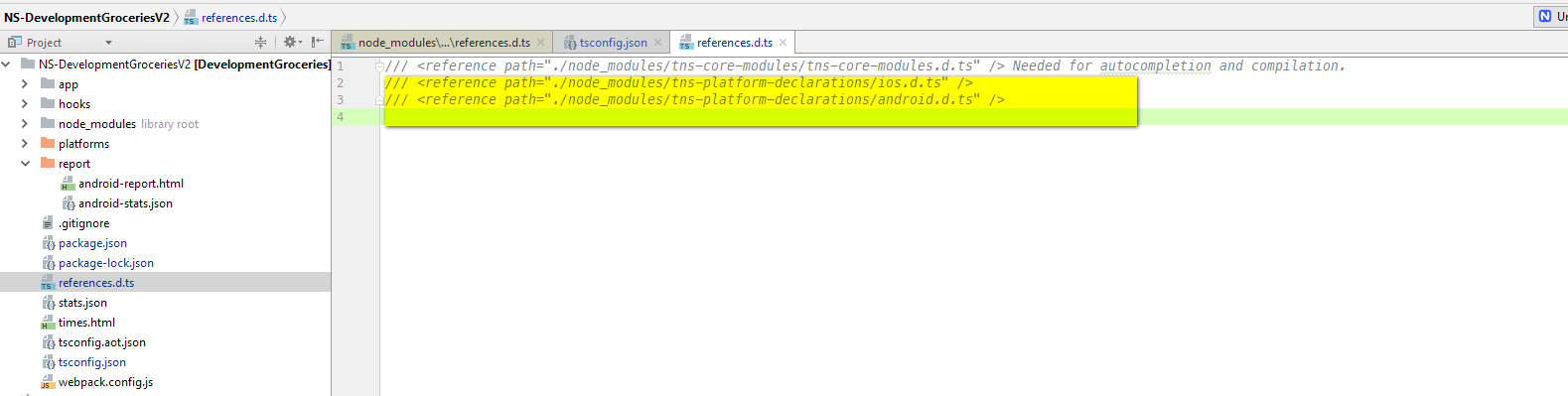
Only the first line was there.
What i'm trying to say is that when installing declarations - the file should be added with those two lines.
That's all. :-)
RoyiNamir
on 12 Dec 2017
OOPS I accidently closed this .
How can I reopen it ? sorry about that.
RoyiNamir
on 12 Dec 2017
@NickIliev @tsonevn Updating : it's not a Webstrom Bug.
I've asked here :
https://youtrack.jetbrains.com/issue/WEB-30225
It all begins becuase the root referenes.d.ts links to tns-core-modules where there is seeks for future references inside the file and there it sees this invalid relative path.
RoyiNamir
on 12 Dec 2017
@RoyiNamir that said you can safely remove the root references.d.ts link to tns-core-modules as it is not needed.
NickIliev
on 12 Dec 2017
@NickIliev If I remove this root file , then I don't have definitions and it fails to compile :
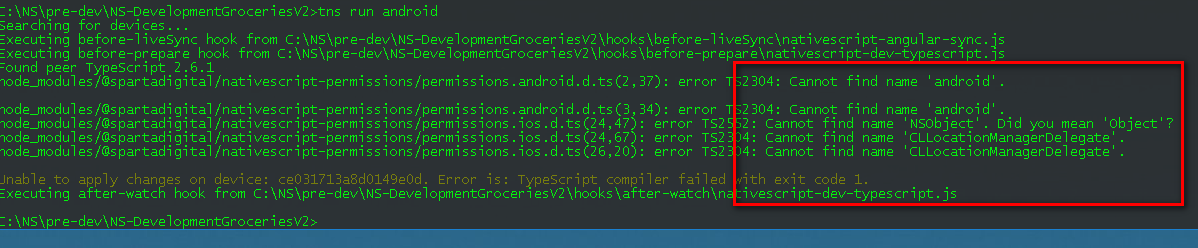
If I bring it back - then all compiles successfully. It make sense this file to exists in root since it supply definitions for other libraries who needs NSObject definition / android etc...
RoyiNamir
on 12 Dec 2017
@NickIliev
Update :
After reading this thread I've added to the TS.config file :
 "files": [

    "./node_modules/tns-platform-declarations/android.d.ts",
    "./node_modules/tns-platform-declarations/ios.d.ts"
  ]
and removed references.d.ts from root.
It all works. ( I know it's the same)
But please tell me i'm not insane - NS's third party libraries which needs NSObject/android - must have definitions (in the compilation process) and they will have it from those 2 files.
Am I right ?
RoyiNamir
on 12 Dec 2017
@RoyiNamir all plugins are transpiled from TS to JS, then NPM packed, and the install files are pure JavaScript. So you do not need tns-platform-declarations (the declaration files are needed only for TypeScript transpilation of TS files to JS files). So if you are using tns-platform-declarations in development use the workflow described here, and you are good to go.
Do not forget to always install tns-platform-declarations as devDependency as you do not need this enormously big files in your project (once again they are only needed in development to transpile TS to JS).
e.g.
tns create myAngularApp --ng
npm i tns-platform-declarations --save-dev
- then create 'references.d.ts' located in in
myAngularApp/references.d.tsand add the following
/// <reference path="./node_modules/tns-platform-declarations/ios.d.ts" />
/// <reference path="./node_modules/tns-platform-declarations/android.d.ts"
Many authors of plugins are using TypeScript as the development language, and they need references.d.ts during the development process of the plugin (or even if you use JavaScript the declaration file will still bring IntelliSense) but after the plugin is ready the TypeScript files are transpiled to JavaScript (using tsc) and then the *.tgz file is created with npm pack. The TypeScript files should be excluded from the NPM (example how this is done here), and the source of the plugin, in the end, will contain only JavaScript files.
NickIliev
on 12 Dec 2017
@NickIliev To tell you the truth , I read 200 times this thread here. (I'm not that new to ts).
But when I created a simple new ng project demo with the instructions you gave me (including adding the references.d.ts to the root) - evrything works. BUT When I navigate to a spcific folder ( and only this folder) - it tries to find android and it doesn't know it ALTHOUGH I put the root references.d.ts
I'm attaching a sample empty project.
https://ufile.io/e6fvm
(i'm using tns run android)
If you navigate to that folder and open that file - you'll see the error. ( which shouldnt be happening since there are d.ts files at root).
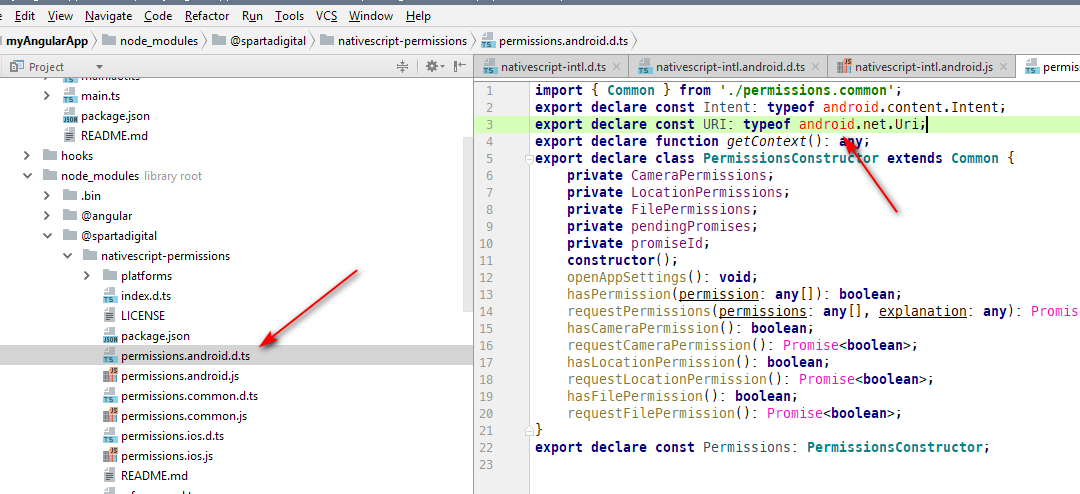
BTW thank you very much .
RoyiNamir
on 12 Dec 2017
@RoyiNamir this is simply a design fault by the author of the wrapped plugin (@spartadigital/nativescript-permissions). In comparison using the nativescript-permissions by @NathanaelA does not have such issue.
You can easily resolve this issue by correcting the path of the reference for the plugin as follows:
_node_modules/@spartadigital/nativescript-permissions/references.d.ts_
/// <reference path="../../tns-platform-declarations/ios.d.ts" />
/// <reference path="../../tns-platform-declarations/android.d.ts" />
However, keep in mind that this would require that your project has installed tns-platform-declarations (which you have already added as a devDependency).
NickIliev
on 13 Dec 2017
@NickIliev @tsonevn Not related to ^ , BUT I don't know how to reach you - AND I think I created a useful feature where you can add to NSNG.
Regarding finding a solution for setTimeout , or in other words : "_how to get rid of setTimeout for view to be ready for measure_"
problem is shown here : https://play.nativescript.org/?template=play-ng&id=rf8Aok (edited)
Solution(!) is shown here. ( notice the times) https://play.nativescript.org/?template=play-ng&id=uJnwGx&v=2
This is eliminating any waiting for an arbitrary setTimeout for a view to be ready
noEmitHelpers": false must be in tsconfig
RoyiNamir
on 16 Dec 2017
This thread has been automatically locked since there has not been any recent activity after it was closed. Please open a new issue for related bugs.
![lock[bot] picture](https://avatars1.githubusercontent.com/in/6672?v=4&s=40) lock[bot]
on 27 Aug 2019
lock[bot]
on 27 Aug 2019
Related issues
 rogangriffin
·
3Comments
rogangriffin
·
3Comments
 Pourya8366
·
3Comments
Pourya8366
·
3Comments
 valentinstoychev
·
3Comments
valentinstoychev
·
3Comments
 vtisnado
·
3Comments
vtisnado
·
3Comments
 guillaume-roy
·
3Comments
guillaume-roy
·
3Comments