Nativescript: Android: DatePicker shows wrong month
Tell us about the problem
For 9th and 10th months DatePicker shows October.

Which platform(s) does your issue occur on?
Android
Please provide the following version numbers that your issue occurs with:
- CLI: 3.1.3
- Cross-platform modules: 3.2.0
- Runtime(s): 3.2.0
- Genymotion Android 7.1.0 Samsung Galaxy S7
Please tell us how to recreate the issue in as much detail as possible.
Here is the repo demonstrating the bug:
https://github.com/terreb/ns-datepicker
Is there code involved? If so, please share the minimal amount of code needed to recreate the problem.
/app/main-page.xml
<Page xmlns="http://schemas.nativescript.org/tns.xsd" navigatingTo="navigatingTo" class="page">
    <StackLayout>
        <DatePicker day="1" month="9" year="2017" verticalAlignment="center"/>
        <DatePicker day="1" month="10" year="2017" verticalAlignment="center"/>
    </StackLayout>
</Page>
/app/App_Resources/Android/values-v21/styles.xml
<?xml version="1.0" encoding="utf-8"?>
<resources>

    <!-- Application theme -->
    <style name="AppTheme" parent="AppThemeBase">
        <item name="android:datePickerStyle">@style/SpinnerDatePicker</item>
        <item name="android:timePickerStyle">@style/SpinnerTimePicker</item>
    </style>

    <!-- Default style for DatePicker - in spinner mode -->
    <style name="SpinnerDatePicker" parent="android:Widget.Material.Light.DatePicker">
        <item name="android:datePickerMode">spinner</item>
    </style>

    <!-- Default style for TimePicker - in spinner mode -->
    <style name="SpinnerTimePicker" parent="android:Widget.Material.Light.TimePicker">
        <item name="android:timePickerMode">spinner</item>
    </style>

    <style name="NativeScriptToolbarStyle" parent="NativeScriptToolbarStyleBase">
        <item name="android:elevation">4dp</item>
    </style>
</resources>
 terreb
All 15 comments
Hi @terreb,
I tested your scenario and indeed there is an issue while setting month inline for the XML for the DatePicker component. This problem is reproduced only while you try to set September as a month.
As a temporary solution, I would suggest setting the date from code behind on the component loaded event. Keep in mind that, while creating a new Date in JavaScript the month start from 0 to 11. Example:
XML
<Page xmlns="http://schemas.nativescript.org/tns.xsd" loaded="onPageLoaded" class="page">
    <StackLayout>
        <DatePicker loaded="dateploaded"  verticalAlignment="center"/>
    </StackLayout>
</Page>
TypeScript
import {Page} from "ui/page"
import {DatePicker} from "ui/date-picker"

export function onPageLoaded( args ) {
}


export function dateploaded(args){
    let dpicker:DatePicker = <DatePicker>args.object;
    dpicker.date = new Date(2017, 8, 9);
}
 tsonevn
on 20 Sep 2017
tsonevn
on 20 Sep 2017
Hi @tsonevn,
Thanks for explanation, the thing is in my real project I'm binding month via view-model and still get this bug. The sample project has month set inline just for simplicity.
terreb
on 20 Sep 2017
Is it fixed?
terreb
on 16 Oct 2017
Hi @terreb,
the fix is merged into the master branch. You could try using @next modules and to verify, whether the DatePicker works as expected
tsonevn
on 17 Oct 2017
Ok, I tried. The problem with months is still there.
I have this XML
```xml
````
Here is the result:
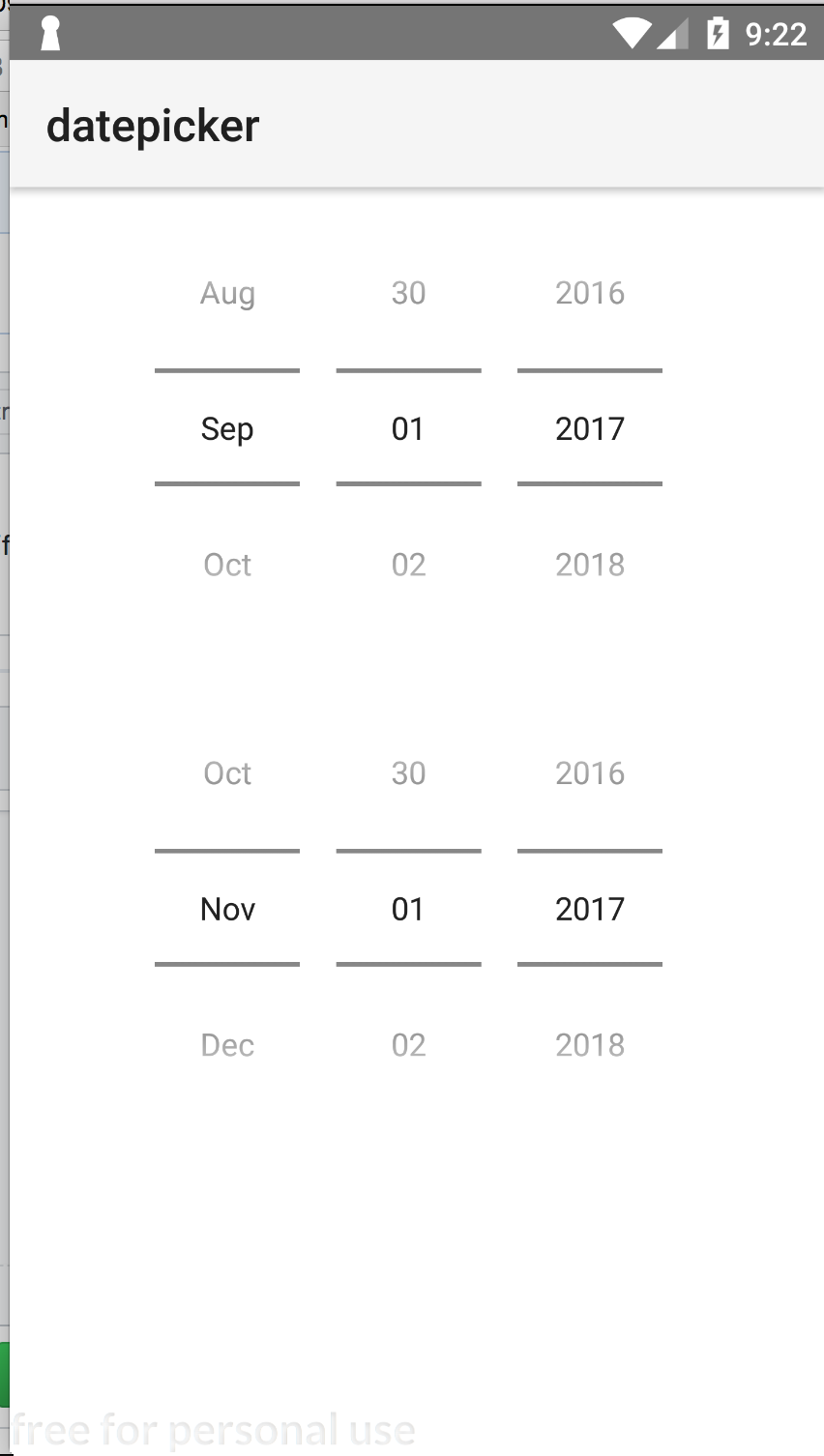
...but should be September and October.
tns-android: 3.3.0-2017-10-17-1
terreb
on 17 Oct 2017
Hi @terreb,
Did you delete node_modules, hooks and platforms folders before rebuilding the application?
tsonevn
on 18 Oct 2017
Hi @tsonevn, yes I did.
terreb
on 19 Oct 2017
Hey @terreb
I have just tested you code and it seems to work as expected now.
Can you make sure that you are using the @next version of the tns-core-modules package (not tns-android)?
 vakrilov
on 19 Oct 2017
vakrilov
on 19 Oct 2017
Hi @vakrilov, yes I did. Can you please pull https://github.com/terreb/ns-datepicker and run it on a device or emulator with Android 7.1?
terreb
on 19 Oct 2017
Hi @terreb,
I tested your project with NativeScript CLI 3.2.1, Android runtime 3.2.0 and @next tns-core-modules on Android API 24. The DatePicker seems to work as expected and to display the correct month. I am attaching a screenshot.
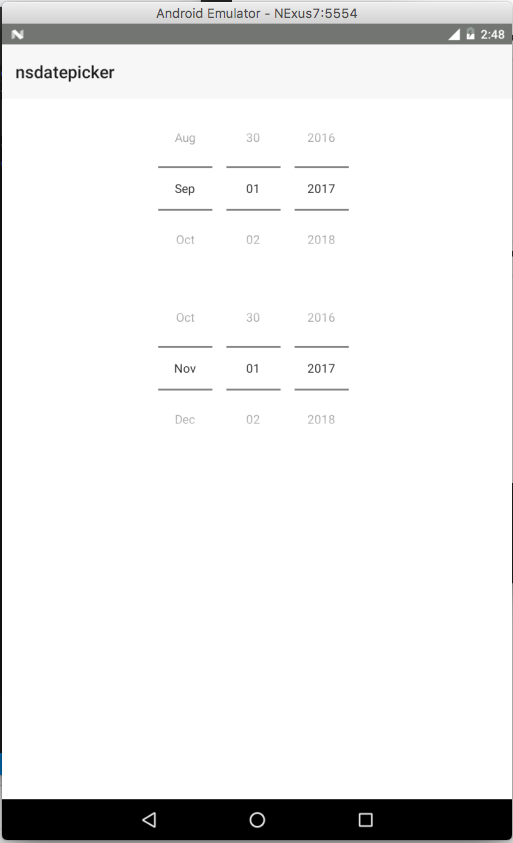
Archive.zip
tsonevn
on 19 Oct 2017
Hi @tsonevn, are you kidding? Do you really think that September is 9th month (no problem here) and November is 10th?! Should I set
<DatePicker day="1" month="9.5" year="2017" verticalAlignment="center"/>
for October then;)
terreb
on 19 Oct 2017
Hi @terreb,
Excuse me for the misunderstanding,
I checked only if the September is displayed properly, however, it seems that the problem still persists also in next version of the modules. I am reopening the issue for further investigation.
tsonevn
on 19 Oct 2017
Hey @terreb,
I tested with your project and indeed managed to reproduce the issue. After a little more digging I noticed that the dependency you have:
"tns-core-modules": "^3.3.0-2017-10-18-3"
Was actually installing an older version of the tns-core-modules([email protected] to be specific). The problem probably in the way npm resolves pre-release version (versions containing -).
I tried to change the dependency to "tns-core-modules": "3.3.0-2017-10-18-3"(without the ^). Success: the right version of the package is installed and the bug is fixed. I also tried with "tns-core-modules": "next" and it also works (that was my original approach actually).
In summary:
- Fix the dependency (either by changing it to
nextor by removing the^) - Do an
npm i - Check if the correct version of the
tns-core-modulesis installed by executingnpm ls
I hope that helps.
vakrilov
on 19 Oct 2017
Hi @vakrilov, thank you for the explanation and I confirm the issue is fixed after I changed to "tns-core-modules": "3.3.0-2017-10-18-3".
terreb
on 20 Oct 2017
This thread has been automatically locked since there has not been any recent activity after it was closed. Please open a new issue for related bugs.
![lock[bot] picture](https://avatars1.githubusercontent.com/in/6672?v=4&s=40) lock[bot]
on 27 Aug 2019
lock[bot]
on 27 Aug 2019
Related issues
 dhanalakshmitawwa
·
3Comments
dhanalakshmitawwa
·
3Comments
 minjunlan
·
3Comments
minjunlan
·
3Comments
 NordlingDev
·
3Comments
NordlingDev
·
3Comments
 pocesar
·
3Comments
pocesar
·
3Comments
 rLoka
·
3Comments
rLoka
·
3Comments