Nativescript: Cannot make the Actionbar transparent
Did you verify this is a real problem by searching Stack Overflow and the other open issues in this repo?
Yes
Tell us about the problem
Please, ensure your title is less than 63 characters long and starts with a capital
letter.
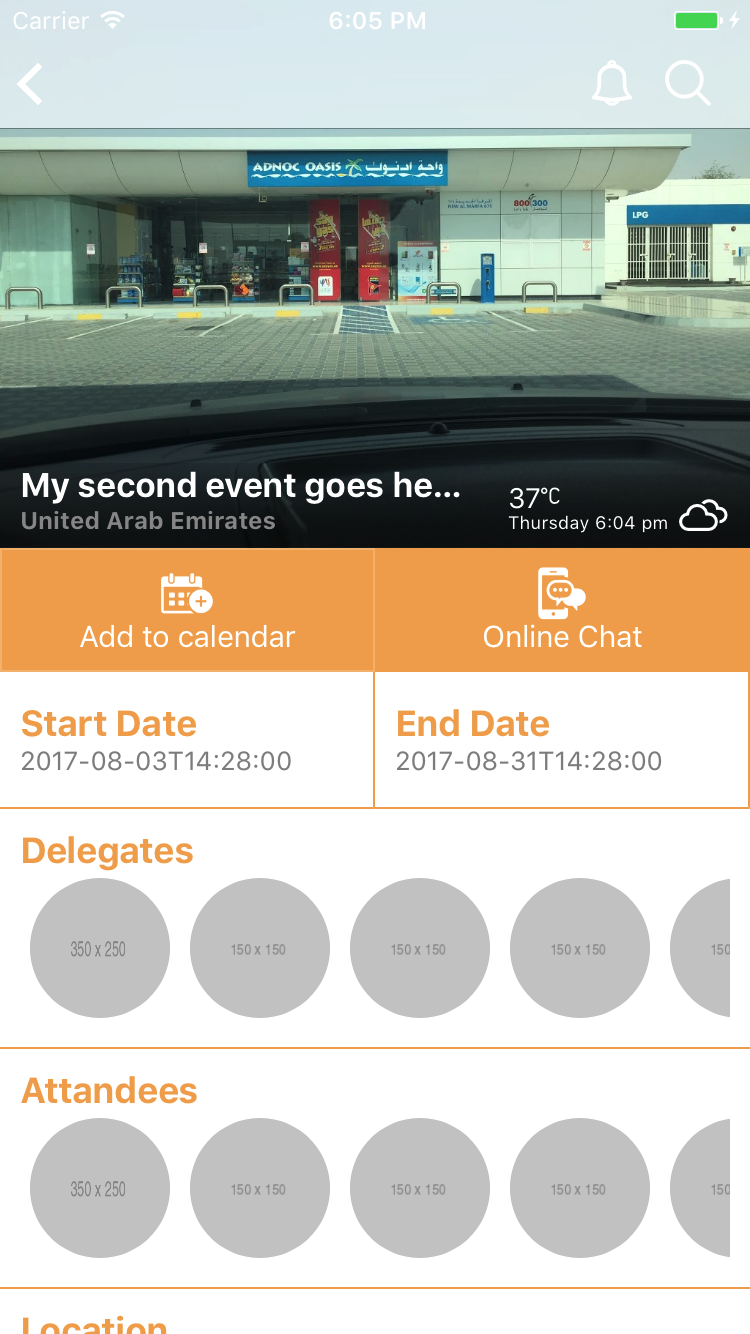
I am not able to achieve the transparent actionbar. I tried all the code shared here at github and on stackoverflow but it doesn't work.
Which platform(s) does your issue occur on?
iOS/Android/Both
Please provide the following version numbers that your issue occurs with:
- CLI: 3.1.3
- Cross-platform modules: 3.1.1
- Runtime(s): tns-ios = 3.1.0
│ nativescript │ 3.1.3
│ tns-core-modules │ 3.1.1
│ tns-android │ 3.1.1
│ tns-ios │ 3.1.0
Please tell us how to recreate the issue in as much detail as possible.
Just create new project, and apply following code.
Is there code involved? If so, please share the minimal amount of code needed to recreate the problem.
Yes. Check following:
ngOnInit() {
        //ios back for titlebar - https://www.nativescript.org/blog/how-to-match-a-nativescript-actionbar-s-color-on-ios
        if (topmost().ios) {
            topmost().ios.controller.backgroundColor= UIColor.clearColor;
            var navigationBar = topmost().ios.controller.navigationBar;
            navigationBar.setBackgroundImageForBarMetrics(UIImage.new(), UIBarMetrics.Default);
            navigationBar.translucent = false;
            navigationBar.shadowImage = UIImage.new();
            navigationBar.backgroundColor = UIColor.colorWithRedGreenBlueAlpha(0.20,0.20, 0.20, 0);
        }
    }
 dotnetdreamer
All 8 comments
@dotnetdreamer Here's an example of working code. It's a custom widget for NS Core, but you can adapt it for your needs.
import { ActionBar as BaseActionBar } from "ui/action-bar";
export class ActionBar extends BaseActionBar {
private get navBar(): UINavigationBar {
const page = this.page;
// Page should be attached to frame to update the action bar.
if (!page || !page.frame) {
return undefined;
}
return (<UINavigationController>page.frame.ios.controller).navigationBar;
}
public update() {
super.update();
let navBar = this.navBar;
if (navBar) {
navBar.barStyle = UIBarStyle.BlackTranslucent;
navBar.setBackgroundImageForBarMetrics(UIImage.new(), UIBarMetrics.Default);
navBar.shadowImage = UIImage.new();
navBar.translucent = true;
}
}
}
 sserdyuk
on 8 Sep 2017
sserdyuk
on 8 Sep 2017
@sserdyuk this navBar.barStyle = UIBarStyle.BlackTranslucent; made it black. i want transparent. no color at all....By the way, how am i suppose to call this custom widget ?
dotnetdreamer
on 8 Sep 2017
I think it's only black if translucent property wasn't set to true. Since Aug 2nd, NS ActionBar plays with this property too, so it's important that you make these tweaks to the native control after ActionBar did.
In NS Core you can use custom widgets by declaring them in the page element. See the ab bits below. shared/widgets/transparentActionBar is the path to the file with the widget. For more info see the docs http://docs.nativescript.org/ui/basics#custom-components
<Page
xmlns="http://schemas.nativescript.org/tns.xsd"
xmlns:ab="shared/widgets/transparentActionBar"
>
<ab:ActionBar title="123">
</ab:ActionBar>
<GridLayout rows="auto,*,auto,*,auto,auto,*">
.....
</GridLayout>
</Page>
@sserdyuk will this work with angular ? i mean i am using angular version. In my knowledge, we don't have Page element there which means i cannot reference custom widget. Any thoughts ?
dotnetdreamer
on 11 Sep 2017
@dotnetdreamer I'm only developing with NS Core. You'll need to figure the Angular part yourself.
sserdyuk
on 11 Sep 2017
you can move the code lower in the lifecycle
ngAfterViewChecked() {
 navBar.barStyle = UIBarStyle.BlackTranslucent;
            navBar.setBackgroundImageForBarMetrics(UIImage.new(), UIBarMetrics.Default);
            navBar.shadowImage = UIImage.new();
            navBar.translucent = true;
}
 triniwiz
on 12 Sep 2017
triniwiz
on 12 Sep 2017
@triniwiz this did the trick. But i used ngAfterviewInit instead. As ngAfterViewChecked is too late.. Thanks
dotnetdreamer
on 12 Sep 2017
This thread has been automatically locked since there has not been any recent activity after it was closed. Please open a new issue for related bugs.
![lock[bot] picture](https://avatars1.githubusercontent.com/in/6672?v=4&s=40) lock[bot]
on 28 Aug 2019
lock[bot]
on 28 Aug 2019
Related issues
 NordlingDev
·
3Comments
NordlingDev
·
3Comments
 fmmsilva
·
3Comments
fmmsilva
·
3Comments
 hshristov
·
3Comments
hshristov
·
3Comments
 tsonevn
·
3Comments
tsonevn
·
3Comments
 kn9ts
·
3Comments
kn9ts
·
3Comments
Most helpful comment
you can move the code lower in the lifecycle