Nativescript: TNS 3.1 breaks background-color through css binding for iOS
This is regarding the DropDown plugin. In TNS 3.0 binding the value of the class that has some background-color property defined worked flawlessly. Now after I've upgraded the demo project to 3.1 setting the background-color fails with the following error:
CONSOLE ERROR file:///app/tns_modules/tns-core-modules/trace/trace.js:165:30: Error: Failed to apply property [background-color
] with value [blue] to DropDown<dd>@file:///app/main-page.xml:3:5;. TypeError: value1.equals is not a function. (In 'value1.equ
als(value2)', 'value1.equals' is undefined)
After debugging the issue turns out that here: https://github.com/NativeScript/NativeScript/blob/b45cbe929b8a402ecb7019ee47f5a3de81052ce8/tns-core-modules/ui/core/properties/properties.ts#L595 the oldValue ends up an instance of UIColor instead of Color and thus the comparison is failing. I have not made any changes to the styling so it must be some of the changes to the TNS core that is messing up the value. In addition testing the same demo app with TNS 3.0 oldValue ends up correctly as an instance of Color
The issue can be easily simulated by using the demo project for the drop down and upgrading it to 3.1 and pressing Change Styles button once it runs.
 PeterStaev
All 13 comments
Possibly related - https://github.com/bradmartin/nativescript-cardview/issues/58
 bradmartin
on 26 Jun 2017
bradmartin
on 26 Jun 2017
@PeterStaev @tsonevn This isn't just iOS or a plugin issue. It's a general 3.1 issue, here's the test app: https://github.com/sserdyuk/ns-bug-4450
JS: Error: Failed to apply property [background-color] with value [red] to Switch(16)@file:///app/main-page.xml:7:9;. TypeError: value1.equals is not a function
JS: Error: Failed to apply property [background-color] with value [red] to Switch(16)@file:///app/main-page.xml:7:9;. TypeError: value1.equals is not a function
JS: Error: Failed to apply property [background-color] with value [red] to Switch(16)@file:///app/main-page.xml:7:9;. TypeError: value1.equals is not a function
JS: Error: Failed to apply property [background-color] with value [red] to Switch(16)@file:///app/main-page.xml:7:9;. TypeError: value1.equals is not a function
Executing before-prepare hook from /home/sergei/Projects/Tests/SwitchBackgroundColor/hooks/before-prepare/nativescript-dev-typescript.js
 sserdyuk
on 28 Jun 2017
sserdyuk
on 28 Jun 2017
@sserdyuk using your test application I was not able to reproduce the issue neither on Android (tested API19 and API25) or iOS.
@PeterStaev I have also tried to reproduce the issue using your demo project but I was not able to run the demo (entry point error) so I have made this test project based on your demo logic. However, the issue is not preproducible (tested both iOS and Android - can you take a look at the test project and let me know if you can reproduce the issue?
 NickIliev
on 29 Jun 2017
NickIliev
on 29 Jun 2017
@NickIliev , sorry but I cannot download the test project as it is included in one huge repo and I do not want to download everything...
Attaching the demo project from the DropDown repo with updated deps. So simply run tns run ios and then press Change Styles in the app.
demo.zip
PeterStaev
on 29 Jun 2017
@NickIliev Did you check the log in the terminal? The switch does change color, so it's working as expected, but each time you toggle it, an error is printed in the terminal.
sserdyuk
on 29 Jun 2017
Yes, sometimes styles are changed, sometimes the widget is totally messed up. So the error does not crash the app, but still seems a problem with the applying the styles.
PeterStaev
on 29 Jun 2017
@manijak - does any of this look familiar from the cardview debugging you did last week?
bradmartin
on 30 Jun 2017
App to reproduce the issue can be found in this linked issue
NickIliev
on 4 Jul 2017
@NickIliev Any update on this issue?
sserdyuk
on 7 Jul 2017
+1 reproducible also on Android via SB template
sample application here
Steps to reproduce:
- go to "Edit" and use the slider (Android)
NickIliev
on 7 Jul 2017
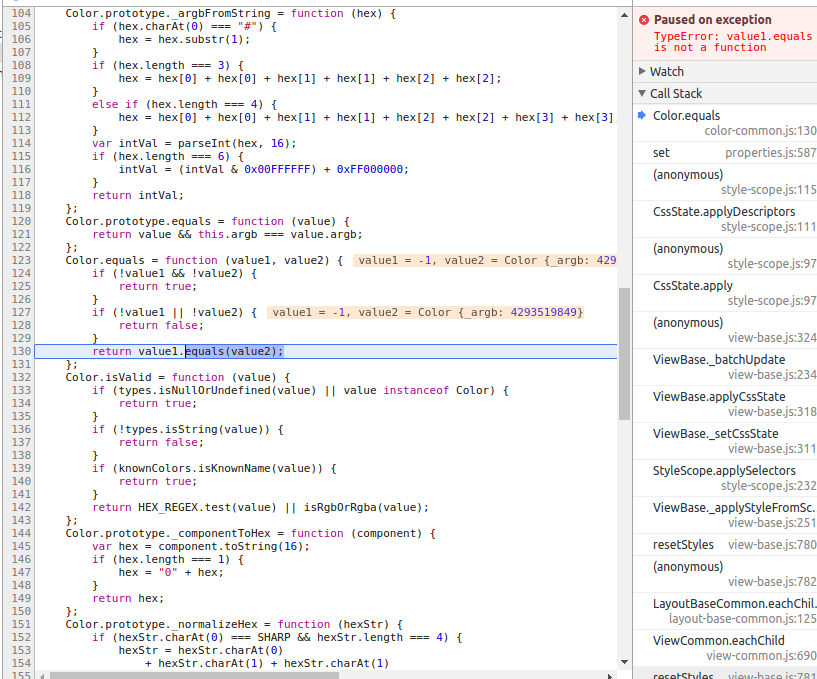
@tsonevn I was using debugger for other reasons and stopped on this exception. Hopefully you can fix it quick, seems like Color.equals is called with a wrong type of parameter. I
$ tns info
All NativeScript components versions information
┌──────────────────┬─────────────────┬────────────────┬─────────────┐
│ Component        │ Current version │ Latest version │ Information │
│ nativescript     │ 3.1.2           │ 3.1.2          │ Up to date  │
│ tns-core-modules │ 3.1.0           │ 3.1.0          │ Up to date  │
│ tns-android      │ 3.1.1           │ 3.1.1          │ Up to date  │
│ tns-ios          │ 3.1.0           │ 3.1.0          │ Up to date  │
The fix is already available in tns-core-modules@next and will be released officially with [email protected].
 SvetoslavTsenov
on 27 Jul 2017
SvetoslavTsenov
on 27 Jul 2017
This thread has been automatically locked since there has not been any recent activity after it was closed. Please open a new issue for related bugs.
![lock[bot] picture](https://avatars1.githubusercontent.com/in/6672?v=4&s=40) lock[bot]
on 28 Aug 2019
lock[bot]
on 28 Aug 2019
Related issues
 tsonevn
·
3Comments
tsonevn
·
3Comments
 rogangriffin
·
3Comments
rogangriffin
·
3Comments
 nirsalon
·
3Comments
NickIliev
·
3Comments
nirsalon
·
3Comments
NickIliev
·
3Comments
 vtisnado
·
3Comments
vtisnado
·
3Comments
Most helpful comment
@PeterStaev @tsonevn This isn't just iOS or a plugin issue. It's a general 3.1 issue, here's the test app: https://github.com/sserdyuk/ns-bug-4450