Nativescript: [FormattedString] The short syntax for Formatted String not working
Based on this documentation article, we are supporting both short and full syntax in NativeScript core application and recommending using the short one.
However with tns-core-modules 3.0.1 only the full syntax is working.
Test project here - reproducible with both Android and iOS.
Non-working short syntax
<Label backgroundColor="lightblue">
<FormattedString>
<Span text=" " fontFamily="FontAwesome" />
<Span text="Test 1234" fontStyle="italic" />
<Span text="Test 5678" />
</FormattedString>
</Label>
Note: this seems to be problematic only when theformatted string is placed within <drawer:RadSideDrawer.mainContent>
Working:
<Label>
<Label.formattedText>
<FormattedString>
<FormattedString.spans>
<Span text=" " fontFamily="FontAwesome" />
<Span text="Test 1234" fontStyle="italic" />
<Span text="Test 5678" />
</FormattedString.spans>
</FormattedString>
</Label.formattedText>
</Label>
t.1114079
 NickIliev
All 6 comments
This is my label code
<Label textWrap="true" >
<Label.formattedText>
<FormattedString>
<FormattedString.spans>
<Span text="I confirm that I am "></Span>
<Span text="{{ ObserverName }}" style="font-weight: bold"></Span>
<Span text=" and I am Observing "></Span>
<Span text="{{ LearnerName }}" style="font-weight: bold"></Span>
</FormattedString.spans>
</FormattedString>
</Label.formattedText>
</Label>
And I crash with
An uncaught Exception occurred on "main" thread.
java.lang.NullPointerException: Attempt to invoke virtual method 'int android.graphics.Typeface.getStyle()' on a null object reference
at org.nativescript.widgets.CustomTypefaceSpan.applyCustomTypeFace(CustomTypefaceSpan.java:35)
at org.nativescript.widgets.CustomTypefaceSpan.updateDrawState(CustomTypefaceSpan.java:23)
at android.text.TextLine.handleRun(TextLine.java:907)
at android.text.TextLine.measureRun(TextLine.java:387)
at android.text.TextLine.measure(TextLine.java:277)
at android.text.TextLine.metrics(TextLine.java:251)
at android.text.BoringLayout.isBoring(BoringLayout.java:313)
at android.widget.TextView.makeSingleLayout(TextView.java:8040)
at android.widget.TextView.makeNewLayout(TextView.java:7877)
at android.widget.TextView.onMeasure(TextView.java:8292)
at android.view.View.measure(View.java:21040)
at org.nativescript.widgets.CommonLayoutParams.measureChild(CommonLayoutParams.java:262)
at org.nativescript.widgets.StackLayout.onMeasure(StackLayout.java:83)
at android.view.View.measure(View.java:21040)
at org.nativescript.widgets.CommonLayoutParams.measureChild(CommonLayoutParams.java:262)
at org.nativescript.widgets.MeasureHelper.measureChildFixedColumnsAndRows(GridLayout.java:1059)
at org.nativescript.widgets.MeasureHelper.measure(GridLayout.java:869)
at org.nativescript.widgets.GridLayout.onMeasure(GridLayout.java:279)
at android.view.View.measure(View.java:21040)
at org.nativescript.widgets.CommonLayoutParams.measureChild(CommonLayoutParams.java:262)
at org.nativescript.widgets.MeasureHelper.measureChildFixedColumnsAndRows(GridLayout.java:1059)
at org.nativescript.widgets.MeasureHelper.measure(GridLayout.java:869)
at org.nativescript.widgets.GridLayout.onMeasure(GridLayout.java:279)
at android.view.View.measure(View.java:21040)
at org.nativescript.widgets.CommonLayoutParams.measureChild(CommonLayoutParams.java:262)
at org.nativescript.widgets.ContentLayout.onMeasure(ContentLayout.java:32)
at android.view.View.measure(View.java:21040)
at android.view.ViewGroup.measureChildWithMargins(ViewGroup.java:6460)
at android.widget.FrameLayout.onMeasure(FrameLayout.java:185)
at android.view.View.measure(View.java:21040)
at android.view.ViewGroup.measureChildWithMargins(ViewGroup.java:6460)
at android.widget.LinearLayout.measureChildBeforeLayout(LinearLayout.java:1464)
at android.widget.LinearLayout.measureVertical(LinearLayout.java:758)
at android.widget.LinearLayout.onMeasure(LinearLayout.java:640)
at android.view.View.measure(View.java:21040)
at android.view.ViewGroup.measureChildWithMargins(ViewGroup.java:6460)
at android.widget.FrameLayout.onMeasure(FrameLayout.java:185)
at com.android.internal.policy.DecorView.onMeasure(DecorView.java:781)
at android.view.View.measure(View.java:21040)
at android.view.ViewRootImpl.performMeasure(ViewRootImpl.java:2553)
at android.view.ViewRootImpl.measureHierarchy(ViewRootImpl.java:1613)
at android.view.ViewRootImpl.performTraversals(ViewRootImpl.java:1864)
at android.view.ViewRootImpl.doTraversal(ViewRootImpl.java:1493)
at android.view.ViewRootImpl$TraversalRunnable.run(ViewRootImpl.java:7040)
at android.view.Choreographer$CallbackRecord.run(Choreographer.java:927)
at android.view.Choreographer.doCallbacks(Choreographer.java:702)
at android.view.Choreographer.doFrame(Choreographer.java:638)
at android.view.Choreographer$FrameDisplayEventReceiver.run(Choreographer.java:913)
at android.os.Handler.handleCallback(Handler.java:751)
at android.os.Handler.dispatchMessage(Handler.java:95)
at android.os.Looper.loop(Looper.java:154)
at android.app.ActivityThread.main(ActivityThread.java:6688)
at java.lang.reflect.Method.invoke(Native Method)
at com.android.internal.os.ZygoteInit$MethodAndArgsCaller.run(ZygoteInit.java:1468)
at com.android.internal.os.ZygoteInit.main(ZygoteInit.java:1358)
 sitefinitysteve
on 14 Jun 2017
sitefinitysteve
on 14 Jun 2017
@sitefinitysteve even with your exact snippet I am not reproducing this with tns-core-modules 3.0.1
Here is the test project I have used - let me know if there are another specifics that are related to this issue (e.g. setting global styles for Label or similar).
The documentation issue is resolved via https://github.com/NativeScript/docs/pull/810
NickIliev
on 20 Jun 2017
This is still a problem. Not working.
 erkanarslan
on 23 Sep 2017
erkanarslan
on 23 Sep 2017
Resolved in [email protected] - both short and long syntaxes are supported for FormattedString
Test application can be found here
NickIliev
on 25 Jul 2018
It doesn't work correctly.
I use this element:
html
<Label class="h3 p-15 m-15 text-left">
    <FormattedString>
        <Span text="Words " color="#006600" ></Span>
        <Span text="with " color="#990000" fontAttributes="Bold"></Span>
        <Span text="different " color="#ffcc00" fontSize="40"></Span>
        <Span text="color."></Span>
    </FormattedString>
</Label>
On iOS it looks like this:
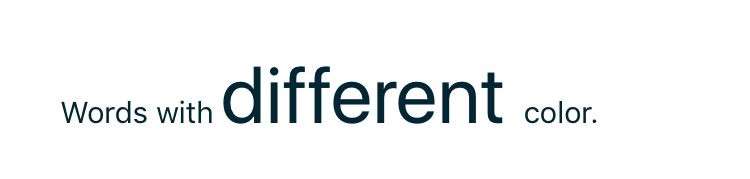
On Android:

On iOS colors and bold font aren't supported.
On Android, bond fold isn't supported.
erkanarslan
on 30 Aug 2018
This thread has been automatically locked since there has not been any recent activity after it was closed. Please open a new issue for related bugs.
![lock[bot] picture](https://avatars1.githubusercontent.com/in/6672?v=4&s=40) lock[bot]
on 30 Aug 2019
lock[bot]
on 30 Aug 2019
Related issues
 Pourya8366
·
3Comments
Pourya8366
·
3Comments
 fmmsilva
·
3Comments
fmmsilva
·
3Comments
 hshristov
·
3Comments
hshristov
·
3Comments
 guillaume-roy
·
3Comments
guillaume-roy
·
3Comments
 OscarLopezArnaiz
·
3Comments
OscarLopezArnaiz
·
3Comments
Most helpful comment
It doesn't work correctly.
I use this element:
html
<Label class="h3 p-15 m-15 text-left">
    <FormattedString>
        <Span text="Words " color="#006600" ></Span>
        <Span text="with " color="#990000" fontAttributes="Bold"></Span>
        <Span text="different " color="#ffcc00" fontSize="40"></Span>
        <Span text="color."></Span>
    </FormattedString>
</Label>
On iOS it looks like this:
On Android:

On iOS colors and bold font aren't supported.
On Android, bond fold isn't supported.