Nativescript: Problem with iOS resizing when there is an activity running in background (active call, hotspot, etc.)
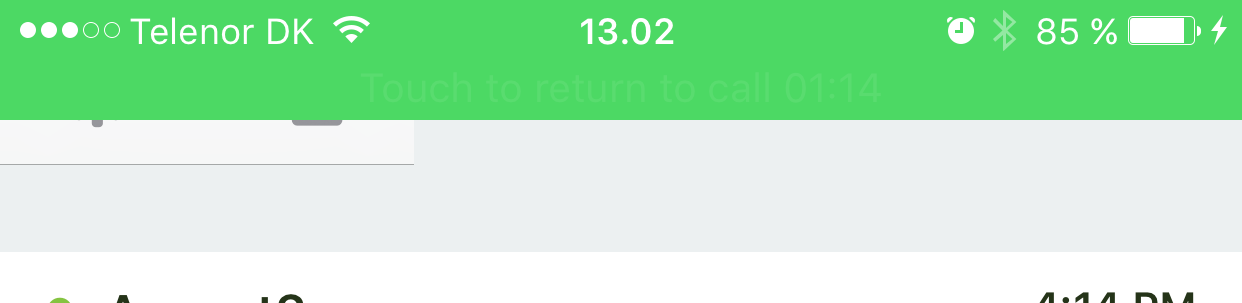
There seems to be a problem when there is an activity running in the background and when the statusbar is higher than usual (like when you have an active call):
Loading screen (with active call):

Loading screen (without active call):

Simple grid layout (with active call):

Simple grid layout (without active call):

Here is the XML for the grid layout page:
<Page xmlns="http://www.nativescript.org/tns.xsd">
  <Page.actionBar>
    <ActionBar title="TEST"/>
  </Page.actionBar>

  <GridLayout rows="auto, *, 30">
    <Label row="0" text="TOP" fontSize="20"/>
    <ListView row="1"></ListView>
    <Label row="2" text="BOTTOM" fontSize="20"/>
  </GridLayout>
</Page>
 PeterStaev
All 6 comments
I found a way to fix this when the in-call status bar shows or hides while in the NS app. But I can't find a way to fix this when the NS app is started while the in-call status bar is displayed. Seems like some sort of iOS issue: https://forums.developer.apple.com/thread/20632
Even if I tell the Navigation Bar to move to y=40, since I know the in-call status bar is visible, it does not because some constraints are conflicting. So I don't really know how to force the NavBar to move down when the app is started or resumed while the in-call status bar is visible. Suggestions are welcome.
 hamorphis
on 10 Feb 2016
hamorphis
on 10 Feb 2016
So I don't really know how to force the NavBar to move down when the app is started or resumed while the in-call status bar is visible. Suggestions are welcome.
@hamorphis
This is the workaround that I have figured out. When the page loads, if I do this:
    setTimeout(()=>{
        page.requestLayout();
    }, 0)
Then the navigation bar is rendered at the correct location. Hopefully you can derive a proper solution from this workaround.
 speigg
on 8 Mar 2016
speigg
on 8 Mar 2016
Has there been any progress on this issue? With NativeScript 3, the navigation bar glitches when the in-call status bar is visible.

 agisboye
on 14 Jun 2017
agisboye
on 14 Jun 2017
I'm having this same issue. It started after I upgraded core-tns-modules from 2.5.2 to 3.0.0.
Here's the basics of my environment...
"dependencies": {
        "@angular/animations": "~4.1.0",
        "@angular/common": "~4.1.0",
        "@angular/compiler": "~4.1.0",
        "@angular/core": "~4.1.0",
        "@angular/forms": "~4.1.0",
        "@angular/http": "~4.1.0",
        "@angular/platform-browser": "~4.1.0",
        "@angular/router": "~4.1.0",
        "nativescript-angular": "~3.0.0",
        "nativescript-appversion": "^1.4.1",
        "nativescript-dev-sass": "^1.1.1",
        "nativescript-email": "^1.4.0",
        "nativescript-fingerprint-auth": "^4.0.0",
        "nativescript-iqkeyboardmanager": "^1.0.1",
        "nativescript-loading-indicator": "^2.3.2",
        "nativescript-permissions": "^1.2.3",
        "nativescript-phone": "^1.3.0",
        "nativescript-telerik-ui": "^2.0.1",
        "nativescript-theme-core": "~1.0.2",
        "reflect-metadata": "~0.1.8",
        "rxjs": "~5.3.0",
        "tns-core-modules": "~3.0.0",
        "zone.js": "~0.8.11"
    },
    "devDependencies": {
        "nativescript-dev-typescript": "~0.4.0",
        "typescript": "~2.2.1"
    }
 soodohkohd
on 20 Jun 2017
soodohkohd
on 20 Jun 2017
If this issue is closed, can it be re-opened?
soodohkohd
on 20 Jun 2017
This thread has been automatically locked since there has not been any recent activity after it was closed. Please open a new issue for related bugs.
![lock[bot] picture](https://avatars1.githubusercontent.com/in/6672?v=4&s=40) lock[bot]
on 28 Aug 2019
lock[bot]
on 28 Aug 2019
Related issues
 vtisnado
·
3Comments
vtisnado
·
3Comments
 hshristov
·
3Comments
hshristov
·
3Comments
 yclau
·
3Comments
yclau
·
3Comments
 NickIliev
·
3Comments
NickIliev
·
3Comments
 tsonevn
·
3Comments
tsonevn
·
3Comments
Most helpful comment
If this issue is closed, can it be re-opened?