Nativescript-vue: iOS ScrollView when trying to scroll crashes on Physical and Emulator
Probably is a similar issue to his one: https://github.com/nativescript-vue/nativescript-vue/issues/24
My code works fine on android but it crashes on iOS
(Foundation) *** Assertion failure in -[UIGestureGraphEdge initWithLabel:sourceNode:targetNode:directed:], /BuildRoot/Library/Caches/com.apple.xbs/Sources/UIKit_Sim/UIKit-3698.33.6/Source/GestureGraph/UIGestureGraphEdge.m:25
Android Sample Running:

IOS Sample Crashing

The code is:
    <TabViewItem title="Documentos">
        <ScrollView>
            <tarefas :lista-tarefas="tarefas.DOCUMENTOS"/>
        </ScrollView>
    </TabViewItem>
Inside the 'tarefas' component:
<template>
    <FlexboxLayout flexDirection="column">
        <StackLayout v-for="item in ListaTarefas" :key="item.ID_TAREFA" class="item">

            <CardView class="card wd-100" radius="0" shadowOffsetWidth="0"
                      shadowOffsetHeight="0" shadowOpacity="0" shadowRadius="0" >
                <FlexboxLayout flexDirection="row">
                    <StackLayout class="barra-situacao" :class="cardStatus(item, true)"></StackLayout>

                    <FlexboxLayout flexDirection="column">
                        <StackLayout class="icone-tarefa wd-30" verticalAlignment="center">

                            <StackLayout v-if="item.TIPO === DOCUMENTO">
                                <image src="~/images/ic_documento.png" class="wd-40"/>
                                <label text="Documento" class="text-center" textWrap="true"/>
                            </StackLayout>

                            <StackLayout v-if="item.TIPO === ORDEM_SERVICO">
                                <image src="~/images/ic_ordem_servico.png" class="wd-40"/>
                                <label text="Ordem de Serviço" class="text-center" textWrap="true"/>
                            </StackLayout>

                            <StackLayout v-if="item.TIPO === PROCESSO">
                                <image src="~/images/ic_processo.png" class="wd-40"/>
                                <label text="Processo" class="text-center" textWrap="true"/>
                            </StackLayout>

                        </StackLayout>
                    </FlexboxLayout>

                    <FlexboxLayout alignItems="column" flexWrap="wrap"
                                   class="wd-70 o-7">
                        <FlexboxLayout alignItems="flex-start" class="card-header">
                            <FlexboxLayout class="wd-50">
                                <image src="~/images/ic_calendario.png"/>
                                <label :text="item.PRAZO" class="data"
                                       :class="cardStatus(item, false)"/>
                            </FlexboxLayout>
                            <FlexboxLayout class="wd-50 label-situacao">
                                <image src="~/images/ic_relogio.png"/>
                                <label :text="labelStatus(item.STATUS)"/>
                            </FlexboxLayout>
                        </FlexboxLayout>
                        <FlexboxLayout alignItems="row" flexWrap="wrap" class="card-body">
                            <label class="nome-tarefa wd-100" :text="item.DESCRICAO"/>
                            <label class="detalhes-tarefa wd-100" :text="item.DETALHES"/>
                        </FlexboxLayout>
                    </FlexboxLayout>
                </FlexboxLayout>
            </CardView>
        </StackLayout>
    </FlexboxLayout>
</template>
Inside the tarefas component I don't have any tap event
 andreMariano90
All 15 comments
Hey guys!
I'm having the same issue. Any ideas what may be happening?
This is my log:
CONSOLE LOG file:///app/app.js:1:108397: '{NSVue (Vue: 2.5.13 | NSVue: 1.3.1)} -> AppendChild(t(page), t(scrollview))'
2018-05-04 15:55:24.436090-0600 dist[926:3236482] *** Assertion failure in -[UIGestureGraphEdge initWithLabel:sourceNode:targetNode:directed:], /BuildRoot/Library/Caches/com.apple.xbs/Sources/UIKit/UIKit-3698.52.10/Source/GestureGraph/UIGestureGraphEdge.m:25
2018-05-04 15:55:24.442320-0600 dist[926:3236482] *** JavaScript call stack:
(
0 UIApplicationMain@[native code]
1 start@file:///app/tns_modules/tns-core-modules/application/application.js:264:26
2 @file:///app/app.js:1:212740
3 initializePromise@:1:11
4 Promise@[native code]
5 $navigateTo@file:///app/app.js:1:212389
6 $start@file:///app/app.js:1:213235
7 @file:///app/app.js:1:458663
8 t@file:///app/app.js:1:175
9 @file:///app/app.js:1:522
10 anonymous@file:///app/app.js:1:532
11 evaluate@[native code]
12 moduleEvaluation@:1:11
13 @:7:48
14 promiseReactionJob@:1:11
)
2018-05-04 15:55:24.442569-0600 dist[926:3236482] *** Terminating app due to uncaught exception 'NSInternalInconsistencyException', reason: 'Invalid parameter not satisfying: targetNode'
*** First throw call stack:
(0x184eb6d8c 0x1840705ec 0x184eb6bf8 0x1858a6fa0 0x18eb7faf0 0x18eb7f788 0x18ec64080 0x18ed51ef0 0x18f1c46fc 0x18ec5f540 0x18ec5f078 0x18ec5e8dc 0x18ec5d238 0x18f43ec0c 0x18f4411b8 0x18f43a258 0x184e5f404 0x184e5ec2c 0x184e5c79c 0x184d7cda8 0x186d5f020 0x18ed5d78c 0x101418044 0x101416160 0x101415c70 0x100b1d1ac 0x1010df1e0 0x1010e7d24 0x1010e7d34 0x1010e7d34 0x1010e11e0 0x10107c2f0 0x1010550cc 0x101290a00 0x101290ee8 0x1010df1e0 0x1010e80e0 0x1010e7d34 0x1010e7d34 0x1010e7d34 0x1010e7d34 0x1010e7d34 0x1010e11e0 0x10107c2f0 0x1010550cc 0x1011ddf9c 0x100b310f4 0x1012734f8 0x1010e8794 0x1010e7d34 0x1010e7d34 0x1010e7d34 0x1010e11e0 0x10107c2f0 0x1010550cc 0x1011de078 0x10126f440 0x100b28c4c 0x100b6b180 0x100205b14 0x18480dfc0)
libc++abi.dylib: terminating with uncaught exception of type NSException
(lldb)
 rigoparis
on 5 May 2018
rigoparis
on 5 May 2018
Well, I found a workaround and discovered why it isn't easy to catch.
If the Vue class with ScrollView is my first screen. It crashes. I Also had the same problem using the RadCalendar component.
The workaround is to call another class before this one. You must set a timeout before calling the $navigateTo method otherwise it will crash (using the @loaded or the mounted() method). Well, I created a second splash screen that waits 1 sec before calling the Home class and then everything works fine with any component. I hope it gives any light to the main developers and helps anyone who is having a hard time with it
mounted(){
        var vm = this;
        setTimeout(function () {
            //calls the class that was crashing when calling the first time
            //the 'clearHistory' class ignore this class and set the Home class as the first one
            vm.$navigateTo(Home,{clearHistory:true});
        },1000);
    }
Also have this issue, has a solution been found, or has this even been acknowledged as being an issue? :)
 Reached
on 1 Jun 2018
Reached
on 1 Jun 2018
+1 to have this issue solved ASAP. This library is the future.
 sagunkho
on 11 Jun 2018
sagunkho
on 11 Jun 2018
I can confirm that the workaround @andreMariano90 posted indeed works. If anyone is struggling with implementing this, let me know, maybe I can help :)
Reached
on 15 Jun 2018
Was banging my head against the wall on this one also - workaround does do the job.
 mrzorn
on 22 Jun 2018
mrzorn
on 22 Jun 2018
Why there is no fix yet? :(
 yauri-io
on 25 Jul 2018
yauri-io
on 25 Jul 2018
@yauri-io we don't know the cause, it is most likely an issue with NativeScript-Core rather than NativeScript-Vue. If you find a fix, feel free to submit a pull request, it's open source.
 rigor789
on 25 Jul 2018
rigor789
on 25 Jul 2018
@rigor789 I wish I could help but I'm not familiar with NativeScript :(
If the creator doesn't know what the cause, I think I'll get the same result if I try to figure out the problem.
Yesterday was my first-day trying nativescript-vue and hit the issue right away.
Then I decided to use the workaround for now.
Anyway thanks for working on the project!
yauri-io
on 25 Jul 2018
Hello, I met this issue today.
It happens when I click any list item in my ListView.
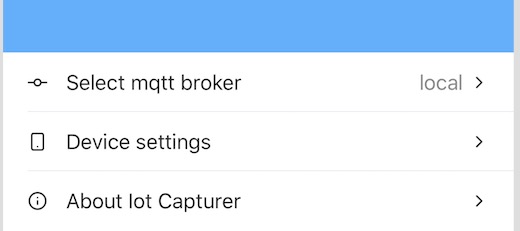
Error message:
* Terminating app due to uncaught exception 'NSInternalInconsistencyException', reason: 'Invalid parameter not satisfying: targetNode'
Here is my ListView code
<!-- Home.vue -->

<ListView for="item in listOfItems" @itemTap="onItemTap">
    <v-template>
      <StackLayout class="list-item">
        <FlexboxLayout>
          <Label class="icon" :text="String.fromCharCode(item.icon)" />
          <Label style="margin-left: 15" flexGrow="1" :text="item.text" />
          <Label v-if="$index === 0" class="broker-type">{{this.useWatson ? 'watson' : 'local'}}</Label>
          <Label class="icon" :text="String.fromCharCode(0xe930)" />
        </FlexboxLayout>
      </StackLayout>

    </v-template>
  </ListView>
I worked around this problem by removing vue-router completely.
Before the home page is loaded by router/index.js => router.replace('/home');
Now, I am rendering home page directly
new Vue({
  store,
  render: h => h(Home)
}).$start();
And the app works again.
BTW , I am trying nativescript-vue from last week.
From my experience, the vue-cli-template is very buggy whereas nativescript-vue-template works in every case.
 uniquejava
on 29 Jul 2018
uniquejava
on 29 Jul 2018
Is there any fix yet ? I am facing the issue on ios.
 ErenYatkin
on 12 Aug 2018
ErenYatkin
on 12 Aug 2018
I have the same problem. And partly I decided it as follows:
<Page class="page">
<FlexboxLayout flexDirection="column" v-if="ready">
<ScrollView orientation="vertical">
<StackLayout orientation="vertical">
// ...
</StackLayout>
</ScrollView>
</FlexboxLayout>
</Page>
<script>
export default {
data() {
return { ready: false };
},
mounted() {
this.ready = true;
},
};
</script>
But when I add the ActionBar to the Page then the application crashes when I go through this routing and an error occurs in the console:
CONSOLE ERROR file:///app/app.js:1:73458: [Vue warn]: Error in directive view inserted hook: "Error: View already has a parent. View: ActionBar(12) Parent: Page(11)"
found in
---> <ActionBar>
<Root>
 supervueman
on 12 Aug 2018
supervueman
on 12 Aug 2018
@Reached If you could help me out it would be great. I have tried @andreMariano90 solution but it didnt work. Maybe I'm putting the code in the wrong place. Here is my code.
new Vue({
         router,
         methods: {
         mounted(){
              var vm = this;
              setTimeout(function () {
               //calls the class that was crashing when calling the first time
              //the 'clearHistory' class ignore this class and set the Home class
        vm.$navigateTo(Home,{clearHistory:true});
      },1000);
    }
  }
 }).$start();
Thanks for any help.
 rickdps
on 19 Aug 2018
rickdps
on 19 Aug 2018
Having the same issue, but found solution
I continued idea from @RinatDav
so to not lose ActionBar try to wrap ScrollView in some other Layout helper
<Page class="page">
  <ActionBar title="My Tasks" class="action-bar" />
  <StackLayout>
      <ScrollView orientation="vertical" v-if="ready">
        <StackLayout orientation="vertical">
          <Label :text="i" v-for="i in 100" :key="i" height="70"></Label>
        </StackLayout>
      </ScrollView>
  </StackLayout>
</Page>
 Tarens2
on 29 Aug 2018
Tarens2
on 29 Aug 2018
@rickdps sorry, somehow your message got lost in my notifications feed.
Don't know if you managed to fix it, otherwise here is what I did:
- Create a new Vue component called Splash.vue and add the following code:
<template>
    <Page class="page">
        <Label>Splash Page</Label>
    </Page>
</template>

<script>
    import Newsfeed from './Newsfeed';

    export default {
        mounted() {
            setTimeout(() => {
                //calls the class that was crashing when calling the first time
                //the 'clearHistory' class ignore this class and set the Newsfeed class as the first one
                this.$navigateTo(Newsfeed, {clearHistory: true});
            }, 1);
        }
    }
</script>
- Then in your router file (index.js) add a redirect to the Splash component instead of your main component:
First add an entry so that the router knows about your Splash component (page):
{
            path: '/splash',
            component: Splash,
            name: 'splash-page',
            meta: {
                title: 'Splash',
                requiresAuth: false
            }
},
Then further down in the file, make sure that the app is redirected to the Splash component when opened:
router.replace('/splash');
- As a sidenote I don't think this is an issue in the 2.0 alpha branch (next), however I will have to test this).
Reached
on 5 Sep 2018
Related issues
 Sjoerd
·
3Comments
Sjoerd
·
3Comments
 MatheusPimentel
·
5Comments
MatheusPimentel
·
5Comments
 kjlaw89
·
3Comments
kjlaw89
·
3Comments
 academici
·
5Comments
academici
·
5Comments
 djroad
·
5Comments
djroad
·
5Comments
Most helpful comment
Well, I found a workaround and discovered why it isn't easy to catch.
If the Vue class with ScrollView is my first screen. It crashes. I Also had the same problem using the RadCalendar component.
The workaround is to call another class before this one. You must set a timeout before calling the $navigateTo method otherwise it will crash (using the @loaded or the mounted() method). Well, I created a second splash screen that waits 1 sec before calling the Home class and then everything works fine with any component. I hope it gives any light to the main developers and helps anyone who is having a hard time with it