Nativescript-ui-feedback: RadListView does not render rows on iOS 13 beta
Please take a minute to read our NativeScript Code of Conduct before proceeding with posting issues or discussing. The purpose of this guide is to make communication and cooperation within our forums a pleasure for you and the other members.
Please, provide the details below:
Tell us about the problem
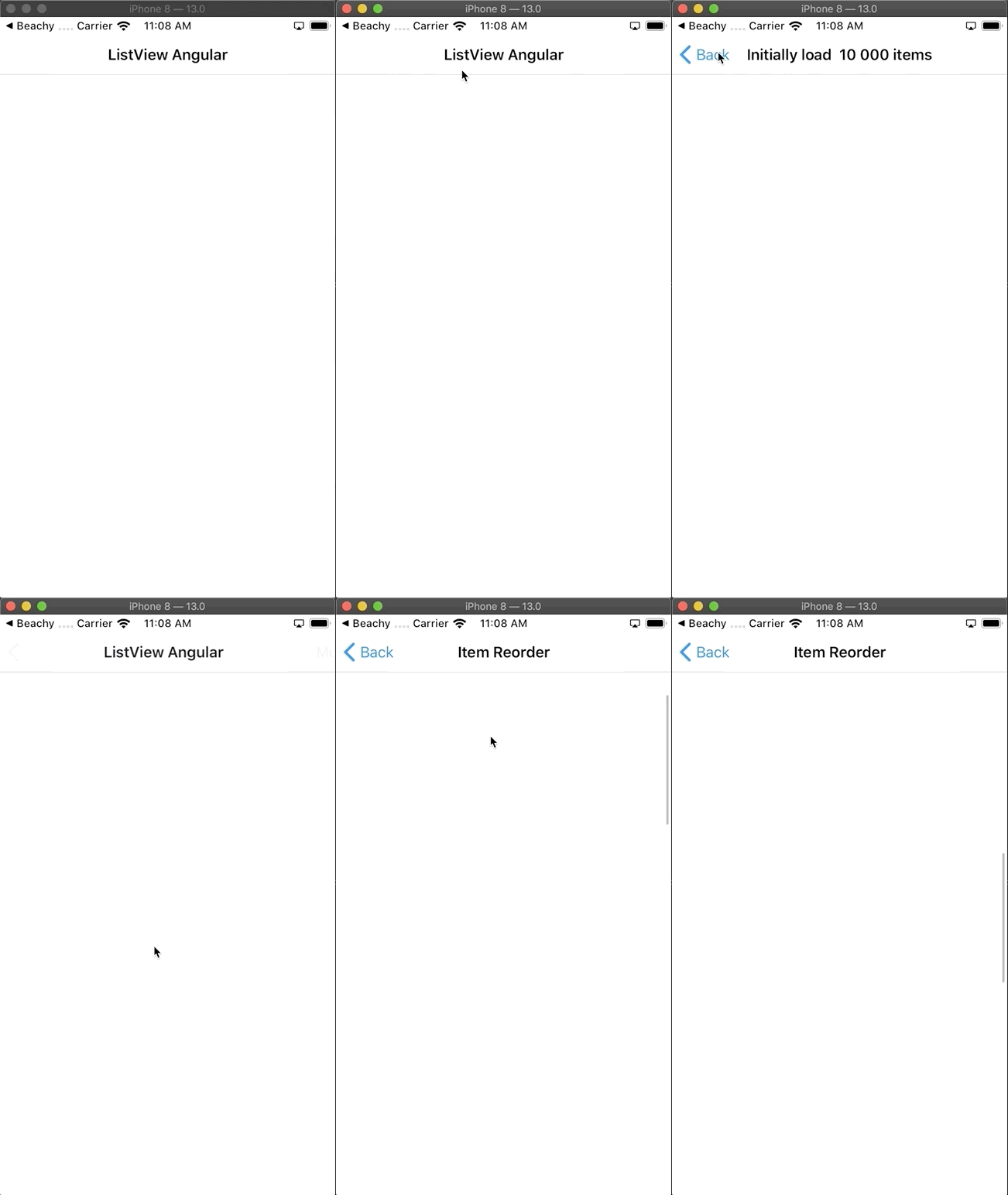
RadListView does not render rows on iOS 13 beta
Which platform(s) does your issue occur on?
iOS (13 beta)
Please provide the following version numbers that your issue occurs with:
- Progress NativeScript UI plugin version: [email protected]
- CLI: 5.4.0
- Cross-platform modules: tns-core-modules@^5.0.0
- Runtime(s): [email protected]
Please tell us how to recreate the issue in as much detail as possible.
- Download nativescript-ui-samples-angular
- Go to ./listview directory
- Run the app
Is there code involved? If so, please share the minimal amount of code needed to recreate the problem.
Yes, I'm able to reproduce that behavior by running listview demo from https://github.com/NativeScript/nativescript-ui-samples-angular
Here's how it looks like:
 piotrilski
All 32 comments
Seeing the same bug with NativeScript-Vue.
 mdjamal
on 3 Jul 2019
mdjamal
on 3 Jul 2019
Hey, i'm seeing the same here, iOS 13 build 17A5522g ... is there a workaround until a fix is ready ?
 darxmac
on 17 Jul 2019
darxmac
on 17 Jul 2019
@darxmac depends of what functionality you need. In my particular case I get rid of RadListView completely and used regular ListView instead. The only missing functionality was an ability to swipe, which I was able to achieve by using my custom implementation of UITableViewDelegate (overriding the default delegate on ngAfterViewInit)
Some pseudo code:
Angular's controller
@ViewChild('bookModeListView', { static: false })
bookModeListView: ListViewComponent;
ngAfterViewInit() {
const listView = this.bookModeListView.nativeElement as ListView;
if (isIOS && listView) {
const delegate = InventoryItemsUITableViewDelegateImpl
.initWithDelegateAndOwner(
(listView.ios as UITableView).delegate,
new WeakRef(listView),
);
listView.ios.delegate = delegate;
listView.ios
.registerClassForCellReuseIdentifier(BeachyListViewCell
.class(), BeachyListViewCell.reuseId());
}
}
InventoryItemsUITableViewDelegateImpl
export class InventoryItemsUITableViewDelegateImpl
extends NSObject
implements UITableViewDelegate {
// tslint:disable-next-line:variable-name
public static ObjCProtocols = [UITableViewDelegate];
private _originalDelegate: UITableViewDelegate;
private _owner: WeakRef<ListView>;
public static initWithDelegateAndOwner(
originalDelegate: UITableViewDelegate,
owner: WeakRef<ListView>,
): InventoryItemsUITableViewDelegateImpl {
const delegate = InventoryItemsUITableViewDelegateImpl
.new() as InventoryItemsUITableViewDelegateImpl;
delegate._originalDelegate = originalDelegate;
delegate._owner = owner;
console.log('INIT: ');
console.log(delegate);
console.log(delegate._originalDelegate);
console.log(delegate._owner);
return delegate;
}
/** OVERRIDES */
tableViewDidSelectRowAtIndexPath(
tableView: UITableView,
indexPath: NSIndexPath,
): NSIndexPath {
tableView.deselectRowAtIndexPathAnimated(indexPath, true);
const item = this.resolveItemAtIndexPath(indexPath);
if (this.itemSelected && item) {
item.isSelected = !item.isSelected;
const indexPaths = new NSMutableArray<NSIndexPath>({
capacity: 1 });
indexPaths.addObject(
NSIndexPath.indexPathForRowInSection(
indexPath.row, item.groupIndex || 0));
tableView.reloadRowsAtIndexPathsWithRowAnimation(
NSArray.arrayWithArray<NSIndexPath>(indexPaths),
UITableViewRowAnimation.Automatic);
this.itemSelected(item);
}
return indexPath;
}
tableViewTrailingSwipeActionsConfigurationForRowAtIndexPath(
tableView: UITableView,
indexPath: NSIndexPath,
): UISwipeActionsConfiguration {
const exampleAction = UIContextualAction
.contextualActionWithStyleTitleHandler(
UIContextualActionStyle.Normal,
'Swipe Action Name',
(_p1pio: UIContextualAction, _p2: UIView,
handler: (p1: boolean) => void) => {
// run your code here, add some handler, etc.
handler(true);
},
);
exampleAction.backgroundColor = UIColor
.colorWithRedGreenBlueAlpha(0.35, 0.78, 0.88, 1.0);
const actionsArray = [];
actionsArray.push(exampleAction);
const array = new NSMutableArray<UIContextualAction>({
capacity: actionsArray.length,
});
actionsArray.forEach(a => array.addObject(a));
return UISwipeActionsConfiguration
.configurationWithActions(NSArray.arrayWithArray(array));
}
tableViewHeightForRowAtIndexPath(
tableView: UITableView,
indexPath: NSIndexPath): number {
if (!this._originalDelegate || !this._owner) {
return tableView.estimatedRowHeight;
}
return floor(this._originalDelegate
.tableViewHeightForRowAtIndexPath(
tableView, indexPath) || 70);
}
tableViewWillDisplayCellForRowAtIndexPath(
_tableView: UITableView,
_cell: UITableViewCell,
indexPath: NSIndexPath,
): void {
if (this._originalDelegate && this._owner) {
this._originalDelegate
.tableViewWillDisplayCellForRowAtIndexPath(
_tableView, _cell, indexPath);
}
}
tableViewWillSelectRowAtIndexPath(
tableView: UITableView,
indexPath: NSIndexPath): NSIndexPath {
return this._originalDelegate
.tableViewWillSelectRowAtIndexPath(
tableView, indexPath);
}
}
I assume that you can override dataSource if needed, and use your custom UITableViewDataSource as well.
piotrilski
on 17 Jul 2019
Same problem. Users updated the system to version IOS 13 and the application does not work in those parts where there is RadListView.
 Cheas
on 17 Jul 2019
Cheas
on 17 Jul 2019
Hi all,
Thank you for your interest in _nativescript-ui-listview_. iOS 13 is still in its early stages of beta testing and is not recommended for general use. We are planning to investigate and resolve any issue connected with that version of iOS. You can rest assure that we will do our best to resolve any such issues before iOS 13 is officially released.
 VladimirAmiorkov
on 18 Jul 2019
VladimirAmiorkov
on 18 Jul 2019
reported via admin t.1419325
 tsonevn
on 30 Jul 2019
tsonevn
on 30 Jul 2019
@VladimirAmiorkov any updates on this one ?
 sunpasup
on 16 Aug 2019
sunpasup
on 16 Aug 2019
Hi @sunpasup @Cheas @piotrilski @darxmac @mdjamal ,
We have been working on this issue for some time now and wanted to give you an update. While we do not want to get too deep in the details of the source of this issue, it is caused by a change of the way that systemLayoutSizeFitting of an UICollectionViewCell is being propagated by the OS itself. In iOS 13 this is no longer being raised and we use this method to be able to parse the NativeScript template of the RadListView (.itemTemplate) and set the native size of the cells in the list, this is related to supporting functionality like dynamic item height etc.
While this still looks to be a breaking change in iOS 13 that concerns all custom UICollectionView elements that have "self-sizing" cells we have found a way to resolve it even with this non documented breaking change. We are currently testing the plugin with this new approach to make sure that it will not cause other issues on iOS 12. Bcause it is possible that the above behavior of the UICollectionView in iOS 13 can be silently resolved with the official release of iOS 13 we are going to continue monitoring it before and after iOS 13 is release to make sure that the applied solution is not causing other issues and if it is still necessary.
VladimirAmiorkov
on 19 Aug 2019
Is there a workaround that we could try out, for those of us that only have one test device that's already on iOS 13?
 sjetha
on 19 Aug 2019
sjetha
on 19 Aug 2019
Same story in Beta 7
 sifex
on 20 Aug 2019
sifex
on 20 Aug 2019
The fix is released in [email protected]
 zbranzov
on 20 Aug 2019
zbranzov
on 20 Aug 2019
updated nativescript-ui-listview to 7.0.3 as mentioned above.
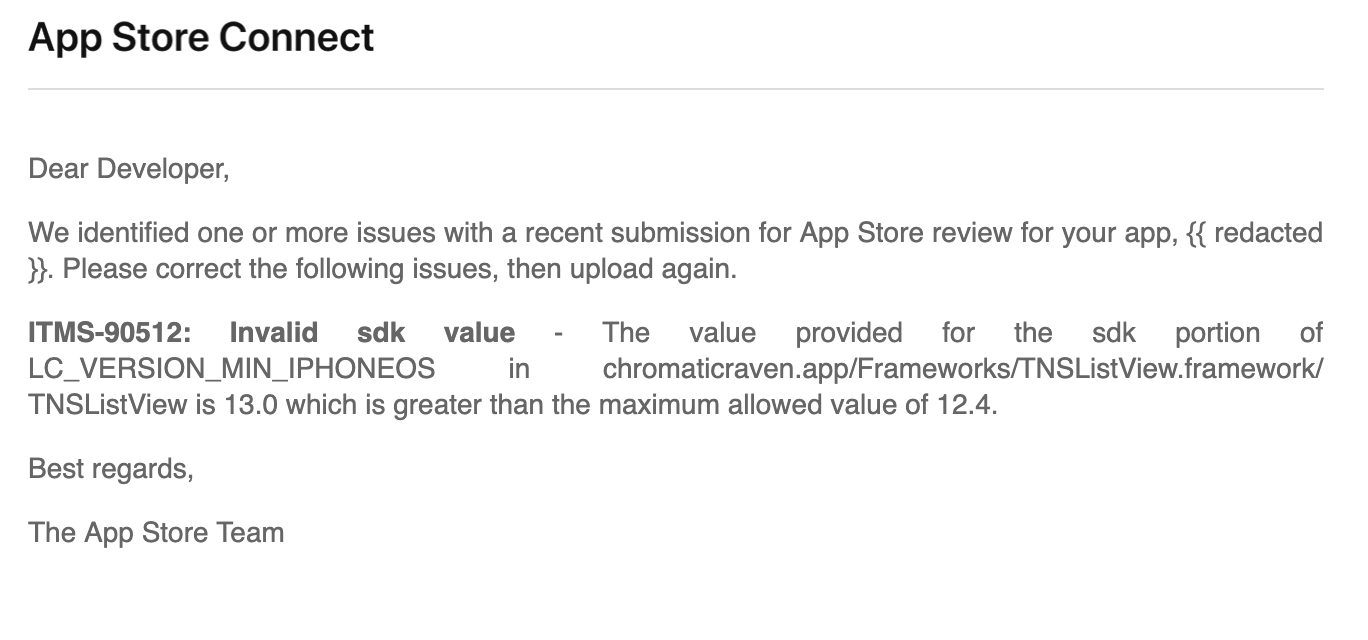
below is the error we are facing now.
Fatal JavaScript exception - application has been terminated.
Native stack trace:
1 0x108b722c1 NativeScript::reportFatalErrorBeforeShutdown(JSC::ExecState, JSC::Exception, bool, bool)
2 0x108baea5f -[TNSRuntime executeModule:referredBy:]
3 0x1083de0f3 main
4 0x7fff51175cf5 start
JavaScript stack trace:
1 @undefined:7:68
2 __extends@[native code]
3 @file:///app/vendor.js:87955:14
4 ../node_modules/nativescript-ui-listview/ui-listview.common.js@file:///app/vendor.js:88591:2
5 __webpack_require__@file:///app/bundle.js:76:34
6 ../node_modules/nativescript-ui-listview/ui-listview.js@file:///app/vendor.js:88629:29
7 __webpack_require__@file:///app/bundle.js:76:34
8 ../node_modules/nativescript-ui-listview/angular/listview-directives.js@file:///app/vendor.js:87036:30
9 __webpack_require__@file:///app/bundle.js:76:34
10 ./shared/shared.module.ts@file:///app/bundle.js:35437:109
11 __webpack_require__@file:///app/bundle.js:76:34
12 ./app.module.ts@file:///app/bundle.js:19384:98
13 __webpack_require__@file:///app/bundle.js:76:34
14 ./main.ts@file:///app/bundle.js:28664:88
15 __webpack_require__@file:///app/bundle.js:76:34
16 checkDeferredModules@file:///app/bundle.js:45:42
17 @file:///app/bundle.js:149:38
18 anonymous@file:///app/bundle.js:150:12
19 evaluate@[native code]
20 modul<…>
JavaScript error:
undefined:7:68: JS ERROR TypeError: undefined is not an object (evaluating 'b.prototype')
(CoreFoundation) * Terminating app due to uncaught exception 'NativeScript encountered a fatal error: TypeError: undefined is not an object (evaluating 'b.prototype')
sunpasup
on 21 Aug 2019
 sifex
on 21 Aug 2019
sifex
on 21 Aug 2019
We're running into the same problem as @sifex. Cannot release the app.
 Burgov
on 21 Aug 2019
Burgov
on 21 Aug 2019
I managed to get this issue fixed for my project using tns 3.3.1, and "nativescript-pro-ui": "3.2.0". Since it is quite impossible for me to upgrade to the latest nativescript so that I can use the fix in [email protected]. I had to hotfix the "nativescript-pro-ui" module.
After reading @VladimirAmiorkov comments, I think the root cause is that iOS 13 beta does not call systemLayoutSizeFittingSize, but rather calls systemLayoutSizeFittingSizeWithHorizontalFittingPriorityVerticalFittingPriority. So the solution is to create the exact copy for function systemLayoutSizeFittingSizeWithHorizontalFittingPriorityVerticalFittingPriority in file listview.ios.js:
Add this function:
ExtendedHeaderCell.prototype.systemLayoutSizeFittingSizeWithHorizontalFittingPriorityVerticalFittingPriority = function (targetSize, horizontalFittingPriority, verticalFittingPriority) {
        if (this.view && this.view.parent) {
            var listView = this.view.parent;
            listView._preparingCell = true;
            var dimensions = listView.layoutHeaderFooterCell(this);
            listView._preparingCell = false;
            return CGSizeMake(view_1.layout.toDeviceIndependentPixels(dimensions.measuredWidth), view_1.layout.toDeviceIndependentPixels(dimensions.measuredHeight));
        }
        return targetSize;
    };
Similarly, I did the same for ExtendedFooterCell, and ExtendedListViewCell as well.
 superbnoo
on 21 Aug 2019
superbnoo
on 21 Aug 2019
We're running into the same problem as @sifex. Cannot release the app.
@Burgov Leaving iOS 13 broken, and deploying @7.0.2 seems to be the best option
sifex
on 22 Aug 2019
I'm sorry for the mistake. We have just released 7.0.4 version built with non beta Xcode. Let us know if the issue persists.
zbranzov
on 22 Aug 2019
I'm sorry for the mistake. We have just released 7.0.4 version built with non beta Xcode. Let us know if the issue persists.
Where do I buy you a coffee?
sifex
on 23 Aug 2019
@sifex :) No need for a coffee just keep bringing us feedback.
VladimirAmiorkov
on 23 Aug 2019
We tested our application with version 7.0.4 on iOS 13, everything works. Thank.
Cheas
on 27 Aug 2019
updated nativescript-ui-listview to 7.0.3 as mentioned above.
below is the error we are facing now.
Fatal JavaScript exception - application has been terminated.
Native stack trace:
1 0x108b722c1 NativeScript::reportFatalErrorBeforeShutdown(JSC::ExecState, JSC::Exception, bool, bool)
2 0x108baea5f -[TNSRuntime executeModule:referredBy:]
3 0x1083de0f3 main
4 0x7fff51175cf5 start
JavaScript stack trace:
1 @undefined:7:68
2 __extends@[native code]
3 @file:///app/vendor.js:87955:14
4 ../node_modules/nativescript-ui-listview/ui-listview.common.js@file:///app/vendor.js:88591:2
5 webpack_require@file:///app/bundle.js:76:34
6 ../node_modules/nativescript-ui-listview/ui-listview.js@file:///app/vendor.js:88629:29
7 webpack_require@file:///app/bundle.js:76:34
8 ../node_modules/nativescript-ui-listview/angular/listview-directives.js@file:///app/vendor.js:87036:30
9 webpack_require@file:///app/bundle.js:76:34
10 ./shared/shared.module.ts@file:///app/bundle.js:35437:109
11 webpack_require@file:///app/bundle.js:76:34
12 ./app.module.ts@file:///app/bundle.js:19384:98
13 webpack_require@file:///app/bundle.js:76:34
14 ./main.ts@file:///app/bundle.js:28664:88
15 webpack_require@file:///app/bundle.js:76:34
16 checkDeferredModules@file:///app/bundle.js:45:42
17 @file:///app/bundle.js:149:38
18 anonymous@file:///app/bundle.js:150:12
19 evaluate@[native code]
20 modul<…>
JavaScript error:
undefined:7:68: JS ERROR TypeError: undefined is not an object (evaluating 'b.prototype')
(CoreFoundation) * Terminating app due to uncaught exception 'NativeScript encountered a fatal error: TypeError: undefined is not an object (evaluating 'b.prototype')
Updated to 7.0.4,
Still facing same issue ?? any work around ??
sunpasup
on 6 Sep 2019
The changes @superbnoo suggested work for me as well (likewise, have an app stuck on an older version of the plugin). Cheers!
 EddyVerbruggen
on 14 Sep 2019
EddyVerbruggen
on 14 Sep 2019
Running NS 5.4: Updating "nativescript-ui-listview": "^5.2.0" to 7.0.4 resolved the issue for me on iOS 13.
 timdoege
on 23 Sep 2019
timdoege
on 23 Sep 2019
Eureeka! @superbnoo's solution works for those of us who are unable to update to the latest version of NS.
Though for me, I am still using [email protected] while changing the listview.ios.js as @superbnoo suggested and it is working perfectly.
Thank you for the solution!
 BMwanza
on 24 Sep 2019
BMwanza
on 24 Sep 2019
Not working on my side:
"nativescript-ui-listview": "7.1.0",
"tns-core-modules": "~6.1.1",
In the inspector I can see the xml structures but is not rendering.
Please help.
 closca
on 9 Oct 2019
closca
on 9 Oct 2019
I managed to get this issue fixed for my project using tns 3.3.1, and "nativescript-pro-ui": "3.2.0". Since it is quite impossible for me to upgrade to the latest nativescript so that I can use the fix in [email protected]. I had to hotfix the "nativescript-pro-ui" module.
After reading @VladimirAmiorkov comments, I think the root cause is that iOS 13 beta does not call
systemLayoutSizeFittingSize, but rather callssystemLayoutSizeFittingSizeWithHorizontalFittingPriorityVerticalFittingPriority. So the solution is to create the exact copy for functionsystemLayoutSizeFittingSizeWithHorizontalFittingPriorityVerticalFittingPriorityin filelistview.ios.js:Add this function:
ExtendedHeaderCell.prototype.systemLayoutSizeFittingSizeWithHorizontalFittingPriorityVerticalFittingPriority = function (targetSize, horizontalFittingPriority, verticalFittingPriority) {
        if (this.view && this.view.parent) {
            var listView = this.view.parent;
            listView._preparingCell = true;
            var dimensions = listView.layoutHeaderFooterCell(this);
            listView._preparingCell = false;
            return CGSizeMake(view_1.layout.toDeviceIndependentPixels(dimensions.measuredWidth), view_1.layout.toDeviceIndependentPixels(dimensions.measuredHeight));
        }
        return targetSize;
    };
Similarly, I did the same for
ExtendedFooterCell, andExtendedListViewCellas well.
Hey, I'm in the same situation as you.
I tried your fix, it did not work for me sadly. You edited only ui-listview.ios.js file, thats all?
 Jaroslav84
on 12 Oct 2019
Jaroslav84
on 12 Oct 2019
Just a data point for those who have tried the above work around in older versions of NS. I also attempted this fix in NS5; it did work for me. Yay! However on rotating the device the UI pro would then crash or freeze the application. :-(
 NathanaelA
on 13 Oct 2019
NathanaelA
on 13 Oct 2019
I managed to get this issue fixed for my project using tns 3.3.1, and "nativescript-pro-ui": "3.2.0". Since it is quite impossible for me to upgrade to the latest nativescript so that I can use the fix in [email protected]. I had to hotfix the "nativescript-pro-ui" module.
After reading @VladimirAmiorkov comments, I think the root cause is that iOS 13 beta does not callsystemLayoutSizeFittingSize, but rather callssystemLayoutSizeFittingSizeWithHorizontalFittingPriorityVerticalFittingPriority. So the solution is to create the exact copy for functionsystemLayoutSizeFittingSizeWithHorizontalFittingPriorityVerticalFittingPriorityin filelistview.ios.js:
Add this function:ExtendedHeaderCell.prototype.systemLayoutSizeFittingSizeWithHorizontalFittingPriorityVerticalFittingPriority = function (targetSize, horizontalFittingPriority, verticalFittingPriority) { if (this.view && this.view.parent) { var listView = this.view.parent; listView._preparingCell = true; var dimensions = listView.layoutHeaderFooterCell(this); listView._preparingCell = false; return CGSizeMake(view_1.layout.toDeviceIndependentPixels(dimensions.measuredWidth), view_1.layout.toDeviceIndependentPixels(dimensions.measuredHeight)); } return targetSize; };Similarly, I did the same for
ExtendedFooterCell, andExtendedListViewCellas well.Hey, I'm in the same situation as you.
I tried your fix, it did not work for me sadly. You edited only ui-listview.ios.js file, thats all?
Yep, I only editted listview.ios.js file, and that's all.
You should not copy exactly the code above, but clone the function systemLayoutSizeFittingSize in your listview.ios.js to the new function systemLayoutSizeFittingSizeWithHorizontalFittingPriorityVerticalFittingPriority
Cloning example - exactly same function body:
ExtendedHeaderCell.prototype.systemLayoutSizeFittingSize = function (targetSize) {
if (this.view && this.view.parent) {
var listView = this.view.parent;
listView._preparingCell = true;
var dimensions = listView.layoutHeaderFooterCell(this);
listView._preparingCell = false;
return CGSizeMake(view_1.layout.toDeviceIndependentPixels(dimensions.measuredWidth), view_1.layout.toDeviceIndependentPixels(dimensions.measuredHeight));
}
return targetSize;
};
ExtendedHeaderCell.prototype.systemLayoutSizeFittingSizeWithHorizontalFittingPriorityVerticalFittingPriority = function (targetSize, horizontalFittingPriority, verticalFittingPriority) {
        if (this.view && this.view.parent) {
            var listView = this.view.parent;
            listView._preparingCell = true;
            var dimensions = listView.layoutHeaderFooterCell(this);
            listView._preparingCell = false;
            return CGSizeMake(view_1.layout.toDeviceIndependentPixels(dimensions.measuredWidth), view_1.layout.toDeviceIndependentPixels(dimensions.measuredHeight));
        }
        return targetSize;
    };
And for my listview.ios.js file, the 3 added functions code are:
ExtendedHeaderCell.prototype.systemLayoutSizeFittingSizeWithHorizontalFittingPriorityVerticalFittingPriority = function (targetSize, horizontalFittingPriority, verticalFittingPriority) {
        if (this.view && this.view.parent) {
            var listView = this.view.parent;
            listView._preparingCell = true;
            var dimensions = listView.layoutHeaderFooterCell(this);
            listView._preparingCell = false;
            return CGSizeMake(view_1.layout.toDeviceIndependentPixels(dimensions.measuredWidth), view_1.layout.toDeviceIndependentPixels(dimensions.measuredHeight));
        }
        return targetSize;
    };
ExtendedFooterCell.prototype.systemLayoutSizeFittingSizeWithHorizontalFittingPriorityVerticalFittingPriority = function (targetSize, horizontalFittingPriority, verticalFittingPriority) {
if (this.view && this.view.parent) {
var listView = this.view.parent;
listView._preparingCell = true;
var dimensions = listView.layoutHeaderFooterCell(this);
listView._preparingCell = false;
return CGSizeMake(view_1.layout.toDeviceIndependentPixels(dimensions.measuredWidth), view_1.layout.toDeviceIndependentPixels(dimensions.measuredHeight));
}
return targetSize;
};
ExtendedListViewCell.prototype.systemLayoutSizeFittingSizeWithHorizontalFittingPriorityVerticalFittingPriority = function (targetSize, horizontalFittingPriority, verticalFittingPriority) {
if (this.view && this.view.itemView && this.view.itemView.parent) {
var owner = this.view.itemView.parent;
owner._preparingCell = true;
var dimensions = owner.layoutCell(this, undefined);
owner._preparingCell = false;
return CGSizeMake(view_1.layout.toDeviceIndependentPixels(dimensions.measuredWidth), view_1.layout.toDeviceIndependentPixels(dimensions.measuredHeight));
}
return targetSize;
};
Thank you @superbnoo
I also have an app that is stuck on NS 3.4 and nativescript-ui-listview 3.5.4 I didn't want to make keep patching the package, so I used the following code to monkey patch at runtime. I put in in the app/app-platform.ios.ts file where I do all other platform specific initialization. I don't use headers or footers elements, so I didn't patch them, but it should be just the same for them.
import * as uilistview from "nativescript-ui-listview";
// patching iOS13 breaking change in UI RadListView component
(<any>uilistview).ExtendedListViewCell.prototype.systemLayoutSizeFittingSizeWithHorizontalFittingPriorityVerticalFittingPriority = (<any>uilistview).ExtendedListViewCell.prototype.systemLayoutSizeFittingSize;
(<any>uilistview).ExtendedLoadOnDemandCell.prototype.systemLayoutSizeFittingSizeWithHorizontalFittingPriorityVerticalFittingPriority = (<any>uilistview).ExtendedLoadOnDemandCell.prototype.systemLayoutSizeFittingSize;
 sserdyuk
on 22 Oct 2019
sserdyuk
on 22 Oct 2019
Hi all,
Thank you for your interest in _nativescript-ui-listview_. iOS 13 is still in its early stages of beta testing and is not recommended for general use. We are planning to investigate and resolve any issue connected with that version of iOS. You can rest assure that we will do our best to resolve any such issues before iOS 13 is officially released.
I fixed this issue by running npm install nativescript-ui-listview@latest and then building the project again on iOS (tns platform clean ios && tns build ios).
 ibnYusrat
on 30 Oct 2019
ibnYusrat
on 30 Oct 2019
@sserdyuk You can also use https://github.com/ds300/patch-package
 Ericky14
on 30 Oct 2019
Ericky14
on 30 Oct 2019
If someone still needs this, & doesnt want to update listview library or update nativescript
Managed to solve, by following this answer:
https://stackoverflow.com/questions/59355398/nativescript-ios-13-ui-listview-component-not-rendered
 HunterJS-bit
on 24 Dec 2019
HunterJS-bit
on 24 Dec 2019
Related issues
 shiv19
·
3Comments
shiv19
·
3Comments
 vratojr
·
3Comments
vratojr
·
3Comments
 jorotenev
·
4Comments
jorotenev
·
4Comments
 nericode
·
3Comments
nericode
·
3Comments
 marcelomiranda90
·
3Comments
marcelomiranda90
·
3Comments
Most helpful comment
I managed to get this issue fixed for my project using tns 3.3.1, and "nativescript-pro-ui": "3.2.0". Since it is quite impossible for me to upgrade to the latest nativescript so that I can use the fix in [email protected]. I had to hotfix the "nativescript-pro-ui" module.
After reading @VladimirAmiorkov comments, I think the root cause is that iOS 13 beta does not call
systemLayoutSizeFittingSize, but rather callssystemLayoutSizeFittingSizeWithHorizontalFittingPriorityVerticalFittingPriority. So the solution is to create the exact copy for functionsystemLayoutSizeFittingSizeWithHorizontalFittingPriorityVerticalFittingPriorityin filelistview.ios.js:Add this function:
Similarly, I did the same for
ExtendedFooterCell, andExtendedListViewCellas well.