Nativescript-ui-feedback: RadListView Swapping issue on Android
Please take a minute to read our NativeScript Code of Conduct before proceeding with posting issues or discussing. The purpose of this guide is to make communication and cooperation within our forums a pleasure for you and the other members.
Please, provide the details below:
Did you verify this is a real problem by searching the NativeScript Forum?
_Yes/No_
Tell us about the problem
Which platform(s) does your issue occur on?
_iOS/Android/Both (if applicable tell us the specific version of the platform)_
Please provide the following version numbers that your issue occurs with:
- Progress NativeScript UI version: (the version of nativescript-telerik-ui/-pro in the
package.json) "nativescript-ui-listview": "^5.1.0", - CLI: (run
tns --versionto fetch it) -> 5.1.0 - Cross-platform modules: (the version of tns-core-modules in the
package.json)
-> "version": "5.1.1", - Runtime(s): (the
"tns-android"and"tns-ios"properties in thepackage.json)
-> "version": "5.1.1",
Please tell us how to recreate the issue in as much detail as possible.
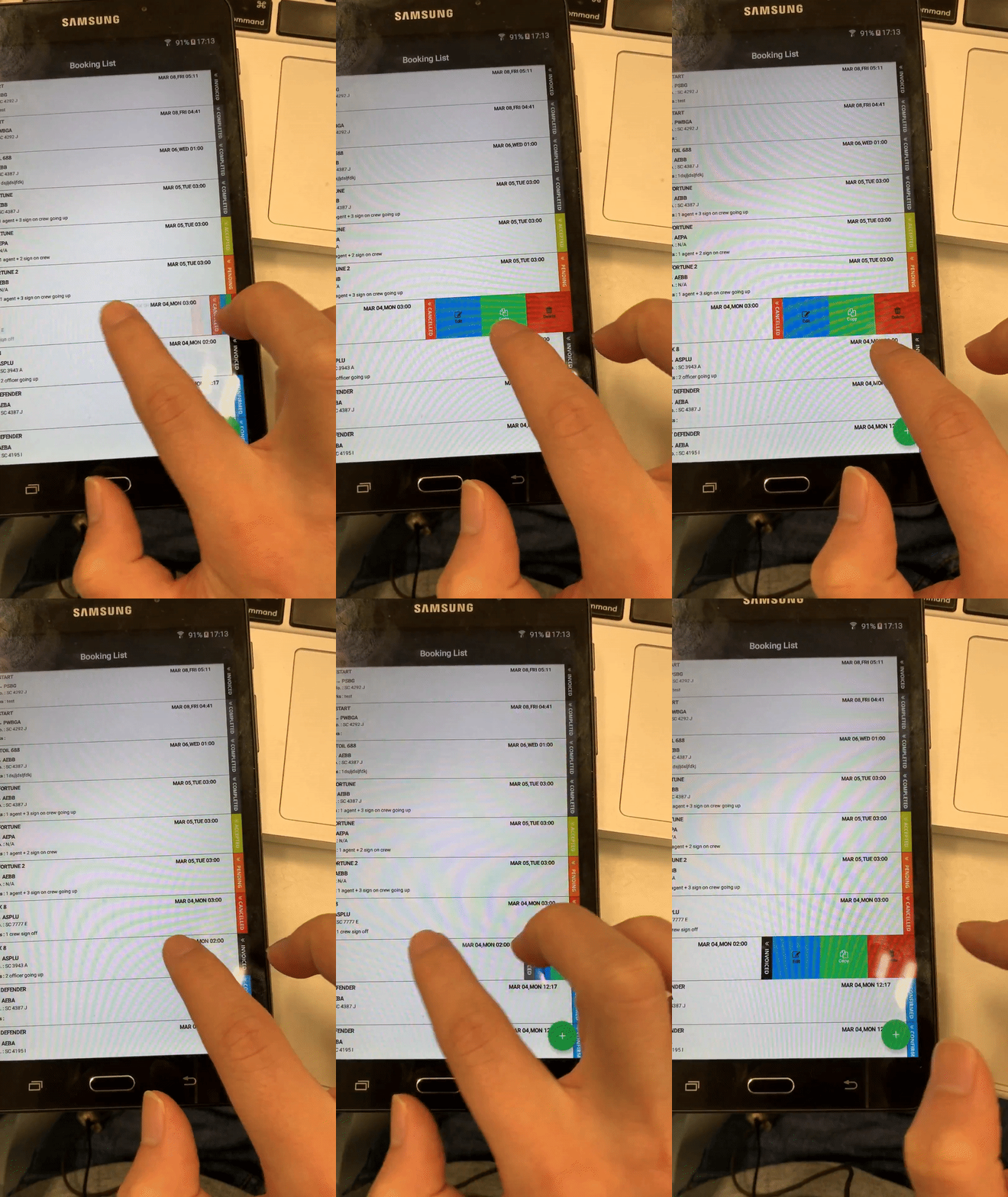
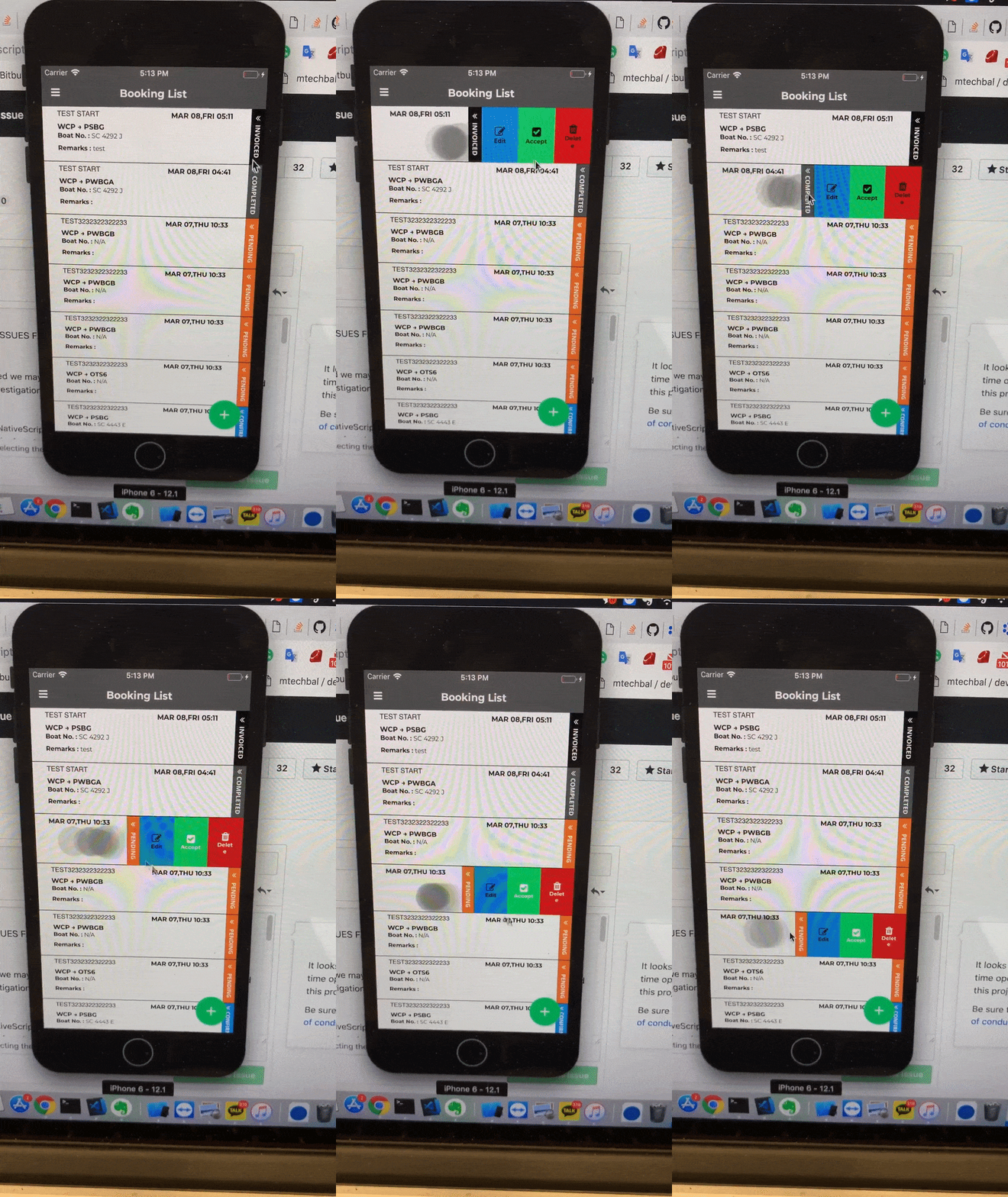
- Thank you for checking my question. As you can See the GIF images below, I want to find a way to change Android swapping event like iOS, I should click other space If I want to fold the other swap.
Can you help me how to solve the problem?
Android
iOS
Is there code involved? If so, please share the minimal amount of code needed to recreate the problem.
_(You can paste entire code snippets or attach a runnable project)_
 sanghyunj5958
All 4 comments
@sanghyunj5958 can you share a sample project demonstrating your source (it is unclear if you have implemented your own logic and if you are using Angular, Vue.js or NativeScript Core)
 NickIliev
on 11 Mar 2019
NickIliev
on 11 Mar 2019
Thank you @Natalia-Hristova. I'm using Angular and
html code
<RadListView
#myListView
[items]="dataItems"
loadOnDemandMode="Auto"
(loadMoreDataRequested)="onLoadMoreItemsRequested($event)"
row="1"
selectionBehavior="None"
(itemSwipeProgressEnded)="onSwipeCellFinished($event)"
(itemSwipeProgressStarted)="onSwipeCellStarted($event)"
(itemSwipeProgressChanged)="onCellSwiping($event)"
swipeActions="true"
pullToRefresh="true"
(pullToRefreshInitiated)="onPullToRefreshInitiated($event)"
>
<ng-template tkListItemTemplate let-item="item">
<Ripple rippleColor="#545454" (tap)="onItemSelected(item)">
<GridLayout rows="90,*,*" columns="40*,40*,auto" [backgroundColor]="item.read_flag ? 'white' : 'yellow'">
<StackLayout col="0" row="0" class="listItemStackLayout rowGrid" orientation="vertical">
<Label class="labelName fa" [text]="item.new ? item.vessel_name + '  NEW ' : item.vessel_name"></Label>
<Label class="labelTitle" [text]="item.from + ' → ' + item.to"></Label>
<Label class="AgentText">
<FormattedString>
<Span [text]="'Boat No. : '" fontWeight="Bold"></Span>
<Span
[text]="
item.launch_number
? item.boat_name
? item.launch_number + ' (' + item.boat_name + ') '
: item.launch_number
: 'N/A'
"
></Span>
</FormattedString>
</Label>
<Label class="remarksText">
<FormattedString>
<Span [text]="'Remarks : '" fontWeight="Bold"></Span> <Span [text]="item.remarks"></Span>
</FormattedString>
</Label>
</StackLayout>
<StackLayout col="1" row="0" class="listItemStackLayoutRight rowGrid" orientation="vertical">
<Label class="labelName" [text]="item.srt_string" horizontalAlignment="right"> </Label>
<Label class="labelTitle" [text]="item.pic_user" horizontalAlignment="right"></Label>
<Label class="AgentText"></Label>
<Label class="remarksText"></Label>
</StackLayout>
<GridLayout col="2" row="0">
<Image src="{{ getImageSRC(item.status) }}" width="100%"></Image>
</GridLayout>
</GridLayout>
</Ripple>
</ng-template>
<!-- >> angular-listview-item-layouts-staggered -->
<ListViewStaggeredLayout tkListViewLayout scrollDirection="Vertical" spanCount="1"></ListViewStaggeredLayout>
<!-- << angular-listview-item-layouts-staggered -->
<GridLayout *tkListItemSwipeTemplate columns="*, 100">
<GridLayout columns="*, *, *" col="2" id="right-stack">
<GridLayout
col="0"
[ngStyle]="{ 'background-color': '#3498db', padding: '12' }"
(tap)="onRightSwipeClick($event, 'edit')"
id="firstBtn"
>
<Label textWrap="true" textAlignment="center" verticalAlignment="middle">
<FormattedString>
<Span class="fa" [text]="'\n'" fontSize="18" [color]="isEnabledFirstBtn ? '#ffffff' : '#000000'"></Span>
<Span text="Edit" fontSize="10" [color]="isEnabledFirstBtn ? '#ffffff' : '#000000'" fontWeight="Bold"></Span>
</FormattedString>
</Label>
</GridLayout>
<GridLayout
*ngIf="issecondBtnAccpet"
col="1"
[ngStyle]="{ 'background-color': '#2ecc71', padding: '12' }"
(tap)="onRightSwipeAcceptClick($event)"
id="secondBtn"
>
<Label textWrap="true" textAlignment="center" verticalAlignment="middle">
<FormattedString>
<Span class="fa" [text]="'\n'" fontSize="18" [color]="isEnabledSecondBtn ? '#ffffff' : '#000000'"></Span>
<Span text="Accept" fontSize="10" [color]="isEnabledSecondBtn ? '#ffffff' : '#000000'" fontWeight="Bold"></Span>
</FormattedString>
</Label>
</GridLayout>
<GridLayout
*ngIf="!issecondBtnAccpet"
col="1"
[ngStyle]="{ 'background-color': '#2ecc71', padding: '12' }"
(tap)="onRightSwipeClick($event, 'copy')"
id="secondBtn"
>
<Label textWrap="true" textAlignment="center" verticalAlignment="middle">
<FormattedString>
<Span class="fa" [text]="'\n'" fontSize="18" [color]="isEnabledSecondBtn ? '#ffffff' : '#000000'"></Span>
<Span text="Copy" fontSize="10" [color]="isEnabledSecondBtn ? '#ffffff' : '#000000'" fontWeight="Bold"></Span>
</FormattedString>
</Label>
</GridLayout>
<GridLayout col="2" [ngStyle]="{ 'background-color': '#cc2222', padding: '15' }" (tap)="onRightSwipDeleteClick($event)" id="thirdBtn">
<Label textWrap="true" textAlignment="center" verticalAlignment="middle">
<FormattedString>
<Span class="fa" [text]="'\n'" fontSize="18" [color]="isEnabledThirdBtn ? '#ffffff' : '#000000'"></Span>
<Span text="Delete" fontSize="10" [color]="isEnabledThirdBtn ? '#ffffff' : '#000000'" fontWeight="Bold"></Span>
</FormattedString>
</Label>
</GridLayout>
</GridLayout>
</GridLayout>
<!-- <ListViewLinearLayout *tkIfAndroid tkListViewLayout itemHeight="120"></ListViewLinearLayout> -->
</RadListView>
ts code
 // >> angular-listview-swipe-action-multiple
    public onCellSwiping(args: ListViewEventData) {
        const swipeView = args['swipeView'];
        this.mainView = args['mainView'];
        this.rightItem = swipeView.getViewById('right-stack');

        if (args.data.x < 0) {
            const rightDimensions = View.measureChild(
                <View>this.rightItem.parent,
                this.rightItem,
                layout.makeMeasureSpec(Math.abs(args.data.x), layout.EXACTLY),
                layout.makeMeasureSpec(this.mainView.getMeasuredHeight(), layout.EXACTLY)
            );

            View.layoutChild(
                <View>this.rightItem.parent,
                this.rightItem,
                this.mainView.getMeasuredWidth() - rightDimensions.measuredWidth,
                0,
                this.mainView.getMeasuredWidth(),
                rightDimensions.measuredHeight
            );
            //    this.hideOtherSwipeTemplateView('right');
        }
    }


 public onSwipeCellStarted(args: ListViewEventData) {
        console.log('onSwipeCellStarted');
        const currentStatus = this._dataItems['_array'][args.index].status;
        this.isSwaping = true;
        const swipeLimits = args.data.swipeLimits;
        swipeLimits.threshold = args['mainView'].getMeasuredWidth() * 0.03; // 20% of whole width
        swipeLimits.left = 0; // 65% of whole width
        swipeLimits.right = args['mainView'].getMeasuredWidth() * 0.5;

        /// MANAGEMENT ///
        if (this.currentUser.role_id === 1) {
            this.issecondBtnAccpet = true;

            if (Number(currentStatus) === 1 || Number(currentStatus) === 2) {
                this.isEnabledFirstBtn = true;
                // this.editBtnColor = 'white';
            } else {
                this.isEnabledFirstBtn = false;
                //   this.editBtnColor = 'black';
            }

            // Accept
            if (Number(currentStatus) === 0 || Number(currentStatus) === 6 || Number(currentStatus) === 8) {
                this.isEnabledSecondBtn = true;
            } else {
                this.isEnabledSecondBtn = false;
            }

            // Delete
            if (Number(currentStatus) === 0 || Number(currentStatus) === 1 || Number(currentStatus) === 2 || Number(currentStatus) === 6) {
                this.isEnabledThirdBtn = true;
            } else {
                this.isEnabledThirdBtn = false;
            }
        } else if (this.currentUser.role_id === 6 || this.currentUser.role_id === 7) {
            this.issecondBtnAccpet = false;

            if (Number(currentStatus) === 0 || Number(currentStatus) === 1 || Number(currentStatus) === 2 || Number(currentStatus) === 6) {
                this.isEnabledFirstBtn = true;
            } else {
                this.isEnabledFirstBtn = false;
            }

            // Copy
            this.isEnabledSecondBtn = true;

            // Delete
            if (Number(currentStatus) === 0 || Number(currentStatus) === 1 || Number(currentStatus) === 2 || Number(currentStatus) === 6) {
                this.isEnabledThirdBtn = true;
            } else {
                this.isEnabledThirdBtn = false;
            }
        } else if (this.currentUser.role_id === 8) {
            this.issecondBtnAccpet = false;

            if (Number(currentStatus) === 0 || Number(currentStatus) === 1 || Number(currentStatus) === 2 || Number(currentStatus) === 6) {
                this.isEnabledFirstBtn = true;
            } else {
                this.isEnabledFirstBtn = false;
            }

            // Copy
            this.isEnabledSecondBtn = true;

            // Delete
            if (Number(currentStatus) === 0 || Number(currentStatus) === 1 || Number(currentStatus) === 2 || Number(currentStatus) === 6) {
                this.isEnabledThirdBtn = true;
            } else {
                this.isEnabledThirdBtn = false;
            }
        }
    }
    public onSwipeCellFinished(args: ListViewEventData) {
        // console.log('onSwipeCellFinished');
        if (args.data.x > 200) {
            // console.log("Perform left action");
        } else if (args.data.x < -200) {
            // console.log("Perform right action");
        }
    }

    public onRightSwipeClick(args: EventData, type: string) {
        const itemView = args.object as View;

        const item = this._dataItems['_array'][this.listViewComponent.listView.items.indexOf(itemView.bindingContext)];

        setTimeout(() => {
            if (type === 'edit' && !this.isEnabledFirstBtn) {
                console.log('type === edit && !this.isEnabledFirstBtn');
            } else {
                this.readNotification(this._dataItems['_array'][this.listViewComponent.listView.items.indexOf(itemView.bindingContext)].id);

                const options: ModalDialogOptions = {
                    viewContainerRef: this._vcRef,
                    context: { id: this._dataItems['_array'][this.listViewComponent.listView.items.indexOf(itemView.bindingContext)].id, type: type },
                    fullscreen: true
                };

                this._modalService.showModal(AdditionalInfoModalComponent, options).then(result => {
                    if (result) {
                        item.srt = DatetimeManager.unixToDate(Number(result.data.srt), 'MMM DD,ddd hh:mm');
                        item.from = result.data.from;
                        item.to = result.data.to;
                        item.pier = result.data.pier;
                        item.vessel_name = result.data.vessel_name;
                        item.launch_number = DataManager.getBoatNumber(Number(result.data.launch_number));
                        item.remarks = result.data.remarks;
                        item.status = result.data.status;
                        item.read_flag = 1;
                        item.new = 0;
                    }
                });

                this.listViewComponent.listView.notifySwipeToExecuteFinished();
            }
        }, 200);
    }
more information ) iOS is working well when I swap to the left even already open right swapping, but Android needs to touch on the other screen for the collapse right swapping first
sanghyunj5958
on 12 Mar 2019
I have the same problem
Is it possible to do something in order to get a similar behavior as on ios?
Or does it depend on the platform and nothing can be done?
 MrDenzzz
on 12 May 2019
MrDenzzz
on 12 May 2019
Related issues
 acivier-serial
·
3Comments
acivier-serial
·
3Comments
 kssfilo
·
3Comments
kssfilo
·
3Comments
 sushant-j
·
4Comments
sushant-j
·
4Comments
 tsonevn
·
3Comments
tsonevn
·
3Comments
 ginev
·
4Comments
ginev
·
4Comments
Most helpful comment
more information ) iOS is working well when I swap to the left even already open right swapping, but Android needs to touch on the other screen for the collapse right swapping first