Nativescript-ui-feedback: RadSideDrawer: Tap event of menu item is not triggered until scrolling of parent ScrollView has finished
Please, provide the details below:
Did you verify this is a real problem by searching the NativeScript Forum?
_Yes_
similar issues:
https://github.com/telerik/nativescript-ui-feedback/issues/878
https://github.com/telerik/nativescript-ui-feedback/issues/575
I decided to create a new issue, as this might be related to the use of a ScrollView within the RadSideDrawer.
Tell us about the problem
We use the RadSideDrawer component as our root view (app-root.xml) and have a huge number of menu items, so that we need to embed the menu items within a ScrollView.
The problem: when we open the drawer, scroll down/up and tap one of the menu items, the tap event is not raised. You need to make a double-tap: the first tap seems to stop the scrolling gesture of the ScrollView and the second tap raises the desired action that is defined in the tap event.
Please note:
This issue occurs differently on different Android devices.
Our devices:
- _Motorola X Play Android 7.1.1_: issue occurs only sometimes
- _Google Nexus 4 Android 5.1.1_: issue occurs more often
- _Nokia 5.1 Android 8.0.0_: issue occurs very often (you can scroll down, tap an item, scroll up, tap another item and so on, and you will never get raised the tap event of one of those menu items).
Here you can see the behaviour on Nokia 5.1:
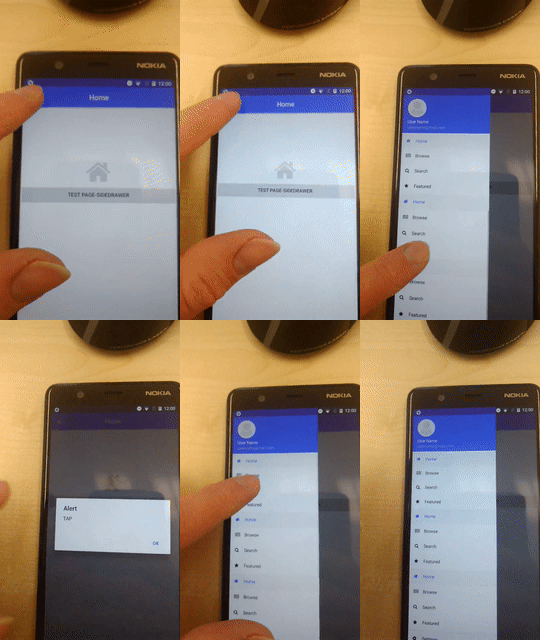
Using a ScrollView within a Drawer as the main menu should not be a bad decision, as we know about 3-4 Android apps that are using such a scrollable main menu within a Drawer and there everything works as expected without any delay or the need of tapping a menu item a second time to make it work.
Which platform(s) does your issue occur on?
We tested only Android at the moment. The Android version doesn't matter, as this issue occurs on Android 5-Android 9.
Please provide the following version numbers that your issue occurs with:
- nativescript-ui-sidedrawer: 5.1.0
- Cross-platform modules: 5.2.0
- Runtime(s): tns-android 5.2.0
Please tell us how to recreate the issue in as much detail as possible.
- Start the application and open the drawer
- if you wait a bit and then tap one item, the tap event is raised correctly (see the "TAP" dialog).
- scroll down and tap one item right after scrolling (without waiting between scroll and tap) -> nothing happens
- if you tap again, the tap event is raised correctly -> the scrolling seems to prevent/block the tap event
Is there code involved? If so, please share the minimal amount of code needed to recreate the problem.
I took the drawer-navigation-template app and mofified it just by adding more menu items to the SideDrawer component, so that its content gets scrollable.
Here is the modified version:
RadSideDrawerAndroidIssue.zip
 felixkrautschuk
All 7 comments
@NickIliev
just to give more detailed information on this:
The issue is not related to the ScrollView component.
I tested adding a ListView with buttons to the RadSideDrawer and the same ListView to a page.
Modified sample project can be found here:
RadSideDrawerAndroidIssue_ListView.zip
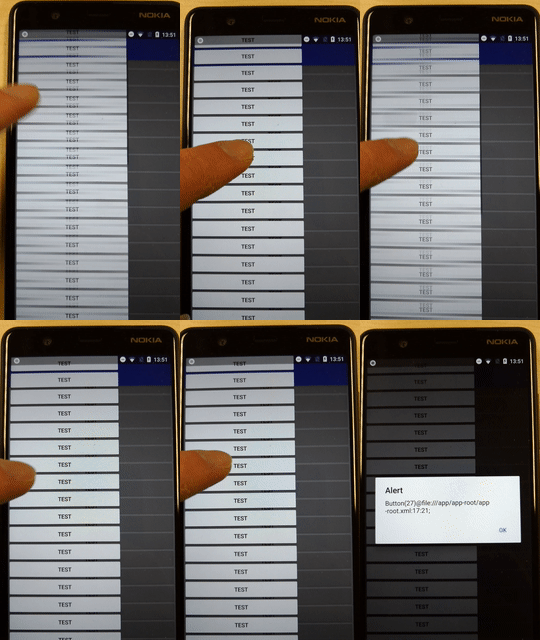
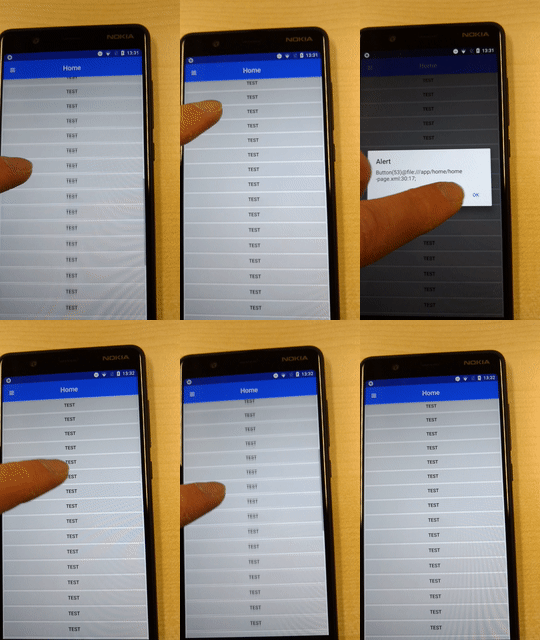
While the tap event is raised as expected within the ListView on the Page, the Button has to be tapped twice within the SideDrawer to step into the tap event (even with waiting some time after scrolling has finished).
SideDrawer:
Page:
felixkrautschuk
on 19 Feb 2019
@felix-idf thanks for the detailed information and the animated gifs - confirming the issue is happening with both ScrollView and ListView but only when they are part of the RadSideDrawer drawer content. The same scenario is working as expected when the scrollable content is outside of sidedrawer.
 NickIliev
on 19 Feb 2019
NickIliev
on 19 Feb 2019
@NickIliev ,
we figured out, that this issue is related to the gesuresEnabled property of the RadSideDrawer.
When setting this property to _false_, the issue does not occur and the tap event is raised as expected after scrolling the content.
Unfortunately, setting gesturesEnabled to false is not an applicable for us, because we want to keep two options, that do not work anymore when gesturesEnables is set to false:
- open/close the drawer via swipe gesture
- close drawer by tapping outside the drawer content
felixkrautschuk
on 21 Feb 2019
My observation is that this issue happens constantly on Android 9, on Android 7.1.1 as previously state it is very hard to reproduce. On that version you have to be at the top of the ListView, pull it down (to show the transparent arc), then after release quickly tap the item (while the arc is being animated upwards).
 VladimirAmiorkov
on 5 Mar 2019
VladimirAmiorkov
on 5 Mar 2019
Same kind of issue here... inside RadDrawer
HeaderView
ScrollView
--features
--settings
space
Logout buttonView on bottom
It makes me logout if I clic anywhere but no reaction when I clic on the button itself...Really strange.
 lostation
on 25 Jul 2019
lostation
on 25 Jul 2019
Same here with nts 6.0.2 + angular, as if the first tap is to activate the side drawer and second tap to navigate.
 cherimo
on 15 Aug 2019
cherimo
on 15 Aug 2019
Woo hoo! I found a work around. In case it helps someone else, here is what I did.
- Create a subject to channel scroll events from the drawer.
private scrollHack: Subject<string> = new Subject(); - Connect to the ScrollView's scroll event
menuScroll(scrollEvent) {
    this.scrollHack.next('');
  }
- Use touchup (some code copied from https://github.com/mudlabs/nativescript-eventify)
  ngAfterViewInit() {

    // https://github.com/mudlabs/nativescript-eventify
    const getObjectXYRelativeToPage = view =>
      view.getLocationRelativeTo(Frame.topmost().currentPage);

    // https://github.com/mudlabs/nativescript-eventify
    const touchUp = veiw => {
      const origin = getObjectXYRelativeToPage(veiw);
      veiw.android.dispatchTouchEvent(
        android.view.MotionEvent.obtain(
          android.os.SystemClock.uptimeMillis(),
          android.os.SystemClock.uptimeMillis(),
          android.view.MotionEvent.ACTION_UP,
          origin.x + veiw.getActualSize().width / 2,
          origin.y + veiw.getActualSize().height / 2,
          0
        )
      );
    };

    this.scrollHack.pipe(
      debounceTime(300)
    ).subscribe({
      next: val => {
        timer(10).subscribe({
          next: val => {
            const sideDrawer = <RadSideDrawer>Application.getRootView();
            touchUp(sideDrawer); // the magic
          }
        });
      }
    });

  }
 sublime392
on 15 Dec 2020
sublime392
on 15 Dec 2020
Related issues
 shiv19
·
3Comments
shiv19
·
3Comments
 tsonevn
·
3Comments
tsonevn
·
3Comments
 nericode
·
3Comments
nericode
·
3Comments
 sushant-j
·
4Comments
sushant-j
·
4Comments
 Cacus3
·
4Comments
Cacus3
·
4Comments
Most helpful comment
@felix-idf thanks for the detailed information and the animated gifs - confirming the issue is happening with both ScrollView and ListView but only when they are part of the RadSideDrawer drawer content. The same scenario is working as expected when the scrollable content is outside of sidedrawer.