Nativescript-ui-feedback: please help me (error:Item must be an object from the currently assigned source)
me and my friend are making a project using nativescript RAD, but I found an error when switching pages, from page page 1 that has a RAD list, to page 2 details,
when I return to page 1 there is an error: (Items must be objects from the current assigned source)
please help me if the problem is resolved can contact me
[email protected]
+6283806092369 (Whatsup)

 Adangsutisna
All 10 comments
Same Issue #867 @Adangsutisna
 TryAnt23
on 9 Oct 2018
TryAnt23
on 9 Oct 2018
HI @Adangsutisna,
Can you isolate the issue in a sample project, which you can share with us? It will help if you provide more info about your environment (NativeScript CLI, tns-core-modules, tns-android, nativescript-ui-listview versions).
 tsonevn
on 9 Oct 2018
tsonevn
on 9 Oct 2018
Hi @tsonevn
sorry i can't share the project,
because it involves company data and there is a secret API,
but I can info tns
✔ Getting NativeScript components versions information...
⚠ Update available for component nativescript. Your current version is 4.2.1 and the latest available version is 4.2.4.
⚠ Update available for component tns-core-modules. Your current version is 4.2.0 and the latest available version is 4.2.1.
✔ Component tns-android has 4.2.0 version and is up to date.
✔ Component tns-ios has 4.2.0 version and is up to date.
RAD listview
"nativescript-ui-listview": "^3.7.0"
thanks
Adangsutisna
on 9 Oct 2018
Hi @Adangsutisna,
I tested the described case with our nativescript-ui-sample/listview examples, however, was unable to recreate the problem. Also, there is a newer version of nativescript-ui-listview-> 3.7.1, try to update the plugin(tns plugin remove nativescript-ui-listview-> tns plugin add nativescript-ui-listview) and check if the issue persists.
Regarding the case, it is hard to investigate the problem, without a way to recreate it. Can you send us at least some code snippets that show, how the RadListView is used in the project and the code that might be related to the crash?
tsonevn
on 9 Oct 2018
hi @tsonevn
this is my code xml
<GridLayout orientation="vertical" columns="*" rows="*" height="100%" width="100%" backgroundColor="#1E252B">
<ActivityIndicator
id="myIndicator"
horizontalAlignment="center"
verticalAlignment="center"
busy="true"
borderRadius="50"
background="#181A1E"
color="#FFC700"
width="50"
height="50"/>
<lv:RadListView id="listviewMyFeed" class="RadListView" items="{{ data_my_feed }}" row="1" pullToRefresh="true" pullToRefreshInitiated="onPullToRefreshMyPost" loadOnDemandMode="Auto" loadMoreDataRequested="onLoadMoreMyPost">
<lv:RadListView.listViewLayout>
<lv:ListViewGridLayout scrollDirection="vertical" spanCount="1"/>
</lv:RadListView.listViewLayout>
<lv:RadListView.itemTemplate>
<StackLayout backgroundColor="#151A1D" marginTop="10">
<GridLayout columns="auto, *, auto" rows="auto" marginLeft="5" marginRight="5" marginTop="10" >
<StackLayout col="0" row="0" verticalAlignment="center" horizontalAlignment="left" orientation="vertical">
<Image horizontalAlignment="left" width="35" style="border-radius:50;" margin="5" tap="tapLihatProfile"
height="35" stretch="aspectFill" src="{{ imgAvatar }}">
</Image>
</StackLayout>
<StackLayout col="1" row="0" verticalAlignment="center" horizontalAlignment="left" orientation="vertical">
<StackLayout >
<Label height="18" tap="tapLihatProfile" text="{{ txName }}" marginLeft="5" horizontalAlignment="left" verticalAlignment="top" style="color:#FFF;font-weight:bold;font-size:15;text-align:left;"/>
</StackLayout>
<StackLayout>
<Label height="12" marginBottom="5" text="{{ txCreatedAt }}" marginLeft="5" horizontalAlignment="left" verticalAlignment="center" style="color:#FFF;font-size:10;text-align:left;"/>
</StackLayout>
</StackLayout>
<StackLayout col="2" row="0" verticalAlignment="center" horizontalAlignment="left" tap="tapTombolDelete" orientation="vertical" visibility="collapse">
<StackLayout >
<Label margin="5" text="" horizontalAlignment="center" verticalAlignment="center" style="font-family:FontAwesome;color:#fcc700;font-size:16;text-align:center"/>
</StackLayout>
</StackLayout>
<StackLayout width="30" col="2" row="0" tap="tapMoreAction" verticalAlignment="center" horizontalAlignment="right" orientation="vertical">
<Label margin="5" text="" horizontalAlignment="right" verticalAlignment="center" style="font-family:FontAwesome; color:white;font-size:20;text-align:center"/>
</StackLayout>
</GridLayout>
<GridLayout columns="*" rows="auto,auto" >
<StackLayout col="0" row="0" orientation="vertical" >
<StackLayout orientation="vertical" visibility="{{ txVisiblePostContent }}">
<StackLayout verticalAlignment="center"
horizontalAlignment="left" orientation="vertical"
margin="10" visibility="{{ txVisiblePostFeedLebih100 }}">
<Label textWrap="true" text="{{ txStatus }}"
marginLeft="5" horizontalAlignment="left" verticalAlignment="center"
style="color:#FFF;font-size:16;text-align:left;"/>
</StackLayout>
<StackLayout verticalAlignment="center"
height="270" horizontalAlignment="center"
orientation="vertical" marginBottom="20"
visibility="{{ txVisiblePostFeedKurang100 }}">
<Label textWrap="true" text="{{ txStatus }}"
padding="10" horizontalAlignment="left" verticalAlignment="center" style="color:#FFF;font-size:35;text-align:center;"/>
</StackLayout>
</StackLayout>
</StackLayout>
<StackLayout marginTop="10" col="0" row="1" verticalAlignment="center" horizontalAlignment="left" orientation="vertical">
<StackLayout col="0" row="0" verticalAlignment="center" horizontalAlignment="left" orientation="vertical">
<StackLayout orientation="vertical" background="#0f0f10" visibility="{{ txvisibleMedia }}">
<GridLayout orientation="horizontal" rows="auto, *, auto" >
<ns:Carousel id="CarouselTournament" height="350" items="{{ data_img_feeds }}" finite="true" color="white" android:indicatorAnimation="drop" indicatorRadius="3" indicatorColor="#FFF" showIndicator="true">
<ns:Carousel.itemTemplate>
<ns:CarouselItem id="slide1" verticalAlignment="center" backgroundColor="black" marginBottom="20" >
<GridLayout visibility="{{ txVisibleImgPostFeed }}" rows="*" columns="*" background="#0f0f10">
<Image src="{{ imgPost_feed }}" stretch="aspectFill" />
</GridLayout>
<GridLayout marginBottom="15" visibility="{{ txVisibleVideoPostFeed }}" rows="*,auto" backgroundColor="black" >
<WebView id="webviewfeed" loaded="webViewFeedHomeLoaded" background="black" src="{{ UrlVideoPostFeed }}"/>
<Label row="1" text="{{ linkUrlVideo }}" width="90%" class="title" color="white" marginTop="5" horizontalAlignment="left" verticalAlignment="bottom"/>
</GridLayout>
</ns:CarouselItem>
</ns:Carousel.itemTemplate>
</ns:Carousel>
</GridLayout>
<!-- <StackLayout width="100%" class="hr-light" height="0"></StackLayout> -->
</StackLayout>
</StackLayout>
</StackLayout>
</GridLayout>
<!-- area share share =============================== -->
<GridLayout columns="*" rows="auto,auto" visibility="{{ txvisiblePostShare }}" >
<StackLayout col="0" row="0" orientation="vertical" >
<StackLayout height="1" background="#B4B4B4" orientation="vertical" marginLeft="15" marginRight="15">
</StackLayout>
<GridLayout columns="auto, *, auto" rows="auto" marginLeft="20" marginRight="5" marginTop="10" >
<StackLayout col="0" row="0" verticalAlignment="center" horizontalAlignment="left" orientation="vertical">
<Image horizontalAlignment="left" width="35" style="border-radius:50;" margin="5" tap="tapLihatProfile"
height="35" stretch="aspectFill" src="{{ imgAvatarShare }}">
</Image>
</StackLayout>
<StackLayout col="1" row="0" verticalAlignment="center" horizontalAlignment="left" orientation="vertical">
<StackLayout >
<Label height="18" tap="tapLihatProfile" text="{{ txNameShare }}" marginLeft="5" horizontalAlignment="left" verticalAlignment="top" style="color:#FFF;font-weight:bold;font-size:15;text-align:left;"/>
</StackLayout>
<StackLayout>
<Label height="12" marginBottom="5" text="{{ txCreatedAtShare }}" marginLeft="5" horizontalAlignment="left" verticalAlignment="center" style="color:#FFF;font-size:10;text-align:left;"/>
</StackLayout>
</StackLayout>
<StackLayout col="2" row="0" verticalAlignment="center" horizontalAlignment="left" orientation="vertical" visibility="collapse">
<StackLayout >
</StackLayout>
</StackLayout>
<StackLayout width="30" col="2" row="0" verticalAlignment="center" horizontalAlignment="right" orientation="vertical">
</StackLayout>
</GridLayout>
<StackLayout orientation="vertical" visibility="{{ txVisiblePostContentShare }}">
<StackLayout verticalAlignment="center"
horizontalAlignment="left" orientation="vertical"
margin="10" visibility="{{ txVisiblePostFeedLebih100Share }}">
<Label textWrap="true" text="{{ txStatusShare }}"
marginLeft="5" horizontalAlignment="left" verticalAlignment="center"
style="color:#FFF;font-size:16;text-align:left;"/>
</StackLayout>
<StackLayout verticalAlignment="center"
height="270" horizontalAlignment="center"
orientation="vertical" marginBottom="20"
visibility="{{ txVisiblePostFeedKurang100Share }}">
<Label textWrap="true" text="{{ txStatusShare }}"
padding="10" horizontalAlignment="left" verticalAlignment="center" style="color:#FFF;font-size:35;text-align:center;"/>
</StackLayout>
</StackLayout>
</StackLayout>
<StackLayout marginTop="10" col="0" row="1" verticalAlignment="center" horizontalAlignment="left" orientation="vertical">
<StackLayout col="0" row="0" marginLeft="10" marginRight="10" verticalAlignment="center" horizontalAlignment="left" orientation="vertical">
<StackLayout orientation="vertical" background="#0f0f10" visibility="{{ txVisibleMediaShare }}" >
<GridLayout orientation="horizontal" rows="auto, *, auto" >
<ns:Carousel id="CarouselTournament" height="350" items="{{ data_img_feeds_Share }}" finite="true" color="white" android:indicatorAnimation="drop" indicatorRadius="3" indicatorColor="#FFF" showIndicator="true">
<ns:Carousel.itemTemplate>
<ns:CarouselItem id="slide1" verticalAlignment="center" backgroundColor="black" marginBottom="20" >
<GridLayout visibility="{{ txVisibleImgPostFeedShare }}" rows="*" columns="*" background="#0f0f10">
<Image src="{{ imgPost_feedShare }}" stretch="aspectFill" />
</GridLayout>
<GridLayout marginBottom="15" visibility="{{ txVisibleVideoPostFeedShare }}" rows="*,auto" backgroundColor="black" >
<WebView id="webviewfeed" loaded="webViewFeedHomeLoaded" background="black" src="{{ UrlVideoPostFeedShare }}"/>
<Label row="1" text="{{ linkUrlVideoShare }}" width="90%" class="title" color="white" marginTop="5" horizontalAlignment="left" verticalAlignment="bottom"/>
</GridLayout>
</ns:CarouselItem>
</ns:Carousel.itemTemplate>
</ns:Carousel>
</GridLayout>
<!-- <StackLayout width="100%" class="hr-light" height="0"></StackLayout> -->
</StackLayout>
</StackLayout>
</StackLayout>
</GridLayout>
<!-- botom area share share =============================== -->
<GridLayout columns="auto, auto, auto" rows="auto" backgroundColor="#2B3034">
<StackLayout col="0" row="0" verticalAlignment="center" horizontalAlignment="left" orientation="vertical">
<StackLayout orientation="horizontal" marginLeft="5">
<label height="0" width="0" id="idOnTapIndexLikeFeeds" text="{{ txIndexNewPost }}" ></label>
<Label id="{{ txPostId }}" margin="5" text="" tap="tapLikePost" horizontalAlignment="center" verticalAlignment="center" color="{{ txWarnaLike }}" style="font-family:FontAwesome;font-size:18;text-align:center"/>
<Label id="{{ txPostId + 'totlike' }}" tap="tapListLikeFeeds" text="{{ txTotalLike }}" marginLeft="5" horizontalAlignment="left" verticalAlignment="center" style="color:#FFF;font-size:12;text-align:left;"/>
<Label id="{{ txPostId + 'lablike' }}" tap="tapListLikeFeeds" marginRight="10" text="{{ txLebelLike }}" horizontalAlignment="left" verticalAlignment="center" style="color:#FFF;font-size:12;text-align:left;"/>
</StackLayout>
</StackLayout>
<StackLayout col="1" row="0" verticalAlignment="center" tap="tapDetailComment" horizontalAlignment="left" orientation="vertical">
<StackLayout orientation="horizontal">
<Label margin="5" text="" horizontalAlignment="center" verticalAlignment="center" style="font-family:FontAwesome;color:white;font-size:22;text-align:center"/>
<Label marginRight="10" text="{{ txTotalComents + ' Comment' }}" marginLeft="5" horizontalAlignment="left" verticalAlignment="center" style="color:#FFF;font-size:12;text-align:left;"/>
</StackLayout>
</StackLayout>
<StackLayout col="2" row="0" paddingRight="5" verticalAlignment="center" horizontalAlignment="left" orientation="vertical" tap="btnSharePost">
<StackLayout orientation="horizontal">
<Label margin="5" text="" horizontalAlignment="center" verticalAlignment="center" style="font-family:FontAwesome;color:white;font-size:18;text-align:center"/>
<Label text="Share" marginLeft="5" horizontalAlignment="left" verticalAlignment="center" style="color:#FFF;font-size:12;text-align:left;"/>
</StackLayout>
</StackLayout>
</GridLayout>
<!-- coment -->
<GridLayout columns="auto, *, auto" rows="auto" backgroundColor="#2B3034" visibility="{{ txVisibleComents }}">
<StackLayout col="0" row="0" verticalAlignment="center" marginLeft="10" horizontalAlignment="left" orientation="vertical">
<Image horizontalAlignment="left" width="25" style="border-radius:50;" margin="5"
height="25" stretch="aspectFill" src="{{ txImgComents }}">
</Image>
</StackLayout>
<StackLayout col="1" row="0" verticalAlignment="center" horizontalAlignment="left" orientation="vertical">
<StackLayout >
<Label height="16" text="{{ txNameComents }}" marginLeft="5" horizontalAlignment="left" verticalAlignment="top" style="color:#FFF;font-size:14;text-align:left;"/>
</StackLayout>
</StackLayout>
<StackLayout col="2" row="0" verticalAlignment="center" marginRight="10" horizontalAlignment="left" orientation="vertical">
<Label height="12" marginBottom="5" text="{{ txCreated_atComents }}" marginLeft="5" horizontalAlignment="left" verticalAlignment="center" style="color:#FFF;font-size:10;text-align:left;"/>
</StackLayout>
</GridLayout>
<GridLayout columns="*" rows="auto" backgroundColor="#2B3034" visibility="{{ txVisibleComents }}" >
<StackLayout col="0" row="0" verticalAlignment="center" horizontalAlignment="left" orientation="vertical" marginLeft="25" marginRight="25" >
<Label textWrap="true" text="{{ txTextComents }}"
marginLeft="5" marginBottom="10" horizontalAlignment="left" verticalAlignment="top" style="color:#FFF;font-size:12;text-align:left;"/>
</StackLayout>
</GridLayout>
<!-- coment -->
</StackLayout>
</lv:RadListView.itemTemplate>
</lv:RadListView>
</GridLayout>
====================================================================
this is my code js
but the code from my API is hidden
                    exports.onNavigatingTo = function (args) {
                        getFeedNew().then(function () {
                        pageData.set("data_my_feed", data_my_feed);
                        });

                    }


                    function getMyFeed() {
                        //getApi in here

                        data.result.forEach(function (resultFeedNew) {


                         data_my_feed.push(
                            {
                                imgAvatar:  resultFeedNew["dataFromAPI"],
                                txPostId: resultFeedNew["dataFromAPI"],
                                txIdPlayer: resultFeedNew["dataFromAPI"],
                                txName: resultFeedNew["dataFromAPI"],
                                txCreatedAt:resultFeedNew["dataFromAPI"],
                                txtapStatusLike:resultFeedNew["dataFromAPI"],
                                txVisibleComents:resultFeedNew["dataFromAPI"],
                                txVisiblePostContent: resultFeedNew["dataFromAPI"],
                                txCreated_atComents:resultFeedNew["dataFromAPI"],
                                txImgComents:resultFeedNew["dataFromAPI"],
                                txTextComents:resultFeedNew["dataFromAPI"],
                                txNameComents:resultFeedNew["dataFromAPI"],
                                txvisibleMedia:resultFeedNew["dataFromAPI"],
                                txTotalComents: resultFeedNew["dataFromAPI"],
                                txVisibleImgPostFeed: resultFeedNew["dataFromAPI"],
                                txVisibleVideoPostFeed: resultFeedNew["dataFromAPI"],
                                txLinkVideo:resultFeedNew["dataFromAPI"],
                                txStatus: resultFeedNew["dataFromAPI"],
                                txVisiblePostFeedLebih100:resultFeedNew["dataFromAPI"],
                                txVisiblePostFeedKurang100:resultFeedNew["dataFromAPI"],
                                txTotalLike: resultFeedNew["dataFromAPI"],
                                txLebelLike: resultFeedNew["dataFromAPI"],
                                txWarnaLike: resultFeedNew["dataFromAPI"],
                                txIndexNewPost: resultFeedNew["dataFromAPI"],
                                data_img_feeds: resultFeedNew["dataFromAPI"],
                                data_img_feeds_Share: resultFeedNew["dataFromAPI"],
                                txvisiblePostShare: resultFeedNew["dataFromAPI"],
                                imgAvatarShare: resultFeedNew["dataFromAPI"],
                                txNameShare: resultFeedNew["dataFromAPI"],
                                txTagingShare: resultFeedNew["dataFromAPI"],
                                txVisiblePostContentShare: resultFeedNew["dataFromAPI"],
                                txStatusShare: resultFeedNew["dataFromAPI"],
                                txVisiblePostFeedLebih100Share:resultFeedNew["dataFromAPI"],
                                txVisiblePostFeedKurang100Share:resultFeedNew["dataFromAPI"],
                                txCreatedAtShare:resultFeedNew["dataFromAPI"],
                                txVisibleMediaShare:resultFeedNew["dataFromAPI"]


                            }
                        );


                    });

                }
thanks
Adangsutisna
on 9 Oct 2018
hai @tsonevn
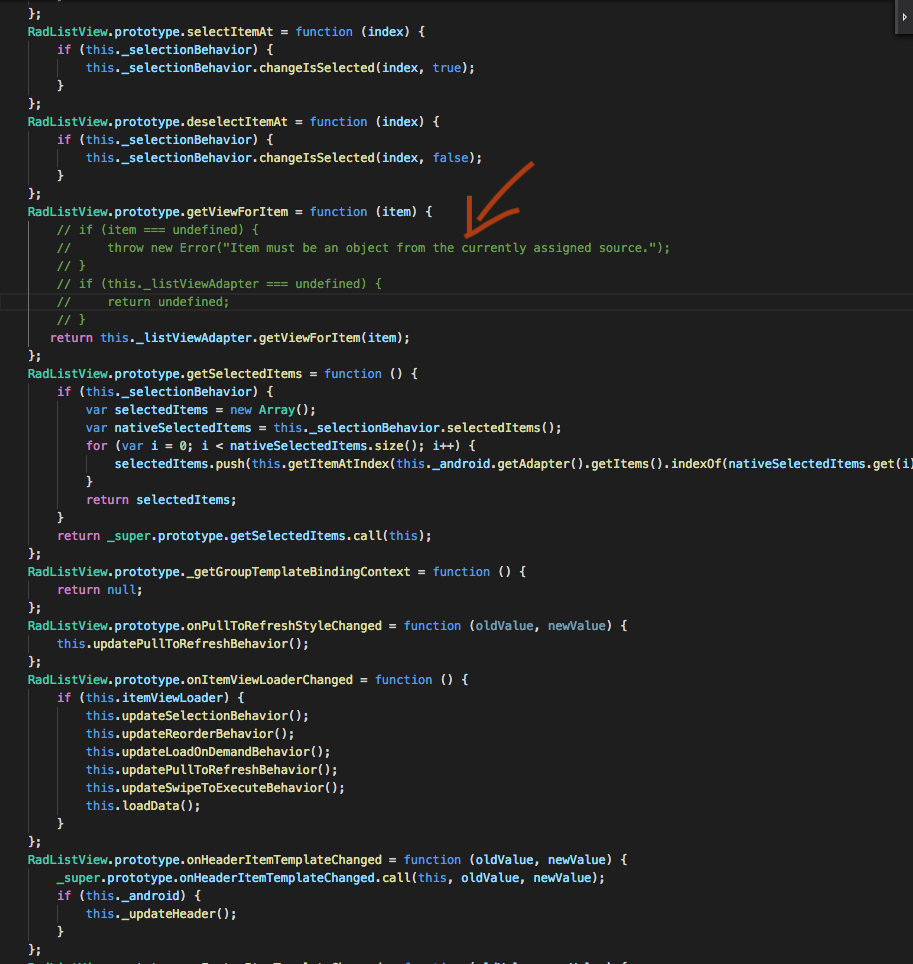
finally I found a solution to this problem
but this is only temporary, because I turned off some code tns_modules tns_modules lines in File: "file: /// data / data / com. (yourapps) .app / files / app / tns_modules / nativescript-ui-listview / ui-listview.js, line: 729, column: 12
I hope ui-listview.js can be updated to solve this problem
thanks
Adangsutisna
on 10 Oct 2018
WoW, that method works while on me too.
thank you very much @Adangsutisna
TryAnt23
on 10 Oct 2018
Hi @Adangsutisna,
Excuse me for the delay in reply.
I noticed that you are using nativescript-carousel plugin and have used the Carousel component inside the lv:RadListView.itemTemplate. Can you try removing the carousel from the template and check if the issue still persists? If the issue is caused by nativescript-carousel I would suggest opening a new issue in the plugins repository.
tsonevn
on 11 Oct 2018
hai @tsonevn
right I use carousel on this xml,
but I use RAD also on other pages without carosel, there is also the same error
thanks
Adangsutisna
on 11 Oct 2018
Hi @Adangsutisna,
We have checked the case and the provided code snippets again. However, without a sample project or steps to reproduce, which can be used for recreating the issue, it is hard to investigate further the problem.
Any sample project will be highly appreciated.
tsonevn
on 24 Oct 2018
Related issues
 felipebernardes
·
3Comments
felipebernardes
·
3Comments
 adnanaliarshad
·
4Comments
adnanaliarshad
·
4Comments
 shiv19
·
3Comments
shiv19
·
3Comments
 marcelomiranda90
·
3Comments
marcelomiranda90
·
3Comments
 ginev
·
4Comments
ginev
·
4Comments
Most helpful comment
WoW, that method works while on me too.
thank you very much @Adangsutisna