Nativescript-ui-feedback: RLV Memory leak in Angular application
Please, provide the details below:
Did you verify this is a real problem by searching the [NativeScript Forum]
Yes, this is related to #822; My clients app is actually a Angular app; and apparent this issue is only visible in an Angular app, not in the original PAN app I provided. I thought they were the same issue as the result looked the same between my test PAN app and my clients NAN app. Since I was trying to give you the reduced test case, I proceeded with that report. However #822 ends up just being a GC timing issue in the Pan app that mimics this issue; until a native GC actually fires.
This version of the bug report has a reduced test case in a NAN app which can show off the issue properly that we are seeing.
Tell us about the problem
Basically the issue is that memory is leaked on each refresh of the listview in an Angular app. Whatever elements were in the template are are basically leaked.
Which platform(s) does your issue occur on?
Android
Please provide the following version numbers that your issue occurs with:
- Progress ListView UI version: 3.6.1 (Latest)
- CLI: 4.2
- Cross-platform modules: 4.2
- Cross-platform Widgets: 4.3-@NEXT
- Runtime(s): 4.2
Please tell us how to recreate the issue in as much detail as possible.
- Start the application
tns debug android - Take a Chrome Heap SnapShot
- Pull to Refresh, Pull to Refresh, Pull to Refresh
- Take a Chrome Heap SnapShot
You can repeat steps 3 & 4 over and over and you will see that the memory is not returned.
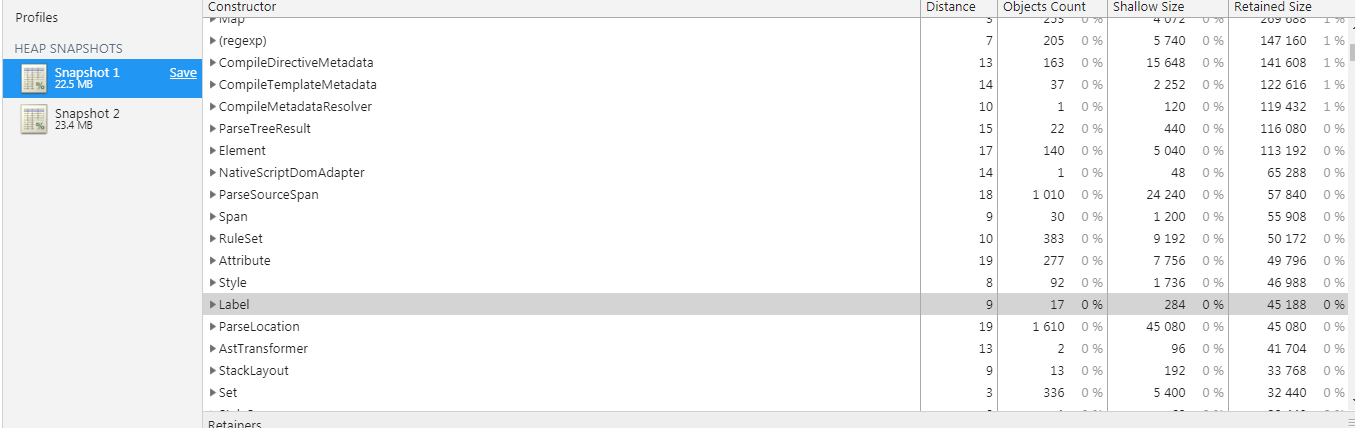
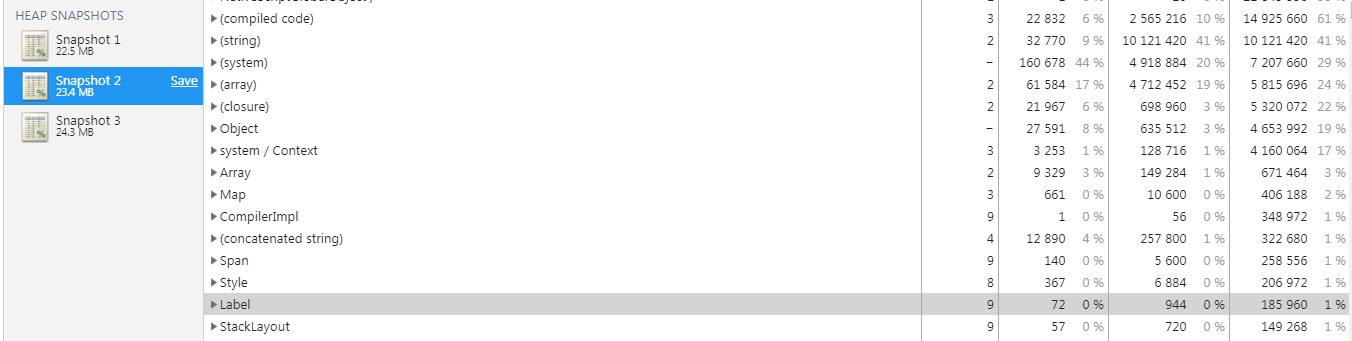
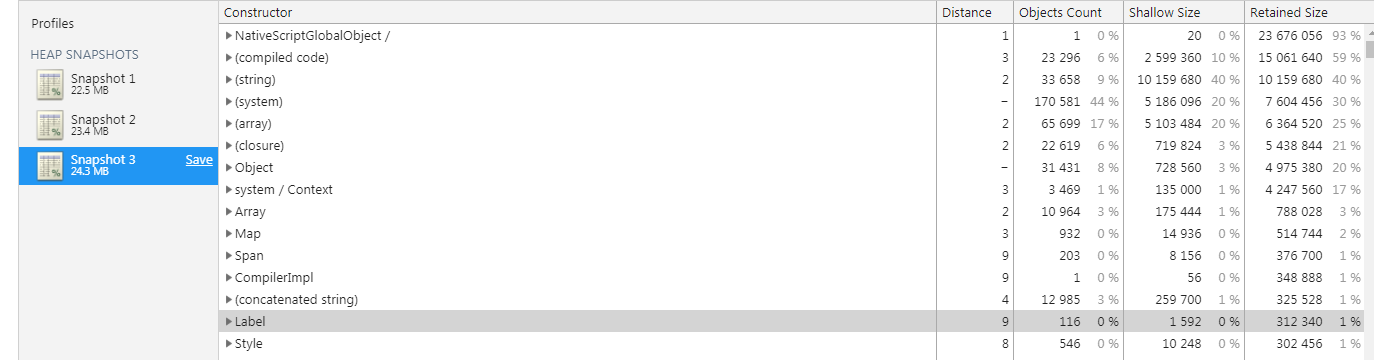
The refresh code causes both a Java and V8 GC (attempts to trigger one). So this should eventually after one of the pull to refreshes cause all the prior garbage to be collected. So after 6 refreshes, GC should have ran at least once because we triggered both 6 times. I have continued this refresh over and over and eventually I had over 300 Labels in memory. Since it starts with only 17, you can see GC should have at least ran in one of the 20 odd times I refreshed... In addition if you switch pages and then back; the labels from the ListView are still retained in memory, and new labels are created.
Step 2 (First Snapshot):
Step 4 (Second Snapshot, 3 refreshes):
Step 6 (Third Snapshot: 3 more refreshes)
Is there code involved?
I used the Kinsey Master/Detail Angular template; and added a couple minor changes to it (updated the packages.json to use the latest widgets and RLV). Added the GC code; move the init into a refresh function and finally enabled pull to refresh.
Attached is the modified project.
testlistng.zip
Notes:
In addition based on looking into this issue the leak appears to be related to the angular code that deals with debug tracking. This structure maintains a "DebugElement" to every created element.

If you modify the code in node_modules/@angular/core/bundles/core.umd.js and replace the _nativeNodeToDebugNodeDebug code at line 5448 with this:
   // Need to keep the nodes in a global Map so that multiple angular apps are supported.
    var _nativeNodeToDebugNode = new Map();
    /**
     * @experimental
     */
    function getDebugNode(nativeNode) {
        return _nativeNodeToDebugNode.get(nativeNode) || null;
    }
    var labelCounter=0;
    function indexDebugNode(node) {
        if (node && node.nativeNode && node.nativeNode.nodeName === "Label") {
            labelCounter++;
            console.log("indexDebugNode, Add Label, Count: ", labelCounter);
        }
        _nativeNodeToDebugNode.set(node.nativeNode, node);
    }
    function removeDebugNodeFromIndex(node) {
        if (node && node.nativeNode && node.nativeNode.nodeName === "Label") {
            labelCounter--;
            console.log("removeDebugNodeFromIndex, delete Label, Count: ", labelCounter);
        }
        _nativeNodeToDebugNode.delete(node.nativeNode);
    }
You will see that indexDebugNode is triggered and removeDebugNodeFromIndex is not triggered during a pull to refresh. Whatever steps is supposed to trigger the removeDebugNodeFromIndex is not happening; and so the Label (and everything related to it) is retained forever by the _nativeNodeToDebugNode map. In addition, I needed to use the if statement to limit it to just the "Labels", because in all reality pretty much every created element is put into this structure (starts with 86 items on first run). And this tracking map had over 1000 items retained by the time I was done running my last test. So I wanted to just show the memory used with just Labels
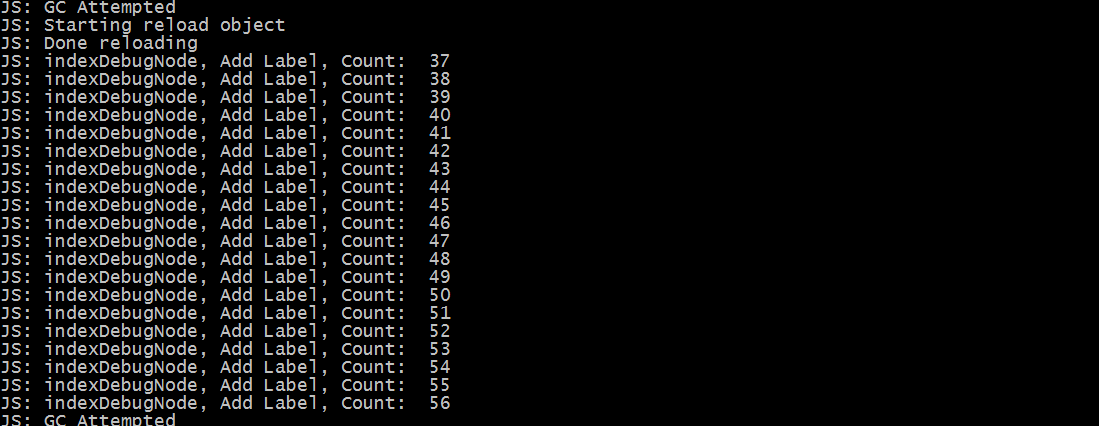
Additional Notes:
If you do navigate to the detail page and then back; you will see that 14 indexDebugNode are called and then when you leave you will see 14 RemoveDebugNodeFromIndex are called on those created Labels. So apparently the Debug tracking code isn't totally broken, as it does clean up after itself in that case correctly.
 NathanaelA
All 17 comments
@VladimirAmiorkov - A another note;
If you enableProdMode(); you do eliminate the _nativeNodeToDebugNode tracking structure. And then the retainer becomes _embeddedViews which stores the views.
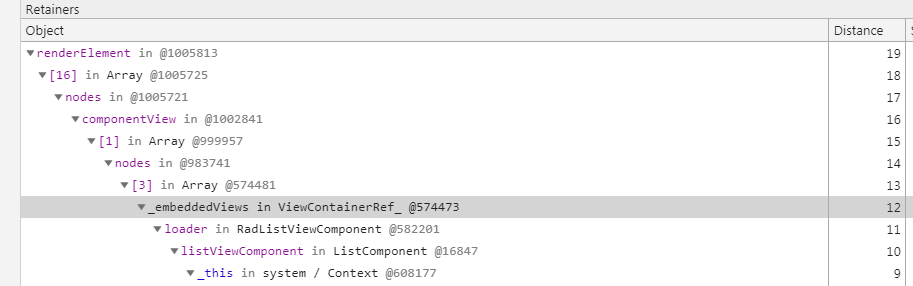
So it does appear that something is not calling into angular to free the structure somewhere. And I don't see anything inside the listview-directives.js that has any sort of call that frees the angular tracked copies of the templates, labels and other objects...
NathanaelA
on 5 Sep 2018
@VladimirAmiorkov - I really hate to pester you; but do we have any idea when this issue can be looked at.
Between this leak & #748 (which is now fixed) they both are causing the clients app to have serious performance issues for a fairly long time. And that is assuming we don't find anything else holding references to the labels after this leak is fixed.
NathanaelA
on 6 Sep 2018
Hi @NathanaelA ,
We will do our best to address all memory issues as soon as possible. We are in the process of reviewing this report but I cannot commit to providing you with a specific ATA for a fix. We understand that memory issues are very inconvenience which is why I have updated the severity of this issue to 'critical'.
 VladimirAmiorkov
on 13 Sep 2018
VladimirAmiorkov
on 13 Sep 2018
@VladimirAmiorkov - Thanks. Can you (or whomever tests this) at least let me know when/if you duplicate the issue; just to make sure that you are seeing the same issue.
NathanaelA
on 13 Sep 2018
Hi @NathanaelA ,
I tested this scenario with Chrome Dev Tools > Memory tab and I was able to observe the multiple Label objects after a "pull to refresh".
VladimirAmiorkov
on 14 Sep 2018
This is not unique to Android. I am experiencing the same issue of detached RadListView children hanging around on iOS.
 facetious
on 24 Sep 2018
facetious
on 24 Sep 2018
Hi @NathanaelA ,
I have been investigating this issue for the last couple of days and I have made couple of PRs with fixes that would be required in order for this to be fix. Please follow the PRs bellow for ETA:
- nativescript-angular: https://github.com/NativeScript/nativescript-angular/pull/1542
- tns-core-modules: https://github.com/NativeScript/NativeScript/pull/6353
- and an PR into the
nativescript-ui-listviewsource code that I cannot share as it is internal
Hi @facetious,
Can you provide me with a sample project that reproduces this issue and also could you share with me more details on how you have profiled this on iOS. I took a look at it using the tns debug ios --inspector (Safari) and the heap shanpshots look to not experience getting bigger after multiple RadListView reloads.
VladimirAmiorkov
on 4 Oct 2018
@NickIliev was kind enough to package up my snippet into a runnable project. It's found here: https://github.com/NickIliev/NS-Issues-2018-II/tree/master/nativescript-ui-feedback/issue-847
Profiling it in Instruments (you can launch this from Xcode using "Profile" instead of "Run") is the easiest way to see memory usage of an app running on an actual device. It's certainly possible that your Safari inspection is only reporting heap usage within the JS context and not the native app as a whole.
facetious
on 4 Oct 2018
@VladimirAmiorkov - Can you say when the UI Listview changes will be in the @next. The other two changes I can manually apply myself to continue doing testing...
NathanaelA
on 4 Oct 2018
I have to report that I notify the same memory leak on the RadListView on IOS. Each time when I change the source or the Layout, I can see an increase in the memory. Even go back doesn't seem to free the memory.
 gogoout
on 5 Oct 2018
gogoout
on 5 Oct 2018
@VladimirAmiorkov - Do we have an ETA yet on when the UI Listview fix will ship in an @next version?
NathanaelA
on 9 Oct 2018
Hi @NathanaelA ,
Tha nativescript-ui-* plugins do not have a "next" version because of multiple reasons but mainly because we release new versions on daily/weekly basis without the need of fixed date released so the latest version contains all of the latest fixes. Currently this issue is chained to fixes in the nativescript-angular package and while it is not merged and released it is very hard for our testing process to verify that the issue is resolved.
We hope to have a released version as soon as possible.
VladimirAmiorkov
on 11 Oct 2018
Hi @VladimirAmiorkov,
Thanks for the feedback; I realize their are two other PR's that need to be released for the fix to take full effect. So just to confirm, because I'm confused by your wording. The current version of RLV now contains the needed fixes that it needed. So if I manually add the other two PR's to my app; I should see this issue fixed, correct?
NathanaelA
on 11 Oct 2018
Hi @NathanaelA ,
No the current version contains the fixes for any issue that has its status as "Closed". I simply wanted to let you know why there are no "next" tags in npm for any of the nativescript-ui-* plugins, because we are not tied to a fixed release date like for example the tns-core-modules package we have a faster release cycle making an "next" version redundant.
The changes required for this issue to be closed are still inly applied internally and are jet to be released.
VladimirAmiorkov
on 11 Oct 2018
Status update
After internal testing we have determined that as previously dicussed one of the sources of this leak is located inside the tns-core-modules which was previously disregarded due to not being observed. I have created a PR that resolves this and you can track it here. After this PR is merged and released the nativescript-ui-listview can release a new version that resolved this issue.
VladimirAmiorkov
on 1 Nov 2018
The above PR has been merged and is now available via the "next" tag and/or above the 5.0.0-2018-11-02-12528 version
VladimirAmiorkov
on 2 Nov 2018
The fix is released in [email protected] and tns-core-modules version mentioned above.
 zbranzov
on 6 Nov 2018
zbranzov
on 6 Nov 2018
Related issues
 marcelomiranda90
·
3Comments
marcelomiranda90
·
3Comments
 tsonevn
·
4Comments
tsonevn
·
4Comments
 tbozhikov
·
4Comments
tbozhikov
·
4Comments
 sudhanshu-15
·
3Comments
sudhanshu-15
·
3Comments
 adnanaliarshad
·
4Comments
adnanaliarshad
·
4Comments
Most helpful comment
The fix is released in [email protected] and tns-core-modules version mentioned above.