Nativescript-ui-feedback: v3.5.11 RadListView with Staggered Layout have offset applied to each item
Please take a minute to read our NativeScript Code of Conduct before proceeding with posting issues or discussing. The purpose of this guide is to make communication and cooperation within our forums a pleasure for you and the other members.
Please, provide the details below:
Did you verify this is a real problem by searching the NativeScript Forum?
Yes
Tell us about the problem

v3.5.7
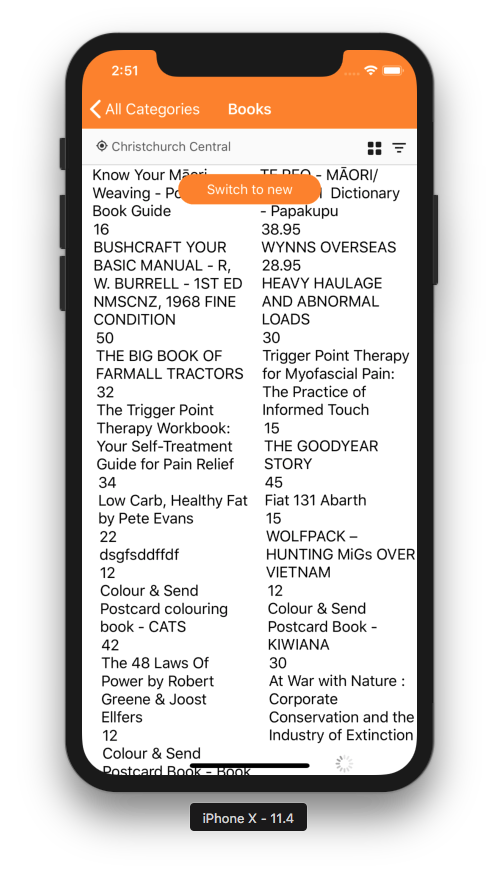
v3.5.11
As you can see, Staggered Layout in v3.5.11 have weird offset applied to each item.
Which platform(s) does your issue occur on?
_iOS/Android/Both (if applicable tell us the specific version of the platform)_
IOS (haven't test on Android)
Please provide the following version numbers that your issue occurs with:
- nativescript-ui-listview 3.5.11
- tns --version
4.3.0-2018-08-03-12074 - "tns-core-modules": "^4.1.1",
- "tns-ios": {
"version": "4.1.0"
}
Please tell us how to recreate the issue in as much detail as possible.
- Start the application .
Is there code involved? If so, please share the minimal amount of code needed to recreate the problem.
https://play.nativescript.org/?template=play-ng&id=AJaSPY
I've created a demo here which is basically paste from the staggered demo which is working fine in the playground since the ListView playground using is 3.5.7. I've tested on my own app, when switching the version to 3.5.7, the problem disappeared.
 gogoout
All 7 comments
Hi, @gogoout,
Can you provide some more info about the issue, which you are facing? We reviewed the images, however, was unable to find the difference. In the provided screenshots we also cannot distinguish the items in The ListView. Can you apply some borders to the items in your project, which will allow us to see the difference? It will help if you show us where is the exact difference. I have tested the attached sample project, however, was unable to recreate the problem as well.
 tsonevn
on 16 Aug 2018
tsonevn
on 16 Aug 2018
Hi @tsonevn ,
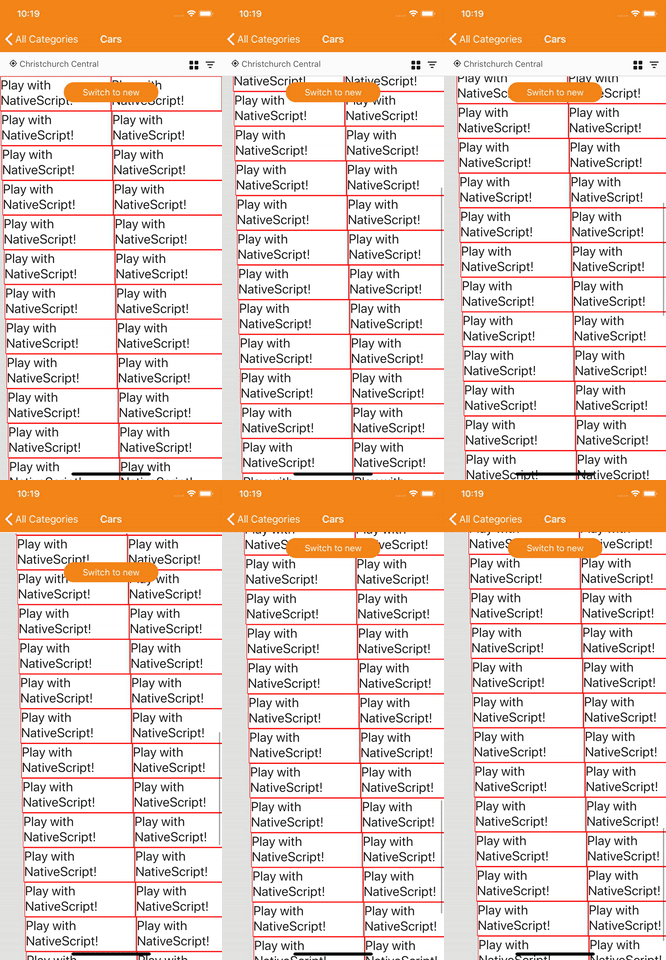
I've added borders to the item and background color to the list, so it should be really obvious now. Please note that only staggered layout have this issue. To make it more clear, the scroll direction is vertical and you can see that it's like there are extra 1px offset applied to the left of each item.

gogoout
on 16 Aug 2018
I've tested with the v3.5.10 and the issue is not reproducible. So it's only occur on the v3.5.11
gogoout
on 17 Aug 2018
The problem occurs also v3.7.1
Did some checking: last version that doesn't have this bug is v3.5.9
 racknoris
on 4 Oct 2018
racknoris
on 4 Oct 2018
May i know any update on this issue? I would like to upgrade from v3.5.9 to v3.7.1 to resolve memory leak issue (which already fixed in the latest version) but this is another obstacle that cause i can't upgrade to the new version now.
 LSmint
on 30 Oct 2018
LSmint
on 30 Oct 2018
@tsonevn Is there a workaround for that in version 3.8.0?
racknoris
on 12 Nov 2018
Hi @racknoris,
Currently, there is no workaround, that can solve this problem. I would suggest keeping track of the issue here. We will update its status when a new naitvescript-ui-listview version with the appropriate fix is available.
tsonevn
on 12 Nov 2018
Related issues
 adnanaliarshad
·
4Comments
adnanaliarshad
·
4Comments
 felipebernardes
·
3Comments
tsonevn
·
3Comments
felipebernardes
·
3Comments
tsonevn
·
3Comments
 bozhidarc
·
3Comments
bozhidarc
·
3Comments
 shiv19
·
3Comments
shiv19
·
3Comments
Most helpful comment
The problem occurs also v3.7.1
Did some checking: last version that doesn't have this bug is v3.5.9