Nativescript-ui-feedback: RadDataForm TKPropertyEditor type decimal does not accept decimal separator iOS 11.4.1 PT-BR
Did you verify this is a real problem by searching the NativeScript Forum?
Yes
Tell us about the problem
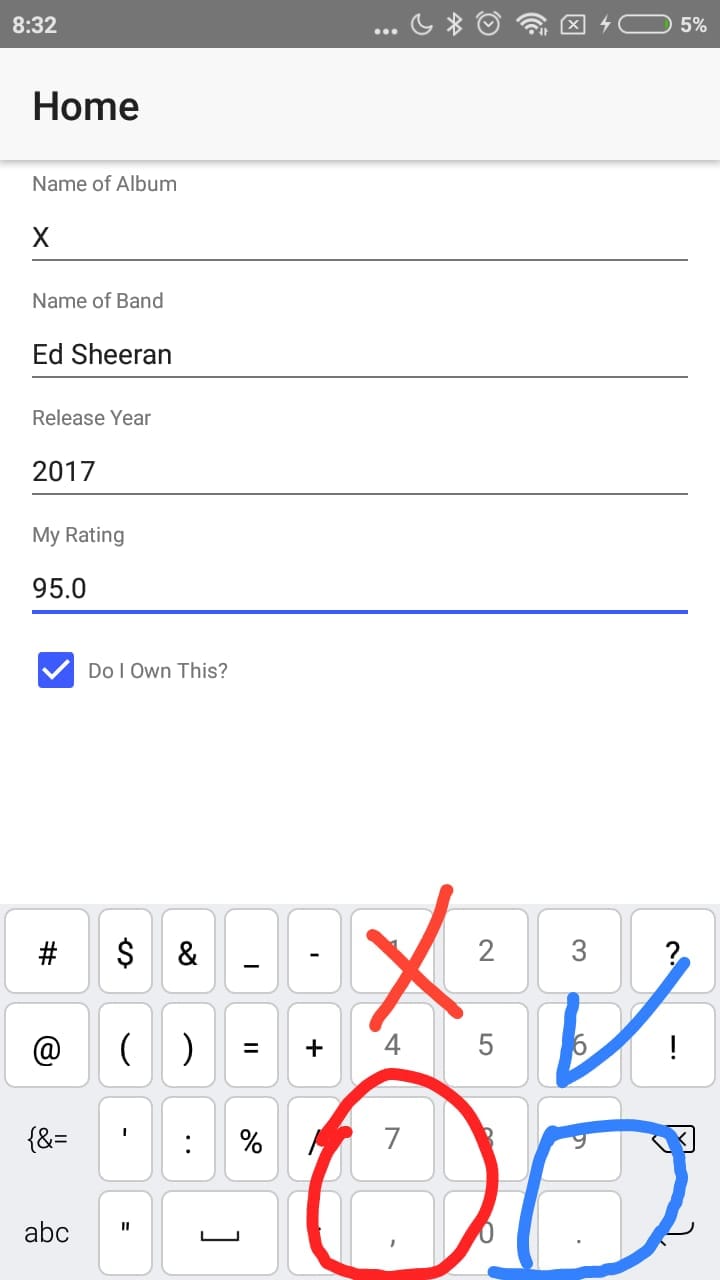
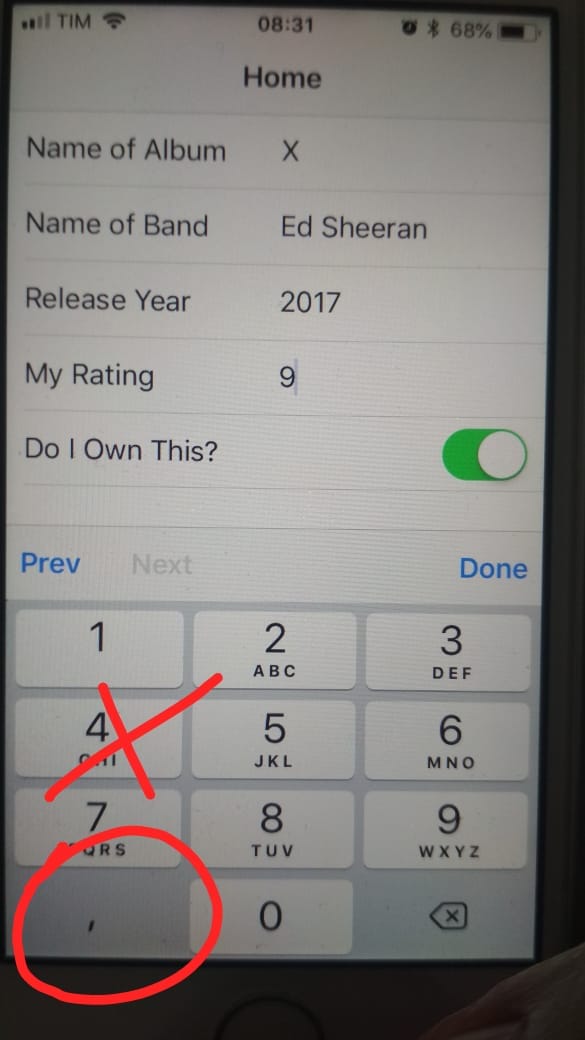
When an input from RadDataForm is set to decimal type, the input does not accept typing the "," tab which is the tab that appears when my iPhone is set to the Portuguese language in Brazil.
When I set the language of my iphone to US English, the keyboard tab automatically switches to (".") And works correctly.
In android 7.0 the keyboard shows both (".") And (","), accepting only the (".") As the separator.
If I try to paste a field (".") The field accepts correctly, the problem I see is that the keyboard should have a (".") Endpoint or the input accept the (",") comma and I could perform any treatment before sending it to my backend.
Which platform(s) does your issue occur on?
IOS 11.4.1 with language Portuguese Brazil
Please provide the following version numbers that your issue occurs with:
- Nativescript-ui-dataform 3.6.1
CLI:** 4.1.2
"tns-core-modules": "^4.1.0",
"tns-android": { "version": "4.1.3" }
"tns-ios": { "version": "4.1.1" }
Please tell us how to recreate the issue in as much detail as possible.
https://play.nativescript.org/?template=play-ng&id=oTxrni
Test on an iphone ios 11.4.1 the playground example with the device language set to Portuguese Brazil.
I changed the rating field to decimal.
Is there code involved? If so, please share the minimal amount of code needed to recreate the problem.
 marcelomiranda90
All 9 comments
Any news on this?
 KevinBeckers
on 21 Jul 2018
KevinBeckers
on 21 Jul 2018
I think it has to do with the device language. My phone is Dutch and we separate numbers with a comma.
KevinBeckers
on 21 Jul 2018
@KevinBeckers Yes, it sure has the connection with the language of the device, if I change my device to English US everything works fine, but it is not an option for the end user.
marcelomiranda90
on 21 Jul 2018
@marcelomiranda90 I have the same problem. Looking for a workaround. I keep you posted.
KevinBeckers
on 21 Jul 2018
@KevinBeckers, probably the solution to this problem will take some time, maybe not even depend on Telerik, because I noticed the same problem in the apple forum.
I'm happy to have developed a workaround and now I can publish my app on the App Store.
Come on...
Insert these two calls into the declaration of your RadDataForm
(editorUpdate)="onEditorUpdate($event)" (loaded)="changeEditor()"Insert these two functions in your component.ts
    public onEditorUpdate(args) {
        if (isIOS) {
            // declare its decimal properties
            let decimal_fields = ["preco", "taxas"];
            if (decimal_fields.indexOf(args.propertyName) > -1) {
                let textField = <UITextField>args.editor.editor;
                textField.keyboardType = UIKeyboardType.DecimalPad;
                let valuetemp = textField.text;
                textField.text = valuetemp.replace(",", ".");
            }
        }
    }
    public changeEditor() {
        if (isIOS) {
            // declare its decimal properties
            let decimal_fields = ["preco", "taxas"];
            decimal_fields.forEach(field => {
                const property = this.dataFormComp.dataForm.getPropertyByName(field);
                const propertyEditor = new PropertyEditor();
                propertyEditor.type = "Text";
                property.editor = propertyEditor;
            });
        }
    }
Explaining: First in the changeEditor function we will change the properties that are originally Decimal to Text so that it accepts the comma.
In onEditorUpdate we will access the native iOS property (do not forget to install tns-platform-declarations in devDependencies), check if the edited field is one of our decimals, change the keyboard to DecimalPad and optionally replace any commas with dot.
When you send it to your backend or perform some arithmetic operation be sure to use parseFloat.
I think that's it, if you need any help you can count on me.
marcelomiranda90
on 26 Jul 2018
I found a better option using the nativescript-numeric-keyboard https://github.com/EddyVerbruggen/nativescript-numeric-keyboard.
On your component.ts
import { NumericKeyboard } from "nativescript-numeric-keyboard";
import { TextField } from "ui/text-field";
    public onEditorUpdate(args) {
        if (isIOS) {
            // Array with its decimal fields
            let decimals_fields = ["preco_compra", "preco_venda", "taxas"];
            if (decimals_fields.indexOf(args.propertyName) > -1) {
                let textField = <TextField>args.editor.editor;

                // Put the best options for you
                new NumericKeyboard().decorate({
                    textField: textField,
                    locale: "en_US",
                    returnKeyTitle: "Pronto",
                });
            }
        }
    }
In your component.html insert a call into the declaration of your RadDataForm
(editorUpdate)="onEditorUpdate($event)"
Will work properly ;)
marcelomiranda90
on 26 Jul 2018
Thank @marcelomiranda90. The nativescript numeric keyboard solves my problem.
KevinBeckers
on 26 Jul 2018
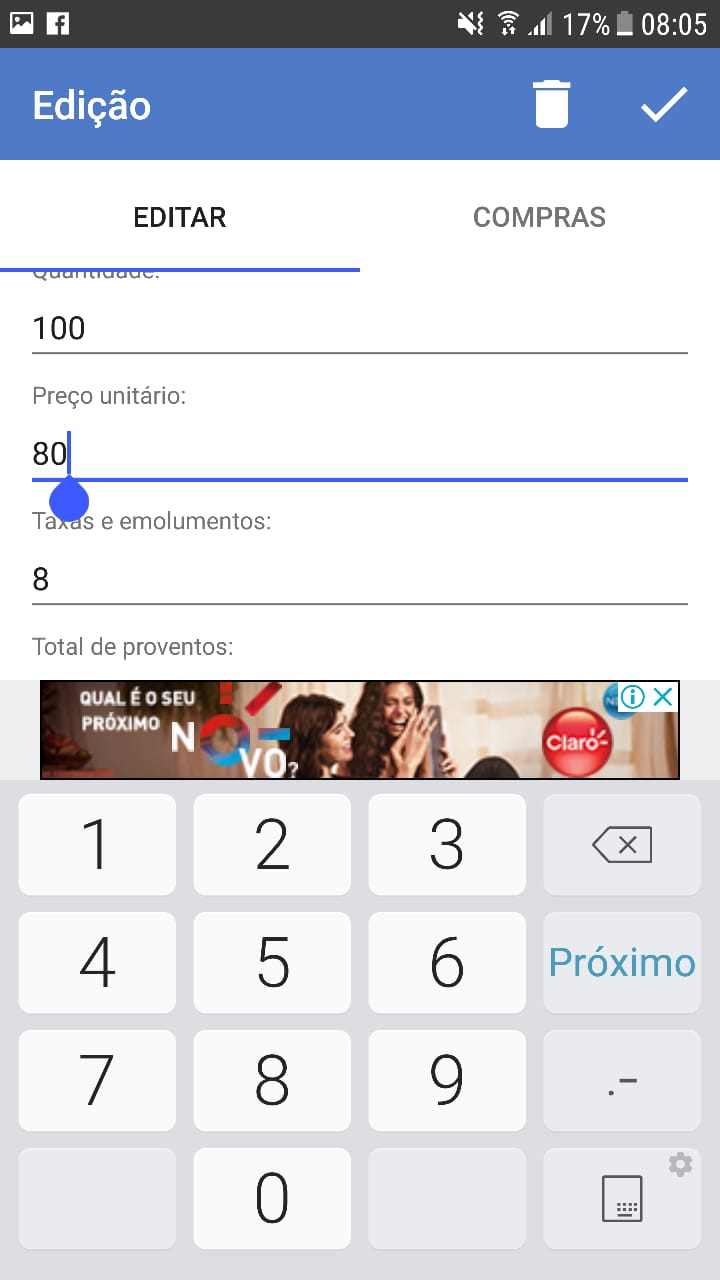
Hello Guys, I now have problems on android with samsung smartphones with standard keyboard.
Phone tested Galaxy S6 with Android 7, but the problem occurs in other samsungs tbm, such as S9 for example, always with the standard keyboard.
     "tns-android": {
       "version": "6.0.0"
     }
     "nativescript-ui-dataform": "5.0.0"
Follows prints with standard keyboard and swiftKey keyboard where it works correctly, but I can't ask all users to change the keyboard.
Samsung keyboard
SwiftKey Keyboard
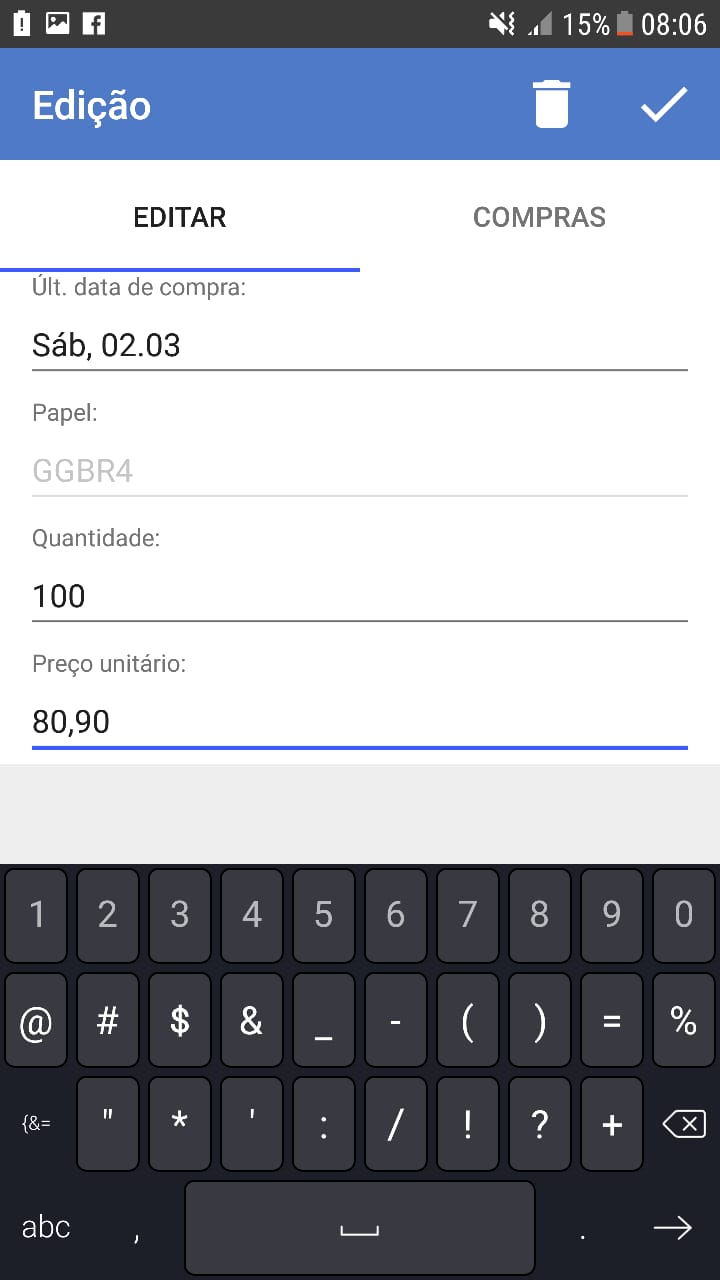
The latest version I can use on android without problems is 3.7.2.
Apparently the text field expects a comma (","), but the samsung keyboard only shows me the (".").
marcelomiranda90
on 26 Jul 2019
Any updates on this? As @marcelomiranda90 mentioned keyboard on Samsung devices doesn't show comma and dot.
 sivo1981
on 14 Oct 2020
sivo1981
on 14 Oct 2020
Related issues
 acivier-serial
·
3Comments
acivier-serial
·
3Comments
 bozhidarc
·
3Comments
bozhidarc
·
3Comments
 felipebernardes
·
3Comments
felipebernardes
·
3Comments
 dali-gharbi
·
3Comments
dali-gharbi
·
3Comments
 shiv19
·
3Comments
shiv19
·
3Comments
Most helpful comment
Any news on this?