Nativescript-ui-feedback: Getting error on ui-autocomplete
Getting the following error on ios 👎
(NativeScript) file:///app/tns_modules/nativescript-ui-autocomplete/ui-autocomplete.js:169:36: JS ERROR TypeError: undefined is not an object (evaluating 'owner.suggestionView.ios')
Error on Android
JS: ERROR TypeError: Cannot set property 'loadSuggestionsAsync' of undefined
Textview is not visible on ios but its visible on android, both tested on emulator and real device.
 JijeshP
All 19 comments
Hi @JijeshP,
Please attach sample project, which demonstrates the problem and could be used for debugging.
Also provide more info about your environment(nativescript-ui-autocomplete, NativeScript CLI, tns-core-modules, tns-android, tns-ios versions).
 tsonevn
on 30 Apr 2018
tsonevn
on 30 Apr 2018
@JijeshP, @tsonevn please see https://github.com/telerik/nativescript-ui-feedback/issues/652 where I joined a playground demo which reproduces this behavior.
https://play.nativescript.org/?template=play-ng&id=l89XGf&v=5
Any investigation would be very helpful.
 stephanegg
on 15 May 2018
stephanegg
on 15 May 2018
Hi @stephanegg,
I tested the playground project on my side, however, was unable to recreate the issue with the AutocompleteTextView. Are there any specific steps, which should be followed? Also provide more info about the devices, which you used for testing.
tsonevn
on 16 May 2018
Hi @tsonevn,
Device info:
Device Name | Model | OS version | Preview app version | Runtime version
iPhone | iPhone 6S | iOS 11.3.1 | 1.12.0 | 4.0.1
I just run the project and click on "Go to Tab" and I got:
[iPhone]: 2018-05-16 08:28:56.610 nsplaydev[7862:2828179] ***** Fatal JavaScript exception - application has been terminated. *****
2018-05-16 08:28:56.610 nsplaydev[7862:2828179] Native stack trace:
1 0x102f01be0 NativeScript::reportFatalErrorBeforeShutdown(JSC::ExecState*, JSC::Exception*, bool)
2 0x102f24930 NativeScript::FFICallback::ffiClosureCallback(ffi_cif*, void*, void**, void*)
3 0x1037da618 ffi_closure_SYSV_inner
4 0x1037dc1b4 .Ldo_closure
5 0x18cfc8078
6 0x18cfc5ed4
7 0x18cfc5500
8 0x18cfc4730
9 0x18ce93770
10 0x18743525c
11 0x1874393ec
12 0x1873a5aa0
13 0x1873cd5d0
14 0x1873ce450
15 0x183266910
16 0x183264238
17 0x183264884
18 0x183184da8 CFRunLoopRunSpecific
19 0x185167020 GSEventRunModal
20 0x18d16578c UIApplicationMain
21 0x1037dc044 ffi_call_SYSV
22 0x1037da160 ffi_call_int
23 0x1037d9c70 ffi_call
24 0x102ee11ac NativeScript::FFICall::call(JSC::ExecState*)
25 0x1034a31e0 JSC::LLInt::setUpCall(JSC::ExecState*, JSC::Instruction*, JSC::CodeSpecializationKind, JSC::JSValue, JSC::LLIntCallLinkInfo*)
26 0x1034abd24 llint_entry
27 0x1034abd34 llint_entry
28 0x1034abd34 llint_entry
29 0x1034abd34 llint_entry
30 0x1034abd34 llint_entry
31 0x1034abd34 llint_entry
2018-05-16 08:28:56.613 nsplaydev[7862:2828179] JavaScript stack trace:
2018-05-16 08:28:56.613 nsplaydev[7862:2828179] 1 collectionViewNumberOfItemsInSection@file:///app/tns_modules/nativescript-ui-autocomplete/ui-autocomplete.js:169:40
2018-05-16 08:28:56.613 nsplaydev[7862:2828179] 2 UIApplicationMain@[native code]
2018-05-16 08:28:56.613 nsplaydev[7862:2828179] 3 start@file:///app/tns_modules/tns-core-modules/application/application.js:264:26
2018-05-16 08:28:56.613 nsplaydev[7862:2828179] 4 run@file:///app/tns_modules/tns-core-modules/application/application.js:284:10
2018-05-16 08:28:56.613 nsplaydev[7862:2828179] 5 bootstrapNativeScriptApp@file:///app/tns_modules/nativescript-angular/platform-common.js:158:26
2018-05-16 08:28:56.613 nsplaydev[7862:2828179] 6 bootstrapApp@file:///app/tns_modules/nativescript-angular/platform-common.js:92:38
2018-05-16 08:28:56.613 nsplaydev[7862:2828179] 7 bootstrapModule@file:///app/tns_modules/nativescript-angular/platform-common.js:81:26
2018-05-16 08:28:56.613 nsplaydev[7862:2828179] 8 anonymous@file:///app/main.js:8:57
2018-05-16 08:28:56.614 nsplaydev[7862:2828179] 9 evaluate@[native code]
2018-05-16 08:28:56.614 nsplaydev[7862:2828179] 10 moduleEvaluation@[native code]
2018-05-16 08:28:56.614 nsplaydev[7862:2828179] 11 @[native code]
2018-05-16 08:28:56.614 nsplaydev[7862:2828179] 12 promiseReactionJob@[native code]
2018-05-16 08:28:56.614 nsplaydev[7862:2828179] JavaScript error:
file:///app/tns_modules/nativescript-ui-autocomplete/ui-autocomplete.js:169:40: JS ERROR TypeError: undefined is not an object (evaluating 'owner.suggestionView.ios.items')
2018-05-16 08:28:56.614 nsplaydev[7862:2828179] PlayLiveSync: Uncaught Exception
2018-05-16 08:28:56.615 nsplaydev[7862:2828179] PlayLiveSync: Sending crash report
Hi I am also getting the same issue with iOS (undefined is not an object (evaluating 'owner.suggestionView.ios.items')
)
But for android Cannot set property 'loadSuggestionsAsync' of undefined for this error I have a solution if you have any *ngIf in your view please remove that so that UI-autocomplete text view will appear and you wont see the above error
 JaganJonnala
on 16 May 2018
JaganJonnala
on 16 May 2018
@tsonevn were you able to reproduce the issue on your side or do you need more details?
stephanegg
on 21 May 2018
Hi @stephanegg,
I am still unable to recreate this behaviour on my side. Are you able to recreate the issue, while building the project locally or you are reproducing it only while building the project via Playground?
tsonevn
on 21 May 2018
@tsonevn I am able to reproduce the issue in both cases. The error happens once the projet is built (either via Playground or in CLI via XCode) when you try to access the tabs in the main view by clicking on “Go to tabs” button. The error does not appear while building.
stephanegg
on 21 May 2018
Same problem here. I am able to reproduce the issue using the playground demo with iPhone 7 when trying to go on tabs.
 ghost
on 21 May 2018
ghost
on 21 May 2018
Hi @tsonevn
Which kind of details do you need me to provide to help you reproducing this behavior?
From what I see in stackoverflow or other issues here, a large number of people experienced this error which is very limiting the use of this ui component. Fixing this issue would extend the use of this autocomplete to iOS TabView.. Let me know if I can help you
stephanegg
on 24 May 2018
Hi @stephanegg,
Different issues could cause the above-described error. It is also possible this problem to be caused due to problems in the user's environment. I tested your sample project several times while using Playground and while downloading and building the project locally on my side., however, I can not reproduce the case. To confirm that this is a problem and our developer's team to investigate it further, we need to have stable steps for reproducing the problem.
Regarding that, make sure that you are using the latest version of NativeScript Playground Preview app on your device.
tsonevn
on 24 May 2018
@tsonevn
I am using an iPhone 6, 6s, and 7 with iOS 11.3.1 and playground v1.12.0 which is the last version (as mentioned in a previous comment).
Please run playground demo: https://play.nativescript.org/?template=play-ng&id=l89XGf&v=6. It goes to tabs and crash at running time as expected (see picture).
Stable steps to reproduce the issue:
- Go to https://play.nativescript.org/?template=play-ng&id=l89XGf&v=6
- Scan the QR code with an iPhone 6, 6s, 7 (I did not try all of them) and launch the app using last version of Nativescript preview
- Experience the app crashing
Let me know what other investigations, steps or details you need,
Thank you very much
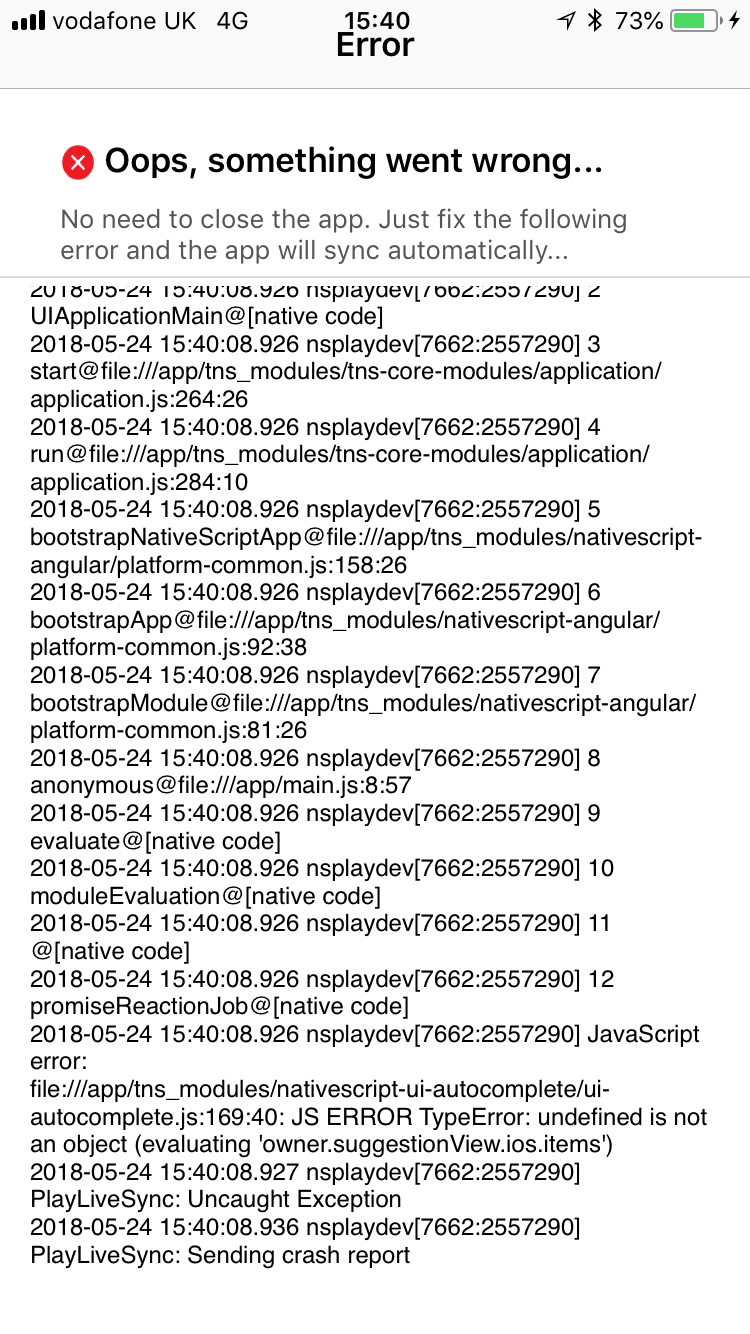
stephanegg
on 24 May 2018
Hi @stephanegg ,
I reviewed the last attached project and found that the issue has been caused by goToTabs method, which is called on ngOnInit event in home.component.ts. The problem, in this case, is that you are trying to navigate to another page before all of the components to be initialised. You can remove this line from the ngOnInit and test again.
    ngOnInit() {
        // this.goToTabs(); // remove this line
    }
Hope this helps.
tsonevn
on 25 May 2018
@tsonevn
Let me explain again the whole issue again because apparently you missed the point of this issue or the goal of why I did spend time creating this playground demo. The issue here is not about a building issue but about behavior expected and run time issues in iOS when anyone tries to use this component inside a TabView.
I know removing this line solves the run time issue however if you remove this line and go manually to tabs by clicking on the button you have the same issue. Now, why?
Because, ui-autocomplete does not work inside TabView. If you try to use ui-autocomplete inside TabView in iOS you got the following error owner.suggestionView.ios.items
Therefore, the only question is do you actually support this autocomplete component inside TabView? If the answer is no you can close the issue.
Otherwise, if your team know how to make it work, it would be very useful for us if you could share your knowledge.
stephanegg
on 25 May 2018
Hi @tsonevn , is there any update on this issue? I am experiencing the same problem on an iPhone 6 and I am able to reproduce the bug following the steps described by @stephanegg . It would be very helpful to know if the Autocomplete component is supported inside a TabView and, if not, what would be a possible workaround. Thank you for your support!
 chlMercier
on 18 Jun 2018
chlMercier
on 18 Jun 2018
Confirming this one as a bug on specific iOS devices.
Steps to reproduce: use the playground demo in this comment
 NickIliev
on 21 Jun 2018
NickIliev
on 21 Jun 2018
I am using "nativescript-ui-autocomplete": "^3.7.1", and can confirm this issue is still there when autocomplete is used in Tab view in ios.
 nmongiya
on 3 Aug 2018
nmongiya
on 3 Aug 2018
The fix is released in [email protected]
 zbranzov
on 8 Aug 2018
zbranzov
on 8 Aug 2018
@zbranzov thanks but I am still not able to make the playground attached working with [email protected], do you have any ideas why?
stephanegg
on 8 Aug 2018
Related issues
 shiv19
·
3Comments
shiv19
·
3Comments
 marcelomiranda90
·
3Comments
marcelomiranda90
·
3Comments
 spmamidi
·
3Comments
spmamidi
·
3Comments
 sushant-j
·
4Comments
sushant-j
·
4Comments
 tbozhikov
·
4Comments
tbozhikov
·
4Comments