Nativescript-ui-feedback: DatePicker in JSON crash: DataFormDateEditor does not support properties of type String
DatePicker property in JSON data form consistently crashes:
System.err: Error: java.lang.Error: DataFormDateEditor does not support properties of type String. Please specify a value converter for your property.
System.err:     com.telerik.widget.dataform.visualization.core.EntityPropertyViewer.loadPropertyValue(EntityPropertyViewer.java:430)
System.err:     com.telerik.widget.dataform.visualization.core.EntityPropertyEditor.loadPropertyValue(EntityPropertyEditor.java:201)
System.err:     com.telerik.widget.dataform.visualization.core.EntityPropertyViewer.load(EntityPropertyViewer.java:409)
System.err:     com.telerik.widget.dataform.visualization.core.EntityPropertyEditor.load(EntityPropertyEditor.java:189)
System.err:     com.telerik.widget.dataform.visualization.RadDataForm.load(RadDataForm.java:814)
System.err:     com.telerik.widget.dataform.visualization.RadDataForm.reload(RadDataForm.java:493)
...
System.err:     com.android.internal.os.ZygoteInit$MethodAndArgsCaller.run(ZygoteInit.java:866)
System.err:     com.android.internal.os.ZygoteInit.main(ZygoteInit.java:756)
System.err: Caused by: java.lang.ClassCastException: java.lang.String cannot be cast to java.lang.Number
System.err:     com.telerik.widget.dataform.visualization.editors.DataFormDateTimeEditor.applyEntityValueToEditor(DataFormDateTimeEditor.java:108)
System.err:     com.telerik.widget.dataform.visualization.core.EntityPropertyViewer.loadPropertyValue(EntityPropertyViewer.java:428)
System.err:     com.telerik.widget.dataform.visualization.core.EntityPropertyEditor.loadPropertyValue(EntityPropertyEditor.java:201)
System.err:     com.telerik.widget.dataform.visualization.core.EntityPropertyViewer.load(EntityPropertyViewer.java:409)
System.err:     com.telerik.widget.dataform.visualization.core.EntityPropertyEditor.load(EntityPropertyEditor.java:189)
System.err:     com.telerik.widget.dataform.visualization.RadDataForm.load(RadDataForm.java:814)
System.err:     com.telerik.widget.dataform.visualization.RadDataForm.reload(RadDataForm.java:493)
To recreate, make the following changes to nativescript-ui-samples-angular (latest as of 1/10/2018):
diff --git a/sdkAngular/app/dataform/data-services/person-metadata.json b/sdkAngular/app/dataform/data-services/person-metadata.json
index b677ca2..9ddb632 100644
--- a/sdkAngular/app/dataform/data-services/person-metadata.json
+++ b/sdkAngular/app/dataform/data-services/person-metadata.json
@@ -38,6 +38,12 @@
       "displayName": "Street Number",
       "index": 5,
       "editor": "Number"
+    },
+    {
+      "name": "birthDate",
+      "displayName": "Date of Birth",
+      "index": 6,
+      "editor": "DatePicker"
     }
   ]
 }
\ No newline at end of file
diff --git a/sdkAngular/app/dataform/properties-json/dataform-properties-json.component.ts b/sdkAngular/app/dataform/properties-json/dataform-properties-json.component.ts
index 5aa9dd8..43fbf8e 100644
--- a/sdkAngular/app/dataform/properties-json/dataform-properties-json.component.ts
+++ b/sdkAngular/app/dataform/properties-json/dataform-properties-json.component.ts
@@ -22,6 +22,8 @@ export class DataformPropertiesJsonComponent implements OnInit {
             .then(function(content) {
                 try {
                     var person = JSON.parse(content);
+                    person.birthDate = new Date();  // Doesn't take string. Would it take a Date?
+                    // person.birthDate = "2000-01-01";
                     that.get().person =  person;
                 } catch (err) {
                     throw new Error('Could not parse JSON file');
Tested with both 3.3.1 and 3.4.0 and it behaves the same. For testing with 3.4.0, the specifics are:
"tns-android": {
"version": "3.4.0"
}
"nativescript-angular": "5.0.0",
"nativescript-pro-ui": "3.3.0",
"tns-core-modules": "3.4.0",
DatePicker works without JSON, whether the input as a string of "YYYY-MM-DD" or even Date type. But in JSON it won't take either. I must have missed something basic. Appreciate any pointers. Thanks in advance.
 yonghongren
All 7 comments
@yonghongren i have been stuck on this one for days, the solution is Don't initialize it with a string "yyyy-mm-dd", instead pass it an integer representing the time in milliseconds, for example try this
(new Date()).getTime() and it should work fine, now to get the value from the model u will have to use this
yourDate = new Date(parseInt(this.modelSource.date.toString(), 10));
 mhmo91
on 12 Jan 2018
mhmo91
on 12 Jan 2018
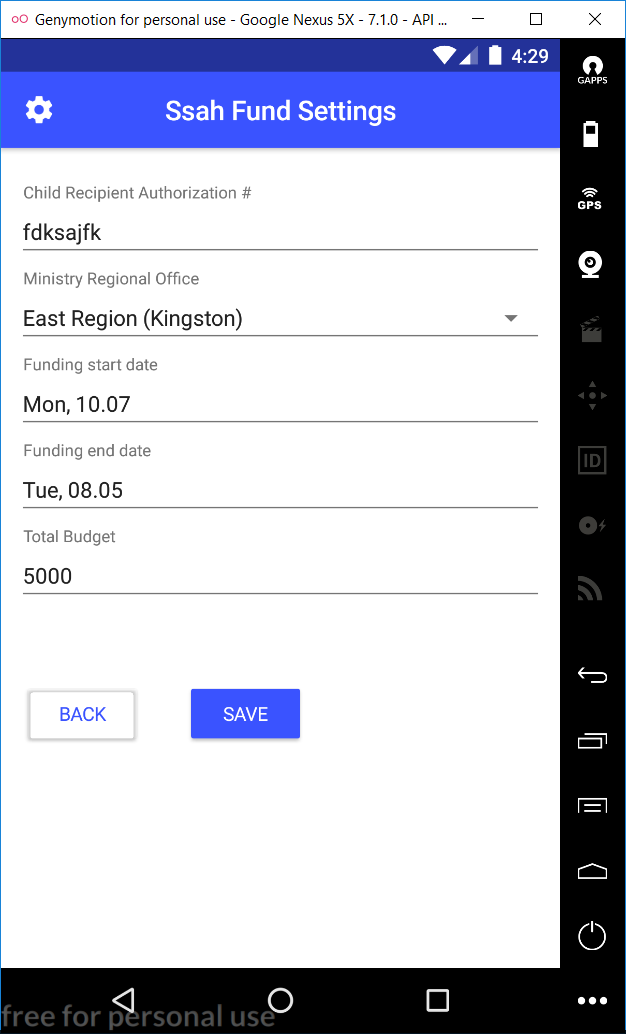
however the bug i'm stuck with now is that it doesn't display the year value correct in the date preview, the funding start date for example is year 2017, it display the value of 07, for the fundingEndDate it's 2018 displaying 05!
I really wish this project was open source or the ns team would be more responsive to the community, this is very bad for the project ((
We also need the feature of setting minDate n maxDate on the date pickers when using RadDataForm
mhmo91
on 12 Jan 2018
Hi @mhmo91, That's a very interesting finding! I just tried it and indeed it takes the milliseconds. This is at least a way to move forward. Thanks for the finding.
On the date, I noticed that as well, but I think it is displaying Day.Month. For your screen shot, can you check to see if your dates happen to be July 10 and May 8?
yonghongren
on 12 Jan 2018
@yonghongren yeah, i see, it's confusing, at least it should display the year, thanks for the add up
mhmo91
on 12 Jan 2018
Closing this issue as the main problem is resolved.
Regarding _"I really wish this project was open source or the ns team would be more responsive to the community,"_ see this blog post
In the long term, we are also considering the option to make the NativeScript Pro UI open source!
 NickIliev
on 16 Jan 2018
NickIliev
on 16 Jan 2018
Hi @NickIliev
Wouldn't it make more sense if the issue is marked as resolved when passing a string as a value for a DatePicker works? Because currently the behavior when using json metadata and xml differs
 jorotenev
on 26 Jan 2018
jorotenev
on 26 Jan 2018
@jorotenev U want my honest opinion? don't use json format style, it's very buggy, specially run time updates, it just doesn't work, for now just use the xml ones
mhmo91
on 26 Jan 2018
Related issues
 nericode
·
3Comments
nericode
·
3Comments
 Cacus3
·
4Comments
Cacus3
·
4Comments
 bozhidarc
·
3Comments
bozhidarc
·
3Comments
 tbozhikov
·
4Comments
tbozhikov
·
4Comments
 tsonevn
·
3Comments
tsonevn
·
3Comments
Most helpful comment
@yonghongren i have been stuck on this one for days, the solution is Don't initialize it with a string "yyyy-mm-dd", instead pass it an integer representing the time in milliseconds, for example try this
(new Date()).getTime() and it should work fine, now to get the value from the model u will have to use this
yourDate = new Date(parseInt(this.modelSource.date.toString(), 10));