Nativescript-ui-feedback: SuggestionView not shown of RadAutoCompleteTextView (iOS)
Did you verify this is a real problem by searching [Stack Overflow]?
Tell us about the problem
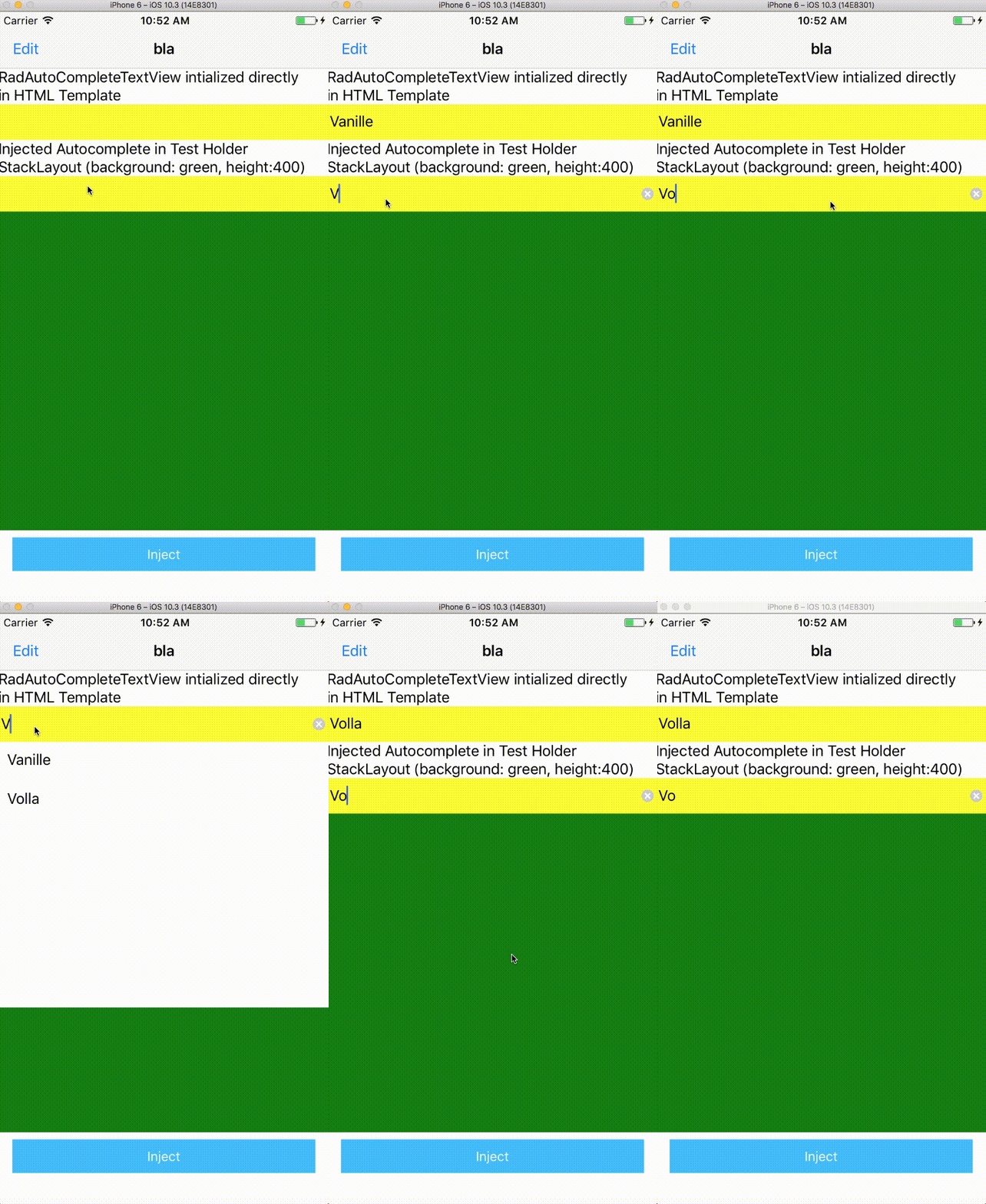
When i instantiate the RadAutoCompleteTextView programatically and add the RadAutoCompleteTextView to a view container, then the SuggestionView is not shown when i typing. This happens only on iOS. On Android works like a charm.
The event listener suggestionViewBecameVisible is called but the view is not shown.
Which platform(s) does your issue occur on?
iOS
Please provide the following version numbers that your issue occurs with:
"nativescript-pro-ui": "^3.1.4"
tns-version: 3.2.1
- Cross-platform modules: "tns-core-modules": "^3.2.0",
"tns-ios": {
"version": "3.2.0"
},
"tns-android": {
"version": "3.2.0"
}
Please tell us how to recreate the issue in as much detail as possible.
- Create RadAutoCompleteTextView and SuggestionView programatically
- Inject this created View in Current Layout
- Start typing
- The suggestion view is not shown
Is there code involved? If so, please share the minimal amount of code needed to recreate the problem.
test.component.ts
`
    @ViewChild("testHolder") testHolder: ElementRef;

public searchFla(s: string): Observable<Array<FlavorDto>> {
    return this.flavorService.searchFlavors(s);
}

public injectAutocmp() {

    var suggestionView = new SuggestionView();
    suggestionView.suggestionViewHeight = 300;
    suggestionView.suggestionItemTemplate = "<StackLayout backgroundColor=\"red\" orientation=\"vertical\" padding=\"10\"><Label text=\"{{ text }}\"></Label></StackLayout>";
    var autoCompleteTextView = new RadAutoCompleteTextView();
    autoCompleteTextView.suggestMode = "SuggestAppend";
    autoCompleteTextView.displayMode = "Plain";
    autoCompleteTextView.items = new ObservableArray<TokenModel>();
    autoCompleteTextView.suggestionView = suggestionView;
    autoCompleteTextView.on("suggestionViewBecameVisible", e =>         this.onSuggestionViewBecameVisible(e));

    var self = this;
    autoCompleteTextView.loadSuggestionsAsync = function (text) {
        var promise = new Promise(function (resolve, reject) {
            self.searchFla(text).subscribe(r => {
                var items: Array<TokenModel> = new Array();
                for (var i = 0; i < r.length; i++) {
                    items.push(new TokenModel(r[i].name, null));
                }
                resolve(items);
            });
        });
        return promise;
    }

    var layout: StackLayout = <StackLayout>this.testHolder.nativeElement;
    layout.addChild(autoCompleteTextView);

}

public onSuggestionViewBecameVisible(args){
    var autocmpView = args.object;
    var suggestionView = args.object.suggestionView;
    console.log(suggestionView.suggestionItemTemplate);
}
`
test.component.html
     <StackLayout #testHolder>
     </StackLayout>
    <GridLayout columns="*" rows="auto">
       <Button class="btn btn-primary btn-active" id="button" text="Inject" (tap)="injectAutocmp()">
       </Button>
    </GridLayout>
 msangals
All 5 comments
@msangals on iOS elements should have a predefined height in order to render properly. Give some 'height' to your StackLayout.
 NickIliev
on 24 Oct 2017
NickIliev
on 24 Oct 2017
@NickIliev I have already test it with a fix height on the StackLayout. This not fix the problem. I attach a gif that shows the problem.
msangals
on 24 Oct 2017
@msangals I can confirm that this behavior is observed with the official SDK example about remote data fetch. We will need some more time to investigate this issue and will post all related information and fixes on this issue.
NickIliev
on 1 Nov 2017
@NickIliev I also face similar problem where suggestions are not shown when I use RadAutoCompleteTextView in a modal. However, if I use it in a page, it works fine with no problem.
I'm only facing this behaviour in iOS
 aboganas
on 23 Dec 2017
aboganas
on 23 Dec 2017
The suggestion view not showing issue should be fixed in the current version of nativescript-ui-autocomplete. The other referenced issue (suggestion box not showing in a modal) will be fixed in the next plugin update. You can follow the referenced issue above for more information.
 lini
on 16 Aug 2018
lini
on 16 Aug 2018
Related issues
 sushant-j
·
4Comments
sushant-j
·
4Comments
 tbozhikov
·
4Comments
tbozhikov
·
4Comments
 felipebernardes
·
3Comments
felipebernardes
·
3Comments
 ginev
·
4Comments
ginev
·
4Comments
 tsonevn
·
4Comments
tsonevn
·
4Comments
Most helpful comment
@NickIliev I also face similar problem where suggestions are not shown when I use
RadAutoCompleteTextViewin a modal. However, if I use it in a page, it works fine with no problem.I'm only facing this behaviour in iOS