Nativescript-ui-feedback: RadCalendar (Angular/iOS) - selectedDateRange is not always in line with what is being shown on UI.
Please take a minute to read our NativeScript Code of Conduct before proceeding with posting issues or discussing. The purpose of this guide is to make communication and cooperation within our forums a pleasure for you and the other members.
Please, provide the details below:
Did you verify this is a real problem by searching Stack Overflow?
Yes
Tell us about the problem
Seems that selectedDateRange is not always in line with what is being shown.
Which platform(s) does your issue occur on?
iOS (tested on iOS 11.0.2 on iPhone 6/6s, iPad mini, iPad Pro)
Please provide the following version numbers that your issue occurs with:
- Progress NativeScript UI version: 3.1.4,
- CLI: 3.2.1
- Cross-platform modules: 3.2.0
- Runtime(s): tns-ios: 3.2.0
Please tell us how to recreate the issue in as much detail as possible.
There are two ways to reproduce that:
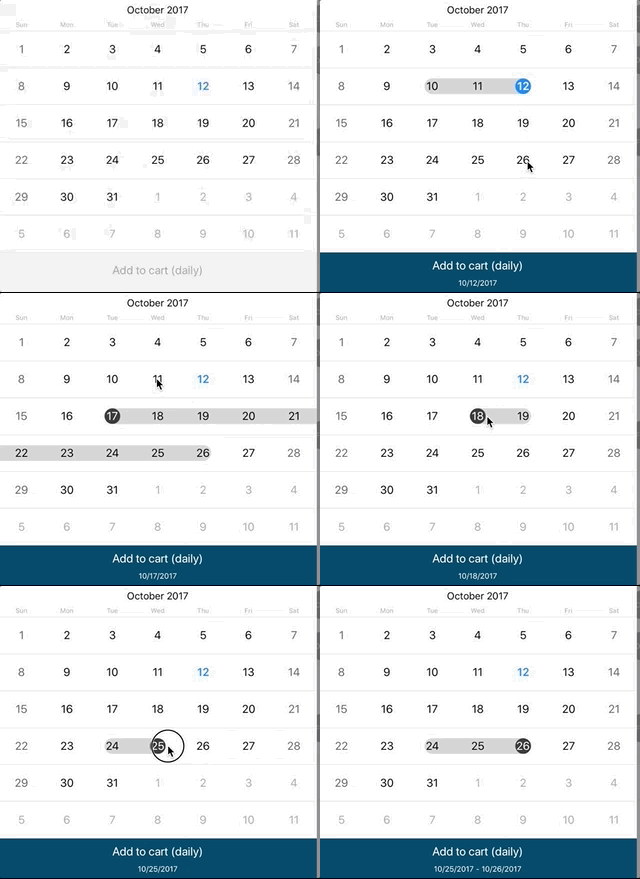
- Swipe the finger to select a date range (easier way, almost always reproducable)
- Click relatively fast at different dates, trying to click the same date multiple times. Unfortunately it happens only at times. Much easier to reproduce on real device.
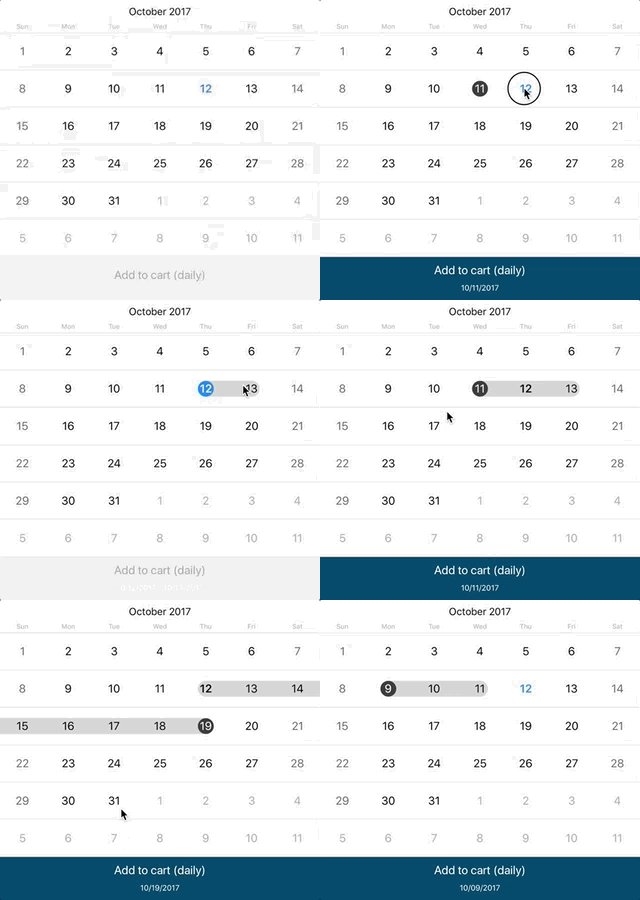
I did try to use some sort of a workaround, and use selectedDate instead and just count the clicks/taps that are being made. The problem with that approach is that when user taps on the same date multiple times, the dateSelected event is fired only once.
Is there code involved? If so, please share the minimal amount of code needed to recreate the problem.
html:
<StackLayout>
    <RadCalendar #radCalendar
      id="radCalendar"
      selectionMode="Range"
      (dateSelected)="onDateSelected($event)">
    </RadCalendar>
  </StackLayout>
...
  <Label
      class="text-center footnote"
      text="{{rangeString}}">
    </Label>
ts:
onDateSelected(args: calendarModule.CalendarSelectionEventData) {
    const range = this
      .calendarComponent
      .calendar
      .selectedDateRange as calendarModule.DateRange;


    if(_.isNil(range)) {
      return;
    }

    range.normalize();

    const momentRange = moment.range(
      range.startDate,
      range.endDate,
    );

   this.rangeString = momentRange.start.toISOString() !== momentRange.end.toISOString() ?
    `${ momentRange.start.format('MM/DD/YYYY') } - ${
      momentRange.end.format('MM/DD/YYYY')
    }` :
    `${ momentRange.start.format('MM/DD/YYYY') }`;

}
 piotrilski
All 6 comments
@piotrilski I can confirm that indeed selectedDateRange is inconsistent when the user taps twice on the same date or when the user has a previously selected date range and tries to select a new range. The inconsistency is also shown when the user tries to correct the range from endDate to startDate.
This issue is related to this feature request which would also provide dateRangeSelected event
Behavior related to this previously logged bug: https://github.com/telerik/nativescript-ui-feedback/issues/212
 NickIliev
on 18 Oct 2017
NickIliev
on 18 Oct 2017
@NickIliev Thanks for your response, appreciate it.
Is there any chance to use some sort of a workaround here? Being able to select date range properly is crucial for the app I work on, as the whole booking systems relies on it. I'll be happy to get involved into fixing that issue although not sure if that seems possible from your end.
piotrilski
on 18 Oct 2017
@tjvantoll
Follow up to our email exchange:
In terms of a workaround the best we can come up with at the moment is to avoid using the selectedDateRange property entirely, and to instead manually track selections using the dateSelected event. Obviously not ideal, but it can hopefully get you working until we can fix the underlying issue.
I did exactly what you described, unfortunately the problem with that solution is that dateSelected event was not fired when the same date was selected multiple times, so I wasn't able to precisely count clicks/taps. My assumption was that I should be counting clicks/taps, remembering previously selected date and then, based on click count create a proper date range. However due to the fact that dateSelected is fired just once for multiple clicks on the same date it was getting out of sync with what was shown on the UI very quickly.
piotrilski
on 19 Oct 2017
@piotrilski Yeah I see what you mean after playing this a little.
I got this example running in a Playground instance so it’s easier for us to play with this and see if we can come up with a workaround https://play.nativescript.org/?id=aGHODa7yf00OfE3bJbVE0&template=play-ng. Unfortunately I don’t have one at the moment.
 tjvantoll
on 19 Oct 2017
tjvantoll
on 19 Oct 2017
@piotrilski
This issue is fixed and will be available in the next official release of the plugin. If you want to test it out before that you can use the "next" version of the nativescript-pro-ui plugin. Simply install that version of the plugin: tns plugin add nativescript-pro-ui@next or reference in your package.json like this nativescript-pro-ui:"next"
 Natalia-Hristova
on 1 Dec 2017
Natalia-Hristova
on 1 Dec 2017
@Natalia-Hristova
I've just tested it using "next" version which was 3.3.0-2017-11-28-1 as of today. I'm not able to reproduce my issue, so I can confirm that it is fixed. Great job, thanks!
piotrilski
on 4 Dec 2017
Related issues
 nericode
·
3Comments
nericode
·
3Comments
 ginev
·
4Comments
ginev
·
4Comments
 dali-gharbi
·
3Comments
dali-gharbi
·
3Comments
 vratojr
·
3Comments
vratojr
·
3Comments
 surdu
·
3Comments
surdu
·
3Comments