Nativescript-ui-feedback: RadListView sometimes crushes on "item selected" event
Hi,
I'm not sure yet when exactly this reproduces, but I keep encoutering this error when selecting an item in a RadListView (creenshot below): " Item must be an object from the currently assigned source".
I have a small guess that it happens when I use loadOnDemandMode="Auto".
Can you help me out what might be the cause of this error?
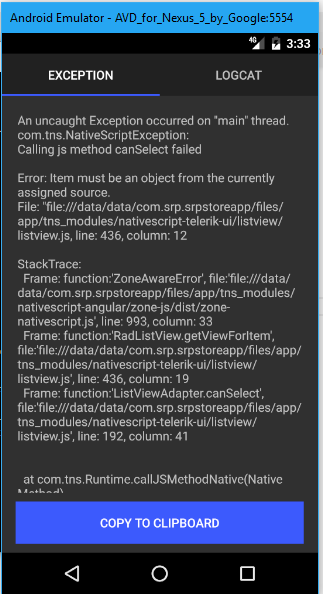
These are the versions I'm using:
Android
Progress NativeScript UI version: "3.1.0-2017-7-31-6",
CLI: 3.1.1
Cross-platform modules: 3.1.0
Runtime(s): 3.1.1
Thanks!
 tigrenok00
All 51 comments
Hello, @tigrenok00, this error would occur when you try select an item that is not currently part of the items source used to populate RadListView. Are you trying to select programatically or by tapping on an item?
 ginev
on 21 Aug 2017
ginev
on 21 Aug 2017
By tapping
tigrenok00
on 21 Aug 2017
@tigrenok00 - I have tried reproducing the error using this scenario:
I have simply amended the loadOnDemandMode="Auto" and scrolled so that the load-on-demand logic is triggered. I have also enabled selection by setting selectionBehavior="Press" and tried selecting items before and after the load-on-demand logic was triggered. I did not manage to reproduce the error you are reporting.
Can you please share more code - JavaScript/TypeScript your XML structure so that I can try to exactly reproduce the scenario?
Thanks!
ginev
on 21 Aug 2017
I am sure now that it reproduces with loadOnDemandMode="Auto" and doesn't with loadOnDemandMode="None". I will attach some code soon.
tigrenok00
on 21 Aug 2017
@tigrenok00 - The error that you are seeing occurs when RadListView tries to find the data-item behind the visual object being selected to provide you with the selection data in the selection events. If no item is found for the specified index - this error is thrown.
ginev
on 21 Aug 2017
<RadListView #suggestLinesView [items]="displayedLines" [itemTemplateSelector]="selectItemTemplate1" class="list-group"
        selectionBehavior="Press"
        (itemSelected)="onItemSelected($event)" (itemDeselected)="onItemDeselected($event)"
        multipleSelection="true" loadOnDemandMode="Auto"
        (loadMoreDataRequested)="onLoadMoreItemsRequested($event)"
        style.backgroundColor="white">

        <ng-template tkTemplateKey="y" let-item="item">
        </ng-template>

        <ng-template tkTemplateKey="x" let-item="item">
        </ng-template>

    </RadListView>
public onItemSelected(args: ListViewEventData) {
        console.log(args.index);
        try {
            let selectedItem = this.displayedLines[args.index];
            if (selectedItem) {
                this.selectedLines.push(selectedItem);
                this.itemSelected.emit(selectedItem);
            }
        }
        catch (error) { console.log(error); }
    }
loadingMore: boolean = false;
    public onLoadMoreItemsRequested(args: ListViewEventData) {
        let listView: RadListView = args.object;

        if (!this.loadingMore) {
            this.loadingMore = true;

            let initialNumberOfItems = this.displayedLines.length;
            for (var i = initialNumberOfItems; i < initialNumberOfItems + 5; i++) {
                if (i >= this.suggestLines.length - 1) {
                    listView.loadOnDemandMode = ListViewLoadOnDemandMode[ListViewLoadOnDemandMode.None];
                    break;
                }
                this.displayedLines.push(this.suggestLines[i]);
            }
        }
        listView.notifyLoadOnDemandFinished();
        this.loadingMore = false;
        args.returnValue = true;
        setTimeout(() => { listView.loadOnDemandMode = ListViewLoadOnDemandMode[ListViewLoadOnDemandMode.Auto] });
    }
Hi,
You can see in the code of onItemSelected() that I check if the item is present in the collection. When it crushes, it seems it happens even before the console.log() in the beginning of the function.
tigrenok00
on 21 Aug 2017
The same code works fine with LoadOnDemandMode = None.
Also, sometimes it crushes on the second item selection, while the first one works fine.
tigrenok00
on 21 Aug 2017
@tigrenok00 - thanks for sharing the requested details. I have created the same scenario in our Angular SDK samples but still am not able to reproduce the problem. Can I ask you to try reproducing the issue using this sample here: https://github.com/telerik/nativescript-ui-samples-angular/tree/master/sdkAngular/app/listview/load-on-demand
It is pretty much similar to what you are working on and should be easy to modify.
Another option would be to ZIP a stripped out version of your project and send it to me for further investigation.
ginev
on 21 Aug 2017
This is actually the same code I used as a base, you can see it is already very similar :)
I am having this issue in two places:
The listview itself is inside a scrollView, together with another listView after it. The idea was to display both lists in full length one after the other, so the LoadOnDemand wasn't actually necessary in this screen, so I ended up disabling the LoadOnDemand in this situation. When it was enabled, the crush was happenning every time item was selected, starting with second selected item.
The second scenario was a normal scrollable list, with LoadOnDemand=Auto in jumps of 5 items. The data source for the list represents auto-complete results, and is changing with a new key stroke.
I think that if an item was selected specifically in the milisecond during which the load on demand was triggered or the data source was changing, it would cause a crush.
Is there a way to disable item selection event during this times?
The interesting thing is that when I disabled LoadOnDemand in this case as well, the crush stopped reproducing.
I hope it is helpful somehow, because it is problematic for us to upload the code right now. For now it seems I can avoid using LoadOnDemand, but of course it would be nice to solve the problem.
tigrenok00
on 21 Aug 2017
@tigrenok00 - you can easily disable item selection during load-on-demand by setting selectionBehavior="None". Can you try this as a workaround?
As for reproducing the case, we have tried several scenarios here without success. My request would be to simply zip your .html and .ts component files and send it to us so that we can reproduce the case directly using your source. Thanks a lot for your time!
ginev
on 22 Aug 2017
Thanks for the selectionBehavior property tip, I'm using it now inside the loadMoreItems function and with ngOnChanges to catch the data source change as well. It might have solved the problem, so I'm closing the issue for now.
tigrenok00
on 4 Sep 2017
Hi,
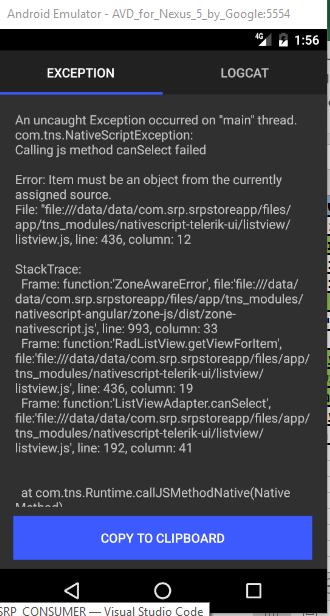
I've found another scenario where this issue reproduces: when clicking on an empty space inside a listview. I have a listview which streches full screen, with no items at all or with few items. When any place inside the listview is clicked, the app crushes with the following error, it happens before the OnItemSelected event code is triggered.
tigrenok00
on 5 Sep 2017
Hi @tigrenok00 - thanks for writing back. The issue has been reproduced. We see this as a critical issue and will fix it for the upcoming release due to a couple of days.
ginev
on 5 Sep 2017
Hi,
I've updated to 3.1.0 version, but the error when selecting a list view with no items still persists.
My current versions:
Angular
Android
"tns-core-modules": "^3.2.0"
"nativescript-telerik-ui": "3.1.0"
"nativescript-angular": "^4.2.0"
"tns-android": { "version": "3.2.0"}
tigrenok00
on 10 Sep 2017
@ginev @miroslavaivanova I hope you guys see the comment because I'm unable to reopen the issue
tigrenok00
on 10 Sep 2017
@tigrenok00 - I have just tried reproducing the issue using nativescript-telerik-ui and nativescript-telerik-ui-pro without success. Can you please make sure you are using the latest version by checking the node_modules/nativescript-telerik-ui/platforms/android folder for .aar files that have the 2017.1.908 version?
Thanks!
ginev
on 11 Sep 2017
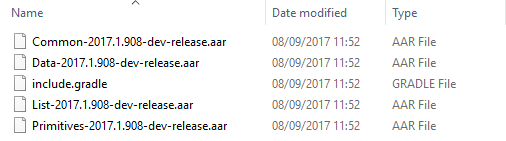
Yes, it looks fine... Still, the simples scenario where I click on an empty space in a list view with no items, or few items, causes the same crush :(
tigrenok00
on 11 Sep 2017
@tigrenok00 - I suspect you are somehow using older binaries which do not contain the fix. Can you try the following:
- tns plugin remove nativescript-telerik-ui
- delete the
platformsfolder of your app - tns plugin add nativescript-telerik-ui
- build and run
how does this work for you?
ginev
on 11 Sep 2017
I followed those instructions exactly, but nothing has changed :(
tigrenok00
on 11 Sep 2017
@tigrenok00 - in that case would it be possible if you sent us the XML, TypeScript/JavaScript source that you use to reproduce the case?
ginev
on 11 Sep 2017
Can you give me an email address to send to?
tigrenok00
on 11 Sep 2017
You can upload to Google Drive or OneDrive and share with deyan.[email protected].
ginev
on 11 Sep 2017
Lets try this, I've shared you a folder with Google Drive, please read the readme first. Let me know if it helps.
Thanks!!
tigrenok00
on 11 Sep 2017
@tigrenok00 - thanks. Can you also share your package.json here?
ginev
on 11 Sep 2017
Sure, you have it
tigrenok00
on 11 Sep 2017
@tigrenok00 - thanks. And while we are investigating - can you try one more thing: npm cache clean, reinstall the plugin and see if it still crashes?
ginev
on 11 Sep 2017
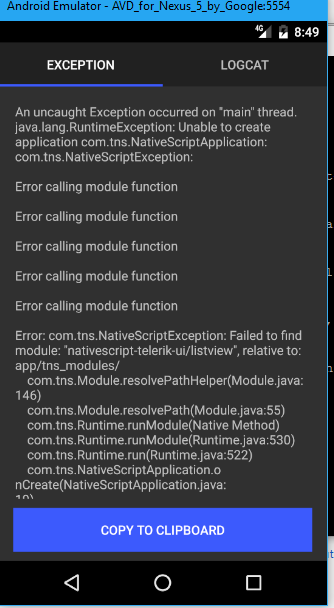
I did npm cache clean --force, tns plugin remove, tns plugin add, and now the app crushes at launch:
tigrenok00
on 11 Sep 2017
@tigrenok00, it seems the plugin did not install correctly. Check your node_modules folder if there is a nativescript-telerik-ui folder inside? If not, remove the node_modules folder and run the tns build android command. Then try starting the app again.
ginev
on 11 Sep 2017
The folder is there. What to do in this case?
tigrenok00
on 11 Sep 2017
This seems weird. Do you have the latest nativescript version on your machine? It must be 3.2.0. Also, try again deleting node_modules, platforms and then running tns run android.
ginev
on 11 Sep 2017
Yes, I've upgraded to 3.2 yesterday.
I jut did what you suggested, and now it recognizes the plugin, but the problem with canSelect still happens. Is there anything else I can check to make sure the new version of the plugin is used?
tigrenok00
on 11 Sep 2017
@tigrenok00 - would it be possible to share a running version of the scenario since there is a lot of stuff missing currently to be able to execute the files you've shared?
FYI, we still cannot reproduce the exception using our own scenarios.
ginev
on 12 Sep 2017
Is there anything else I can check to make sure the new version of the plugin is in use? Any new attribute list view related I can access from code, etc?
tigrenok00
on 12 Sep 2017
@tigrenok00 - the fix that we introduced is in the native Android ListView component, i.e. you cannot identify it within the JavaScript source of the component. However, there is something you can do to verify that this exact issue is still causing a problem on your side:
- Go to the
node_modulesfolder and find thenativescript-telerik-uifolder. - Go to the
nativescript-telerik-uiand navigate to thelistviewfolder inside - Open the
listview.android.jsfile in a text editor of your choice and find the following code snippet:
 ListViewAdapter.prototype.canSelect = function (position) {
            var canSelect = true;
            if (this.ownerLv.items) {
                var dataItem = this.ownerLv.getItemAtIndex(position);
                var isSelected = this.ownerLv.isItemSelected(dataItem);
                var currentEventName = isSelected === true ? listViewCommonModule.RadListView.itemDeselectingEvent : listViewCommonModule.RadListView.itemSelectingEvent;
                var view = this.ownerLv.getViewForItem(dataItem);
                var args = {
                    eventName: currentEventName,
                    object: this.ownerLv,
                    index: position,
                    groupIndex: -1,
                    returnValue: true,
                    view: view
                };
                if ((lastSelectedIndex != position) || (lastSelectedIndex == position && lastFiredEvent != currentEventName)) {
                    lastSelectedIndex = position;
                    this.ownerLv.notify(args);
                    canSelect = args.returnValue === true;
                    lastFiredEvent = currentEventName;
                }
            }
            return canSelect;
        };
- Replace it with the following code snippet:
 ListViewAdapter.prototype.canSelect = function (position) {
            var canSelect = true;
            console.log("Select position: " + position);
            if (this.ownerLv.items) {
                var dataItem = this.ownerLv.getItemAtIndex(position);
                var isSelected = this.ownerLv.isItemSelected(dataItem);
                var currentEventName = isSelected === true ? listViewCommonModule.RadListView.itemDeselectingEvent : listViewCommonModule.RadListView.itemSelectingEvent;
                var view = this.ownerLv.getViewForItem(dataItem);
                var args = {
                    eventName: currentEventName,
                    object: this.ownerLv,
                    index: position,
                    groupIndex: -1,
                    returnValue: true,
                    view: view
                };
                if ((lastSelectedIndex != position) || (lastSelectedIndex == position && lastFiredEvent != currentEventName)) {
                    lastSelectedIndex = position;
                    this.ownerLv.notify(args);
                    canSelect = args.returnValue === true;
                    lastFiredEvent = currentEventName;
                }
            }
            return canSelect;
        };
Save the file, delete the platforms folder and execute tns run android again.
As you can see, I have added a console.log call to print the position to be selected. I need to see the value of the position argument on your side.
ginev
on 12 Sep 2017
Hi, it says "select position: -2"
tigrenok00
on 12 Sep 2017
@tigrenok00 - -2 is something completely unexpected. To avoid any further confusion and time-wasting, I would like to request a functional project that we can use to reproduce the bug. We will make sure to issue a fix ASAP if needed. Thanks!
ginev
on 12 Sep 2017
We are unable to provide the original project as a whole, we might need to try and recreate this scenario in a side project. Meanwhile, from the look you had at the html file, was there something that could alert you in any way? The layouts, the multiple listviews, etc?
tigrenok00
on 12 Sep 2017
@ginev Hi, we are considering sharing the original project, could you please relate to the question of what is the standard procedure to make sure the code remains private and visible to your team only? (won't be uploaded to any public git or anything like that).
Alternatively, what would be the process of asking you to connect to our environment and see the code there? Is there a support level we can purchase to make it happen?
Thanks!
tigrenok00
on 12 Sep 2017
@tigrenok00 - I will consult with my colleagues and will get back to you with a solution.
ginev
on 12 Sep 2017
@tigrenok00 - since communication like that is not a standard practice, we do not have an official procedure here for such cases. I can recommend taking a look at the Enterprise Support options for NativeScript which include NativeScript UI as well: https://www.nativescript.org/enterprise
How does this sound to you?
ginev
on 12 Sep 2017
@tigrenok00 - Please note that each support option includes confidentiality from our side in the agreement.
ginev
on 12 Sep 2017
@ginev Hi, thanks for the info. We will have to fill in the contact form as the page does not list prices for each level.
If we just upload the project now, does this include the confidentiality as well?
tigrenok00
on 13 Sep 2017
@ginev We were able to isolate the issue in a side project!! The problem happens when you add a tkListViewHeader template to the list. We are sharing the folder with the new project with you in a few minutes. Would you take a look? Thanks!
tigrenok00
on 13 Sep 2017
@tigrenok00 - great, that sounds like a different scenario from the one already tested. We will take a look and issue an update with a fix for this. Thanks again for your time!
ginev
on 13 Sep 2017
@tigrenok00 - the issue has been addressed in our internal codebase. You can check it by using the @next tag. We will perform some testing and will publish an update by the end of the day.
ginev
on 14 Sep 2017
@ginev Hi, I've just installed the @next version and it installed the "^3.1.0-2017-9-13-3" build, in which the issue still reproduces. Is the new version not available yet? Or did I do something wrong?
tigrenok00
on 14 Sep 2017
@tigrenok00 - the builds weren't finished yet but now you should be able to access it. The version token should be 3.1.1-2017-9-14-1. Simply reinstall the plugin using @next. I have just tested this on my side and it works as expected.
ginev
on 14 Sep 2017
@ginev Thanks! it is working now!
tigrenok00
on 14 Sep 2017
@tigrenok00 - nativescript-telerik-ui and nativescript-telerik-ui-pro have been updated to 3.1.1 with the fix included.
ginev
on 14 Sep 2017
Im having a issue regarding this, installed @next version which gives me today the [email protected] but seems that when it load more items scrolls the first item to the top of the view and pushes the ones im looking at at does not feel good.
Its strange, because the ones im viewing moves out the screen and the new ones comes in suddenly.
Im using the Auto mode, pushing the items all at.
public onLoadMoreItemsRequested(args: ListViewEventData) {
        var listView: RadListView = args.object;
        if (carRepo.totalPages > this.lastPage) {
           this.lastPage += 1;

           carRepo.loadMore(this.lastPage).then(result => {
              that.get().carData.push(result);
              listView.notifyLoadOnDemandFinished();
           }).catch(error => {
              listView.loadOnDemandMode = ListViewLoadOnDemandMode[ListViewLoadOnDemandMode.None];
           });
        } else {
           listView.loadOnDemandMode = ListViewLoadOnDemandMode[ListViewLoadOnDemandMode.None];
        }

        args.returnValue = true;

    }
I been testing the behaibour adding items 1 by one and, when I touch the scroll suddenly im at the bottom of the page with all items loaded (30 items), looks like the calculation on the scroll position its related to the actual position and not the X.Y axis, (Hope it helps)
I can share the code if you need to, nothing mayor, following the ui-samples.
 kikoseijo
on 14 Oct 2017
kikoseijo
on 14 Oct 2017
Related issues
 tsonevn
·
3Comments
tsonevn
·
3Comments
 marcelomiranda90
·
3Comments
marcelomiranda90
·
3Comments
 kssfilo
·
3Comments
kssfilo
·
3Comments
 adnanaliarshad
·
4Comments
ginev
·
4Comments
adnanaliarshad
·
4Comments
ginev
·
4Comments
Most helpful comment
@tigrenok00 - nativescript-telerik-ui and nativescript-telerik-ui-pro have been updated to 3.1.1 with the fix included.