Nativescript-ui-feedback: Calendar - Can I use a Day view in Telerik Calendar
Did you verify this is a real problem by searching Stack Overflow?
_Yes_
Tell us about the problem
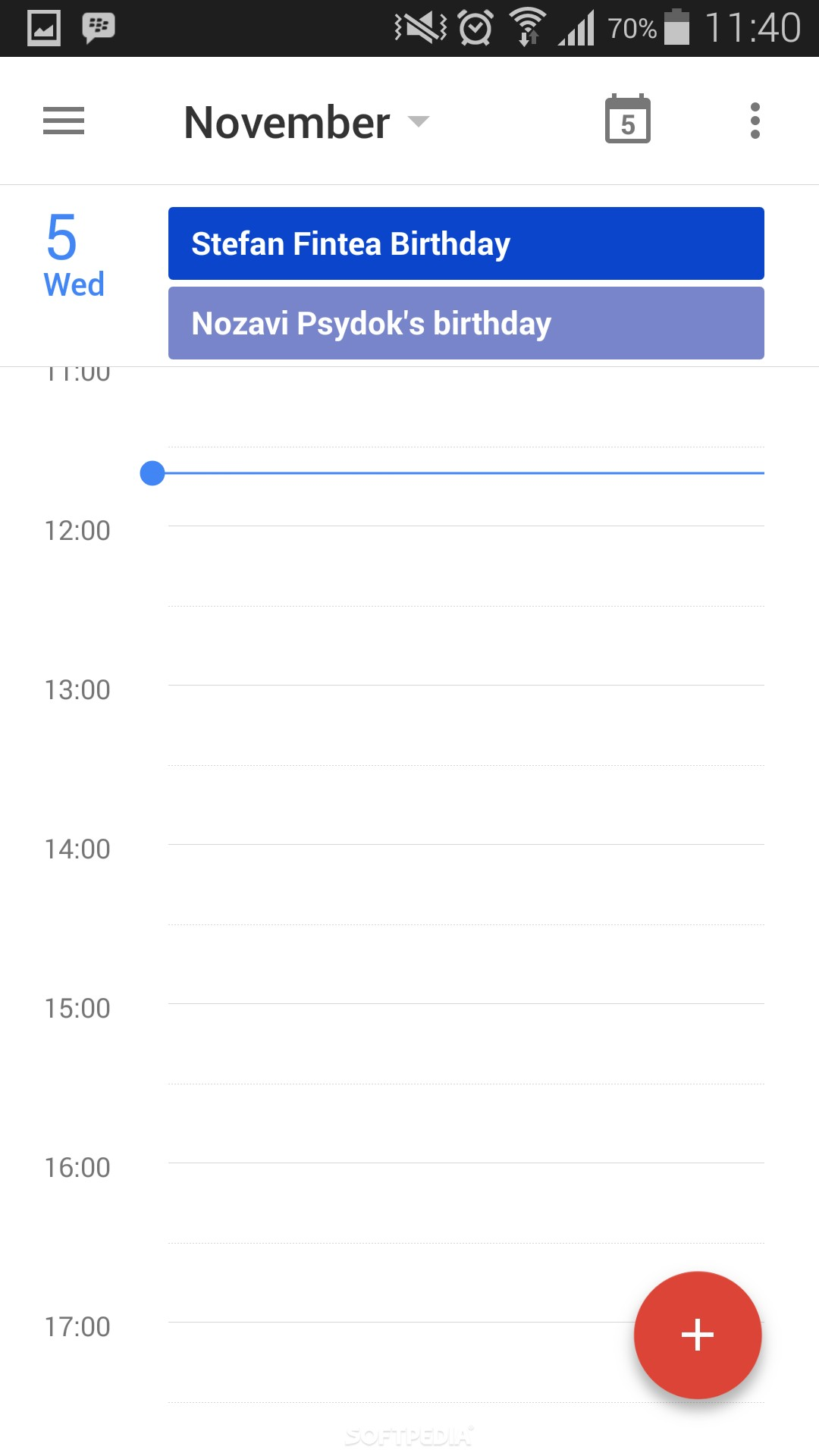
There is any way to get a Day view with the Telerik Calendar?
Like the one google calendar have when you press a specific day:
Which platform(s) does your issue occur on?
_Both_
Please provide the following version numbers that your issue occurs with:
- Progress NativeScript UI version: the version of nativescript-telerik-ui-pro - 3.0.0.292
- CLI: 3.1.2
- Cross-platform modules: 3.1.0
- Runtime(s): "tns-android": { "version": "3.1.1" }
 shabib3
All 24 comments
@shabib3 - yes, this feature is already implemented in our internal codebase. We need to expose it through the Nativescript APIs. This is on the TODO list so stay tuned.
 ginev
on 13 Jul 2017
ginev
on 13 Jul 2017
@ginev - Thank you!
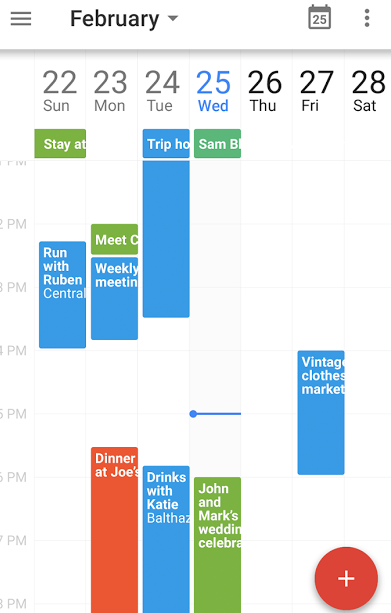
And as I think about it - there will be also a week view in that time line view? like this:
Thank you
shabib3
on 13 Jul 2017
@ginev There is any estimation time for it to be stable and out for us the users?
shabib3
on 24 Jul 2017
Would like to see this feature as well @ginev Is there any ETA for this one?
 idoadse
on 27 Jul 2017
idoadse
on 27 Jul 2017
@shabib3, @idoadse - we will make sure to prioritize this feature because of the increased interest.
ginev
on 28 Jul 2017
@ginev Is there any update about this issue?
idoadse
on 22 Aug 2017
@idoadse - the current development iteration ends by the end of August (beginning of September). We will put this on the TODO list for the upcoming iteration.
ginev
on 23 Aug 2017
@ginev - Awesome! There is any ETA when will the upcoming iteration end?
Thanks a lot!
shabib3
on 29 Aug 2017
@shabib3 - probably by mid October. Of course we are constantly uploading the latest working bits under the @next tag so you will be able to access the DayView as soon as we have something internally ready.
ginev
on 29 Aug 2017
@ginev - This is awesome! I will be glad if you will notice here as soon as I can you will have something internally ready.
Also you told us about the DayView... The WeekView is also on the planning?
Thanks a lot!
shabib3
on 29 Aug 2017
@ginev sorry to bother you, can I ask if there is an update on this?
 esistgut
on 3 Oct 2017
esistgut
on 3 Oct 2017
@ginev What are the chances that we can already do the @next and gets the day view?
shabib3
on 10 Oct 2017
@shabib3, @esistgut
Hi, yes you can take @next and get the day view.
Then you will be able to use
<rc:RadCalendar viewMode="Day" />
and the Calendar will show DayView.
The week view is not included in the planning yet.
 tgpetrov
on 11 Oct 2017
tgpetrov
on 11 Oct 2017
@tgpetrov @ginev
Awesome! I will give it a try today and let you know if everything is going good!
Actually the week view is a 7 times day view, no?
If you have any ETA for the Week View it would be awesome!
Thank you very much!
shabib3
on 11 Oct 2017
@ginev @tgpetrov
Just AMAZING!
Can't wait to see the week view and where you guys can take it!
Thank you very much again! :)
shabib3
on 11 Oct 2017
@tgpetrov @ginev
I started to mess with it a bit and for showing events this looks pretty awesome... and for my needs I am satisfied with the week days cells in the top view :)
But the thing that is missing for me here is to add/get some interactions with the Day view element like existing CalendarEvents being clicked and Day view empty cell being clicked (for example clicking the empty cell between 7PM and 8PM on the Day view element).
Is it implemented? Will be implement soon? Is there a way to implement this on my end?
Thanks a lot! :slightly_smiling_face:
shabib3
on 15 Oct 2017
@shabib3,
Thank you for getting back to us.
I'm glad your first impression on the DayView is positive.
I'd like to point out that when the DayView is officially released (later this month) it will be well documented and there will be examples with its features. Regarding your specific questions - Yes, there will be an event for tapping on the events inside the day view, but for this release we haven't planned the option to have an event notifying for taps on the empty area (for example between 7PM and 8PM). We will have to evaluate it later and prioritize it among our other requests depending on the customer demand.
tgpetrov
on 16 Oct 2017
Hi - @tgpetrov :)
Awesome!
Couple things:
As I understand from you the CalendarEvent click event still doesn't exist, but will be in the official release...There is a chance that you will notify us here when it will be ready on the @next version?
About the empty cell click event - There is any planning of doing it in the future? If yes, you have any ETA about this issue?
Thank you a lot again! :)
shabib3
on 16 Oct 2017
@shabib3
Yes, you understood correctly - the event notifying for clicks in the events inside the day view still doesn't exist, but will be in the official release. I can notify you when it is ready on the @next but in general I'd suggest you wait for the official release. The @next tag is a convenience which is more applicable for confirmation that a bug is indeed fixed for your scenario and also when there is a blocking issue, you can get the fix and continue with development. For new features, the suggested way to go is to wait for an official as you would benefit in multiple ways - you will have the feature documented, you will have examples for its usage and also as the feature will be more thoroughly tested and you won't bump into some potential bugs that we will fix until the release.
As to the empty cell click - it is not implemented and not yet planned.
tgpetrov
on 16 Oct 2017
Thanks a lot @tgpetrov !
I am waiting for the official release :)
shabib3
on 16 Oct 2017
@shabib3
While you wait for the official release you can have a look at the @next version if you'd like.
With it you will be able to use the dayViewEventSelected event which is fired when an event from the day view is pressed.
tgpetrov
on 25 Oct 2017
@tgpetrov @ginev - Hey guys! :)
So after a few days of messing around with this new feature I want to say that is really really awesome!!!!
It looks great and it makes our life easier! :)
I have also some things for improvement:
An event listener to an empty cell click...That thing is a must have thing, for example in our app we want to create a new event with user interaction straight on the calendar view.
.
For now to make a click event listener on the empty cells I am creating a white event without any text so you cannot notice it, and then I get the click interaction available...But this is a ugly workaround and also there is a minor downgrades of performance and that on top of the day view there is the days scroller that tells how much events the day contains, so it tell that there is 24 events because all of the white events that I create.There is some kind of bug or maybe it's a know behavior...When I update the eventSource array it refreshes the view totally, and by totally I mean that the calendar view scroll all the way up...For example, let's say that the calendar view was in 19:00 area, and I update the eventSource array, it refreshes and go back to 1am area.
When you create the empty cell click event, I think it would be right to have an option to click on empty cell even if the cell has already event on it...By that I mean that any event not going to stretch on all of the width of the calendar, but going to leave some space for empty cell.
Hope that I was clear lol :)
Besides that things it the crazy feature! :)
Thanks!
shabib3
on 30 Oct 2017
@shabib3 I created new items for your suggestions - cell click & time offset as this one is already closed.
tgpetrov
on 15 Nov 2017
Hey guys, not sure where we are on the week view implementations, but I saw someone has already made a week view (although not maintained anymore) here : https://github.com/dlucidone/nativescript-calendar-weekview
Any chance this could get added to the RadCalendar?
 benjaminhorner
on 30 Mar 2018
benjaminhorner
on 30 Mar 2018
Related issues
 jorotenev
·
4Comments
jorotenev
·
4Comments
 spmamidi
·
3Comments
spmamidi
·
3Comments
 shiv19
·
3Comments
shiv19
·
3Comments
 tsonevn
·
4Comments
tsonevn
·
4Comments
 vratojr
·
3Comments
vratojr
·
3Comments