Nativescript-ui-feedback: [RadListView] Swipe Actions worknig only when backgroundColor is set for tkListItemTemplate
To use the swipe actions the user should explicitly set a background color for _tkListItemTemplate_ or otherwise, the swipe action layouts are not rendered as expected (not hidden by default)
How to reproduce this issue:
- open this example
- remove the background color from here
- the result is as follows

temporary workaround (given to t.1097385)
- provide backgroundColor for the container element of your _tkListItemTemplate_
- the result is now as expected (the swipe action layouts are hidden by default)
 NickIliev
All 7 comments
@NickIliev Should we consider this as an issue? We cannot implicitly provide a background color to the View supplied by inflating the item template. This may override other user settings.
 ginev
on 13 Mar 2017
ginev
on 13 Mar 2017
@ginev I see your point - marked this one as a documentation add so we can provide it as a mandatory thing to do in order to use swipe actions.
NickIliev
on 14 Mar 2017
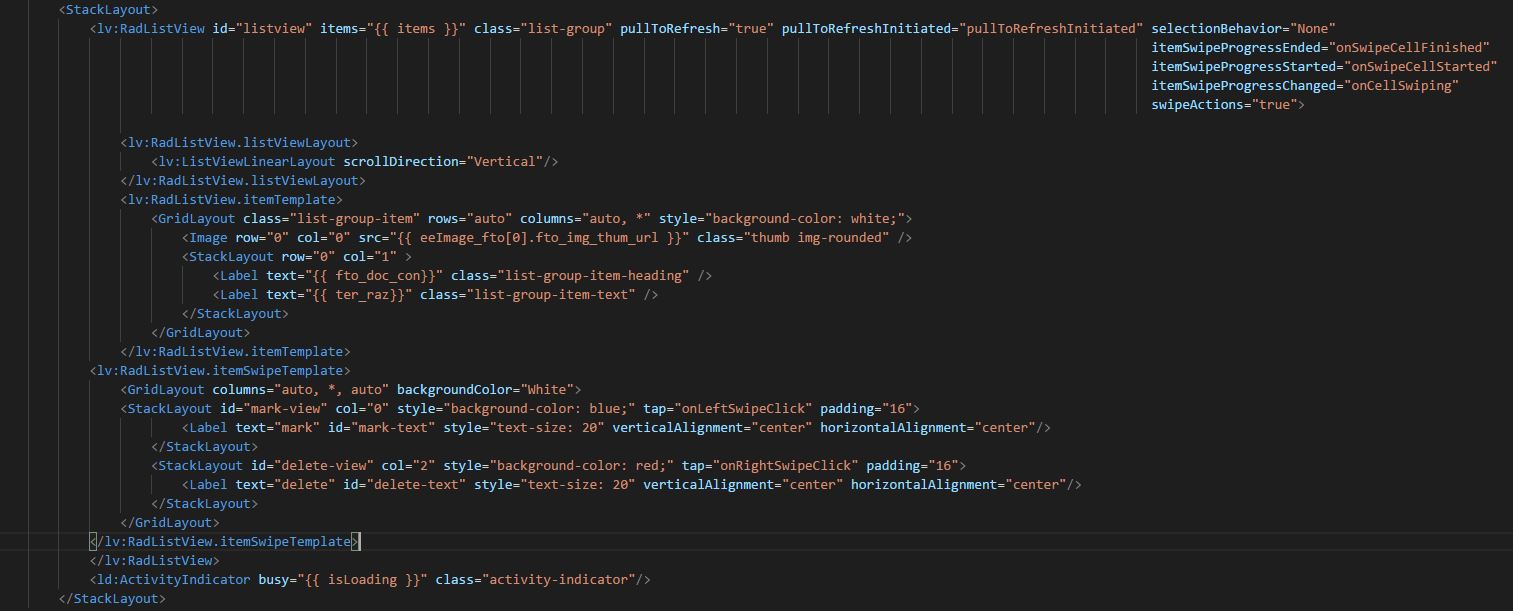
I had the same isssue, I'm using nativescript core with javascript, in my case, the solution was add style="background-color: white;" in GridLayout tag as I show on the attach, thank you so much.
`
 jsandrea88
on 4 Jan 2018
jsandrea88
on 4 Jan 2018
Please add this to documentation. Ran into this particular issue on Android (iOS didn't need background color specified) and spent quite some time trying to figure out the root-cause.
 noumaans
on 21 Feb 2018
noumaans
on 21 Feb 2018
The requested information has been added to the Swipe Actions documentation in the articles for both NativeScript Core and NativeScript with Angular.
 tgpetrov
on 23 Feb 2018
tgpetrov
on 23 Feb 2018
I run into the same problem, but the background color set to white didnt fix it, the items are not swiping, there is no overlap of text though.
here is my code:
   <lv:RadListView id="listview" items="{{ items }}" class="list-group" swipeActions="true" pullToRefresh="true" pullToRefreshInitiated="pullToRefreshInitiated">

        <lv:RadListView.itemTemplate>
            <GridLayout class="list-group-item" rows="auto" columns="auto, *" backgroundColor="white" >

                <StackLayout row="0" col="1" >
                    <Label text="{{ itemName }}" class="list-group-item-heading" />
                    <Label text="{{ itemDesc }}" class="list-group-item-text" />
                </StackLayout>
            </GridLayout>
        </lv:RadListView.itemTemplate>


        <lv:RadListView.itemSwipeTemplate>
            <GridLayout columns="auto, *, auto" >
                <StackLayout col="0" class="save-btn" tap="onLeftSwipe" orientation="horizontal">
                    <Label text="Save" verticalAlignment="center" horizontalAlignment="center"/>
                </StackLayout>
                <StackLayout col="2" class="delete-btn" tap="onRightSwipe" orientation="horizontal">
                    <Label text="Delete" verticalAlignment="center" horizontalAlignment="center" />
                </StackLayout>
            </GridLayout>
        </lv:RadListView.itemSwipeTemplate>
    </lv:RadListView>
 Xsmael
on 14 Jul 2018
Xsmael
on 14 Jul 2018
Hi,
I ran into this issue in the past. and setting background color to white solve it.
But now after supporting dark theme I can not set the background color to white because in dark mode nothing will be shown after switching text color to white.
I hope you find another solution.
Thanks.
 OPADA-Eng
on 18 Feb 2020
OPADA-Eng
on 18 Feb 2020
Related issues
 sushant-j
·
4Comments
sushant-j
·
4Comments
 jorotenev
·
4Comments
jorotenev
·
4Comments
 shiv19
·
3Comments
shiv19
·
3Comments
 marcelomiranda90
·
3Comments
marcelomiranda90
·
3Comments
 dali-gharbi
·
3Comments
dali-gharbi
·
3Comments