Nativescript-ui-feedback: RadListView notifyPullToRefreshFinished not works.
HI,
There is a problem that I tested in angular2 android.
when the ObservableArray of source changes in pull to refresh the spinner never hides with calling notifyPullToRefreshFinished;
for example:
 <RadListView [items]="dataItems" pullToRefresh="true" (pullToRefreshInitiated)="onPullToRefreshInitiated($event)">

public onPullToRefreshInitiated(args: ListViewEventData) {
    var listView = args.object;
    //here I created new ObservableArray for dataItems
   //and the spinner will not hide with notifyPullToRefreshFinished
     this.dataItems = new ObservableArray(paths);
   //for making example simple I'll call the notifyPullToRefreshFinished
  //after  5 seconds
    timer.setTimeout(()=>{
               listView.notifyPullToRefreshFinished();
    },5000)
}
but If I don't create newObservableArray and just modify the previous one that works correctly.
 public onPullToRefreshInitiated(args: ListViewEventData) {
       var listView = args.object;
       //modify the previous one
       this.dataItems.pop();
       timer.setTimeout(()=>{
               listView.notifyPullToRefreshFinished();
       },5000)
 }
 kazemihabib
All 24 comments
@kazemihabib, in general, you should call the notifyPullToRefreshFinished immediately after the new data has been delivered and loaded into the listview. Why are you using a timeout? You can check out our SDK samples where the correct usage of pull-to-refresh is demonstrated:
 ginev
on 6 Mar 2017
ginev
on 6 Mar 2017
@ginev Actually I don't use timeout I'm using RxObservable and I want to call notifyPullToRefreshFinished after complete event.
I just use timeout here to make the example simple.
kazemihabib
on 6 Mar 2017
@kazemihabib I would need a project to reproduce this to be able to help.
ginev
on 21 Apr 2017
This bug is happening to me as well. It seems like it's the act of creating a new ObservableArray? Were you ever able to get this working @kazemihabib?
 Christopotamus
on 1 May 2017
Christopotamus
on 1 May 2017
@Christopotamus can you please share some code for us so that we can identify and address any pending issues accordingly?
ginev
on 2 May 2017
@ginev I'll try and get a little project togother to hopefully replicate the issue for you. This seems to only happen with me on android so far.
Christopotamus
on 2 May 2017
I got the same error, only on IOS.
 jbfulgencio
on 3 May 2017
jbfulgencio
on 3 May 2017
same here
 cmargulhano
on 18 Aug 2017
cmargulhano
on 18 Aug 2017
@cmargulhano - are you modifying the existing ObservableArray source or reassigning the list it to a new source?
ginev
on 29 Aug 2017
@cmargulhano, @Christopotamus - unfortunately we've never managed to reproduce the case with or without recreating the ObservableArray. Normally you would modify the existing source without recreating it. If a completely new source ought to be assigned - you can simply empty the existing one and add the new items in it.
ginev
on 29 Aug 2017
Sorry, haven't had time to put anything together for this. My workaround is
working for now. I'll revisit this if I have time in the future to see if
it still happens.
On Tue, Aug 29, 2017, 5:36 AM Deyan Ginev notifications@github.com wrote:
@cmargulhano https://github.com/cmargulhano, @Christopotamus
https://github.com/christopotamus - unfortunately we've never managed
to reproduce the case with or without recreating the ObservableArray.
Normally you would modify the existing source without recreating it. If a
completely new source ought to be assigned - you can simply empty the
existing one and add the new items in it.—
You are receiving this because you were mentioned.
Reply to this email directly, view it on GitHub
https://github.com/telerik/nativescript-ui-feedback/issues/64#issuecomment-325650145,
or mute the thread
https://github.com/notifications/unsubscribe-auth/ABRHdJqjc28iWAC18WGkDzckwJCYMZA7ks5sdAXNgaJpZM4MGt9r
.
Christopotamus
on 29 Aug 2017
@Christopotamus - if it's not a hassle, may I ask you to post your workaround here for the others to see? Thanks! :)
ginev
on 29 Aug 2017
I'll have to see if I'm allowed to share some of the code, but basically I'm checking if the app is on iOS, and if so, I create a whole new ObservableArray and use the constructor immediately with all of my items, otherwise (if android) I just push new items to the array like normal.
It's been a long time since I've had the issue so I'm not sure if my workaround is needed or if the problem even happens anymore!
Christopotamus
on 29 Aug 2017
Thanks @Christopotamus and sorry for the delayed reply from our side. Anyway - you normally would not need to recreate the ObservableArray. You can simply modify its contents.
ginev
on 30 Aug 2017
This happens to me too if i call the notifyPullToRefreshFinished() in a
interlaced Promise callback:
    public refresh(args: ListViewEventData) {
        let listView = args.object;
        this.accountService.synchronizeAccount(account)
            .then(account => {
                this.accountService.setCurrentAccount(account);
                this.marketService.update()
                    .then(result => {
                        listView.notifyPullToRefreshFinished();
                    })
                    .catch(error => {
                        listView.notifyPullToRefreshFinished();
                    });
            })
            .catch(error => {
                listView.notifyPullToRefreshFinished();
            })
    }
Closes normally if called in the first Promise callback
 cgebe
on 8 Oct 2017
cgebe
on 8 Oct 2017
Having same problem when calling it inside an observable subscription
 hdrdiab
on 7 Dec 2017
hdrdiab
on 7 Dec 2017
@hdrdiab in the base case you would not need to call the method inside observable subscription.
Here is an example using RX Observable and async pipe (code modified and based on this example)
import { Component, OnInit, ChangeDetectorRef } from "@angular/core";
import { ObservableArray } from "tns-core-modules/data/observable-array";
import { DataItem } from "../dataItem";
import { ListViewEventData } from "nativescript-pro-ui/listview";
import * as Application from "tns-core-modules/application";
import * as timerModule  from "tns-core-modules/timer";
var posts = require("../../listview/posts.json");

import { Observable as RxObservable } from "rxjs/Observable";

@Component({
    moduleId: module.id,
    selector: "tk-listview-pull-to-refresh",
    templateUrl: "listview-pull-to-refresh.component.html",
    styleUrls: ["listview-pull-to-refresh.component.css"]
})
// >> angular-listview-pull-to-refresh-code
export class ListViewPullToRefreshComponent implements OnInit {

    public items: RxObservable<Array<DataItem>>;

    private _dataItems: Array<DataItem>;
    private _numberOfAddedItems;
    private _subscr;

    constructor(private _changeDetectionRef: ChangeDetectorRef) {
    }

    ngOnInit() {
        this.initDataItems();
        this._changeDetectionRef.detectChanges();
    }

    public get dataItems(): Array<DataItem> {
        return this._dataItems;
    }

    public onPullToRefreshInitiated(args: ListViewEventData) {

            var initialNumberOfItems = this._numberOfAddedItems;
            for (var i = this._numberOfAddedItems; i < initialNumberOfItems + 2; i++) {
                if (i > posts.names.length - 1) {
                    break;
                }
                var imageUri = Application.android ? posts.images[i].toLowerCase() : posts.images[i];

                this._dataItems.splice(0, 0, new DataItem(i, posts.names[i], "This is item description", posts.titles[i], posts.text[i], "res://" + imageUri));
                this._numberOfAddedItems++;
            }

            var listView = args.object;
            listView.notifyPullToRefreshFinished();
;
    }

    private initDataItems() {
        this._dataItems = new Array<DataItem>();
        this._numberOfAddedItems = 0;
        for (var i = 0; i < posts.names.length - 15; i++) {
            this._numberOfAddedItems++;
            if (Application.android) {
                this._dataItems.push(new DataItem(i, posts.names[i], "This is item description", posts.titles[i], posts.text[i], "res://" + posts.images[i].toLowerCase()));
            }
            else {
                this._dataItems.push(new DataItem(i, posts.names[i], "This is item description", posts.titles[i], posts.text[i], "res://" + posts.images[i]));
            }
        }

        this.items = RxObservable.create(subscriber => {
            this._subscr = subscriber;
            subscriber.next(this._dataItems);
        });
    }
}
// << angular-listview-pull-to-refresh-code
HTML file
<GridLayout orientation="vertical" tkExampleTitle tkToggleNavButton>
     <!-- >> angular-listview-pull-to-refresh -->
    <RadListView [items]="items | async" pullToRefresh="true" (pullToRefreshInitiated)="onPullToRefreshInitiated($event)">
     <!-- << angular-listview-pull-to-refresh -->
        <ng-template tkListItemTemplate let-item="item">
            <StackLayout class="itemTemplateStackLayout" orientation="vertical">
                <StackLayout class="innerOtemTemplateStackLayout" orientation="horizontal">
                    <Image *tkIfIOS [src]="item.image" stretch="aspectFit" height="100" width="100"></Image>
                    <FrescoDrawee *tkIfAndroid height="100" width="80" [imageUri]="item.image"></FrescoDrawee>
                    <StackLayout class="labelsStackLayout" orientation="vertical">
                        <Label class="labelName" [text]="item.name"></Label>
                        <Label class="labelTitle" [text]="item.title" textWrap="true"></Label>
                        <Label class="labelText" [text]="item.text" textWrap="true"></Label>
                    </StackLayout>
                </StackLayout>
            </StackLayout>
        </ng-template>
    </RadListView>
</GridLayout>
 NickIliev
on 11 Dec 2017
NickIliev
on 11 Dec 2017
@NickIliev thanks for the reply ,i think i can't use the async pipe in my case , i am making a http request ,doing some treatment for the data received then putting then assigning the new items in the list , so i haven't found a way other than calling the notifyPullToRefreshFinished() method inside the http subscription.
hdrdiab
on 11 Dec 2017
Tried to reproduce with this test application and the latest versions but the issue does not seem to be reproducible
NickIliev
on 6 Jun 2018
Unfortunately it's still happening
{N}: 4.2.3
Device: Samsung Galaxy S8
Android: 8.0.0
Can't share the entire app, but the code is straight forward, shouldn't be anything wrong there:
template:
  <GridLayout tkExampleTitle tkToggleNavButton>
      <RadListView [items]="itemsList$ | async" pullToRefresh="true" (pullToRefreshInitiated)="onPullToRefreshInitiated($event)">
          <ng-template tkListItemTemplate let-item="item">
              <StackLayout orientation="vertical" [nsRouterLink]="['/some', 'path', item.slug]">
                  <Label [text]="item.id"></Label>
                  <Label [text]="item.name + ' (' + item.slug + ')'"></Label>
              </StackLayout>
          </ng-template>

          <!-- >> angular-listview-item-layouts-staggered -->
          <ListViewStaggeredLayout tkListViewLayout scrollDirection="Vertical" spanCount="2"></ListViewStaggeredLayout>
          <!-- << angular-listview-item-layouts-staggered -->
      </RadListView>
  </GridLayout>
component:
  @Select(MyState.itemsList) itemsList$: Observable<Item[]>; // (ngxs state management, but it's just an Observable in the end, and I use the async pipe in the template)

  // ...

  onPullToRefreshInitiated(evt: ListViewEventData) {
    const listView = evt.object;

    // this re-fetches the items from the server and causes the itemsList$ observable to emit a new value
    this.store.dispatch(new GetItems()).subscribe(result => {
      // const listView = evt.object;
      listView.notifyPullToRefreshFinished();
      console.log('-- LOAD FINISHED');
    });
  }
I get the console.log, but the spinner never goes away,
Not to mention the fact that, after a reload, the space occupied by the items initially remains blank and they are re-added after that blank space (see screenshot)
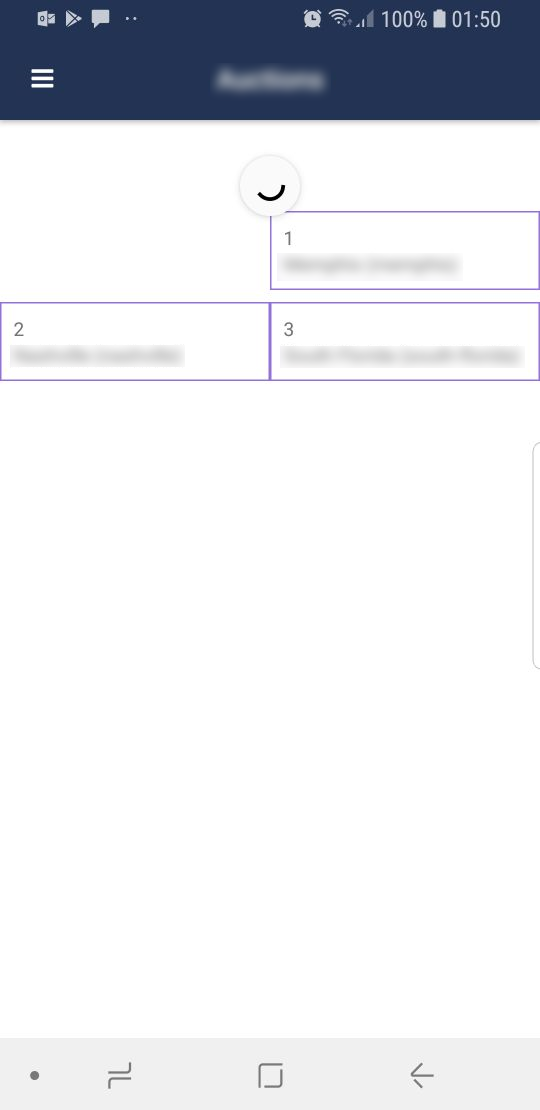
The layout readjusts, however, if I rotate the device. But the spinner still never goes away (unless I minimize the app/put it into background and switch back to it again, but it only goes away visually... I can't pull to refresh again, so it's still like .notifyPullToRefreshFinished() never happened, only the indicator disappears).
Must be a bug that has to do with updating the UI I guess...
 MrCroft
on 29 Aug 2018
MrCroft
on 29 Aug 2018
Hi @MrCroft ,
Could you do a quick test by wrapping the notifyPullToRefreshFinished() with a setTimeout(). Also I see that you are using ngrx Store to dispatch and subscribe, are you sure that the listView is available in that closure ?
 VladimirAmiorkov
on 5 Sep 2018
VladimirAmiorkov
on 5 Sep 2018
@MrCroft did you ever resolve this? I am also using NGXS and RadListView and seeing the same. I've tried lodash defer(), using a setTimeout() and using another observable to trigger the event.
I have added a hack for now which just removes the spinner immediately on android.
onPullToRefreshInitiated(args: ListViewEventData) {
    const listView: RadListView = args.object;
    this.store.dispatch(new LoadData())
        .pipe(first())
        .subscribe(() => listView.notifyPullToRefreshFinished());

    if (isAndroid) {
        listView.notifyPullToRefreshFinished();
    }
}
 garystubbings
on 12 Sep 2018
garystubbings
on 12 Sep 2018
I'm sorry, I missed the messages. Too many emails.
@VladimirAmiorkov
Could you do a quick test by wrapping the notifyPullToRefreshFinished() with a setTimeout()
That would be the simplest way to illustrate the bug. If I simply do this:
  onPullToRefreshInitiated(evt: ListViewEventData) {
    const listView = evt.object;
    setTimeout(() => {
      listView.notifyPullToRefreshFinished();
    }, 1000);
  }
and the spinner never goes away.
@garystubbings nope, I wasn't able to find a solution for this 😞 . For now, it's just a visual effect, I just "pretend" it's working. I simply do:
  onPullToRefreshInitiated(evt: ListViewEventData) {
    const listView = evt.object;
    listView.notifyPullToRefreshFinished();

    this.store.dispatch(new GetItems());
  }
I've created a Playground to illustrate this issue:
https://play.nativescript.org/?template=play-ng&id=WxcmBP
change pleaseBugMyListview to true and you'll se it never stops spinning. The problem is, I don't get why this is considered intended behavior. Why not let the developer choose when to dismiss the pulltorefresh? I believe the developer should be able to trigger a refresh himself as well, just as you can with nativescript-pulltorefresh.
 edusperoni
on 21 Sep 2018
edusperoni
on 21 Sep 2018
Related issues
 marcelomiranda90
·
3Comments
marcelomiranda90
·
3Comments
 spmamidi
·
3Comments
ginev
·
4Comments
spmamidi
·
3Comments
ginev
·
4Comments
 jorotenev
·
4Comments
jorotenev
·
4Comments
 Cacus3
·
4Comments
Cacus3
·
4Comments
Most helpful comment
I've created a Playground to illustrate this issue:
https://play.nativescript.org/?template=play-ng&id=WxcmBP
change
pleaseBugMyListviewto true and you'll se it never stops spinning. The problem is, I don't get why this is considered intended behavior. Why not let the developer choose when to dismiss the pulltorefresh? I believe the developer should be able to trigger a refresh himself as well, just as you can with nativescript-pulltorefresh.