Nativescript-plugin-firebase: Cannot read property tasks of undefined
I've added the plugin to our project and followed the push-only instructions.
When running on device i get the following error:
System.err: TypeError: Cannot read property 'tasks' of undefined
System.err:     at android.app.ActivityThread.handleBindApplication(ActivityThread.java:5968)
System.err:     at android.app.ActivityThread.-wrap1(Unknown Source:0)
System.err:     at android.app.ActivityThread$H.handleMessage(ActivityThread.java:1755)
System.err:     at android.os.Handler.dispatchMessage(Handler.java:106)
System.err:     at android.os.Looper.loop(Looper.java:164)
System.err:     at android.app.ActivityThread.main(ActivityThread.java:6753)
System.err:     at java.lang.reflect.Method.invoke(Native Method)
System.err:     at com.android.internal.os.RuntimeInit$MethodAndArgsCaller.run(RuntimeInit.java:482)
System.err:     at com.android.internal.os.ZygoteInit.main(ZygoteInit.java:807)
System.err: Caused by: com.tns.NativeScriptException: Error calling module function
System.err: TypeError: Cannot read property 'tasks' of undefined
System.err: File: "file:///node_modules/nativescript-plugin-firebase/storage/storage.js:5:0
System.err:
System.err: StackTrace:
System.err:     Frame: function:'../node_modules/nativescript-plugin-firebase/storage/storage.js', file:'file:///node_modules/nativescript-plugin-firebase/storage/storage.js:5:0
System.err:     Frame: function:'__webpack_require__', file:'file:///app/webpack/bootstrap:750:0
System.err:     Frame: function:'fn', file:'file:///app/webpack/bootstrap:120:0
System.err:     Frame: function:'../node_modules/nativescript-plugin-firebase/firebase-common.js', file:'file:///node_modules/nativescript-plugin-firebase/firebase-common.js:9:14
System.err:     Frame: function:'__webpack_require__', file:'file:///app/webpack/bootstrap:750:0
System.err:     Frame: function:'fn', file:'file:///app/webpack/bootstrap:120:0
System.err:     Frame: function:'', file:'file:///node_modules/nativescript-plugin-firebase/messaging/messaging.js:3:24
System.err:     Frame: function:'../node_modules/nativescript-plugin-firebase/messaging/messaging.js', file:'file:///data/data/com.xxx.mobile/files/app/vendor.js', line: 44286, column: 30
System.err:     Frame: function:'__webpack_require__', file:'file:///app/webpack/bootstrap:750:0
System.err:     Frame: function:'fn', file:'file:///app/webpack/bootstrap:120:0
System.err:     Frame: function:'../node_modules/nativescript-plugin-firebase/messaging/index.js', file:'file:///node_modules/nativescript-plugin-firebase/messaging/index.js:3:13
System.err:     Frame: function:'__webpack_require__', file:'file:///app/webpack/bootstrap:750:0
System.err:     Frame: function:'fn', file:'file:///app/webpack/bootstrap:120:0
System.err:     Frame: function:'', file:'file:///app/app.ts:1:66
System.err:     Frame: function:'./app.ts', file:'file:///data/data/com.wxxx.mobile/files/app/bundle.js', line: 776, column: 30
System.err:     Frame: function:'__webpack_require__', file:'file:///app/webpack/bootstrap:750:0
System.err:     Frame: function:'checkDeferredModules', file:'file:///app/webpack/bootstrap:43:0
System.err:     Frame: function:'webpackJsonpCallback', file:'file:///app/webpack/bootstrap:30:0
System.err:     Frame: function:'', file:'file:///data/data/com.xxx.mobile/files/app/bundle.js', line: 2, column: 57
System.err:     Frame: function:'require', file:'', line: 1, column: 266
 tobydeh
All 42 comments
Thanks for the report - what kind of device is this, and does it have Google Play Services installed?
 EddyVerbruggen
on 2 Aug 2019
EddyVerbruggen
on 2 Aug 2019
One Plus 5T, Oxygen OS 5.1.5, Android version 8.1.0. Google play services is installed.
tobydeh
on 5 Aug 2019
Upgrading to Oxygen OS 9.0.7, Android version 9 has fixed the issue.
tobydeh
on 5 Aug 2019
Also throws this error on my devices:
- Huawei P9 Lite, Android v 7.1
- Nexus 6P, Android v 7.0
- Nexus 5 Android 8.0
I am using nativescript + vue.
here my package:
  "dependencies": {
    "nativescript-plugin-firebase": "*",
    "nativescript-theme-core": "^1.0.6",
    "nativescript-ui-sidedrawer": "~7.0.0",
    "nativescript-vue": "~2.4.0",
    "rxjs": "~6.5.0",
    "tns-core-modules": "~6.0.0"
  },
  "devDependencies": {
    "@babel/core": "~7.1.0",
    "@babel/preset-env": "~7.1.0",
    "babel-loader": "~8.0.0",
    "nativescript-dev-webpack": "~1.0.0",
    "nativescript-vue-template-compiler": "~2.4.0",
    "node-sass": "^4.7.1",
    "vue-loader": "~15.4.0"
  },
Code:
var firebase = require("nativescript-plugin-firebase");

firebase.init({
    apiKey: "AIza...XXXXXX",    /
    databaseURL: "https://myApp-d41a2.firebaseio.com",
}).then(
    function () {
        console.log("firebase.init done");
    },
    function (error) {
        console.log("firebase.init error: " + error);
    }
);
Hope this helps with the issue
 Nebulosar
on 16 Aug 2019
Nebulosar
on 16 Aug 2019
Same issue, Samsung A7. and LG G6.
 delanick
on 16 Aug 2019
delanick
on 16 Aug 2019
@delanick is there a repo and reproduction path I can work with? Or ideas on a fix perhaps.
EddyVerbruggen
on 16 Aug 2019
It seems like in the storage.js file, var gmsTasks = com.google.android.gms.tasks; causes the trouble.
gms is undefined. I'm not hardcore android, so i do not really know what this is, or where to fix it.
Maybe this issue is somewhat related to and of any help? https://stackoverflow.com/questions/45692460/failed-to-resolve-com-google-android-gmsplay-services-in-intellij-idea-with-gr
Again, not my field of expertise..
Nebulosar
on 16 Aug 2019
Ah that one, yeah I took care of it here https://github.com/EddyVerbruggen/nativescript-plugin-firebase/commit/10a8d90d0013fe85bd3cb59292108d22842efef2 but the new version is not out yet. Will do soon!
EddyVerbruggen
on 18 Aug 2019
Nice @EddyVerbruggen ! Looking forward to the update!
Nebulosar
on 19 Aug 2019
Nice @EddyVerbruggen ! Looking forward to the update!
Ditto! :) Any idea of when @EddyVerbruggen ? :)
delanick
on 19 Aug 2019
Working on it. When it's done.
EddyVerbruggen
on 19 Aug 2019
@EddyVerbruggen Oh awesome! Was prepping myself spiritually to put the project on hold for a few weeks for when you have time :) You legend!
I also see you responded to my +1 on the issue on Friday - somehow I accidentally deleted the email notification and couldn't find it. Thought I was going crazy. Seems I don't need to send you a repo as you've identified the problem... Let me know if you still want me to share it :)
delanick
on 19 Aug 2019
@delanick No worries, looks like this is tackled indeed.
I have a few other tasks to complete before the 9.1.0 version can be released. And there's a lot of testing involved, so can't rush it. I do aim to complete it early this week though.
EddyVerbruggen
on 19 Aug 2019
@EddyVerbruggen Amazing! Thanks mate! Will keep an eye out for the update. Do you know if there is a way to subscribe to updates -> like having Github notify you when repos are updated?
delanick
on 19 Aug 2019
@delanick You can get notified when releases are created here:

EddyVerbruggen
on 19 Aug 2019
@EddyVerbruggen Ah awesome, thanks so much!
delanick
on 19 Aug 2019
@EddyVerbruggen I'm also having this issue, currently using the latest nativescript version. Also experience TypeError: cannot read property 'tasks' of undefined. my android version is 8.1.0.
I will be very grateful to get your response on this.
 delino12
on 21 Aug 2019
delino12
on 21 Aug 2019
@EddyVerbruggen I can also add you to the development repository if you want to get clearer view on the implementation.
delino12
on 21 Aug 2019
@delino12 Which plugin version do you use?
EddyVerbruggen
on 21 Aug 2019
"nativescript-plugin-firebase": "^9.1.0",
delino12
on 21 Aug 2019
@EddyVerbruggen was wondering if missed out anything i followed all the steps and instructions carefully. I guess i will start debugging by the last 3 version.
delino12
on 21 Aug 2019
If your issue is related to storage (like the OP) then 9.1.0 should have fixed it. Otherwise, please open a new issue and post your stacktrace (adb logcat will help).
EddyVerbruggen
on 21 Aug 2019
@EddyVerbruggen Alright.
delino12
on 21 Aug 2019
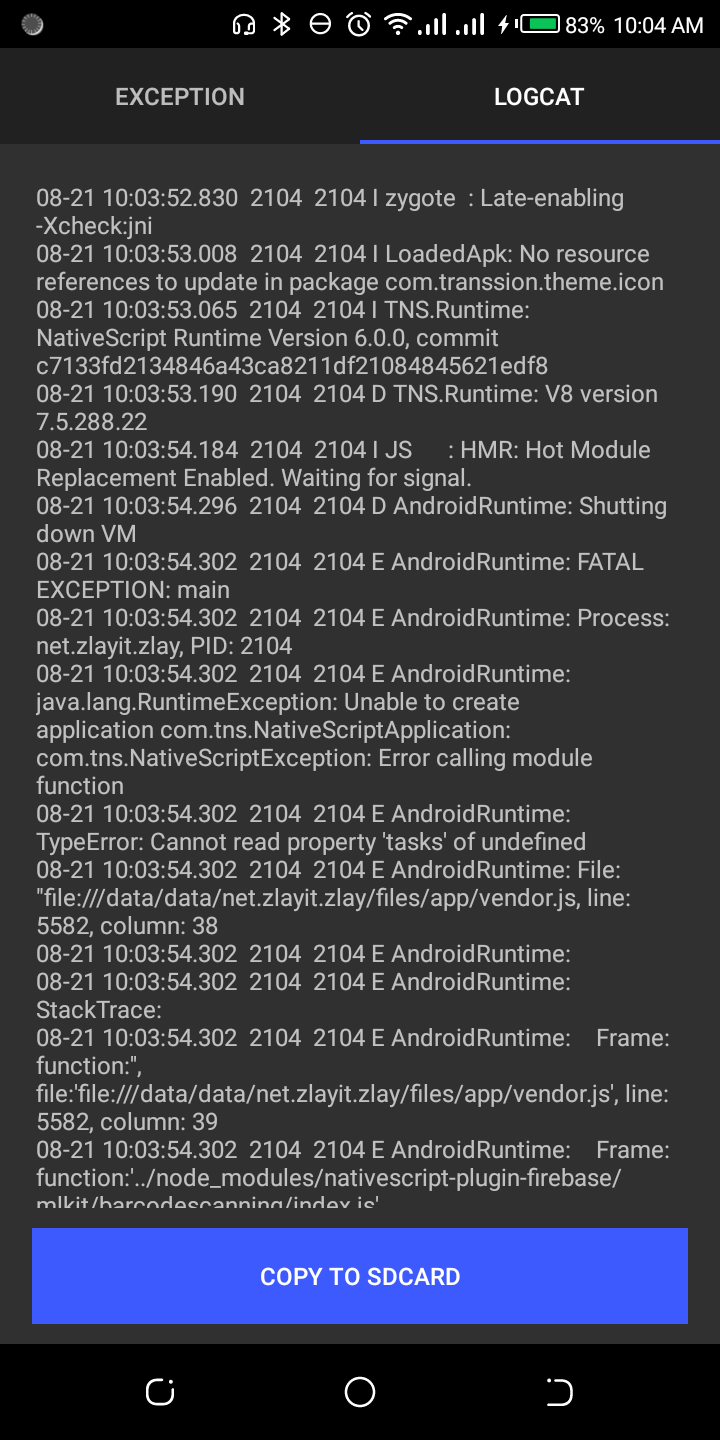
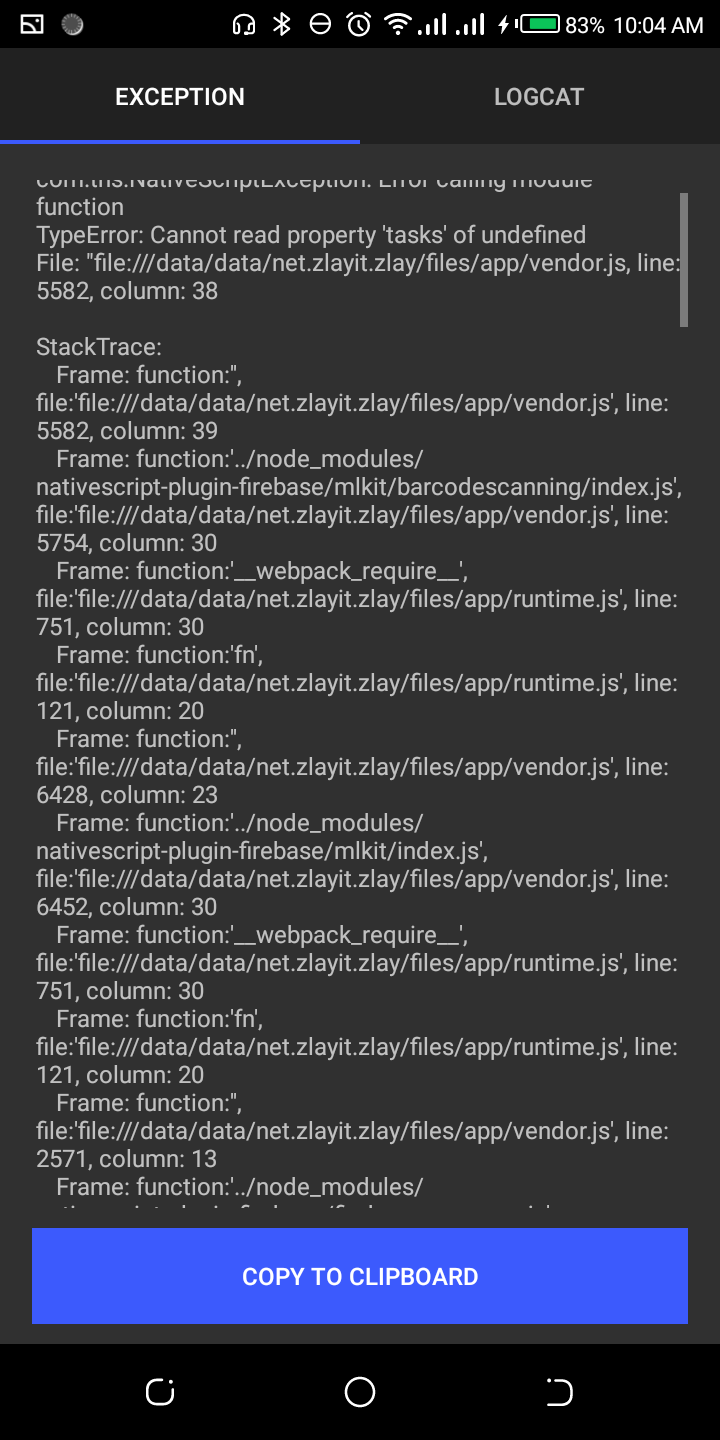
@EddyVerbruggen still haven't detect if it's related to storage yet.
delino12
on 21 Aug 2019
@delino12 I see mlkit barcodescanning in your stacktrace. Did you enable that?
EddyVerbruggen
on 21 Aug 2019
@EddyVerbruggen No I didn't. the only configuration was
{
  "external_messaging": true
}
@delino12 You mean literally this? It's important to be precise. I really need a repo to look at.
EddyVerbruggen
on 21 Aug 2019
@EddyVerbruggen I also updated to the latest plugin version and am still facing this exact issue. My repo is empty, it's a blank app with only the plugin installed and required google-services file added to the project, but happy to share with you :)
delanick
on 21 Aug 2019
@delanick are you sure you don't require/import the plugin anywhere?
EddyVerbruggen
on 21 Aug 2019
@EddyVerbruggen apologies, I wasn't quite clear enough. Yes, I do require and init the plugin in my app.js file. My assumption is that that's where it's breaking.
delanick
on 21 Aug 2019
@delanick OK, then the demo-push app in this repo should crash as well. Let me try that once I'm done with a bunch of other stuff 😅
EddyVerbruggen
on 21 Aug 2019
@EddyVerbruggen Ok cool, don't work too hard now ya hear? :P
delanick
on 21 Aug 2019
@delanick I just bumped demo-push to NativeScript 6 and it worked without problems on my emulator (which has Play services installed).
So can you either share that problematic repo with me, or try the demo-push app yourself? For the latter:
git clone https://github.com/EddyVerbruggen/nativescript-plugin-firebase
cd nativescript-plugin-firebase/src
npm i
npm run demo-push.android
@EddyVerbruggen will do both. Sending my project to your gmail account.
delanick
on 21 Aug 2019
@EddyVerbruggen i will clone the source repo and run a demo on android. @delanick I guess yours should be working now. You should get a notification by now i've sent you an invite.
delino12
on 22 Aug 2019
@delino12 I didn't have a chance to get the build done, will do it tonight. What invite?
delanick
on 22 Aug 2019
@EddyVerbruggen cloned the project and tried building via Sidekick. On opening it in Sidekick it flags the project as not being compatible with {N} 6.
Running it through CLI failed even with following all those steps. Wouldn't allow me to build via CLI, not sure why.
delanick
on 22 Aug 2019
@delino12, invite failed I guess:

EddyVerbruggen
on 22 Aug 2019
@delanick In the project you emailed me, this filename is incorrect, that will screw things up for sure:

EddyVerbruggen
on 22 Aug 2019
@EddyVerbruggen my apologies for that, Just sent you another here on github. https://github.com/delino12/zlay-nativescript/invitations thanks.
delino12
on 22 Aug 2019
@EddyVerbruggen Holy hell, yep that'll do it! That's a combination of late night work and multiple projects. Will fix it on that machine and try again.
So I have the project on a different machine with the correct filename, and am now getting the build failed due to the firebase-copy-google-services.json hook not working. Below:
Build failed. Failed to execute hook: D:\NS Projects\PropMan\hooks\after-prepare\firebase-copy-google-services.js
delanick
on 22 Aug 2019
@EddyVerbruggen Holy hell, yep that'll do it! That's a combination of late night work and multiple projects. Will fix it on that machine and try again.
So I have the project on a different machine with the correct filename, and am now getting the build failed due to the firebase-copy-google-services.json hook not working. Below:
Build failed. Failed to execute hook: D:\NS Projects\PropMan\hooks\after-prepare\firebase-copy-google-services.js
delanick
on 22 Aug 2019
Related issues
 afaridanquah
·
34Comments
afaridanquah
·
34Comments
 seanstanden
·
38Comments
seanstanden
·
38Comments
 RaphaelJenni
·
22Comments
RaphaelJenni
·
22Comments
 shabib3
·
22Comments
shabib3
·
22Comments
 ViVer-7
·
57Comments
ViVer-7
·
57Comments