Nativescript-plugin-firebase: Phone Authentication with reCAPTCHA
The firebase ios phone auth in documentation claims that there is 2 ways to do phone auth (https://firebase.google.com/docs/auth/ios/phone-auth#set-up-recaptcha-verification)
- Silent APNs notifications;
- reCAPTCHA verification
This plugin documentation (https://github.com/EddyVerbruggen/nativescript-plugin-firebase/blob/master/docs/AUTHENTICATION.md#phone-verification) claims:
- iOS: Make sure you have messaging enabled as well, as this uses push notifications on iOS.
Is this the only way at this point?
Is there any way to do it with reCAPTCHA?
Any one has a demo with it?
Thank you
 jmfsilva
All 13 comments
At the time of writing there was only the APNs option, so the plugin doesn't support it.
I'll mark this as a feature request and depending on the nr of 👍we can consider adding this feature. As always, PR's are appreciated (and merged).
 EddyVerbruggen
on 28 Mar 2018
EddyVerbruggen
on 28 Mar 2018
I checked the version notes and they added this feature in version 4.2.0 (https://firebase.google.com/support/release-notes/ios).
There is no need to change firebase pod version to add this feature.
jmfsilva
on 28 Mar 2018
Using the latest podfile and firebase-UI components for IOS, at the moment, if i try the Phone Auth, i get a reCaptcha challenge (APNs, silent or otherwise, doesnt seem to work). at the end of the successful answering of the captcha, i get an about:blank page. which i can close, but it crashes the app after that. What I am not handling at the end of this process?
According to the docs, the recaptcha challenge is only shown if it fails to send the silent notification somehow. So why is APNs not working? (i've seen and double-checked all the various settings and configs). I am using a authentication .p8 KEY (not a .p12 CERT). capabilities are enabled. swizzling - i've tried both ways. with swizzling enabled, i get 'token mismatch' error. with it disabled, the above scenario occurs.
Phone-Auth issues seem to be reported several times over the past two years, and I still cant find an authoritative solution or sample to get this working. Is this case supposed to work? is it generally not a recommended approach to get people logged in to my app?
i am sure i am doing something wrong, but not having any luck figuring out what, exactly!
 kumar-chalasani
on 30 Jul 2018
kumar-chalasani
on 30 Jul 2018
I've never seen (not implemented support for) a reCAPTCHA. So not sure about this.
What do you mean by "firebase-UI components for IOS"? That's not something I've tested authentication with so can't comment on that.
Also, what do you mean with "swizzling - i've tried both ways". If you refer to a warning in the log that suggests to set a plist property - don't. It's not something I can suppress, but the plugin doesn't add it to your app's plist on purpose.
The only phone auth flow I've tested is part of the (non-ng) demo app that you're free to clone and fiddle with.
EddyVerbruggen
on 1 Aug 2018
Hi Eddy - i apologise. Somehow, this message went to the completely wrong group. It was meant for Firebase-UI/IOS: https://github.com/firebase/FirebaseUI-iOS/tree/master/samples/swift
kumar-chalasani
on 1 Aug 2018
Lol, thanks for letting me know. Good luck!
EddyVerbruggen
on 1 Aug 2018
Keeping this open as a reminder to someday look at implementing this feature.
EddyVerbruggen
on 1 Aug 2018
hi, having problem in reCAPTCHA after the first verify screen robot the page(screen shot is attach) is showing blank no reCAPTCHA was show. phone authentication is working perfectly but in most rear case that reCAPTCHA show. i have implement firebase reCAPTCHA verification.but it's not working.

 faizantariq1
on 1 Sep 2018
faizantariq1
on 1 Sep 2018
@faizantariq1 are you 10000% sure you're using this plugin? If so, please share a repo reproducing this issue.
EddyVerbruggen
on 1 Sep 2018
@EddyVerbruggen it's not producing on my different device but when i have submit my app on app store they said about it on device.I set all the setup of reCAPTCHA as per firebase said.I have reproduced this issue on simulator but it's not working as per firebase doc said :
Note : (To ensure that both scenarios are working correctly, test your app on a physical iOS device with background app refresh both enabled and disabled. When background app refresh is disabled, you should be able to successfully sign in after completing the reCAPTCHA challenge. You can also test the reCAPTCHA flow by running your app on an iOS simulator, which always uses the reCAPTCHA flow.) in this phone authentication link : https://firebase.google.com/docs/auth/ios/phone-auth
faizantariq1
on 1 Sep 2018
See my previous comment please. Feel free to reopen when you have those answers.
EddyVerbruggen
on 1 Sep 2018
@EddyVerbruggen if i use phone auth on simulator it actually opens reCAPTCHA using this plugin... But for me it works perfectly. The same code on real device will not open reCAPTCHA.
jmfsilva
on 30 Sep 2018
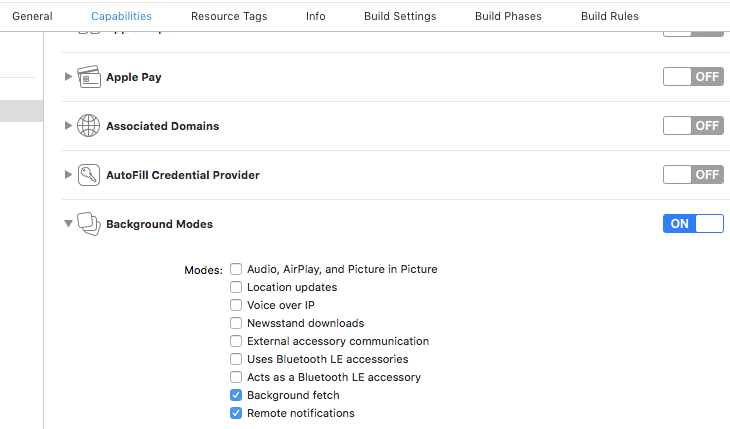
For the blank re-captcha page issue I was able to resolve it by doing these 2 things:
1st thing-
In the project navigator select the
blue project iconSelect
CapabilitiesOpen
Background ModesSelect
Background fetch
2nd thing-
- Before verifying the phone number call
PhoneAuthProvider.provider(auth: Auth.auth())
@IBAction func phoneButton(sender: UIButton) {

    // ***step 5***
    PhoneAuthProvider.provider(auth: Auth.auth())

    PhoneAuthProvider.provider().verifyPhoneNumber(phoneNumberTextField.text!, uiDelegate: nil) {
            [weak self](verificationID, error) in

            if let error = error {
                print(error.localizedDescription)
                return
            }

            guard let verificationId = verificationID else { return }
    }
}
 LanceSamaria
on 15 Feb 2019
LanceSamaria
on 15 Feb 2019
Related issues
 yencolon
·
4Comments
yencolon
·
4Comments
 romandragan
·
3Comments
romandragan
·
3Comments
 thunder413
·
3Comments
thunder413
·
3Comments
 tsili852
·
3Comments
tsili852
·
3Comments
 NNieto
·
4Comments
NNieto
·
4Comments
Most helpful comment
For the blank re-captcha page issue I was able to resolve it by doing these 2 things:
1st thing-
In the project navigator select the
blue project iconSelect
CapabilitiesOpen
Background ModesSelect
Background fetch2nd thing-
PhoneAuthProvider.provider(auth: Auth.auth())