Nativescript-plugin-firebase: Click on push notification when active
I've discovered a small issue with the messaging part. I sent a message to my app:
- App is open --> getting push message
- App is active, but in background --> not getting push message
- App is killed --> getting push message during open
Any idea how to resolve this?
 hypery2k
All 11 comments
iOS, right?
Are you using the latest version? I've done a major update to fix background notifications on iOS recently.
You'll need to follow the steps in the doc very carefully to make those work.
 EddyVerbruggen
on 27 Jan 2017
EddyVerbruggen
on 27 Jan 2017
no, running on Android (6.0). It havens when I click on the push notification message in the notification area of android
hypery2k
on 27 Jan 2017
sorry, was my fault on using the data/notification property wrong on the server side. It's working
hypery2k
on 27 Jan 2017
@hypery2k Would you mind elaborating on what you did wrong on the server side?
I am stuck with the same behaviour, where the onMessageReceivedCallback is called when the push notification is received while the app is open or after it is clicked from the system tray while the app is killed. When the application is in background, the push notification shows up in the tray, yet the callback is not invoked on-click.
The push notification itself is sent as a data message via HTTP:
{
"notification": {"title": "My title", "text": "My text", "badge": "1", "sound": "default"},
"data": {"foo":"bar"},
"priority": "High",
"to": "/topics/foo"
}
@EddyVerbruggen I can open a separate issue on this matter, if that's more convenient for you
EDIT
After reviewing several related issues I've figured it out: When the application is in the background, the handler passed to the callback is indeed not invoked in my case.
Instead the onNewIntent(intent: android.content.Intent) method of the corresponding android activity is invoked. The passed intent then contains the data part of the notification as its extras bundle (intent.getExtras() -> {"foo":"bar"}). I am not sure if this is a specific problem of this library or related to the launch mode configured for my application (which is set to android:launchMode="singleTask" in my AndroidMainfest.xml).
 nilsmehlhorn
on 21 Apr 2017
nilsmehlhorn
on 21 Apr 2017
Any idea how to use onNewIntent, with this plugin ? @nilsmehlhorn
I don't have android:launchMode="singleTask" config
 Aks659
on 25 Sep 2017
Aks659
on 25 Sep 2017
I've setup a gist to show you how it's working for me:
https://gist.github.com/nilsmehlhorn/1a3ee7447d0c7b60104288bc16c80c13
nilsmehlhorn
on 25 Sep 2017
@nilsmehlhorn
Thank for the gits. In my case, Intent does gets called as expected, but with an empty 'Extras'
JS: SaveInstanceState-------
JS: Stop-------
JS: NewIntent,{}<=============
JS: Start-------
I don't get it. Expected behavior is clearly mentioned in firebase docs .
I will try with fresh project one last time and log an issue if problem persists.
Aks659
on 25 Sep 2017
Finally got it working! @nilsmehlhorn Your gist is perfect except :
We need to do get("paramName") on intent to obtain the paramName
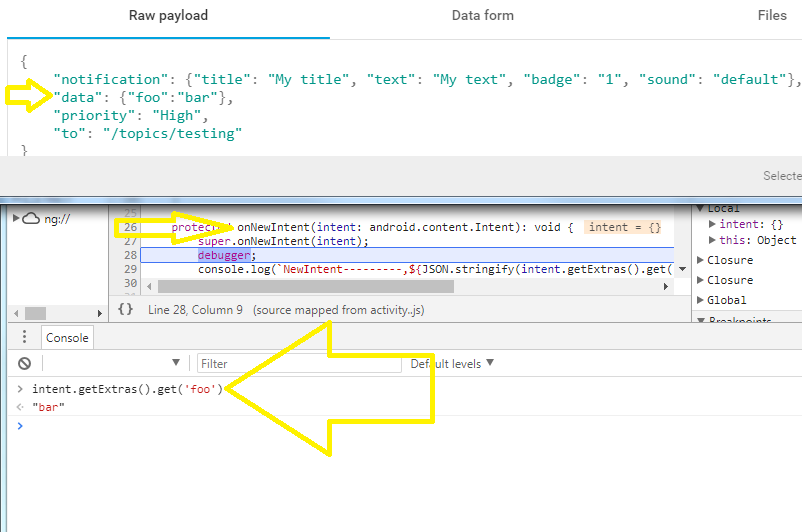
Refer: How to use Firebase Cloud Messaging in a NativeScript Angular Mobile App
Aks659
on 25 Sep 2017
@nilsmehlhorn . A side-note.
I saw custom notif icon config in your AndroidManifest.xml.
Were you able to make it work ?
Aks659
on 26 Sep 2017
_Extras_
Actually I excluded the retrieval of extras to make the gist more generic. In my app I'm mapping the extra-bundle to a JavaScript map like this
    ...
    .map(i => i.getExtras())
    .map(extras => {
        let data = {};
        const iterator = extras.keySet().iterator();
        while (iterator.hasNext()) {
            let key = iterator.next();
            data[key] = extras.get(key);
        }
        return data;
    })
_Icon_
Yes, it is working for me. Make sure to provide the resource appropriately (dont forget to do a full rebuild) and specify the icon when dispatching the notficiation with firebase.
nilsmehlhorn
on 26 Sep 2017
@nilsmehlhorn When I included your gist tns run android did not build the project successfully and threw an error of java.
 Sharique-Hasan
on 13 Oct 2017
Sharique-Hasan
on 13 Oct 2017
Related issues
 indiggojorge
·
3Comments
indiggojorge
·
3Comments
 tsili852
·
3Comments
tsili852
·
3Comments
 b02505048
·
3Comments
b02505048
·
3Comments
 dopefatimah
·
3Comments
dopefatimah
·
3Comments
 andrewexton373
·
4Comments
andrewexton373
·
4Comments
Most helpful comment
_Extras_
Actually I excluded the retrieval of extras to make the gist more generic. In my app I'm mapping the extra-bundle to a JavaScript map like this
_Icon_
Yes, it is working for me. Make sure to provide the resource appropriately (dont forget to do a full rebuild) and specify the icon when dispatching the notficiation with firebase.