Nativescript-cli: Preemptively add corresponding runtime dependency when adding a platform
Is your feature request related to a problem? Please describe.
In order to add a platform, the runtime dependency has to be added first, or else npm continues to run indefinitely.
Describe the solution you'd like
When running ns platform add {android,ios}, check package.json for the dependency and run npm i @nativescript/{android,ios} if it is absent.
Describe alternatives you've considered
Run those command manually.
Additional context
 pavi2410
All 10 comments
I'm not understanding what issue you are trying to say:
For example a brand new created JS app has no runtime dependancy;
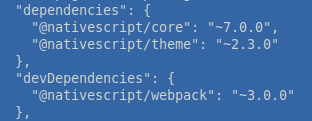
However, if I do ns platform add android
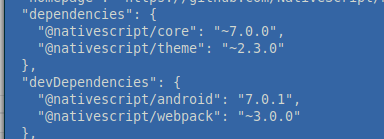
I now have the android dependancy...
Can you describe in steps what you are seeing?
 NathanaelA
on 22 Oct 2020
NathanaelA
on 22 Oct 2020
I posted about this on Slack
https://nativescriptcommunity.slack.com/archives/C0L9EEURY/p1603379632012300?thread_ts=1603379632.012300&cid=C0L9EEURY
- I have installed the latest version of Nativescript using
npm i -g nativescript - Then, created a new React NS project using
ns create NSTest --react cd NSTestnpm i- All good until here
- Run
ns doctorand it reports the platforms are missing in the project. Suggests runningns platform add - Naively run
ns platform add android - Get's something like what is shown in Slack (npm runs indefinitely)
To fix this,
- Run
npm i @nativescript/android --save-dev - Then, run
ns platform add android - Mission successful!
pavi2410
on 23 Oct 2020
This is interesting can confirm it fails for a --react, but works fine for --js, --ng, --svelte, and --vue;
Using --log trace shows these lines
⠹ Using Android SDK '30'.
Directories to clean:
[]
Platform android successfully added. v7.0.1
And then it freezes until you hit ctrl-c; package.json has updated dev dependancy and platforms and node_modules has the correct files. So it installed everything correctly; but appears to have froze on exiting on Linux...
NathanaelA
on 23 Oct 2020
@pavi2410 - Can you please try the latest NS Cli; I updated my cli mid-tests because I needed the --svelte support; and now when I tried --react again it worked... So maybe this is fixed in the latest version. (npm i -g nativescript@latest)
NathanaelA
on 23 Oct 2020
Using npm i -g nativescript@latest, I am not able to create a new RNS project
C:\Users\Pavitra\Desktop\NS>ns create --react NSReact
npm ERR! code ERESOLVE
npm ERR! ERESOLVE unable to resolve dependency tree
npm ERR!
npm ERR! While resolving: @nativescript/[email protected]
npm ERR! Found: [email protected]
npm ERR! node_modules/react
npm ERR! react@"^16.13.1" from the root project
npm ERR!
npm ERR! Could not resolve dependency:
npm ERR! peer react@"16.13.1" from [email protected]
npm ERR! node_modules/react-native
npm ERR! peer react-native@"*" from @react-navigation/[email protected]
npm ERR! node_modules/@react-navigation/native
npm ERR! @react-navigation/native@"^5.4.3" from the root project
npm ERR!
npm ERR! Fix the upstream dependency conflict, or retry
npm ERR! this command with --force, or --legacy-peer-deps
npm ERR! to accept an incorrect (and potentially broken) dependency resolution.
npm ERR!
npm ERR! See C:\Users\Pavitra\AppData\Local\npm-cache\eresolve-report.txt for a full report.
npm ERR! A complete log of this run can be found in:
npm ERR! C:\Users\Pavitra\AppData\Local\npm-cache\_logs\2020-10-30T05_00_04_627Z-debug.log
Command npm.cmd failed with exit code 1
Using
npm i -g nativescript@latest, I am not able to create a new RNS projectC:\Users\Pavitra\Desktop\NS>ns create --react NSReact npm ERR! code ERESOLVE npm ERR! ERESOLVE unable to resolve dependency tree npm ERR! npm ERR! While resolving: @nativescript/[email protected] npm ERR! Found: [email protected] npm ERR! node_modules/react npm ERR! react@"^16.13.1" from the root project npm ERR! npm ERR! Could not resolve dependency: npm ERR! peer react@"16.13.1" from [email protected] npm ERR! node_modules/react-native npm ERR! peer react-native@"*" from @react-navigation/[email protected] npm ERR! node_modules/@react-navigation/native npm ERR! @react-navigation/native@"^5.4.3" from the root project npm ERR! npm ERR! Fix the upstream dependency conflict, or retry npm ERR! this command with --force, or --legacy-peer-deps npm ERR! to accept an incorrect (and potentially broken) dependency resolution. npm ERR! npm ERR! See C:\Users\Pavitra\AppData\Local\npm-cache\eresolve-report.txt for a full report. npm ERR! A complete log of this run can be found in: npm ERR! C:\Users\Pavitra\AppData\Local\npm-cache\_logs\2020-10-30T05_00_04_627Z-debug.log Command npm.cmd failed with exit code 1
@shirakaba does this seem like something that needs to be fixed in the template, or one of the packages for rns?
 rigor789
on 30 Oct 2020
rigor789
on 30 Oct 2020
@rigor789 I think that I mistakenly added @react-navigation/native instead of @react-navigation/core as a dependency to the template. I might also need to ensure that React Navigation hasn’t moved on to a (too new) version of React.
Tracked in: https://github.com/shirakaba/react-nativescript-navigation/issues/1
 shirakaba
on 30 Oct 2020
shirakaba
on 30 Oct 2020
@pavi2410 I’m aiming to fix this over the weekend. Looks like React Navigation has a new version, so I need to refactor React NativeScript Navigation significantly to catch up with it. I’ve refactored two out of the three navigators now, and will make the fix to RNS Navigation after fixing the third one.
After that fix is released, I can patch the RNS template.
shirakaba
on 31 Oct 2020
@pavi2410 I've updated React NativeScript Navigation to [email protected], which supports the latest version of React Navigation 👴
I've also opened a Pull Request to update the React NativeScript starter template to @nativescript/[email protected], in which it will use [email protected] and @react-navigation/[email protected]: https://github.com/NativeScript/nativescript-app-templates/pull/174/files
To get the benefits in an existing project, just run:
npm uninstall --save @react-navigation/native
npm install --save @react-navigation/[email protected] [email protected]
(And you may benefit from running a clean build)
shirakaba
on 31 Oct 2020
Thank you so much @shirakaba @NathanaelA @rigor789
Very much excited to try React NativeScript 🤗
pavi2410
on 31 Oct 2020
Related issues
 bradmartin
·
3Comments
bradmartin
·
3Comments
 donker
·
3Comments
donker
·
3Comments
 NickIliev
·
3Comments
NickIliev
·
3Comments
 Fatme
·
3Comments
Fatme
·
3Comments
 charsleysa
·
3Comments
charsleysa
·
3Comments
Most helpful comment
@pavi2410 I've updated React NativeScript Navigation to
[email protected], which supports the latest version of React Navigation 👴I've also opened a Pull Request to update the React NativeScript starter template to
@nativescript/[email protected], in which it will use[email protected]and@react-navigation/[email protected]: https://github.com/NativeScript/nativescript-app-templates/pull/174/filesTo get the benefits in an existing project, just run:
(And you may benefit from running a clean build)