Nativescript-cli: Error while trying to start application on Android emulator with API level Q
@neil-119 commented on Wed Mar 20 2019
Environment
Provide version numbers for the following components (information can be retrieved by running tns info in your project folder or by inspecting the package.json of the project):
- CLI: 5.2.4
- Cross-platform modules: 5.2.2
- Android Runtime: 5.2.1
- iOS Runtime: 5.2.0
- Plugin(s): Default package.json
Describe the bug
After tns run android, the application runs when opened manually, but we are unable to debug or see any console logs because the app fails to start:
Project successfully built.
Installing on device 8A9Y0G2BK...
Successfully installed on device with identifier '8A9Y0G2BK'.
Restarting application on device 8A9Y0G2BK...
Error while trying to start application org.nativescript.ngApp on device 8A9Y0G2BK. Error is: Invalid Version: null
Unable to start application org.nativescript.ngApp on device 8A9Y0G2BK. Try starting it manually.
Successfully synced application org.nativescript.ngApp on device 8A9Y0G2BK.
Below is a log trace from the newly created app:
https://gist.githubusercontent.com/neil-119/e8ecdc5d3d7036c78005033f3532ffb3/raw/632599f919cbf9cc360498d6103c8c9b65695c59/log.txt
To Reproduce
tns create ngApp --ng && cd ngApp
tns run android
Expected behavior
Application runs without error
Sample project
Default project when running tns create
Additional context
Note that we are running the latest beta build of Android Q on Google Pixel 3 XL.
@neil-119 commented on Wed Mar 20 2019
Update - works fine on our Android 9 (i.e. Android P) device. This issue seems to be associated with Android Q (tried on two different Android Q devices).
@NathanaelA commented on Wed Mar 20 2019
@neil-119 - Question for you; can you try a couple things if you have time.
- try
tns create test --js && cd testthentns run android(i.e. try just a simple base app) - Do you know if this fails on Android Q emulators? (yes)
- When you click on the icon on the phone, I assume it also crashes out, correct? (no, app runs fine)
@NathanaelA commented on Wed Mar 20 2019
I ran a couple tests on an Q emulator (don't have a real Q device).
The message:
Error is: Invalid Version: null
is from TNS CLI not the emulator. And the app runs fine, but logging from TNS is halted because of this error.
The easier way to see this is just do a tns device log
The actual device.deviceInfo retrieved from my emulator is:
{ identifier: 'emulator-5556',
  displayName: 'Pixel_2_API_Q',
  model: 'Android SDK built for x86',
  version: 'Q',
  vendor: 'google',
  platform: 'Android',
  status: 'Connected',
  errorHelp: null,
  isTablet: false,
  type: 'Emulator',
  imageIdentifier: 'Pixel_2_API_Q' }
The callstack is at:
    at new SemVer (/usr/local/lib/node_modules/nativescript/node_modules/semver/semver.js:291:24)
    at compare (/usr/local/lib/node_modules/nativescript/node_modules/semver/semver.js:581:10)
    at Function.gte (/usr/local/lib/node_modules/nativescript/node_modules/semver/semver.js:630:10)
    at LogcatHelper.<anonymous> (/usr/local/lib/node_modules/nativescript/lib/common/mobile/android/logcat-helper.js:87:80)
On logcat-helper.js line 87; const isLogcatPidSupported = !!device.deviceInfo.version && semver.gte(semver.coerce(device.deviceInfo.version), minAndroidWithLogcatPidSupport);
So it is looking at device.deviceInfo.version of which version = 'Q' and so semVer throws that error, and of course fails out.
@NickIliev.- This issue needs to be moved to the CLI.
@neil-119 - You can do the following on Linux or Mac:
In the meantime you can do adb logcat | grep JS to see error from another terminal window....
 tsonevn
All 12 comments
This issue is persisting for me with Pixel 2 API 28 and Pixel 2 API 29, both running Android Q (10.0 x86).
$ nativescript --version
7.0.11
 shirakaba
on 1 Dec 2020
shirakaba
on 1 Dec 2020
Make sure to upgrade to non-beta version, I believe the "Letter" is what is causing the issue. If I recall correctly it needs to be an actual version and not a letter.
 NathanaelA
on 1 Dec 2020
NathanaelA
on 1 Dec 2020
Thanks for the pointer @NathanaelA. Is Android Q a beta release, do you mean? It’s a bit unclear to me. I also hadn’t expected to have been automatically given a beta release by Android Studio’s device / ADB manager.
shirakaba
on 1 Dec 2020
Well when this issue was posted back in 2019 it was. If you haven't updated your emulators and still have a beta emulator it could cause this issue; see this:
{ identifier: 'emulator-5556',
  displayName: 'Pixel_2_API_Q',
  model: 'Android SDK built for x86',
  version: 'Q',
  vendor: 'google',
  platform: 'Android',
  status: 'Connected',
  errorHelp: null,
  isTablet: false,
  type: 'Emulator',
  imageIdentifier: 'Pixel_2_API_Q' }
See that version: 'Q', line that really should say version: 10.0
If it is returning Q then that could be the issue. Maybe when you upgraded it in the past from a beta to release the config file never was updated? You can try deleting the emulator and creating it again.
One other thing that you said confuses me; API 28 is NOT Q, so if your Pixel 28 emulator is returning Q and API 28, then something is wrong with that emulator. API 29=Q, API 28=P
NathanaelA
on 1 Dec 2020
@NathanaelA
One other thing that you said confuses me; API 28 is NOT Q, so if your Pixel 28 emulator is returning Q and API 28, then something is wrong with that emulator. API 29=Q, API 28=P
I could well have misread the API 28 one; maybe disregard that. The main thing is that it suffers the very same nondescript error on both my 28 and 29 virtual devices.
Here's what my 29 device shows in AVD in Android Studio 4.1.1:


And, when trying to create a new one:

Not clear to me whether I'm getting a beta by accident.
$ tns device log
Searching for devices...

Connected devices & emulators
┌───┬────────────────┬──────────┬──────────────────────────────────────┬──────────┬───────────┬─────────────────┐
│ # │ Device Name    │ Platform │ Device Identifier                    │ Type     │ Status    │ Connection Type │
│ 1 │ Pixel_2_API_29 │ Android  │ emulator-5554                        │ Emulator │ Connected │ Local           │
│ 2 │ iPhone 8 Plus  │ iOS      │ F7839325-EC09-4316-A9ED-165EE3E597AE │ Emulator │ Connected │ Local           │
└───┴────────────────┴──────────┴──────────────────────────────────────┴──────────┴───────────┴─────────────────┘
How did you print out your device.deviceInfo? Was that just by shoving a console.log() into the CLI code?
shirakaba
on 1 Dec 2020
Hmm, that looks correct. Let me try to create a new emulator on Api 29 and see what happens.
(And yes, I modified the CLI last year when researching this issue to output what it was finding, because I ran into it too... )
NathanaelA
on 1 Dec 2020
Ok, created a new API 29 & Api 30 emulator:
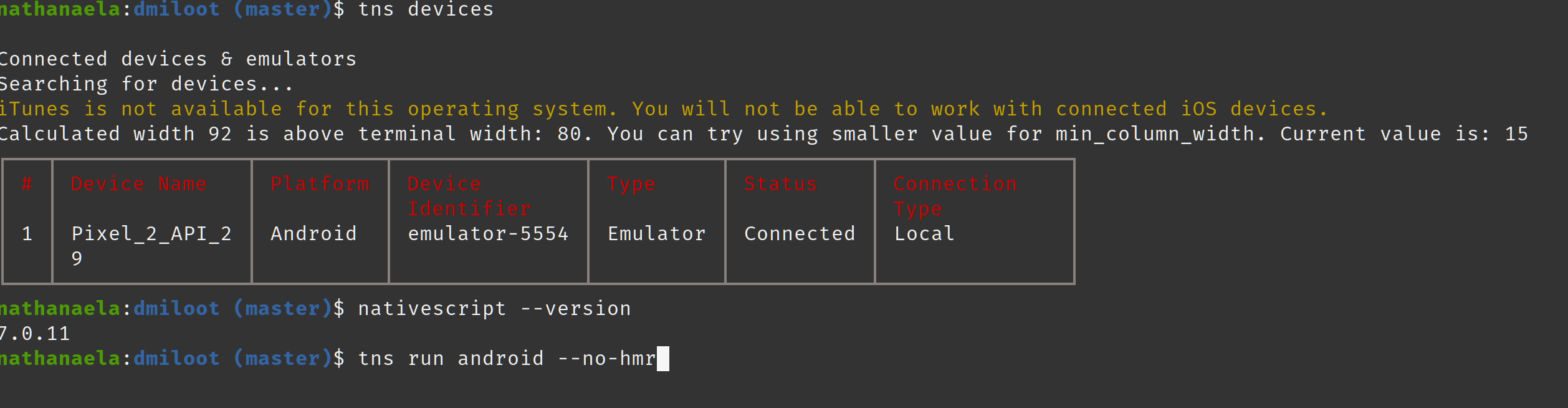
And then ran the app;

And it worked fine on my Api 29 & Api 30 emulators.
Can you try tns run android --log all and then send me the log
NathanaelA
on 1 Dec 2020
@NathanaelA I've been looking into this. deviceInfo may have been a red herring. I understood that the error was ultimately coming from a call to semver, so I put a trace into semver.js, then ran a tns plugin add command:
Trace: [CLI] here, boss
    at new SemVer (/usr/local/lib/node_modules/nativescript/node_modules/semver/classes/semver.js:22:15)
    at compare (/usr/local/lib/node_modules/nativescript/node_modules/semver/functions/compare.js:3:32)
    at Object.gt (/usr/local/lib/node_modules/nativescript/node_modules/semver/functions/gt.js:2:29)
    at PluginsService.isPluginDataValidForPlatform (/usr/local/lib/node_modules/nativescript/lib/services/plugins-service.js:415:29)
    at PluginsService.<anonymous> (/usr/local/lib/node_modules/nativescript/lib/services/plugins-service.js:66:26)
    at Generator.next (<anonymous>)
    at /usr/local/lib/node_modules/nativescript/lib/services/plugins-service.js:8:71
    at new Promise (<anonymous>)
    at __awaiter (/usr/local/lib/node_modules/nativescript/lib/services/plugins-service.js:4:12)
    at action (/usr/local/lib/node_modules/nativescript/lib/services/plugins-service.js:65:83)
So the problem evidently begins here:
> console.log(`runtimePackage`, runtimePackage);
< { name: '@nativescript/android', version: null }
So it's getting null for the Android runtime version...
Here is the package.json for my app (it is made from the official NativeScript plugin seed, but note that I hoist the @nativescript/android dependency, as I comment on later):
{
    "main": "app.js",
    "dependencies": {
        "@nativescript/android": "file:../../node_modules/@nativescript/android",
        "@nativescript/core": "file:../../node_modules/@nativescript/core",
        "@nativescript/ios": "file:../../node_modules/@nativescript/ios",
        "@react-navigation/core": "file:../../node_modules/@react-navigation/core",
        "react": "file:../../node_modules/react",
        "react-nativescript": "file:../../node_modules/react-nativescript",
        "react-nativescript-navigation": "file:../../node_modules/react-nativescript-navigation",
    },
    "devDependencies": {
        "@babel/core": "file:../../node_modules/@babel/core",
        "@nativescript/webpack": "~3.0.0",
        "@nativescript/types": "file:../../node_modules/@nativescript/types",
        "@pmmmwh/react-refresh-webpack-plugin": "file:../../node_modules/@pmmmwh/react-refresh-webpack-plugin",
        "@types/react": "file:../../node_modules/@types/react",
        "babel-loader": "file:../../node_modules/babel-loader",
        "fork-ts-checker-webpack-plugin": "file:../../node_modules/fork-ts-checker-webpack-plugin",
        "react-refresh": "file:../../node_modules/react-refresh",
        "typescript": "file:../../node_modules/typescript"
    }
}
... these refer to the monorepo dependencies. The monorepo's package.json is:
{
    "name": "plugins",
    "version": "0.0.0",
    "license": "MIT",
    "scripts": {
        "postinstall": "node ./node_modules/husky/lib/installer/bin install && patch-package",
        "setup": "npx rimraf node_modules package-lock.json dist tmp && npm i && ts-patch install",
        "start": "nps",
        "add": "nx g @nativescript/plugin-tools:add-package",
        "add-angular": "nx g @nativescript/plugin-tools:add-angular",
        "config": "nx g @nativescript/plugin-tools:config",
        "publish-packages": "nx g @nativescript/plugin-tools:publish"
    },
    "private": true,
    "devDependencies": {
        "@angular/animations": "~10.1.0",
        "@angular/common": "~10.1.0",
        "@angular/compiler": "~10.1.0",
        "@angular/compiler-cli": "~10.1.0",
        "@angular/core": "~10.1.0",
        "@angular/forms": "~10.1.0",
        "@angular/platform-browser": "~10.1.0",
        "@angular/platform-browser-dynamic": "~10.1.0",
        "@angular/router": "~10.1.0",
        "@babel/core": "^7.4.5",
        "@nativescript/android": "7.0.1",
        "@nativescript/angular": "~10.1.0",
        "@nativescript/core": "~7.0.0",
        "@nativescript/ios": "7.0.6",
        "@nativescript/plugin-tools": "~1.0.0",
        "@nativescript/types": "~7.0.0",
        "@nativescript/webpack": "~3.0.0",
        "@ngtools/webpack": "~10.1.0",
        "@pmmmwh/react-refresh-webpack-plugin": "^0.4.0-beta.5",
        "@react-navigation/core": "^5.13.2",
        "@types/react": "16.9.34",
        "babel-loader": "8.0.6",
        "fork-ts-checker-webpack-plugin": "^5.1.0",
        "husky": "^4.3.0",
        "nativescript-vue": "~2.8.0",
        "nativescript-vue-template-compiler": "~2.8.0",
        "ng-packagr": "~10.1.0",
        "patch-package": "^6.2.2",
        "react": "^16.13.1",
        "react-nativescript": "^2.1.0",
        "react-nativescript-navigation": "^2.0.1",
        "react-refresh": "^0.8.3",
        "rxjs": "~6.6.0",
        "typescript": "~4.0.0",
        "zone.js": "0.11.1"
    },
    "husky": {
        "hooks": {
            "pre-commit": "lint-staged"
        }
    },
    "lint-staged": {
        "**/*": [
            "nx format:write --files"
        ]
    }
}
So might this only affect monorepos? Unlike the NativeScript plugin seed, I've chosen to hoist the Android dependency in mine, as I couldn't see why it couldn't be hoistable – maybe that led to something breaking?
shirakaba
on 1 Dec 2020
So might this only affect monorepos? Unlike the NativeScript plugin seed, I've chosen to hoist the Android dependency in mine, as I couldn't see why it couldn't be hoistable – maybe that led to something breaking?
Nope, I tried "unhoisting" it, and it still faces the same error.
shirakaba
on 1 Dec 2020
After unhoisting my @nativescript/android dependency, and running tns clean, I tried tns doctor:
$ tns doctor
✔ Getting environment information

No issues were detected.
✔ Your ANDROID_HOME environment variable is set and points to correct directory.
✔ Your adb from the Android SDK is correctly installed.
✔ The Android SDK is installed.
✔ A compatible Android SDK for compilation is found.
✔ Javac is installed and is configured properly.
✔ The Java Development Kit (JDK) is installed and is configured properly.
✔ Xcode is installed and is configured properly.
✔ xcodeproj is installed and is configured properly.
✔ CocoaPods are installed.
✔ CocoaPods update is not required.
✔ CocoaPods are configured properly.
✔ Your current CocoaPods version is newer than 1.0.0.
✔ Python installed and configured correctly.
✔ The Python 'six' package is found.
✔ Xcode version 12.2.0 satisfies minimum required version 10.
✔ Getting NativeScript components versions information...
✔ Component nativescript has 7.0.11 version and is up to date.
✔ Component @nativescript/core has 7.0.13 version and is up to date.
✖ Component @nativescript/ios is not installed.
✖ Component @nativescript/android is not installed.

$ tns platform add [email protected]
Copying template files...
Platform android successfully added. v7.0.1

✔ Getting environment information

No issues were detected.
✔ Your ANDROID_HOME environment variable is set and points to correct directory.
✔ Your adb from the Android SDK is correctly installed.
✔ The Android SDK is installed.
✔ A compatible Android SDK for compilation is found.
✔ Javac is installed and is configured properly.
✔ The Java Development Kit (JDK) is installed and is configured properly.
✔ Xcode is installed and is configured properly.
✔ xcodeproj is installed and is configured properly.
✔ CocoaPods are installed.
✔ CocoaPods update is not required.
✔ CocoaPods are configured properly.
✔ Your current CocoaPods version is newer than 1.0.0.
✔ Python installed and configured correctly.
✔ The Python 'six' package is found.
✔ Xcode version 12.2.0 satisfies minimum required version 10.
✔ Getting NativeScript components versions information...
✔ Component nativescript has 7.0.11 version and is up to date.
✔ Component @nativescript/core has 7.0.13 version and is up to date.
✖ Component @nativescript/ios is not installed.
✖ Component @nativescript/android is not installed.
Pretty alarming that it still can't find @nativescript/android...
Note that the [CLI!] logs were added by myself into the NativeScript CLI.
$ tns plugin add my-cool-plugin
npm WARN [email protected] requires a peer of react@^16.13.1 but none is installed. You must install peer dependencies yourself.
npm WARN @0.0.1 No description
npm WARN @0.0.1 No repository field.
npm WARN @0.0.1 No license field.

+ @nativescript-community/[email protected]
updated 1 package and audited 901 packages in 4.853s

35 packages are looking for funding
  run `npm fund` for details

found 0 vulnerabilities

[CLI!] projectData.projectDir /Users/jamie/Documents/git/my-monorepo/apps/demo-react
[CLI!] platform android
[CLI!] runtimePackage { name: '@nativescript/android', version: null }
[CLI!] installedFrameworkVersion null
[CLI!] pluginPlatformsData { ios: '6.0.0', android: '6.0.0' }
[CLI!] pluginPlatformsData[platform] 6.0.0
Trace: [CLI!] here boss
    at new SemVer (/usr/local/lib/node_modules/nativescript/node_modules/semver/classes/semver.js:22:15)
    at compare (/usr/local/lib/node_modules/nativescript/node_modules/semver/functions/compare.js:3:32)
    at Object.gt (/usr/local/lib/node_modules/nativescript/node_modules/semver/functions/gt.js:2:29)
    at PluginsService.isPluginDataValidForPlatform (/usr/local/lib/node_modules/nativescript/lib/services/plugins-service.js:421:29)
    at PluginsService.<anonymous> (/usr/local/lib/node_modules/nativescript/lib/services/plugins-service.js:66:26)
    at Generator.next (<anonymous>)
    at /usr/local/lib/node_modules/nativescript/lib/services/plugins-service.js:8:71
    at new Promise (<anonymous>)
    at __awaiter (/usr/local/lib/node_modules/nativescript/lib/services/plugins-service.js:4:12)
    at action (/usr/local/lib/node_modules/nativescript/lib/services/plugins-service.js:65:83)
Invalid Version: null
@shirakaba - Create a new Issue for this; so we can track it. We probably should add code in the CLI that if we get a NULL version we set the version to "0.0.0" or something like that.
NathanaelA
on 1 Dec 2020
@NathanaelA Moved to here: https://github.com/NativeScript/nativescript-cli/issues/5444
shirakaba
on 2 Dec 2020
Related issues
 Fatme
·
3Comments
Fatme
·
3Comments
 jerbob92
·
3Comments
jerbob92
·
3Comments
 farfromrefug
·
3Comments
farfromrefug
·
3Comments
 NickIliev
·
3Comments
NickIliev
·
3Comments
 StevenSeo
·
3Comments
StevenSeo
·
3Comments