Nativescript-angular: Same ActionBar between Components
Hi guys,
Using a component like a Layout, for example:
{ path: '', component: CatalogHomeComponent,
    children: [
      {
        path: '',
        component: CatalogCategoryListComponent
      },
      {
        path: 'category-list/:categoryId',
        component: CatalogCategoryListComponent
      },
      {
        path: 'product-list/:categoryId',
        component: CatalogProductListComponent
      }
    ]
}
Is possible to have the same ActionBar between multiple components from a Layout Component? For example:
<ActionBar backgroundColor="white">
    <NavigationButton visibility="collapsed"></NavigationButton>
    <GridLayout columns="auto,*,auto">
        <Image horizontalAlignment="left" width="26" ios:marginLeft="8" marginRight="10" src="res://menu" row="0" col="0"></Image>
        <SearchBar (loaded)="onSearchBarLoaded($event)" hint="Search in catalog" row="0" col="1" height="30"></SearchBar>
        <Image (tap)="scanBarcode()" horizontalAlignment="right" width="26" ios:marginRight="24" android:marginRight="15" marginLeft="10" src="res://scan" row="0" col="2"></Image>
    </GridLayout>
</ActionBar>
<page-router-outlet></page-router-outlet>
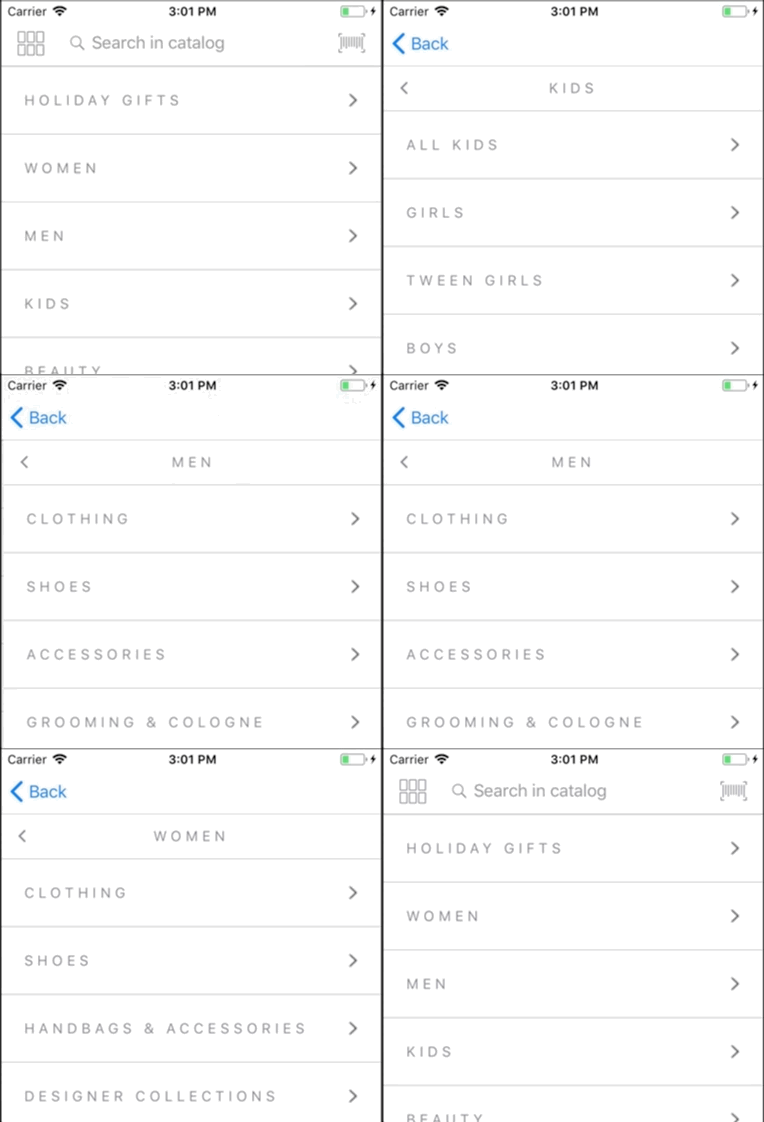
But the ActionBar is affected by the navigation
Let me know what you think.
Thank in advance, Nicholls
 jdnichollsc
All 9 comments
I would love the possibility of having a property to define that the ActionBar is kept between different views or that we can have animations using the router-outlet component.
jdnichollsc
on 22 Nov 2017
Hi @jdnichollsc,
If I understand you correctly, you need to share your ActionBar with the whole stilling, which you have attached to it between different components in the project.
In this case, you could define a custom component which contains only the ActionBar and to share it inside the other components, while using its selector. For example.
actionar-component.html
<ActionBar [title]="acbtitle" backgroundColor="green" class="action-bar"></ActionBar>
actionar-component.ts
import { Component, OnInit, Input } from "@angular/core";
import { ActivatedRoute } from "@angular/router";

@Component({
    selector: "ab-component",
    moduleId: module.id,
    templateUrl: "./actionbar-component.html",
})
export class ActionBarComponent{
@Input() acbtitle:string;
}
For your convenience, I am attaching a sample project.
 tsonevn
on 23 Nov 2017
tsonevn
on 23 Nov 2017
Yes @tsonevn, I have the ActionBar in a component, example:
searchbar.component.html
<ActionBar backgroundColor="white">
    <NavigationButton visibility="collapsed"></NavigationButton>
    <GridLayout columns="auto,*,auto">
        <Image horizontalAlignment="left" width="26" ios:marginLeft="8" marginRight="10" src="res://menu" row="0" col="0"></Image>
        <SearchBar (loaded)="onSearchBarLoaded($event)" hint="Search in catalog" row="0" col="1" height="30"></SearchBar>
        <Image (tap)="scanBarcode()" horizontalAlignment="right" width="26" ios:marginRight="24" android:marginRight="15" marginLeft="10" src="res://scan" row="0" col="2"></Image>
    </GridLayout>
</ActionBar>
But I want to avoid to inject the new component in every page with the same header. Because I'm getting the following issue with the ActionBar on iOS (Check the wrong transition of the SearchBar)

Thanks for your help!
jdnichollsc
on 23 Nov 2017

I think that movement of the searchbar is an error with the transition of the iOS navigation ☝
Additionally it would be too useful to be able to maintain the status of the ActionBar between several views, to improve the user experience by navigating between different views with the same ActionBar.
What do you think guys? Any help with this issue is really appreciated 🙏
For the moment I'm using the router-outlet, but the transition of the page-router-outlet component is very important.
Thanks in advance, Nicholls
jdnichollsc
on 23 Nov 2017
Hi @jdnichollsc,
I will review the issue with the application transition animations and will check if this is something that depends on NativeScript.
Regarding your question, I would suggest you another option for sharing the ActionBar. You could create a custom directive, which will allow you setting up the ActionBar between the components in the app. The similar scenario is already used in one of our sample apps. You could review the sample implementation here.
tsonevn
on 24 Nov 2017
Hi @jdnichollsc,
Could you check if you will have the same behavior with transition animations while using the latest NativeScript 3.4?
tsonevn
on 3 Jan 2018
@tsonevn ok, let me try, thanks for the help! 👍
jdnichollsc
on 3 Jan 2018
Closing due to inactivity. If the issue still persists, please provide sample project, which could be used for debugging and I will reopen the issue.
tsonevn
on 22 Jan 2018
@tsonevn sorry for the delay, the transition looks good!
Thanks for the help!
jdnichollsc
on 22 Jan 2018
Related issues
 leakira
·
3Comments
leakira
·
3Comments
 pkoleva
·
3Comments
pkoleva
·
3Comments
 NathanWalker
·
3Comments
NathanWalker
·
3Comments
 sis0k0
·
3Comments
tsonevn
·
3Comments
sis0k0
·
3Comments
tsonevn
·
3Comments
Most helpful comment
Hi @jdnichollsc,
If I understand you correctly, you need to share your ActionBar with the whole stilling, which you have attached to it between different components in the project.
In this case, you could define a custom component which contains only the ActionBar and to share it inside the other components, while using its selector. For example.
actionar-component.html
actionar-component.ts
For your convenience, I am attaching a sample project.
Archive.zip