Nativescript-angular: Pages freeze for some seconds when navigating back or clicking to another page
App freezes for some seconds when navigating. here is a short video https://monosnap.com/file/zCaoIuun29R2lL4r7y3ezD8QH8Nld9 of an emulator, the same problem persists on devices as well, even some other nativescript I'm working on and some other sample apps.
you may just add styles.css to the root of the app folder to avoid missing file error.
main.js
import 'reflect-metadata';
import { platformNativeScriptDynamic, NativeScriptModule } from "nativescript-angular/platform";
import { NgModule } from "@angular/core";
import { NativeScriptRouterModule } from "nativescript-angular/router";
import { NativeScriptFormsModule } from "nativescript-angular/forms";

import { Component, OnInit, OnDestroy } from "@angular/core";
import { ActivatedRoute, Router } from '@angular/router';
import { Observable } from "rxjs";
import { Location } from '@angular/common';
import { Page } from "ui/page";


@Component({
    selector: "first",
    styleUrls: ["./styles.css"],
    template: `
    <StackLayout>
        <Label text="First component" class="title"></Label>
        <Button text="Second(1)" [nsRouterLink]="['/second', '1' ]"></Button>
        <Button text="Second(2)" [nsRouterLink]="['/second', '2' ]"></Button>

        <Button text="Third(1)" [nsRouterLink]="['/third', '1' ]"></Button>
        <Button text="Third(2)" [nsRouterLink]="['/third', '2' ]"></Button>
    </StackLayout>`
})
class FirstComponent implements OnInit, OnDestroy {
    constructor(page: Page) {
        console.log("FirstComponent.constructor() page: " + page);
    }

    ngOnInit() {
        console.log("FirstComponent - ngOnInit()");
    }

    ngOnDestroy() {
        console.log("FirstComponent - ngOnDestroy()");
    }
}

@Component({
    selector: "second",
    styleUrls: ["./styles.css"],
    template: `
    <StackLayout>
        <Label [text]="'Second component: ' + (id | async)" class="title"></Label>

        <Button text="BACK" (tap)="goBack()"></Button>

        <Button text="First" [nsRouterLink]="['/']"></Button>
        <Button text="Third(1)" [nsRouterLink]="['/third', '1' ]"></Button>
        <Button text="Third(2)" [nsRouterLink]="['/third', '2' ]"></Button>
    </StackLayout>`
})
class SecondComponent implements OnInit, OnDestroy {
    public id: Observable<string>;
    constructor(private location: Location, route: ActivatedRoute, page: Page) {
        console.log("SecondComponent.constructor() page: " + page);
        this.id = route.params.map(r => r["id"]);
    }

    ngOnInit() {
        console.log("SecondComponent - ngOnInit()");
    }

    ngOnDestroy() {
        console.log("SecondComponent - ngOnDestroy()");
    }

    goBack() {
        this.location.back();
    }
}

@Component({
    selector: "third",
    styleUrls: ["./styles.css"],
    template: `
    <StackLayout>
        <Label [text]="'Third component: ' + (id | async)" class="title"></Label>

        <Button text="BACK" (tap)="goBack()"></Button>

        <Button text="First" [nsRouterLink]="['/']"></Button>
        <Button text="Second(1)" [nsRouterLink]="['/second', '1' ]"></Button>
        <Button text="Second(2)" [nsRouterLink]="['/second', '2' ]"></Button>
    </StackLayout>`
})
class ThirdComponent implements OnInit, OnDestroy {
    public id: Observable<string>;
    constructor(private location: Location, route: ActivatedRoute, page: Page) {
        console.log("ThirdComponent.constructor() page: " + page);
        this.id = route.params.map(r => r["id"]);
    }

    ngOnInit() {
        console.log("ThirdComponent - ngOnInit()");
    }

    ngOnDestroy() {
        console.log("ThirdComponent - ngOnDestroy()");
    }

    goBack() {
        this.location.back();
    }
}

@Component({
    selector: 'navigation-test',
    template: `<page-router-outlet></page-router-outlet>`
})
export class PageRouterOutletAppComponent {
    static routes = [
        { path: "", component: FirstComponent },
        { path: "second/:id", component: SecondComponent },
        { path: "third/:id", component: ThirdComponent },
    ];

    static entries = [
        FirstComponent,
        SecondComponent,
        ThirdComponent
    ]

    constructor(router: Router, private location: Location) {
        router.events.subscribe((e) => {
            console.log("--EVENT-->: " + e.toString());
        });
    }
}


@NgModule({
    declarations: [ PageRouterOutletAppComponent, PageRouterOutletAppComponent.entries ],
    bootstrap: [PageRouterOutletAppComponent],
    imports: [
        NativeScriptModule,
        NativeScriptRouterModule,
        NativeScriptRouterModule.forRoot(PageRouterOutletAppComponent.routes),
        NativeScriptFormsModule
    ],
})
class AppComponentModule {}

platformNativeScriptDynamic().bootstrapModule(AppComponentModule);
 kielsoft
All 13 comments
This is a problem with tns core modules 2.3.0, try using 2.2.1 and check. Should work I think
 sivsushruth
on 26 Sep 2016
sivsushruth
on 26 Sep 2016
Please could you help on how to downgrade the tns-core-modules, I tried using
npm uninstall tns-core-modules --save
and then use
npm install [email protected] --save
and when I tns run android i got this error
Executing before-prepare hook from /BackUP/Projects/NativeScript/OneClick.ng/hooks/before-prepare/nativescript-dev-typescript.js
Found peer TypeScript 2.0.3
node_modules/tns-core-modules/es6.d.ts(9,13): error TS2451: Cannot redeclare block-scoped variable 'Object'.
node_modules/typescript/lib/lib.d.ts(94,11): error TS2451: Cannot redeclare block-scoped variable 'Object'.
node_modules/typescript/lib/lib.d.ts(235,15): error TS2451: Cannot redeclare block-scoped variable 'Object'.
TypeScript compiler failed with exit code 1
The exact same thing is happening to me (it even happens on the sample-groceries app), I'll try to downgrade and let you know what I got.
 agu-z
on 30 Sep 2016
agu-z
on 30 Sep 2016
Alright....
kielsoft
on 30 Sep 2016
I got the same problem but found temporary solution here:
https://github.com/NativeScript/NativeScript/issues/2735
Go to file: tns-core-modules/ui/transition/transition.android.js and comment gc(); on line 12.
 mani3kxc
on 4 Oct 2016
mani3kxc
on 4 Oct 2016
Couldn't find that file in 2.3.0
kielsoft
on 4 Oct 2016
Strange, I also use 2.3.0.
Check again, are you sure you're looking in your_project_dir/node_modules/tns-core-modules/ui/transition/?
mani3kxc
on 5 Oct 2016
There seems to be a kinda problem with {N} page-router-outlet in [email protected] you have to downgrade to @2.2.1 that helped, but some other little things to do are:
- delete these folders:
hooks,lib,node_modules, andplatforms - update the
package.jsonin your project root to have these dependencies:
"dependencies": {
"@angular/common": "2.0.0",
"@angular/compiler": "2.0.0",
"@angular/core": "2.0.0",
"@angular/http": "2.0.0",
"@angular/platform-browser": "2.0.0",
"@angular/platform-browser-dynamic": "2.0.0",
"@angular/platform-server": "2.0.0",
"@angular/router": "3.0.0",
"nativescript-angular": "1.0.0",
"reflect-metadata": "^0.1.3",
"rxjs": "5.0.0-beta.12",
"tns-core-modules": "2.2.1"
},
"devDependencies": {
"zone.js": "^0.6.21",
"babel-traverse": "6.10.4",
"babel-types": "6.10.2",
"babylon": "6.8.1",
"chai": "^3.5.0",
"filewalker": "0.1.3",
"karma": "^0.13.22",
"karma-chai": "^0.1.0",
"karma-mocha": "^0.2.2",
"karma-nativescript-launcher": "^0.4.0",
"lazy": "1.0.11",
"mocha": "^2.4.5",
"nativescript-dev-typescript": "^0.3.1",
"typescript": "^1.8.10"
}
2b. dont forget to to include other plugins you used in your app
- Remove
dependenciesanddevDependenciesinapp/package.jsonif any, it is useless tns platform add androidortns platform add iosas your lordship pleases- run your app.
I hope this navigation issue will be solved in 2.4
kielsoft
on 5 Oct 2016
@kielsoft we disccussed about it on Slack, your solution work but is quite of a downgrade, I would prefer to use @mani3kxc solution, which works fine ! :)
 echap
on 5 Oct 2016
echap
on 5 Oct 2016
This issue is indeed duplicate of NativeScript/NativeScript#2735.
The solution @mani3kxc proposed (removing the gc() call in tns-core-modules/ui/transition/transition.android.js) may work, but keep in mind it can cause memory problems.
 vakrilov
on 5 Oct 2016
vakrilov
on 5 Oct 2016
I dont know why I can find the file in my package
kielsoft
on 5 Oct 2016
hi @vakrilov i am using "tns-android" "version": "3.4.0" and nativescript 3.4 and facing the same problem.
i use tns run android --bundle --env.uglify --env.aot --env.snapshot
to build my project but the problems of freez when navigating from one page to another persist.
i did the profiling using timeline-view and here is my report :
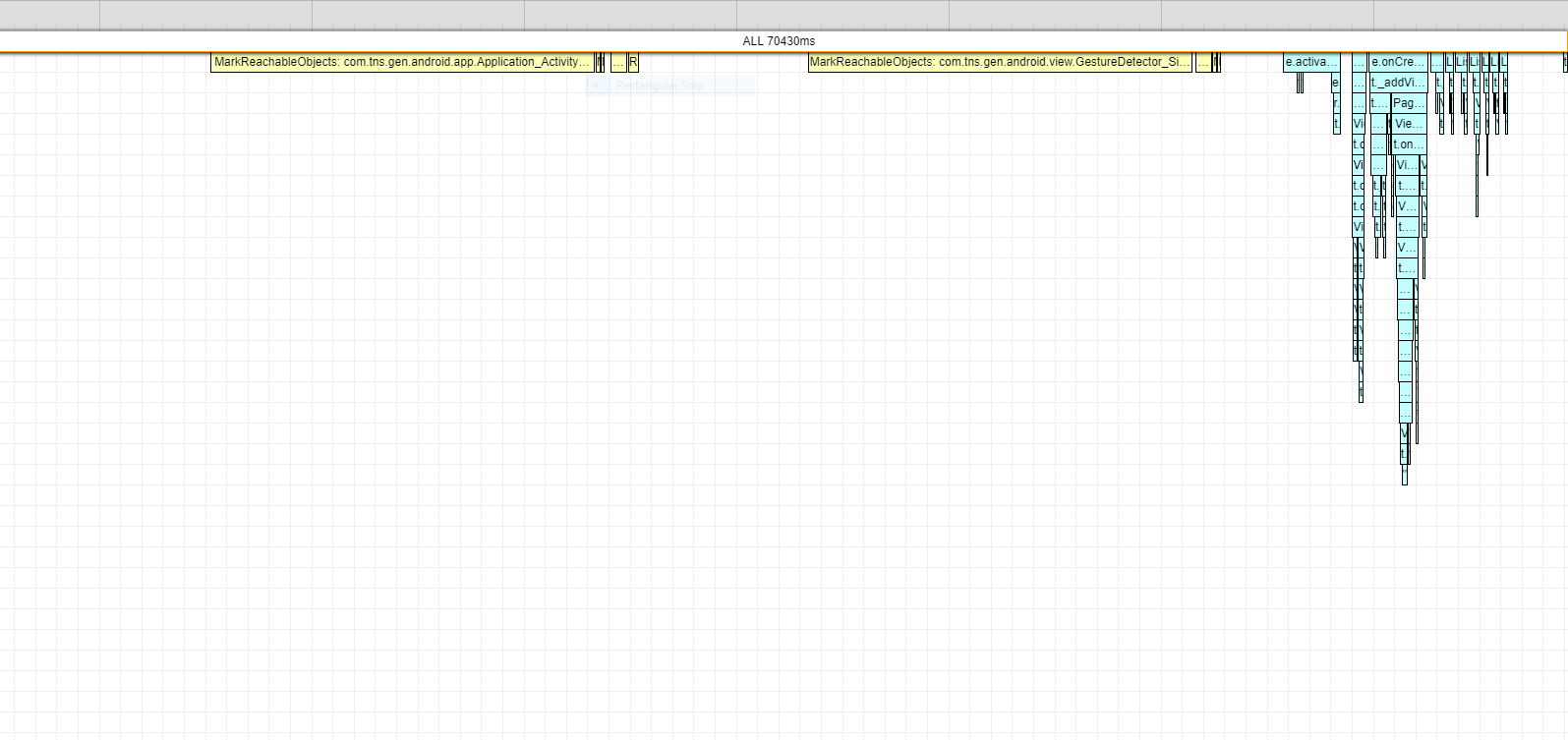
any leads ?
thanks.
 dali-gharbi
on 26 Feb 2018
dali-gharbi
on 26 Feb 2018
Hi @dali-gharbi
The large MarkReachableObjects chunks are part of the garbage collection pass. There is currently a performance issue with the GC especially on Android when using angular. Our team is active working on the problem as it is a quite complicated one.
Currently, there is an experimental mode of the GC that you can try out by setting markingMode in the package.json which is inside your app folder:
  "android": {
     // ...
    "markingMode": "none"
  }
Note: This is still an experimental options an might lead and there are some known issues when using it (like https://github.com/NativeScript/android-runtime/issues/887). However, it will speed up the GC pass significantly and works well in most applications.
vakrilov
on 27 Feb 2018
Related issues
 triniwiz
·
3Comments
triniwiz
·
3Comments
 bhavincb
·
3Comments
bhavincb
·
3Comments
 tskweres
·
3Comments
tskweres
·
3Comments
 pkoleva
·
3Comments
pkoleva
·
3Comments
 dxshindeo
·
3Comments
dxshindeo
·
3Comments
Most helpful comment
Hi @dali-gharbi
The large
MarkReachableObjectschunks are part of the garbage collection pass. There is currently a performance issue with the GC especially on Android when using angular. Our team is active working on the problem as it is a quite complicated one.Currently, there is an experimental mode of the GC that you can try out by setting
markingModein thepackage.jsonwhich is inside your app folder:Note: This is still an experimental options an might lead and there are some known issues when using it (like https://github.com/NativeScript/android-runtime/issues/887). However, it will speed up the GC pass significantly and works well in most applications.