Nativefier: WhatsApp Web stopped working around 2018-11-30 - Asks for Google Chrome ≥ 36
Description
WhatsApp Web was working so well until few days back. Now when the application is started, it says the following:
WhatsApp works with Google Chrome 36+
To use WhatsApp, update Chrome or use Mozilla Firefox, Safari, Microsoft Edge or Opera.

Update Google Chrome

Steps to reproduce issue
$ nativefier --name "WhatsApp Web" https://web.whatsapp.com
$ ./whatsapp-web-linux-x64/whatsapp-web
Details
- Are you nativefying a public website? Yes.
- Feature request? No.
- Full nativefier command used to build your app:
nativefier --name "WhatsApp Web" https://web.whatsapp.com - Version of Nativefier (run
nativefier --version):v7.6.8 - Version of node.js (run
node --version):v8.10.0 - OS:
Ubuntu 18.04.1 LTS - Bionic - Error message / stack trace (if any): None.
 prashant-shahi
All 71 comments
@coolboi567 just update Nativefier and re-package the app. Yes we know we should do a better job at communicating this to users, see https://github.com/jiahaog/nativefier/issues/556; contributions welcome.
 ronjouch
on 30 Nov 2018
ronjouch
on 30 Nov 2018
same issue with vers. 7.6.8
I think this issue need to be open
 bitlab-code
on 30 Nov 2018
bitlab-code
on 30 Nov 2018
@bitlab-code Nativefier 7.6.8 ships with a default Electron version of 3.0.3, based on Chrome 66. Are you sure you did re-package your app with it, by re-running the nativefier command used to package it? If yes, then inside your nativefied app can you pop open the inspector (Ctrl/Cmd+Shift+I) and in the console type navigator.userAgent . What does it output?
ronjouch
on 30 Nov 2018
@ronjouch command + log
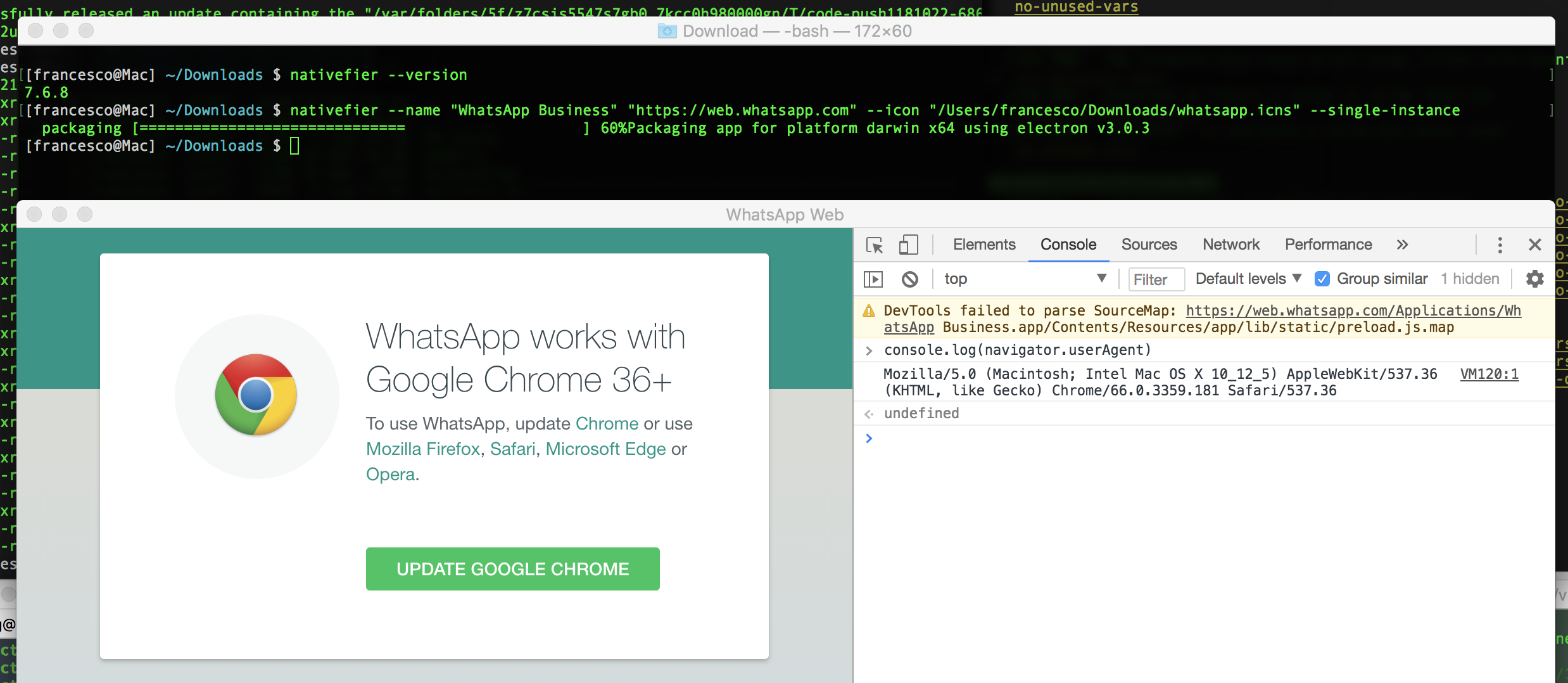
bitlab-code
on 30 Nov 2018
@bitlab-code thanks, your setup looks good indeed.
WhatsApp must be doing some kind of new userAgent sniffing / feature detection that results in blocking Nativefier. Patches welcome.
ronjouch
on 30 Nov 2018
As a "workaround" you can go to 'edit > clear app data' and rescan the QR code.
 lima-eduardo
on 2 Dec 2018
lima-eduardo
on 2 Dec 2018
As a "workaround" you can go to 'edit > clear app data' and rescan the QR code.
Better "workaround"
Steps:
- Open DevTools (Ctrl+Shift+i)
- Application
- Service Workers
- Bypass for network
- Reload (Ctrl+r)
- Close DevTools
Or inject this code
if (document.body.innerText.replace(/\n/g, ' ').search(/whatsapp works with.*to use whatsapp.*update/i) === 0)
    navigator.serviceWorker.getRegistration().then(function (r) { r.unregister(); document.location.reload() });
 saulocastelo
on 3 Dec 2018
saulocastelo
on 3 Dec 2018
sorry for the noob question.
Where should i Inject the above code?
 lipe1966
on 11 Dec 2018
lipe1966
on 11 Dec 2018
"Bypass for network" works for me only once.
 vip9
on 11 Dec 2018
vip9
on 11 Dec 2018
@lipe1966 create file whatsapp-fix.js with inject code from @saulocastelo comment, then nativefier -n "WhatsApp" --inject whatsapp-fix.js "https://web.whatsapp.com"
 shvchk
on 12 Dec 2018
shvchk
on 12 Dec 2018
I ran it clean using the container to build a new bin and worked. So what's going on exactly?
I had that error with Chrome 66. (does it apply only with old existing sessions?)
 roccomuso
on 12 Dec 2018
roccomuso
on 12 Dec 2018
It does not work for me, even with a new session. But if I open multiple instances of the app at the same time, one usually works.
With the fix saulocastelo it works all the time, as far as I can tell right now. Thanks @saulocastelo :)
 Birkenstab
on 12 Dec 2018
Birkenstab
on 12 Dec 2018
I'm having the same issue on electron, but that @saulocastelo 's fix doesn't work. in the promise result r is undefined for me.
roccomuso
on 12 Dec 2018
As a "workaround" you can go to 'edit > clear app data' and rescan the QR code.
This only works once. @shvchk's solution worked for me.
 eaorak
on 13 Dec 2018
eaorak
on 13 Dec 2018
Related: https://github.com/meetfranz/franz/issues/1185
Hopefully someone will find a stable fix
roccomuso
on 16 Dec 2018
Found this snap that works perfectly https://snapcraft.io/whatsdesk
lipe1966
on 17 Dec 2018
Hello! I hope I can contribute with my suggestion. You could enable the right click and show the element inspector option, among others. Through the element inspector, the user can define a user agent supported by WhatsApp Web. I am looking forward to using Nativefier. Success to all!
 FcoMarcosMAbreu
on 21 Dec 2018
FcoMarcosMAbreu
on 21 Dec 2018
@lipe1966 create file
whatsapp-fix.jswith inject code from @saulocastelo comment, thennativefier -n "WhatsApp" --inject whatsapp-fix.js "https://web.whatsapp.com"
This hack works for me. Thanks!
 copyme
on 26 Dec 2018
copyme
on 26 Dec 2018
@lipe1966 create file
whatsapp-fix.jswith inject code from @saulocastelo comment, thennativefier -n "WhatsApp" --inject whatsapp-fix.js "https://web.whatsapp.com"
Thank you very much! This works for me too.
FcoMarcosMAbreu
on 27 Dec 2018
Surprisingly for me, CTRL+SHIFT+I and after the DevTools appear CTRL+R is resolving the issue temporarily.
prashant-shahi
on 28 Dec 2018
Hi everyone!
I decided to create "fix" for WhatsApp which will build the application correctly. This is a simple bash script, which download JS script and execute build app with nativefier including JS file. I know is it not resolved bug, but at least the application works correctly.
 DocBox12
on 1 Jan 2019
DocBox12
on 1 Jan 2019
I'm having the same issue on electron, but that @saulocastelo 's fix doesn't work. in the promise result
ris undefined for me.
Are you still facing this problem? Maybe I can help you, send me a message using Google Hangout or an E-mail with the details ([email protected])
saulocastelo
on 13 Feb 2019
As a "workaround" you can go to 'edit > clear app data' and rescan the QR code.
This only works once. @shvchk's solution worked for me.
You have to activate on every session, that's the reason that i make the js code
saulocastelo
on 13 Feb 2019
Hello! I hope I can contribute with my suggestion. You could enable the right click and show the element inspector option, among others. Through the element inspector, the user can define a user agent supported by WhatsApp Web. I am looking forward to using Nativefier. Success to all!
The nativefier has an option('-u') to set the useragent but didn't work
saulocastelo
on 13 Feb 2019
I'm having this problem now (Electron), did you find her solution?
Occasionally it happens, When it happens I always resolve with this:
As a "workaround" you can go to 'edit > clear app data' and rescan the QR code.
bitlab-code
on 25 Feb 2019
@saulocastelo 's solution worked for quite some time, but as of yesterday, only Clearing App Data has been doing the trick. But I don't want to rescan the code everytime.
 Jodanzuki
on 10 Apr 2019
Jodanzuki
on 10 Apr 2019
@Jodanzuki agree, stopped working again yesterday. Clean app required now. too bad.
roccomuso
on 10 Apr 2019
@saulocastelo 's solution worked for quite some time, but as of yesterday, only Clearing App Data has been doing the trick. But I don't want to rescan the code everytime.
I will see this problem again soon as possible and I will get back to you!
saulocastelo
on 10 Apr 2019
@Jodanzuki agree, stopped working again yesterday. Clean app required now. too bad.
Please always add me to the conversation when this has any failure, will be easier for me to see your problem. 😉🖖🏻
saulocastelo
on 10 Apr 2019
Same here:
when using your whats-app-linux-64/whats-app executable it's possible to enter dev tools on chromium: ctrl+shift+I, then in Applications -> Bypass for network: check, ctrl+ r to reload then it works. But need to do it everytime when start.
Do you have solution?
 boban-dj
on 11 Apr 2019
boban-dj
on 11 Apr 2019
Heeeey guys whaaaaat are you waiting foooooor
if (document.body.innerText.replace(/\n/g, ' ').search(/whatsapp works with.*to use whatsapp.*update/i) !== -1)
navigator.serviceWorker.getRegistration().then(function (r) { r.unregister(); document.location.reload() });
just replace === 0 to !== -1 and be happy!
saulocastelo
on 12 Apr 2019
Hi everyone!
I decided to create "fix" for WhatsApp which will build the application correctly. This is a simple bash script, which download JS script and execute build app with nativefier including JS file. I know is it not resolved bug, but at least the application works correctly.
@DocBox12 Check the pull request!
saulocastelo
on 12 Apr 2019
@saulocastelo I accepted pull request. Thanks!
DocBox12
on 13 Apr 2019
This is work for me:
mainWindow.webContents.on('dom-ready', function(e) {
let script = `
window.onunload = () => {
navigator.serviceWorker.getRegistrations().then(
function(registrations) {
for(let registration of registrations) {
registration.unregister();
}
}
)
}
`
mainWindow.webContents.executeJavaScript(script)
})
 fabionogueira
on 28 Apr 2019
fabionogueira
on 28 Apr 2019
This is work for me:
mainWindow.webContents.on('dom-ready', function(e) { let script = ` window.onunload = () => { navigator.serviceWorker.getRegistrations().then( function(registrations) { for(let registration of registrations) { registration.unregister(); } } ) } ` mainWindow.webContents.executeJavaScript(script) })
This is a great way to do but will always remove the workers even if there's no need. But will avoid the reload on startup. Another issue could be if you need to kill the app (unresponsive) ... the window.unload will not be called and then you will have the problem again.
Tell me if you are able to solve this 2 questions. It's really better avoid the reload when start.
Thank's for sharing this. :)
saulocastelo
on 29 Apr 2019
Did WhatsApp update again?
It keeps asking for Google Chrome 36+, no matter I refresh the page manually or programmingly.
 chriskyfung
on 26 Jun 2019
chriskyfung
on 26 Jun 2019
Now It's asking for me again, to update for Chrome 49+. Tried a lot of fixes that I saw here but nothing works. :(
 raulcraveiro
on 14 Jan 2020
raulcraveiro
on 14 Jan 2020
I have to second this, the issue is back, whatsapp is asking for something already has. No big deal having to do the developer tools stuff, but it's frustrating to do it every single time I open the app.
Now It's asking for me again, to update for Chrome 49+. Tried a lot of fixes that I saw here but nothing works. :(
 MauricioGlz
on 15 Jan 2020
MauricioGlz
on 15 Jan 2020
I can confirm also that the issue is back. Nativefier is up to date here.
 filipegarrett
on 30 Jan 2020
filipegarrett
on 30 Jan 2020
Now It's asking for me again, to update for Chrome 49+. Tried a lot of fixes that I saw here but nothing works. :(
Facing the same issue here
 NikSWE
on 30 Jan 2020
NikSWE
on 30 Jan 2020
I had the same issue again, since 2 weeks or so.
Hi everyone!
I decided to create "fix" for WhatsApp which will build the application correctly. This is a simple bash script, which download JS script and execute build app with nativefier including JS file. I know is it not resolved bug, but at least the application works correctly.
This fix actually DID still work for me!
 CrazyEasy
on 30 Jan 2020
CrazyEasy
on 30 Jan 2020
I had the same issue again, since 2 weeks or so.
Hi everyone!
I decided to create "fix" for WhatsApp which will build the application correctly. This is a simple bash script, which download JS script and execute build app with nativefier including JS file. I know is it not resolved bug, but at least the application works correctly.
https://github.com/DocBox12/WhatsApp-nativefier-fixThis fix actually DID still work for me!
Worked here as well!
filipegarrett
on 30 Jan 2020
Now It's asking for me again, to update for Chrome 49+. Tried a lot of fixes that I saw here but nothing works. :(
Facing the same issue here
updated the electron version to 8.0.0 and its working fine for me
NikSWE
on 10 Feb 2020
I just released Nativefier 8.0.2, which defaults to latest Electron 8.1.1. I don't use WhatsApp, can anyone test it and report if this issue is addressed, and if the fix at https://github.com/jiahaog/nativefier/issues/719#issuecomment-482736304 is still necessary.
ronjouch
on 15 Mar 2020
I just released Nativefier 8.0.2, which defaults to latest Electron 8.1.1. I don't use WhatsApp, can anyone test it and report if this issue is addressed, and if the fix at #719 (comment) is still necessary.
I'm trying to install nativefier here and getting an error:
``npm ERR! code ELIFECYCLE
npm ERR! errno 1
npm ERR! [email protected] postinstall:cd app && yarn install --no-lockfile --no-progress --silent`
npm ERR! Exit status 1
npm ERR!
npm ERR! Failed at the [email protected] postinstall script.
npm ERR! This is probably not a problem with npm. There is likely additional logging output above.
npm ERR! A complete log of this run can be found in:
npm ERR! /root/.npm/_logs/2020-03-15T22_51_32_660Z-debug.log```
raulcraveiro
on 15 Mar 2020
I'm trying to install nativefier here and getting an error:
npm ERR! errno 1 npm ERR! [email protected] postinstall: `cd app && yarn install --no-lockfile --no-progress --silent` npm ERR! Exit status 1 npm ERR! npm ERR! Failed at the [email protected] postinstall script. npm ERR! This is probably not a problem with npm. There is likely additional logging output above. npm ERR! A complete log of this run can be found in: npm ERR! /root/.npm/_logs/2020-03-15T22_51_32_660Z-debug.log`
@raulcraveiro what does /root/.npm/_logs/2020-03-15T22_51_32_660Z-debug.log say? What happens if you manually do the postinstall: going in your global lib/node_modules/nativefier folder, then running cd app && yarn install --no-lockfile --no-progress --silent.
Installation works for me, but as user in a user-writable npm_config_prefix, not as root:
~ npm i -g nativefier
npm WARN deprecated [email protected]: request has been deprecated, see https://github.com/request/request/issues/3142
/home/ronj/.node_modules/bin/nativefier -> /home/ronj/.node_modules/lib/node_modules/nativefier/lib/cli.js
> [email protected] postinstall /home/ronj/.node_modules/lib/node_modules/nativefier/node_modules/core-js
> node -e "try{require('./postinstall')}catch(e){}"
> [email protected] postinstall /home/ronj/.node_modules/lib/node_modules/nativefier
> cd app && yarn install --no-lockfile --no-progress --silent
+ [email protected]
added 288 packages from 332 contributors in 14.917s
This is the result of the debug.log: https://paste.ubuntu.com/p/Q5mZ28673x/
raulcraveiro
on 16 Mar 2020
This is the result of the debug.log: paste.ubuntu.com/p/Q5mZ28673x
@raulcraveiro thanks. So,
8682 verbose lifecycle [email protected]~postinstall: unsafe-perm in lifecycle false
8683 verbose lifecycle [email protected]~postinstall: PATH: /usr/share/npm/node_modules/npm-lifecycle/node-gyp-bin:/usr/local/lib/node_modules/nativefier/node_modules/.bin:/usr/local/lib/node_modules/.bin:/usr/local/sbin:/usr/local/bin:/usr/sbin:/usr/bin:/sbin:/bin:/snap/bin
8684 verbose lifecycle [email protected]~postinstall: CWD: /usr/local/lib/node_modules/nativefier
8685 silly lifecycle [email protected]~postinstall: Args: [ '-c',
8685 silly lifecycle 'cd app && yarn install --no-lockfile --no-progress --silent' ]
8686 silly lifecycle [email protected]~postinstall: Returned: code: 1 signal: null
8687 info lifecycle [email protected]~postinstall: Failed to exec postinstall script
8688 verbose unlock done using /root/.npm/_locks/staging-3a08f0df5026584d.lock for /usr/local/lib/node_modules/.staging
8689 verbose stack Error: [email protected] postinstall: `cd app && yarn install --no-lockfile --no-progress --silent`
8689 verbose stack Exit status 1
8689 verbose stack at EventEmitter.<anonymous> (/usr/share/npm/node_modules/npm-lifecycle/index.js:283:16)
8689 verbose stack at EventEmitter.emit (events.js:189:13)
8689 verbose stack at ChildProcess.<anonymous> (/usr/share/npm/node_modules/npm-lifecycle/lib/spawn.js:55:14)
8689 verbose stack at ChildProcess.emit (events.js:189:13)
8689 verbose stack at maybeClose (internal/child_process.js:970:16)
8689 verbose stack at Process.ChildProcess._handle.onexit (internal/child_process.js:259:5)
At 8684 we're told we're in /usr/local/lib/node_modules/nativefier (as root, right? You ran sudo npm install -g nativefier, correct?). Then cd app && yarn install --no-lockfile --no-progress --silent errors and returns 1, which I don't understand as you're su and previous writes worked. Can you retry this manually?
cd /usr/local/lib/node_modules/nativefier/app
sudo yarn install --no-lockfile --no-progress --silent
# If `yarn` isn't installed globally, please run it wih its fully-qualified path,
# probably /usr/local/bin/yarn or node /usr/local/lib/node_modules/yarn/index.js
Yes, I ran with sudo.
When I try to cd to this path, It says that the directory doesn't exist D:
raulcraveiro
on 16 Mar 2020
When I try to cd to this path, It says that the directory doesn't exist D:
@raulcraveiro what's the output of /usr/local/lib/node_modules/nativefier/ ?
EDIT I meant ls /usr/local/lib/node_modules/nativefier/ (I had forgotten ls)
ronjouch
on 16 Mar 2020
@ronjouch
bash: /usr/local/lib/node_modules/nativefier/: Arquivo ou diretório inexistente
The directory doesn't exist
raulcraveiro
on 16 Mar 2020
@raulcraveiro sorry, I meant ls /usr/local/lib/node_modules/nativefier/ . But wait, you say /usr/local/lib/node_modules/nativefier/ itself doesn't exist?! This is weird, as your logs say this is where nativefier got installed:
8684 verbose lifecycle [email protected]~postinstall: CWD: /usr/local/lib/node_modules/nativefier
Can you look around (use find or other filesystem search tools) and look where nativefier got installed?
ronjouch
on 16 Mar 2020
@ronjouch The only file named nativefier is on /usr/bin, but there isn't any folder for nativefier.
raulcraveiro
on 16 Mar 2020
The only file named nativefier is on /usr/bin, but there isn't any folder for nativefier.
@raulcraveiro where does /usr/bin/nativefier point to? Pls ls -la /usr/bin/nativefier
ronjouch
on 16 Mar 2020
@ronjouch lrwxrwxrwx 1 root root 41 mar 15 20:19 /usr/bin/nativefier -> ../lib/node_modules/nativefier/lib/cli.js
raulcraveiro
on 16 Mar 2020
@raulcraveiro so, the link is broken now, right? Resolving the relative symlink gets us /usr/lib/node_modules/nativefier/lib/cli.js, and we said /usr/lib/node_modules/nativefier doesn't exist.
Can you try uninstalling nativefier globally, then retrying? sudo npm uninstall -g nativefier && sudo npm install -g nativefier
ronjouch
on 16 Mar 2020
@ronjouch I uninstalled and installed again and I got the same error, and the /usr/local/lib/node_modules/nativefier/ still doesn't exist :/
raulcraveiro
on 16 Mar 2020
Okay, someone else reported the same at https://github.com/jiahaog/nativefier/issues/923 . Stopping the discussion here to stop polluting the WhatsApp issue, and continuing the discussion at https://github.com/jiahaog/nativefier/issues/923
ronjouch
on 16 Mar 2020
@ronjouch Just tried to create the Whatsapp nativefier with the 8.0.4 without the inject code. On the first time that I opened, it worked ok. But If I close the app and open again, the problem continues. :/
raulcraveiro
on 17 Mar 2020
@ronjouch Just tried to create the Whatsapp nativefier with the 8.0.4 without the inject code. On the first time that I opened, it worked ok. But If I close the app and open again, the problem continues. :/
@raulcraveiro hmmmmm, now we're back to a WhatsApp-specific issue, and here you're on your own, I don't use WhatsApp and don't wish to invest time debugging it. Maybe the serviceWorker-patching inject is still necessary. If not and if someone here finds out a generic change fixing the issue, patch welcome 🙂.
ronjouch
on 17 Mar 2020
I try to create Whatsapp using nativefier 8.0.4, the problem is the same, I used versions of Electron 8.1.1; 9.0.0-beta.9, used whatsapp-fix.js, no result, requires updating chrome
 alexkrass76
on 17 Mar 2020
alexkrass76
on 17 Mar 2020
As a "workaround" you can go to 'edit > clear app data' and rescan the QR code.
Better "workaround"
Steps:
- Open DevTools (Ctrl+Shift+i)
- Application
- Service Workers
- Bypass for network
- Reload (Ctrl+r)
- Close DevTools
Or inject this code
if (document.body.innerText.replace(/\n/g, ' ').search(/whatsapp works with.*to use whatsapp.*update/i) === 0)
    navigator.serviceWorker.getRegistration().then(function (r) { r.unregister(); document.location.reload() });
This method only works if you perform this action with every new start.
alexkrass76
on 17 Mar 2020
I try to create Whatsapp using nativefier 8.0.4, the problem is the same, I used versions of Electron 8.1.1; 9.0.0-beta.9, used whatsapp-fix.js, no result, requires updating chrome
This problem disappeared after running nativefier with the --honest option
Nativefier 8.0.4 Ubuntu 18.04.4 amd64 kernel 5.3.0-050300-generic
alexkrass76
on 19 Mar 2020
Note that the above check for the page's text is language-specific. An alternative which works in any language is checking for a link on that page instead:
if (document.querySelector("a[href='https://support.google.com/chrome/answer/95414']"))
 The-Compiler
on 24 Mar 2020
The-Compiler
on 24 Mar 2020
The webapp doesn't work for me regardless of whether I use the extra injected code or not, i.e. it just shows the "update" screen after restarting. The console in developer tools shows this :
init.ts:206 Unable to load preload script: /home/daniel/WhatsAppWeb-linux-x64/resources/app/lib/preload.js
(anonymous) @ init.ts:206
init.ts:207 Error: Cannot find module 'loglevel'
Require stack:
- /home/daniel/WhatsAppWeb-linux-x64/resources/app/lib/preload.js
    at Module._resolveFilename (internal/modules/cjs/loader.js:798)
    at Function../lib/common/reset-search-paths.ts.Module._resolveFilename (reset-search-paths.ts:40)
    at Module._load (internal/modules/cjs/loader.js:691)
    at Module._load (electron/js2c/asar.js:717)
    at Function.Module._load (electron/js2c/asar.js:717)
    at Module.require (internal/modules/cjs/loader.js:853)
    at require (internal/modules/cjs/helpers.js:74)
    at Object.<anonymous> (/home/daniel/WhatsAppWeb-linux-x64/resources/app/lib/preload.js:21)
    at Object.<anonymous> (/home/daniel/WhatsAppWeb-linux-x64/resources/app/lib/preload.js:68)
    at Module._compile (internal/modules/cjs/loader.js:968)
(anonymous) @ init.ts:207
/home/daniel/WhatsAppWeb-linux-x64/resources/app/lib/preload.js:46 Uncaught ReferenceError: Cannot access 'INJECT_JS_PATH' before initialization
    at injectScripts (/home/daniel/WhatsAppWeb-linux-x64/resources/app/lib/preload.js:46)
    at HTMLDocument.<anonymous> (/home/daniel/WhatsAppWeb-linux-x64/resources/app/lib/preload.js:16)
Could that even be a nativefier issue, or is something else seriously wrong?
 xavery
on 25 Mar 2020
xavery
on 25 Mar 2020
The webapp doesn't work for me regardless of whether I use the extra injected code or not, i.e. it just shows the "update" screen after restarting. The console in developer tools shows this :
init.ts:206 Unable to load preload script: /home/daniel/WhatsAppWeb-linux-x64/resources/app/lib/preload.js
(anonymous) @ init.ts:206
init.ts:207 Error: Cannot find module 'loglevel'
Require stack:
- /home/daniel/WhatsAppWeb-linux-x64/resources/app/lib/preload.js
    at Module._resolveFilename (internal/modules/cjs/loader.js:798)
    at Function../lib/common/reset-search-paths.ts.Module._resolveFilename (reset-search-paths.ts:40)
    at Module._load (internal/modules/cjs/loader.js:691)
    at Module._load (electron/js2c/asar.js:717)
    at Function.Module._load (electron/js2c/asar.js:717)
    at Module.require (internal/modules/cjs/loader.js:853)
    at require (internal/modules/cjs/helpers.js:74)
    at Object.<anonymous> (/home/daniel/WhatsAppWeb-linux-x64/resources/app/lib/preload.js:21)
    at Object.<anonymous> (/home/daniel/WhatsAppWeb-linux-x64/resources/app/lib/preload.js:68)
    at Module._compile (internal/modules/cjs/loader.js:968)
(anonymous) @ init.ts:207
/home/daniel/WhatsAppWeb-linux-x64/resources/app/lib/preload.js:46 Uncaught ReferenceError: Cannot access 'INJECT_JS_PATH' before initialization
    at injectScripts (/home/daniel/WhatsAppWeb-linux-x64/resources/app/lib/preload.js:46)
    at HTMLDocument.<anonymous> (/home/daniel/WhatsAppWeb-linux-x64/resources/app/lib/preload.js:16)
Could that even be a nativefier issue, or is something else seriously wrong?
Same problem for me, errors look about the same. The @saulocastelo workaround still works. Anyone have an idea how to fix the injections apparently not loading?
 dospes
on 9 Apr 2020
dospes
on 9 Apr 2020
Note that the above check for the page's text is language-specific. An alternative which works in any language is checking for a link on that page instead:
if (document.querySelector("a[href='https://support.google.com/chrome/answer/95414']"))
This worked for me! Now, instead of reloading dozens of times, It just reloads one and then It work. <3
raulcraveiro
on 2 Jul 2020
function recheck () {
        if (document.querySelector("a[href='https://support.google.com/chrome/answer/95414']")) {
                console.log("reload");
                navigator.serviceWorker.getRegistration().then((registration) => {
                        registration.unregister();
                        document.location.reload();
                });
        }
        setTimeout(recheck, 5000); // callback

}
recheck();
this workaround worked for me
 aarestu
on 12 Aug 2020
aarestu
on 12 Aug 2020
@aarestu, where to place that code snippet so that it becomes a persistent workaround?
 je-vv
on 12 Aug 2020
je-vv
on 12 Aug 2020
@aarestu, where to place that code snippet so that it becomes a persistent workaround?
@je-vv just follow @shvchk instruction:
@lipe1966 create file
whatsapp-fix.jswith inject code from @saulocastelo comment, thennativefier -n "WhatsApp" --inject whatsapp-fix.js "https://web.whatsapp.com"
aarestu
on 13 Aug 2020
Is there a way to inject the code without building the app again?
EDIT: Yes, there is. Simply insert @aarestu's code in resources/app/inject/inject.js.
 renyhp
on 21 Oct 2020
renyhp
on 21 Oct 2020
Related issues
 codekandis
·
4Comments
codekandis
·
4Comments
 theman8631
·
5Comments
theman8631
·
5Comments
 simonweil
·
5Comments
simonweil
·
5Comments
 jjgalvez
·
3Comments
jjgalvez
·
3Comments
 mklaber
·
5Comments
mklaber
·
5Comments
Most helpful comment
Better "workaround"
Steps:
Or inject this code