Nativefier: Build fails on Windows with rcedit.exe "exit code 1. Fatal error: Unable to commit changes"
Description
Whenever it reached 60-65% it fails.
Then There comes an error, It starts packaging and stops at 80%
Steps to reproduce issue
nativefier "http://maps.google.com" or any url
Details
- Tried with a dozen sites
- Tried running in different directories
- Tried CMD, Bash
C:\WINDOWS\system32>nativefier "http://maps.google.com"
  packaging [===================================               ] 69%Packaging app for platform win32 x64 using electron v1.7.9
Error: rcedit.exe failed with exit code 1. Fatal error: Unable to commit changes
    at ChildProcess.<anonymous> (C:\Users\hpp\AppData\Roaming\npm\node_modules\nativefier\node_modules\rcedit\lib\rcedit.js:68:16)
    at ChildProcess.emit (events.js:159:13)
    at maybeClose (internal/child_process.js:943:16)
    at Process.ChildProcess._handle.onexit (internal/child_process.js:220:5)
  packaging [========================================          ] 80%
 KingOfDireWolves
All 15 comments
@WinningRed thanks for the feedback. Sadly I can't reproduce the issue, could you:
- Provide all the information requested by the issue template
- Try on another machine and help us isolate what could be causing the problem.
 ronjouch
on 9 Dec 2017
ronjouch
on 9 Dec 2017
Description
rcedit.exe failed with exit code 1. Fatal error: Unable to commit changes.
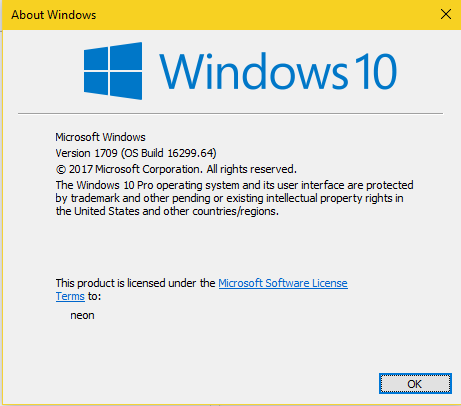
have tried with two notebook ,1 daily use 2 fresh install same os build/version
Steps to reproduce issue
nativefier "http://medium.com"
Details
Q: Are you nativefying a public website?
A : Yes
Q: Feature request? Have you looked at nativefier --help to see if an existing option could fit your needs?
A : Yes
- Full nativefier command used to build your app:
nativefier "http://medium.com" - Version of Nativefier (run
nativefier --version):v7.5.4 - Version of node.js (run
node --version):v6.10.0 - OS:
Windows
Downloading tmp-15260-1-SHASUMS256.txt-1.7.9
[============================================>] 100.0% of 2.93 kB (2.93 kB/s)
Packaging app for platform win32 x64 using electron v1.7.9
Error: rcedit.exe failed with exit code 1. Fatal error: Unable to commit changes
    at ChildProcess.<anonymous> (C:\Users\neon\AppData\Roaming\npm\node_modules\nativefier\node_modules\rcedit\lib\rcedit.js:68:16)
    at emitTwo (events.js:106:13)
    at ChildProcess.emit (events.js:191:7)
    at maybeClose (internal/child_process.js:877:16)
    at Process.ChildProcess._handle.onexit (internal/child_process.js:226:5)
 serifreedom
on 14 Dec 2017
serifreedom
on 14 Dec 2017
I have got it fixed by using this command :
cd C: or cd X where X is the path to folder.
I was trying to build in C:Windows\System32 but that's not possible as It is a Windows directory.
KingOfDireWolves
on 25 Dec 2017
Upgrade Your Node Js... :)
v.6 upgrade to v.8
 onyet
on 14 Feb 2018
onyet
on 14 Feb 2018
@onyet did that, but issue persits
C:\Users\Richard>nativefier --name "Name" https://*snip*
  copying [==========                                        ] 21%  electron-packager Electron Packager 11.2.0 +0ms
  electron-packager Node v7.7.3 +2ms
  electron-packager Host Operating system: win32 (x64) +2ms
  electron-packager Packager Options: {"dir":"C:\\Users\\Richard\\AppData\\Local\\Temp\\tmp-143280Aab3RuK1JV40","name":"Name","targetUrl":"https://*snip*","platform":"win32","arch":"x64","electronVersion":"1.8.4","nativefierVersion":"7.6.1","out":"C:\\Users\\Richard","overwrite":true,"asar":false,"icon":"C:\\Users\\Richard\\AppData\\Local\\Temp\\tmp-1432809n72gU3p0KCf\\icon.png","counter":false,"width":1280,"height":800,"showMenuBar":false,"fastQuit":false,"userAgent":"Mozilla/5.0 (Windows NT 10.0; Win64; x64) AppleWebKit/537.36 (KHTML, like Gecko) Chrome/59.0.3071.115 Safari/537.36","ignoreCertificate":false,"ignoreGpuBlacklist":false,"enableEs3Apis":false,"insecure":false,"flashPluginDir":null,"diskCacheSize":null,"inject":[],"ignore":"src","fullScreen":false,"maximize":false,"tmpdir":false,"zoom":1,"internalUrls":null,"singleInstance":false,"win32metadata":{"ProductName":"Name","InternalName":"Name","FileDescription":"Name"},"tray":false,"basicAuthUsername":null,"basicAuthPassword":null,"alwaysOnTop":false} +0ms
  electron-packager Target Platforms: win32 +3ms
  electron-packager Target Architectures: x64 +1ms
  packaging [==============================                    ] 60%  electron-packager Inferring appVersion from version in C:\Users\Richard\AppData\Local\Temp\tmp-143280Aab3RuK1JV40\package.json +0ms
  electron-packager Inferring win32metadata.CompanyName from author in C:\Users\Richard\AppData\Local\Temp\tmp-143280Aab3RuK1JV40\package.json +1ms
  electron-packager Application name: Name +11ms
  electron-packager Target Electron version: 1.8.4 +1ms
  electron-packager Ignored path regular expressions: [ 'src',
  '/node_modules/electron($|/)',
  '/node_modules/electron-prebuilt(-compile)?($|/)',
  '/node_modules/electron-packager($|/)',
  '/\\.git($|/)',
  '/node_modules/\\.bin($|/)',
  '\\.o(bj)?$' ] +0ms
  electron-packager Downloading Electron with options {"platform":"win32","arch":"x64","version":"1.8.4"} +0ms
  packaging [==============================                    ] 61%Packaging app for platform win32 x64 using electron v1.8.4
  electron-packager Creating C:\Users\Richard\win32-x64-template +243ms
  electron-packager Extracting C:\Users\Richard\AppData\Local\electron\Cache\electron-v1.8.4-win32-x64.zip to C:\Users\Richard\win32-x64-template +5ms
  packaging [================================                  ] 64%  electron-packager Initializing app in C:\Users\Richard\Name-win32-x64 from C:\Users\Richard\win32-x64-template template +0ms
  packaging [================================                  ] 65%  electron-packager Ignored paths based on the out param: [ 'C:\\Users\\Richard\\Name-darwin-x64',
  'C:\\Users\\Richard\\Name-linux-ia32',
  'C:\\Users\\Richard\\Name-linux-x64',
  'C:\\Users\\Richard\\Name-linux-armv7l',
  'C:\\Users\\Richard\\Name-linux-arm64',
  'C:\\Users\\Richard\\Name-linux-mips64el',
  'C:\\Users\\Richard\\Name-mas-x64',
  'C:\\Users\\Richard\\Name-win32-ia32',
  'C:\\Users\\Richard\\Name-win32-x64' ] +3s
  packaging [=================================                 ] 66%  electron-packager Pruning modules via: npm prune --production +0ms
  packaging [=======================================           ] 79%  electron-packager Renaming electron.exe to Name.exe in C:\Users\Richard\Name-win32-x64 +7s
  electron-packager Running rcedit with the options {"version-string":{"FileDescription":"Name","InternalName":"Name","OriginalFilename":"Name.exe","ProductName":"Name","CompanyName":"Jia Hao"},"file-version":"1.0.0","product-version":"1.0.0","icon":"C:\\Users\\Richard\\AppData\\Local\\Temp\\tmp-1432809n72gU3p0KCf\\icon.ico"} +0ms
Error: rcedit.exe failed with exit code 1. Fatal error: Unable to set icon
    at ChildProcess.<anonymous> (C:\Users\Richard\AppData\Roaming\npm\node_modules\nativefier\node_modules\electron-packager\node_modules\rcedit\lib\rcedit.js:68:16)
    at emitTwo (events.js:106:13)
    at ChildProcess.emit (events.js:194:7)
    at maybeClose (internal/child_process.js:899:16)
    at Process.ChildProcess._handle.onexit (internal/child_process.js:226:5)
  packaging [========================================          ] 80%
C:\Users\Richard>
 rkorebrits
on 23 Apr 2018
rkorebrits
on 23 Apr 2018
Hi @rkorebrits. Following @WinningRed 's suggestion, can you try explicitly passing the output folder to somewhere you have access rights? For example,
nativefier --name "AppName" "https://*snip*" C:\Users\Richard\AppName
Thanks @ronjouch
I was already running the app from C:\Users\Richard\ and also ran the CMD as administrator. Tested with your suggestion, but no luck. No idea what is causing this.. I have reinstalled nativefier, but the same issue persists.
Is it possible to generate a Windows package from Ubuntu? When I run it on my VM, it works fine, but only creates a package for linux
C:\Users\Richard>nvm use 8
8.0.0
Now using node v8.0.0 (64-bit)

C:\Users\Richard>nativefier --name "AppName" "https://***" C:\Users\Richard\AppName
  packaging [==============================                    ] 61%Packaging app for platform win32 x64 using electron v1.8.4
  packaging [===================================               ] 69%Error: rcedit.exe failed with exit code 1. Fatal error: Unable to set icon
    at ChildProcess.<anonymous> (C:\Users\Richard\AppData\Roaming\npm\node_modules\nativefier\node_modules\electron-packager\node_modules\rcedit\lib\rcedit.js:68:16)
    at emitTwo (events.js:125:13)
    at ChildProcess.emit (events.js:213:7)
    at maybeClose (internal/child_process.js:887:16)
    at Process.ChildProcess._handle.onexit (internal/child_process.js:208:5)
  packaging [========================================          ] 80%
C:\Users\Richard>
"Is it possible to generate a Windows package from Ubuntu? When I run it on my VM, it works fine, but only creates a package for linux"
@rkorebrits it is, you'll need WINE, and we also have rcedit trouble there ( https://github.com/jiahaog/nativefier/issues/375 ), but give it a try. You'll want to use flag --platform windows to enforce a target that is not the same as the build host.
ronjouch
on 23 Apr 2018
Thanks, no luck also though. Not winning here haha
root@ubuntu:/home/richard# nativefier  --arch 'x64' --platform "windows" --name "Ditto Jobs ATS" https://ats.dittojobs.com /home/richard/nativefier/
  packaging [==============================                    ] 61%Packaging app for platform win32 x64 using electron v1.8.4
  packaging [====================================              ] 72%[Error: rcedit.exe failed with exit code 1. wine: created the configuration directory '/root/.wine'
Could not load wine-gecko. HTML rendering will be disabled.
Could not load wine-gecko. HTML rendering will be disabled.
wine: configuration in '/root/.wine' has been updated.
Fatal error: Unable to set icon]
  packaging [========================================          ] 80%root@ubuntu:/home/richard#
@rkorebrits yeah that's exactly #375. ¯\_(ツ)_/¯ and patches welcome.
ronjouch
on 23 Apr 2018
Okay. Is there no flag to do something with the icon? Just realised that I posted to a thread that has a different error code than mine
rkorebrits
on 23 Apr 2018
nativefier --name "googwin" "https://www.google.ca/"
This worked however..
Edit
Also managed to get my own one working by adding --icon d:\Projects\ditto\public\favicon.ico
rkorebrits
on 23 Apr 2018
I also get this error when I execute this on my Win10 machine. It still seems to create the application, but doesn't set the icon correctly. I'm not sure if this means that the application is built correctly apart from the icon or not.
I added some debugging to the rcedit.js file, and it appears that the icon file doesn't actually exist.
If I use the --icon, it also works for me without error (similar to @rkorebrits). Unfortunately, my knowledge of Node/JS is not good enough to troubleshoot further. Where is the section of code that downloads the favicon and stores it in the temp directory?
 rossknudsen
on 4 May 2018
rossknudsen
on 4 May 2018
change your build script take a look at this
https://www.christianengvall.se/electron-packager-tutorial/
that work for me
 abderrahman-teta
on 2 Mar 2019
abderrahman-teta
on 2 Mar 2019
Hi @rkorebrits. Following @winningred 's suggestion, can you try explicitly passing the output folder to somewhere you have access rights? For example,
nativefier --name "AppName" "https://*snip*" C:\Users\Richard\AppName
Great, thats the main problem, the output directory final path
 disetec21
on 20 Aug 2019
disetec21
on 20 Aug 2019
Related issues
 marcelocecin
·
4Comments
marcelocecin
·
4Comments
 simonweil
·
5Comments
simonweil
·
5Comments
 jamiewilson
·
5Comments
jamiewilson
·
5Comments
 mklaber
·
5Comments
mklaber
·
5Comments
 toddself
·
5Comments
toddself
·
5Comments
Most helpful comment
I have got it fixed by using this command :
cd C: or cd X where X is the path to folder.
I was trying to build in C:Windows\System32 but that's not possible as It is a Windows directory.