Nativebase: Ionicons not rendering the expected icon
I have gone through these following points
- [] Check latest documentation: https://docs.nativebase.io/
- [] Check for existing open/closed issues for a possible duplicate before creating a new issue: https://github.com/GeekyAnts/NativeBase/issues
- [] Use the latest NativeBase release: https://github.com/GeekyAnts/NativeBase/releases
- [] Check examples from NativeBase KitchenSink https://github.com/GeekyAnts/NativeBase-KitchenSink
- [] For discussion purpose make use of NativeBase Slack: http://slack.nativebase.io/
- [] For queries related to theme, check Theme Variables from Docs and live NativeBase Theme Editor http://nativebase.io/customizer/
Issue Description
node, npm, react-native, react and native-base version, expo version if used, xcode version
Node: v12.18.3
npm: 6.14.6
React: 16.11.0
native-base: 2.13.13
expo: 38.0.0
Expected behaviour
According to: https://oblador.github.io/react-native-vector-icons/
Expecting icons ios-grid and people to be those (Ionicons family)

Actual behaviour
Getting those instead

Steps to reproduce
import {Icon} from 'native-base'

<Icon name="ios-grid" type="Ionicons" />
<Icon name="people" type="Ionicons" />
https://snack.expo.io/@pixcell/mad-coffee
Is the bug present in both iOS and Android or in any one of them?
Any other additional info which would help us debug the issue quicker.
Important
If you want your issue to be looked at quicker, attach a snack reproducible with your issue. Makes it easier for us!
 Pixcell
All 4 comments
I faced same problem.
NativeBase Icon uses react-native-vector-icons
Try update the font.
Android
copy all fonts from/yourproject/node_modules/react-native-vector-icons/Fontsand paste to/your-project/android/app/src/main/assets/fontsIOS
via xcode just drag and drop all font/yourproject/node_modules/react-native-vector-icons/Fontsto "Resources"
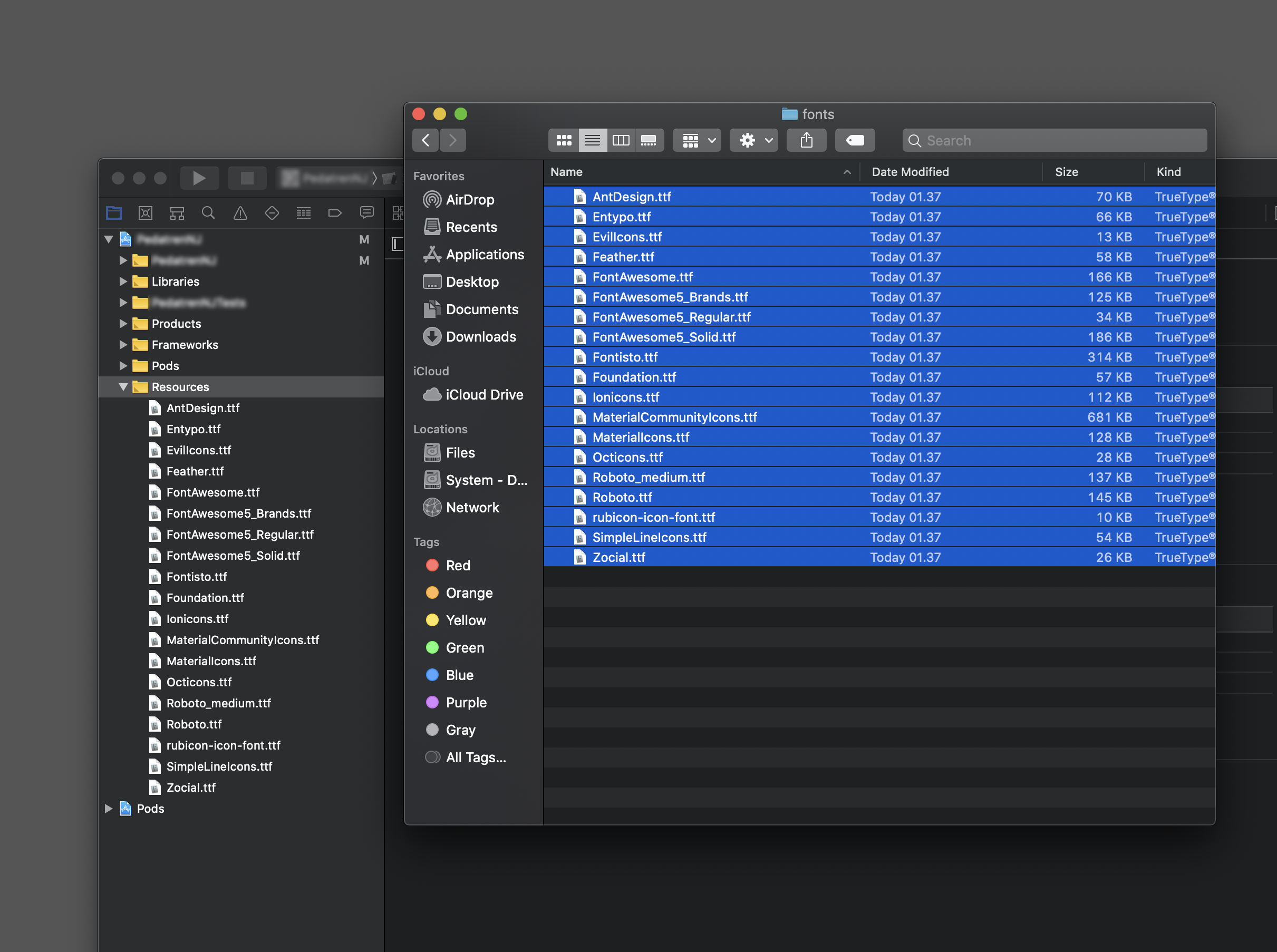
 alfianwahid
on 11 Aug 2020
alfianwahid
on 11 Aug 2020
Verified @alfianwahid's solution. It worked. The problems were caused by the out of dated font files provided by NativeBase. You can also install my patched version yarn add "git+https://github.com/jjleng/NativeBase.git#v2.13.13" and then npx react-native link.
 jjleng
on 12 Aug 2020
jjleng
on 12 Aug 2020
Thanks heaps for the help !
It is my first project using React-Native and Native-Base. I am really enjoying it so far. However, I am using a build managed by expo.
Where do I need to put my Fonts for this to work ?
It uses a hook to load some resources before the app start
import * as Font from 'expo-font'
import * as SplashScreen from 'expo-splash-screen'
import * as React from 'react'
import Ionicons from '../assets/fonts/Ionicons.ttf'

export default function useCachedResources () {
  const [isLoadingComplete, setLoadingComplete] = React.useState(false)

  // Load any resources or data that we need prior to rendering the app
  React.useEffect(() => {
    async function loadResourcesAndDataAsync () {
      try {
        SplashScreen.preventAutoHideAsync()

        // Load fonts
        await Font.loadAsync({
          Ionicons,
          Roboto: require('native-base/Fonts/Roboto.ttf'),
          Roboto_medium: require('native-base/Fonts/Roboto_medium.ttf')
        })
      } catch (e) {
        // We might want to provide this error information to an error reporting service
        console.warn(e)
      } finally {
        setLoadingComplete(true)
        SplashScreen.hideAsync()
      }
    }

    loadResourcesAndDataAsync()
  }, [])

  return isLoadingComplete
}
I tried adding the Ionicons bit in there, but it didn't work as expected.
(I copied the content from node_modules/react-native-vector-icons/Fonts into the folder pointed by my import path. (I also tried importing directly from the node_modules folder)
Any help is greatly appreciated
Pixcell
on 12 Aug 2020
I faced same problem.
NativeBase Icon uses react-native-vector-icons
Try update the font.
- Android
copy all fonts from/yourproject/node_modules/react-native-vector-icons/Fontsand paste to/your-project/android/app/src/main/assets/fonts- IOS
via xcode just drag and drop all font/yourproject/node_modules/react-native-vector-icons/Fontsto "Resources"
I do it but not working, what do I need to do next?
 tudiantuan
on 8 Sep 2020
tudiantuan
on 8 Sep 2020
Related issues
 bsiddiqui
·
3Comments
bsiddiqui
·
3Comments
 aloifolia
·
3Comments
aloifolia
·
3Comments
 Landerson352
·
3Comments
Landerson352
·
3Comments
 nschurmann
·
3Comments
nschurmann
·
3Comments
 maphongba008
·
3Comments
maphongba008
·
3Comments
Most helpful comment
I faced same problem.
NativeBase Icon uses react-native-vector-icons
Try update the font.
Android
copy all fonts from
/yourproject/node_modules/react-native-vector-icons/Fontsand paste to/your-project/android/app/src/main/assets/fontsIOS
via xcode just drag and drop all font
/yourproject/node_modules/react-native-vector-icons/Fontsto "Resources"