Nativebase: Nested VirtualizedLists Warning in Flatlist with <Content> Tags
Since upgrading RN to latest I am getting a warning:
"VirtualizedLists should never be nested inside plain ScrollViews with the same orientation - use another VirtualizedList-backed container instead"
This error is being caused by the
RN: 61.1
Native Base: 2.13.8
React: 16.9.0
React Navigation: 4.0.9
This warning comes up on every flatlist as I use Content tag around my flatlist. This only started yesterday as I upgraded to latest RN from 60, and native base 2.13.8. I can remove the error by removing the Content tag.
Thoughts?
 dl-husky73
All 87 comments
Getting the exact same error. And removing the Content tag works for me. I guess your question gave me my answer. Those yellow box warnings are really annoying, anything to remove them. I just don't want to see them.
 toritsejuFO
on 27 Sep 2019
toritsejuFO
on 27 Sep 2019
Same here I'm using https://github.com/i6mi6/react-native-parallax-scroll-view
Is this affecting anything?
 netgfx
on 2 Oct 2019
netgfx
on 2 Oct 2019
I am also facing this issue by using KeyboardAwareScrollView (vertical) and FlatList (Horizontal) in the same page
 yeong0809
on 2 Oct 2019
yeong0809
on 2 Oct 2019
I am also getting this warning a lot.
What is the other VirtualizedList-backed container we should use instead?
 djschilling
on 5 Oct 2019
djschilling
on 5 Oct 2019
Good question. Default orientation for flex containers is column. Can't be having to change one's orientation to row.
toritsejuFO
on 5 Oct 2019
I am also experiencing this issue using ScrollViews, what should we do?
 murilokrugner
on 5 Oct 2019
murilokrugner
on 5 Oct 2019
+1 Experiencing the same thing. Just updated to the latest version of RN.
 yarapolana
on 5 Oct 2019
yarapolana
on 5 Oct 2019
+1 Not sure what they want me to replace this with.
 captaincole
on 6 Oct 2019
captaincole
on 6 Oct 2019
+1
 sudo97
on 7 Oct 2019
sudo97
on 7 Oct 2019
My guessing is that it happens because you have a ScrollView inside another ScrollView. When I say scrollView I'm meaning ScrollView or FlatList
 johanjmoncada
on 11 Oct 2019
johanjmoncada
on 11 Oct 2019
I ended up using _.map_ for all occasions, the warning went away not sure if it is ideal though.
yarapolana
on 11 Oct 2019
@yarapolana that is a very bad approach, if you have a list of 1000 items, they will all be rendered eating up a lot of your users data, using virtualized list AKA Flatlist i imagine in this case, you will be only rendering the items that fit on the screen, + 1 or 2 above or below. This ensures best practice for your end users.
 Dellybro
on 17 Oct 2019
Dellybro
on 17 Oct 2019
@Dellybro Yeah I know and you are right, I would not use for handling this amount of data for sure. _.map_ worked for one case and added the _ignoreWarning_ for the other cases until something comes to light.
yarapolana
on 17 Oct 2019
+1 here with the same trouble
 lucasmedeiros
on 17 Oct 2019
lucasmedeiros
on 17 Oct 2019
can you write this code in the Flatlist and create a function ex (_render_item)
ListHeaderComponent={this._render_Item}
(ListHeaderComponent)
https://facebook.github.io/react-native/docs/flatlist
 HikkersOne
on 19 Oct 2019
HikkersOne
on 19 Oct 2019
My guessing is that it happens because you have a ScrollView inside another ScrollView. When I say scrollView I'm meaning ScrollView or FlatList
That's correct. I was using a SectionList inside a ScrollView, but this is wrong, because SectionList is a ScrollView too, so I removed the ScrollView tag and SectionList did the work!
 andrefangeloni
on 21 Oct 2019
andrefangeloni
on 21 Oct 2019
This problem usually persist when we try to use Flatlist inside a ScrollView. In the previous version this wasnt a issue, but after 0.61 this issue has been seen.Is there any workaround for solving this??
(ps:Workaround without styling the flatlist)
 sjonchhe
on 23 Oct 2019
sjonchhe
on 23 Oct 2019
This problem usually persist when we try to use Flatlist inside a ScrollView. In the previous version this wasnt a issue, but after 0.61 this issue has been seen.Is there any workaround for solving this??
(ps:Workaround without styling the flatlist)
FlatList should not be used inside a ScrollView with the same orientation, please paste your code here, maybe I can help you.
andrefangeloni
on 24 Oct 2019
@andrefangeloni Can you explain why FlatList should not be inside ScrollView with the same orientation?
I know this warning, but noone could really explain why.
djschilling
on 24 Oct 2019
@andrefangeloni Can you explain why
FlatListshould not be insideScrollViewwith the same orientation?I know this warning, but noone could really explain why.
@djschilling Because FlatList do the same thing that ScrollView, it's redundant. Using only FlatList expected to resolve your problem.
andrefangeloni
on 24 Oct 2019
@andrefangeloni Can you explain why
FlatListshould not be insideScrollViewwith the same orientation?
I know this warning, but noone could really explain why.@djschilling Because FlatList do the same thing that ScrollView, it's redundant. Using only FlatList expected to resolve your problem.
But what if I want to add some additional components outside of the FlatList and must scrollable, how can I do?
 httol
on 28 Oct 2019
httol
on 28 Oct 2019
@andrefangeloni Can you explain why
FlatListshould not be insideScrollViewwith the same orientation?
I know this warning, but noone could really explain why.@djschilling Because FlatList do the same thing that ScrollView, it's redundant. Using only FlatList expected to resolve your problem.
But what if I want to add some additional components outside of the FlatList and must scrollable, how can I do?
I'm having the same problem
 thyagobrejao
on 28 Oct 2019
thyagobrejao
on 28 Oct 2019
I think this whole thing is happening because we are using <Content> for the whole body and then inside the body, we might have <FlatList>. So, we may need to find a way how to use this format without getting the warning.
 Aung-Myint-Thein
on 29 Oct 2019
Aung-Myint-Thein
on 29 Oct 2019
+1 And this caused me the behavior of loading data crazy at the beginning of the interface. Currently I deleted Content to temporarily stop it.
 DoGoodMore
on 29 Oct 2019
DoGoodMore
on 29 Oct 2019
I think this whole thing is happening because we are using
<Content>for the whole body and then inside the body, we might have<FlatList>. So, we may need to find a way how to use this format without getting the warning.
I have 3 FlatList inside Content... I only need to scroll the Content...
thyagobrejao
on 29 Oct 2019
If you aren't concerned with this warning and just want to ignore it (until it is fixed) just do this.
import { YellowBox } from 'react-native'


YellowBox.ignoreWarnings([
  'VirtualizedLists should never be nested', // TODO: Remove when fixed
])
It will disable this warning for good. 👋 Remove it when fixed.
EDIT
👀👀👀👀👀👀👀👀👀👀👀👀
Thanks for all the reactions! This means people care. To be clear this was just a workaround until the real issue was fix, it was by no means a solution.
 timothystewart6
on 4 Nov 2019
timothystewart6
on 4 Nov 2019
Eu estava nesta mesma situação
retirei o
 wilsonmegax
on 18 Nov 2019
wilsonmegax
on 18 Nov 2019
So, if this is discouraged, what would you suggest to use to build some UI where there are multiple FlatLists on one screen? Suppose the FlatLists are stacked vertically, and together overflow the screen (thus the parent screen must be a ScrollView of some sort, right?).
 SSTPIERRE2
on 18 Nov 2019
SSTPIERRE2
on 18 Nov 2019
I have a weird issue, in my case I have a component below the FlatList which needs to be scrolled after finishing FlatList. So in order to do that I used Content as a wrapper to both.
Now what happens is when Content is wrapped on FlatList(having data of 100+ list) the features of FlatList like render items on scroll stops working making the page freeze.
I am stuck with my app release due to this, please guide me with a solution.
 bijomon-tolexo
on 19 Nov 2019
bijomon-tolexo
on 19 Nov 2019
Having this same issue where I use a FlatList for a Picker component inside a ScrollView. I used @timothystewart6 solution to disable this warning. But isn't there any better solution? Is it really that bad to use a FlatList inside a ScrollView? What is the best way to have scrollable content within scrollable content?
 ramonvermeulen
on 22 Nov 2019
ramonvermeulen
on 22 Nov 2019
Accordion example is got a same warning. https://docs.nativebase.io/Components.html#accordion-def-headref
 KiyotakaTheBlack
on 23 Nov 2019
KiyotakaTheBlack
on 23 Nov 2019
@andrefangeloni Can you explain why
FlatListshould not be insideScrollViewwith the same orientation?
I know this warning, but noone could really explain why.@djschilling Because FlatList do the same thing that ScrollView, it's redundant. Using only FlatList expected to resolve your problem.
But what if I want to add some additional components outside of the FlatList and must scrollable, how can I do?
Hi @httol I was also having the same warning while implementing the same setup Scrollview with some data and then Flatlist and I also wanted the screen to scroll.
What I did is the component which I wanted to render outside the flatlist I included that inside the ListHeaderComponent and removed the Scrollview component. Now its working fine without any warning.
Below is the previous code:
<ScrollView >
           <ReadCard data={this.state.data}/>
           <FlatList
                      data={this.state.data.related}
                       keyExtractor={this._keyExtractor}
                       renderItem={this._renderItem}
                       ItemSeparatorComponent={ListSeprator}
                  />
</ScrollView>
Below is the changed code without any warning:
<FlatList
               data={this.state.data.related}
               keyExtractor={this._keyExtractor}
               renderItem={this._renderItem}
               ItemSeparatorComponent={ListSeprator}
               ListHeaderComponent={
                    <ReadCard data={this.state.data}/>
               }
/>
I hope it helps.
 Delwalt
on 29 Nov 2019
Delwalt
on 29 Nov 2019
@andrefangeloni Can you explain why
FlatListshould not be insideScrollViewwith the same orientation?
I know this warning, but noone could really explain why.@djschilling Because FlatList do the same thing that ScrollView, it's redundant. Using only FlatList expected to resolve your problem.
But what if I want to add some additional components outside of the FlatList and must scrollable, how can I do?
Hi @httol I was also having the same warning while implementing the same setup Scrollview with some data and then Flatlist and I also wanted the screen to scroll.
What I did is the component which I wanted to render outside the flatlist I included that inside the
ListHeaderComponentand removed theScrollviewcomponent. Now its working fine without any warning.Below is the previous code:
<ScrollView >
           <ReadCard data={this.state.data}/>
           <FlatList
                      data={this.state.data.related}
                       keyExtractor={this._keyExtractor}
                       renderItem={this._renderItem}
                       ItemSeparatorComponent={ListSeprator}
                  />
</ScrollView>
Below is the changed code without any warning:
<FlatList
               data={this.state.data.related}
               keyExtractor={this._keyExtractor}
               renderItem={this._renderItem}
               ItemSeparatorComponent={ListSeprator}
               ListHeaderComponent={
                    <ReadCard data={this.state.data}/>
               }
/>
I hope it helps.
Thx! Maybe in some scene, it's a good solution!Just for if I have one head or one footer. But if FlatList inside ScrollView is not good support towards officials. Maybe, It's not a good choice! After all, it's not compatible in all scene.
httol
on 29 Nov 2019
@andrefangeloni Can you explain why
FlatListshould not be insideScrollViewwith the same orientation?
I know this warning, but noone could really explain why.@djschilling Because FlatList do the same thing that ScrollView, it's redundant. Using only FlatList expected to resolve your problem.
But what if I want to add some additional components outside of the FlatList and must scrollable, how can I do?
Hi @httol I was also having the same warning while implementing the same setup Scrollview with some data and then Flatlist and I also wanted the screen to scroll.
What I did is the component which I wanted to render outside the flatlist I included that inside theListHeaderComponentand removed theScrollviewcomponent. Now its working fine without any warning.
Below is the previous code:<ScrollView > <ReadCard data={this.state.data}/> <FlatList data={this.state.data.related} keyExtractor={this._keyExtractor} renderItem={this._renderItem} ItemSeparatorComponent={ListSeprator} /> </ScrollView>Below is the changed code without any warning:
<FlatList
               data={this.state.data.related}
               keyExtractor={this._keyExtractor}
               renderItem={this._renderItem}
               ItemSeparatorComponent={ListSeprator}
               ListHeaderComponent={
                    <ReadCard data={this.state.data}/>
               }
/>
I hope it helps.
Thx! Maybe in some scene, it's a good solution!Just for if I have one head or one footer. But if FlatList inside ScrollView is not good support towards officials. Maybe, It's not a good choice! After all, it's not compatible in all scene.
I know the ListHeaderComponent and it is quite useful for a lot of cases. But what if I want for example a custom scrollable Picker input component inside a ScrollView? Then you basically get something like ScrollView as main view with an CustomPickerInput inside it which has another ScrollView in itself. And you will receive this warning. Isn't there any other solution for scrollable content within scrollable content.
ramonvermeulen
on 29 Nov 2019
And when u need for example, a button at the end of the view witch follows the keyboard with a flat list above whats the best approach, i'm using <KeyboardAwareScrollView> with a FlatList inside.
 alom2
on 7 Dec 2019
alom2
on 7 Dec 2019
This makes for a horrible component hierarchy. You have a list that uses a FlatList, you want to put it on a screen, and you want that whole screen to be scrollable. If you have to use the Header and Footer components of FlatList, your component needs to know about everything else on that screen. You can no longer have a reusable component to use on multiple screens.
 badbod99
on 10 Dec 2019
badbod99
on 10 Dec 2019
I agree, this warning on the FlatList when we are using a parent as the scroll container. I'm not nesting the items above the FlatList inside of the FlatList header component as that is poor design in many circumstances. Can you just not disable the warning when scrollEnabled: false is set on the FlatList component?
 dvester
on 11 Dec 2019
dvester
on 11 Dec 2019
Accordion example is got a same warning. https://docs.nativebase.io/Components.html#accordion-def-headref
I have the same issue. Implementation of accordion uses flatList, so the issue is still because of the nested virtualizedList. I tried to disableVirtualization on the accordion but it didn't work.
Has anyone figured out a solution yet??
 sachinshettigar
on 12 Dec 2019
sachinshettigar
on 12 Dec 2019
Is there no other way of having FlatList inside ScrollView without using "ListHeaderComponent". I have a long FlatList of images that is first of all nested under partial screen tabs, and second of all is only in 1 out of 2 columns. Appending header adds it inside of the column... Also there are refresh issues with ListHeaderComponent.
 Egizas
on 12 Dec 2019
Egizas
on 12 Dec 2019
@Delwalt thank you so much :)
 vinhnglx
on 31 Dec 2019
vinhnglx
on 31 Dec 2019
hey @andrefangeloni , i am having this issue can you please help me out ?
https://github.com/archriss/react-native-snap-carousel/issues/641
here is expo snack to recreate the issue https://snack.expo.io/@sagar293/flatlist-inside-scrollview
 sagarrs
on 2 Jan 2020
sagarrs
on 2 Jan 2020
I agree, this warning on the FlatList when we are using a parent as the scroll container. I'm not nesting the items above the FlatList inside of the FlatList header component as that is poor design in many circumstances. Can you just not disable the warning when
scrollEnabled: falseis set on the FlatList component?
^ This should be implemented
 RiatIO
on 23 Jan 2020
RiatIO
on 23 Jan 2020
the problem is that your are using a scrowView inside a scrowView.
 sirsuccess
on 1 Feb 2020
sirsuccess
on 1 Feb 2020
No, a FlatList is a repeating list of components, the fact that it also has a ScrollView internally is clearly an additional OPTIONAL feature since it can be disabled with an exposed prop. We are one conditional away from this issue being closed.
dvester
on 1 Feb 2020
I agree, this warning on the FlatList when we are using a parent as the scroll container. I'm not nesting the items above the FlatList inside of the FlatList header component as that is poor design in many circumstances. Can you just not disable the warning when
scrollEnabled: falseis set on the FlatList component?^ This should be implemented
No, it shouldn't. The warning is a warning for a specific cause. If you are nesting the FlatList into a normal ScrollView you are not using the performance optimization of FlatList since all the content of the FlatList is rendered immediately. Hence you will have a super bad performance, when you have ~50-200 columns minimum (depending on the content of the columns).
The best way is to use the ListHeaderComponent or ListFooterComponent prop, which FlatList offers. Or try to wrap FlatList into another VirtualizedList-backed container, as the warning says.
 iDuuck
on 4 Feb 2020
iDuuck
on 4 Feb 2020
What is the alternative VirtualizedList-backed container to use in this case? I want all the functionality of FlatList but I want my whole page to scroll, not just the FlatList. My FlatList is one component on my page of many. I may even have 2 FlatList on the page. The only alternative I can find it to use .map
badbod99
on 4 Feb 2020
Wow, didn’t thought that the comment which is the most helpful (but actually not the one people want to hear) answer, get’s downvoted so often.
@badbod99 I will eventually write a blog post about this issue, when I have the time, until then: Could you provide me with a rough sketch of your page you want to achieve and I am glad to help you via email: nick at kreativgebiet dot com
iDuuck
on 5 Feb 2020
I agree, this warning on the FlatList when we are using a parent as the scroll container. I'm not nesting the items above the FlatList inside of the FlatList header component as that is poor design in many circumstances. Can you just not disable the warning when
scrollEnabled: falseis set on the FlatList component?^ This should be implemented
No, it shouldn't. The warning is a warning for a specific cause. If you are nesting the
FlatListinto a normalScrollViewyou are not using the performance optimization ofFlatListsince all the content of theFlatListis rendered immediately. Hence you will have a super bad performance, when you have ~50-200 columns minimum (depending on the content of the columns).The best way is to use the
ListHeaderComponentorListFooterComponentprop, whichFlatListoffers. Or try to wrapFlatListinto anotherVirtualizedList-backed container, as the warning says.
Well, of course, that makes sense. However, there are certain use-cases that cannot be fulfilled without nesting FlatList/ScrollView's - and I suggest you to research that before you write a blog post regarding this matter.
As for my case, I have a ScrollView with mostly "static" content. However, within this ScrollView I utilize a library-component that apparently is implemented with ListView. So, without having to split the ScrollView, I'd prefer to flag that library-component with 'scrollEnabled: false', and then have the warning to disappear.
RiatIO
on 5 Feb 2020
Je suppose que cela se produit parce que vous avez un ScrollView dans un autre ScrollView. Quand je dis scrollView, je veux dire ScrollView ou FlatList
C'est correct. J'utilisais une SectionList dans un ScrollView, mais c'est faux, car SectionList est aussi un ScrollView, j'ai donc supprimé la balise ScrollView et SectionList a fait le travail!
le probleme es
This problem usually persist when we try to use Flatlist inside a ScrollView. In the previous version this wasnt a issue, but after 0.61 this issue has been seen.Is there any workaround for solving this??
(ps:Workaround without styling the flatlist)
the FlatList is not the only object that we want to make scrollable on the page...
 jblackvk
on 7 Feb 2020
jblackvk
on 7 Feb 2020
I'm facing this problem. I want to use a FlatList and still scroll other content on the same page.
 AndersonSchmidt
on 7 Feb 2020
AndersonSchmidt
on 7 Feb 2020
I think a temporary monkey patch would be to have the content as a single item in the FlatList. Currently busy and not on the desktop, so I don’t’ have an example ready. But that would be my ideal approach so far.
Just so a conditional renderItem in the FlatList. And just add the stuff as string into the data array.
iDuuck
on 8 Feb 2020
So I ran into this and was initially frustrated that I was being warned about something that seemed to work fine, even if it wasn't "optimal." Then I realized it was the right message, and the way I was using a FlatList within a ScrollView was an anti-pattern.
Like a few folks above, I have ScrollViews in which I have multiple, short, vertically stacked lists, with various content in between. Wrapping it all into a FlatList in the place of that ScrollView would be clunky and hard to reason about.
But the warning sends a good message, if it could be phrased better - "why are you using a FlatList if you're not getting the benefits of it?" As I understand it, a FlatList inside a non-VirtualizedList (such as a ScrollView) doesn't know how to choose which list items to render, and thus it renders them all, making it effectively the same as a map, but more complex.
So that gives us a couple choices:
- Change your nested
FlatListcomponents into plain-oldmaps of their list items. Sure, that renders all of them at once, which in my case is what I wanted (short lists of items), and AFAICT is also what you're already getting if you're seeing this warning. Don't think (like I did) that just because there's a*Listcomponent available, that's what you should use for lists. There may be use cases for aFlatListthat aren't met by a simplemap, but I don't know them. - Do what the robot says, and change that top-level
ScrollViewor similar into something backed byVirtualizedList(which, in RN 0.61, isFlatListandSectionListas well asVirtualizedListitself: link), so the childVirtualizedListcomponents can take advantage of this nested structure for optimization. - Ignore the warnings with
YellowBox, but (a) they still clutter the console and (b) it's a valid, useful warning, so it may not be "fixed" until aVirtualizedListcould get the information it needs to render from a parentScrollView, which _could_ be never.
Good luck!
 kalzoo
on 9 Feb 2020
kalzoo
on 9 Feb 2020
I think this whole thing is happening because we are using
<Content>for the whole body and then inside the body, we might have<FlatList>. So, we may need to find a way how to use this format without getting the warning.
Exactly!! that is the problem, when using
 lortmorris
on 18 Feb 2020
lortmorris
on 18 Feb 2020
What if we need to use an empty component with multiple Flatlist. It will render everything at once that is okay but we need some extra properties to show other views. How do we achieve that? Do we need to implement it manually?
 manojeeva
on 2 Mar 2020
manojeeva
on 2 Mar 2020
Je fais face à ce problème. Je souhaite utiliser une FlatList et continuer à faire défiler d'autres contenus sur la même page.
sorry for the late and for my bad English. i think i have found the greet comportment of the flatlist component. If we need to scroll other thing that is not in flatlist we can add it with the props ListHeaderComponent, and ListFooterComponent of the flatlist component. the ListHeaderComponent can takes to parameter a function whose return the component you need to add
exemple:
setHeader= () => {
return(/* your component */)
}
jblackvk
on 12 Mar 2020
Getting the exact same error. And removing the Content tag works for me. I guess your question gave me my answer. Those yellow box warnings are really annoying, anything to remove them. I just don't want to see them.
it worked for me, thanks for the tip. 👍 @toritsejuFO
 lordjack
on 19 Mar 2020
lordjack
on 19 Mar 2020
The anatomy of native base told us that we should use Container Component as a wrapper for the list. the Kitchen sink also uses the Container Component as a wrapper i guess its fine to ignore the warning. Tho its a bit annoying
 thekingrenz23
on 20 Mar 2020
thekingrenz23
on 20 Mar 2020
Hey guys!
This happens when our view structure is like this:
<Container>
    <Content>
        <FlatList />
    </Content>
</Container>
Explained:
<Content> Component extends from KeyboardAwareScrollViewProps itself extends from ScrollViewProps of React Native.
<FlatList> Component extends inderictly from ScrollViewProps of React Native too.
So it is normal we have this warning. This is like we put a <ScrollView> in a <ScrollView>. So it doesn't really recommanded and compatible.
The best way is to replace our <Content> Component by <View style={{ flex: 1 }}> like this:
<Container>
    <View style={{ flex: 1 }}>
        <FlatList />
    </View>
</Container>
For me it works like a charm 🚀.
Cheers 🍻
 anthlasserre
on 22 Mar 2020
anthlasserre
on 22 Mar 2020
f*k who bought these new shit, things were just fine with a flat list inside scroll view why did they change it
 lylest
on 25 Mar 2020
lylest
on 25 Mar 2020
My workaround for this is monkey patching <Content> to use KeyboardAwareView (https://www.npmjs.com/package/react-native-keyboard-aware-view) instead of KeyboardAwareScrollView like so:
https://gist.github.com/tspike/71b716edd4c8c138783e2d1040d8193b
... then using it like:
      <Container>
        <Header>
          <Left />
          <Body>
            <Title>My Title</Title>
          </Body>
          <Right />
        </Header>
        <FlatlistContent>
          <FlatList>
            ...
          </FlatList>
        </FlatlistContent>
      </Container>
Caveat: this will break theming or custom styling for <Content>, but it works for my use case to get rid of the warning and preserve the nice padding properties of <Content>.
 tspike
on 25 Mar 2020
tspike
on 25 Mar 2020
Hey there!
I'm also playing around and come across this issue. I have in my App.js the SafeAreaProvider, found it smart to add the KeyboardAwareScrollView and then the AppContainer. This is holding some Views and then the FlatList.
I read all the comments here and I can totally understand, that the "VirtualizedLists should never be nested inside plain ScrollViews with the same orientation - use another VirtualizedList-backed container instead." warning is there for a reason and as pointed out, nested ScrollViews are a bad practise for the performance optimization.
First: I still don't know what "use another VirtualizedList-backed container instead." should mean and what I need to do.
Second: I get the point with the not re-usability, if I put outside elements now in the ListHeaderComponent. But I removed the KeyboardAwareScrollView and the warning is gone. But this now introduces a already solved issue: Clicking in an Input inside the FlatList opens up the keyboard. Assuming, that the list is long enough, the keyboard will overlay the input, causing it to lose the focus causing the keyboard to fade out. keyboardDismissMode={'none'} also wasn't of a help here. It's looking like https://stackoverflow.com/questions/56348262/textinput-inside-a-flatlist-loses-focus-when-off-screen and the preferred solution for this behavior is to put the FlatList inside a ScrollView. Hooray. That brings me back to the nested-warning. Also https://stackoverflow.com/questions/58243680/react-native-another-virtualizedlist-backed-container is not helping there.
I thought, maybe clicking on in Input that will be covered by the keyboard, is not rendered anymore and removed, causing the focus lose. So I can trick the system by windowSize or so. No effect. I can now either live with the keyboard messing around the FlatList or nesting the FlatList back into a ScrollView and getting the warning back.
Or: Any of you can brighten me and point me into a new direction or tell me a solution.
I'm on
"expo": "^37.0.4","react-native-keyboard-aware-scroll-view": "^0.9.1",- android emulator
Oh, and btw: I added a test Input after the FlatList and clicking in there moves it directly over the keyboard area (caused by the page's container having a flex: 1. Replacing it with e. g. height: 500 fixes the nested-warning AND the losing focus issue with the downside, that the keyboard is now covering the last Inputs, so that I cannot see my text, until I close the keyboard.
Yeah… I know. Pretty long text. I hoped to find a solution while explaining it, but meeeh… maybe you guys have an idea now.
 Florianer
on 11 Apr 2020
Florianer
on 11 Apr 2020
Hi guys.
I think, I found a solution.
Put everything in Flatlist. (Even if it's another FlatList)
<Container>
  <Header>...</Header>
  <FlatList
    style={{ width: '100%' }}
    nestedScrollEnabled
    data={['filter', 'title1', 'list1', 'title2', 'list2']}
    keyExtractor={(data) => data}
    renderItem={({ item, index }) => {
      switch (index) {
        case 0:
          return <SearchFilterCard />;
        case 1:
          return <Text style={styles.title}>Title1</Text>;
        case 2:
          return (
            <FlatList
              style={{ width: '100%' }}
              nestedScrollEnabled
              data={['1', '2']}
              keyExtractor={(data) => data}
              renderItem={({ item, index }) => <MyCard />}
            />
          );
        case 3:
          return <Text style={styles.title}>Title2</Text>;
        case 4:
          return (
            <FlatList
              style={{ width: '100%' }}
              nestedScrollEnabled
              data={['3', '4', '5']}
              keyExtractor={(data) => data}
              renderItem={({ item, index }) => <MyCard />}
            />
          );

        default:
          return null;
      }
    }}
  />
</Container>
Result:
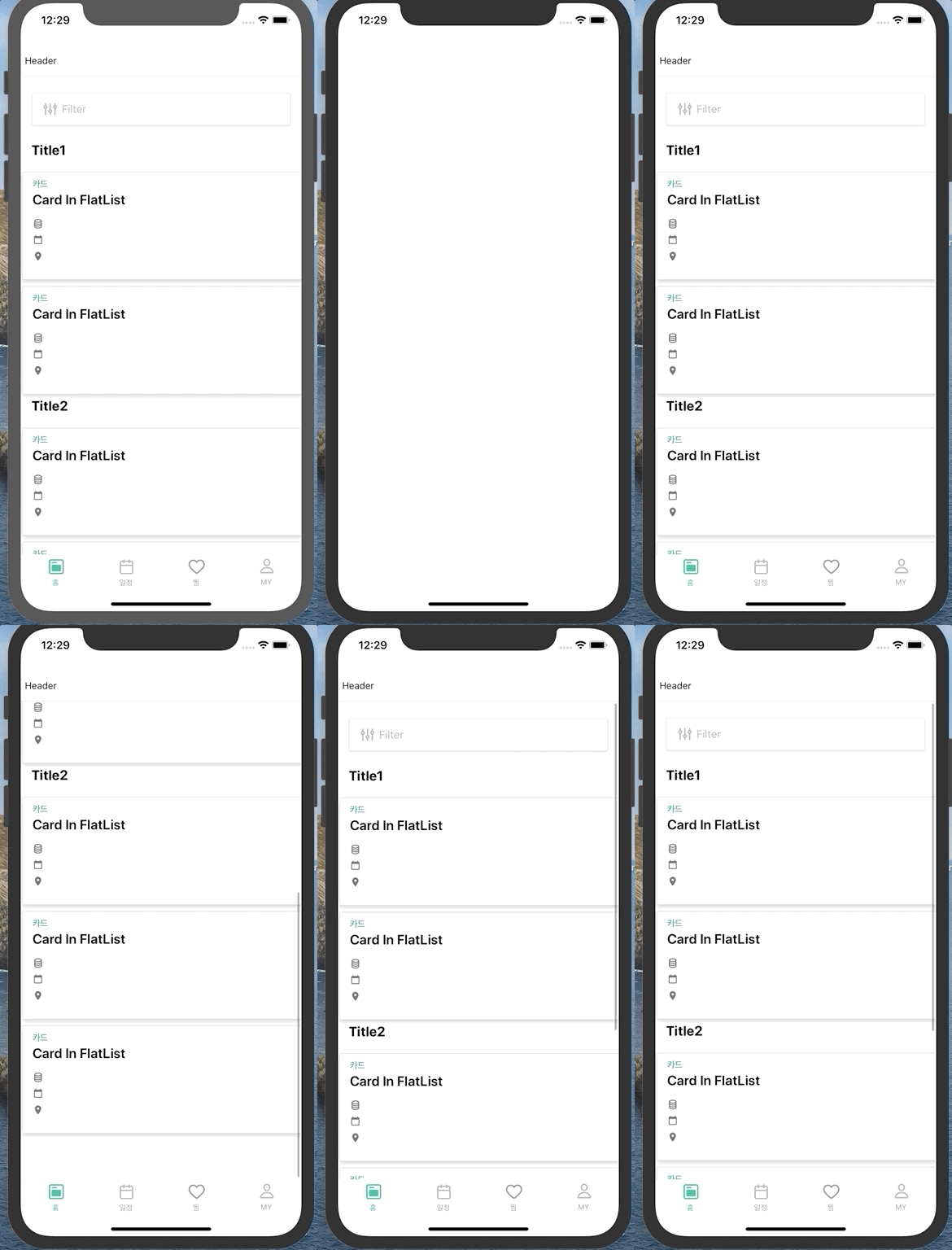
No Error, no warning.
thanks.
 pygd-ysb
on 21 Apr 2020
pygd-ysb
on 21 Apr 2020
Hi guys.
I think, I found a solution.Put everything in Flatlist. (Even if it's another FlatList)
<Container>
  <Header>...</Header>
  <FlatList
    style={{ width: '100%' }}
    nestedScrollEnabled
    data={['filter', 'title1', 'list1', 'title2', 'list2']}
    keyExtractor={(data) => data}
    renderItem={({ item, index }) => {
      switch (index) {
        case 0:
          return <SearchFilterCard />;
        case 1:
          return <Text style={styles.title}>Title1</Text>;
        case 2:
          return (
            <FlatList
              style={{ width: '100%' }}
              nestedScrollEnabled
              data={['1', '2']}
              keyExtractor={(data) => data}
              renderItem={({ item, index }) => <MyCard />}
            />
          );
        case 3:
          return <Text style={styles.title}>Title2</Text>;
        case 4:
          return (
            <FlatList
              style={{ width: '100%' }}
              nestedScrollEnabled
              data={['3', '4', '5']}
              keyExtractor={(data) => data}
              renderItem={({ item, index }) => <MyCard />}
            />
          );

        default:
          return null;
      }
    }}
  />
</Container>
Result:
No Error, no warning.
thanks.
@pygd-ysb the question is: does it lazy load your nested flatlist items ? :)
Because in itself the warning in annoying (in Dev) but not problematic !
 pybuche
on 21 Apr 2020
pybuche
on 21 Apr 2020
Switching to FlatList and removing Content worked for me with "Pull to Refresh" functionality. Had to update a few props (dataArray -> data, renderRow -> renderItem); code below.
@pygd-ysb the question is: does it lazy load your nested flatlist items ? :)
It does seem to lazy load; if I scroll down quickly white space is briefly displayed before the rows display. It's more responsive than before.
import { StyleSheet, RefreshControl, FlatList } from 'react-native';
import { Button, Container, Header, ListItem, Text } from 'native-base';
...
      <Container>
        <Header><Text>Header</Text></Header>
            <FlatList
              nestedScrollEnabled
              refreshControl={<RefreshControl
                refreshing={isFetching}
                onRefresh={this.handleRefresh} />}
              data={items}
              keyExtractor={(item, index) => index.toString()}
              renderItem={({item, index, separators}) => (
                <ListItem>
                  {item.type == 'button' ?
                    <Button transparent onPress={item.onPress}>
                      <Text>{item.name}</Text>
                    </Button> :
                    <Text>
                      {item.name}: {!item.value ?
                        '--' :
                        typeof item.value == "number" ?
                        item.value.toFixed() + ' ' + item.suffix :
                        item.value + ' ' + item.suffix
                      }
                      </Text>
                    }
                </ListItem>
                )
              } />
      </Container>
...
 lifekaizen
on 1 May 2020
lifekaizen
on 1 May 2020
This error message pretty simple but what not simple is why this error occur ? and how to fix it properly?
So main reason we want to use a FlatList inside a ScrollView when we need a header or a footer for a FlatList which also should be scrollable.
Why this error occurred?
Benefits of FlatList is it only renders the content that is currently visible in the window unlike ScrollView. But if we use FlatList inside a ScrollView , we will not get this benefit.
How to Fix it ?
Let say this component is giving you warning
const App= () => {
  return (
    <ScrollView>
        <Text style={{ fontSize: 25 }}>Header Title</Text>
      <Text>Subtitle</Text>
      <FlatList
        data={someListArray}
        renderItem={<SomeRenderComponent />}
      />
      <SomeFooter/>
    </ScrollView>
  );
};
convert that code to this :
const App= () => {
  return (
    <FlatList
      LisHeaderComponent={
      <>
        <Text style={{ fontSize: 25 }}>Header Title</Text>
        <Text>Subtitle</Text>
      </>}
      data={someListArray}
      renderItem={<SomeRenderComponent />}
      ListFooterComponent={
        <SomeFooter/>
      }/>
  );
};
 leninsheikh
on 18 Jun 2020
leninsheikh
on 18 Jun 2020
For me this error occurs when using <FlatList /> inside native-base <Content />. The error still there even after upgrading "native-base": "^2.13.12" to latest version.
 loyoliteabid
on 24 Jun 2020
loyoliteabid
on 24 Jun 2020
in my case
i had called
i removed the Scrollview and it worked for me
 siddesh94
on 2 Jul 2020
siddesh94
on 2 Jul 2020
I removed all my components, and rendered them using methods, and kept the flatlist as is. This fixed my problem
 Loche123
on 13 Jul 2020
Loche123
on 13 Jul 2020
This is not a bug. FlatLists inside of ScrollViews with the same direction (a horizontal FlatList inside a vertical ScrollView is not an issue) will render all of the items at once and can’t be virtualized. So you can have a FlatList inside a ScrollView but all the performance benefits will be worthless as they’re not working.
 Carly509
on 21 Jul 2020
Carly509
on 21 Jul 2020
Here is a VirutalizedList -backed container implementation using FlatList:
import React from 'react';
import { FlatList } from 'react-native';

export default function VirtualizedView(props: any) {
  return (
    <FlatList
      data={[]}
      ListEmptyComponent={null}
      keyExtractor={() => "dummy"}
      renderItem={null}
      ListHeaderComponent={() => (
        <React.Fragment>{props.children}</React.Fragment>
      )}
    />
  );
}
Usage:
<VirtualizedView>
  <Text>Anything goes here</Text>
  <FlatList
    data={data}
    keyExtractor={keyExtractor}
    renderItem={({item}) => <Item data={item} />}
    onRefresh={refetch}
    refreshing={loading}
    onEndReached={concatData}
  />
</VirtualizedView>
This will show scrollbar when you rotate your iPhone, and also remove warning message and performance will be saved without any problem.
 bravemaster619
on 1 Aug 2020
bravemaster619
on 1 Aug 2020
same problem when using draggable list inside <Content>
 emclab
on 2 Aug 2020
emclab
on 2 Aug 2020
I've a Picker component inside a
came up. I suspect that is a problem of the Picker component itself because the warning fire up on the screen where i should select the option.
RN 0.62.2
React: 16.11
native-base: 2.13.13
Expo SDK: 38
 pierol
on 15 Aug 2020
pierol
on 15 Aug 2020
I ended up using _.map_ for all occasions, the warning went away not sure if it is ideal though.
Frankly this seems like the better solution.
 jalexandremoreira
on 2 Sep 2020
jalexandremoreira
on 2 Sep 2020
I ended up using _.map_ for all occasions, the warning went away not sure if it is ideal though.
Frankly this seems like the better solution.
Could you make a code example of using .map. I'm using Picker component.
pierol
on 2 Sep 2020
I don't know exactly what that component looks like, but where you would have a flatlist, like:
<FlatList
     data={array}
     keyExtractor={(element) => element.id.toString()}
     renderItem={({ element}) => (
          <Image
              source={{
              uri: element.url,
              }}
          />
     )}
 />
(for instance). You would replace this with:
{array.map((element) => (
    <Image
         source={{
             uri: element.url,
         }}
    />
))}
jalexandremoreira
on 2 Sep 2020
I have the same issue @pierol currently has.
Getting the warning VirtualizedLists should never be nested inside plain ScrollViews with the same orientation - use another VirtualizedList-backed container instead., when I have a code like the following.
<Item picker>
  <Picker
    selectedValue={gender}
    onValueChange={(selected) => {
      setGender(selected);
    }}
  >
    <Picker.Item label="Female" value={Gender.Female} />
    <Picker.Item label="Male" value={Gender.Male} />
    <Picker.Item label="Other" value={Gender.Other} />
  </Picker>
</Item>
RN: 0.63.2
React: 16.13.1
native-base: 2.13.14
 hs-digid
on 9 Sep 2020
hs-digid
on 9 Sep 2020
seems <Content> has some scroll view in it, removing <Content> solves the issue
 wisletmichel
on 15 Sep 2020
wisletmichel
on 15 Sep 2020
Hello everyone my code was something like this
<ScrollView>
       {/* Some FlatList here */}
</ScrollView>
It threw the Nested VirtualizedLists Warning
HOW I FIXED IT:
I replaced:
<ScrollView>
       {/* Some FlatList here */}
</ScrollView>
With:
<View>
       {/* Some FlatList here */}
</View>
And like poop :D:D:D the warning was flushed away.
 blackgeneration
on 17 Sep 2020
blackgeneration
on 17 Sep 2020
seems
<Content>has some scroll view in it, removing<Content>solves the issue
Yeah because i removed scrollview the warning went away
blackgeneration
on 17 Sep 2020
This error message pretty simple but what not simple is why this error occur ? and how to fix it properly?
So main reason we want to use a FlatList inside a ScrollView when we need a header or a footer for a FlatList which also should be scrollable.
Why this error occurred?
Benefits of FlatList is it only renders the content that is currently visible in the window unlike ScrollView. But if we use FlatList inside a ScrollView , we will not get this benefit.
How to Fix it ?
Let say this component is giving you warning
const App= () => {
  return (
    <ScrollView>
        <Text style={{ fontSize: 25 }}>Header Title</Text>
      <Text>Subtitle</Text>
      <FlatList
        data={someListArray}
        renderItem={<SomeRenderComponent />}
      />
      <SomeFooter/>
    </ScrollView>
  );
};
convert that code to this :
const App= () => {
  return (
    <FlatList
      LisHeaderComponent={
      <>
        <Text style={{ fontSize: 25 }}>Header Title</Text>
        <Text>Subtitle</Text>
      </>}
      data={someListArray}
      renderItem={<SomeRenderComponent />}
      ListFooterComponent={
        <SomeFooter/>
      }/>
  );
};
Honestly I had to scrap the content and follow this. Basically flat list with flat list is fine like suggested above.
So my renderItem renders Card (FlatList behind the scenes)
 rmnegatives
on 18 Sep 2020
rmnegatives
on 18 Sep 2020
Here is a VirutalizedList -backed container implementation using
FlatList:import React from 'react'; import { FlatList } from 'react-native'; export default function VirtualizedView(props: any) { return ( <FlatList data={[]} ListEmptyComponent={null} keyExtractor={() => "dummy"} renderItem={null} ListHeaderComponent={() => ( <React.Fragment>{props.children}</React.Fragment> )} /> ); }Usage:
<VirtualizedView>
  <Text>Anything goes here</Text>
  <FlatList
    data={data}
    keyExtractor={keyExtractor}
    renderItem={({item}) => <Item data={item} />}
    onRefresh={refetch}
    refreshing={loading}
    onEndReached={concatData}
  />
</VirtualizedView>
This will show scrollbar when you rotate your iPhone, and also remove warning message and performance will be saved without any problem.
Thanks!
One remark: I had to insert a component instead of a function in ListHeaderComponent.
Are you sure that the performance of the nested FlatLists is preserved this way?
Or is this just a workaround to avoid the warning?
 avlonder
on 30 Sep 2020
avlonder
on 30 Sep 2020
I'm using Native base's Picker component and rendering using .map:
Tried everything the Internet has suggested!! Didn't get it fixed yet
<Item rounded style={{marginBottom:20}}>
    <Picker selectedValue={this.state.district} onValueChange={(val)=>this.setDistrict(val)}>
        <Picker.Item label='Select District' value='0'/>
         {this.state.districtsList.map((item,index) => {
            return (<Picker.Item label={item.name} value={item.id} key={index+1}/>) //if you have a bunch of keys value pair
         })}
    </Picker>
</Item>
 khaja-nizamuddin1
on 1 Oct 2020
khaja-nizamuddin1
on 1 Oct 2020
@khaja-nizamuddin1 @hs-digid @pierol I am having the same issue, mapping picker item in picker. I am using picker from native base. Any solution?
 KhimGurung
on 19 Oct 2020
KhimGurung
on 19 Oct 2020
@KhimGurung I stopped using Picker from Native base and used React Native's instead
There's little problem here -
Picker works great in iPhone with little space adjustments - but consumes lot of space, can't fit more than 3 pickers in a screen
This way warnings are gone!
khaja-nizamuddin1
on 20 Oct 2020
Here is a VirutalizedList -backed container implementation using
FlatList:import React from 'react'; import { FlatList } from 'react-native'; export default function VirtualizedView(props: any) { return ( <FlatList data={[]} ListEmptyComponent={null} keyExtractor={() => "dummy"} renderItem={null} ListHeaderComponent={() => ( <React.Fragment>{props.children}</React.Fragment> )} /> ); }Usage:
<VirtualizedView>
  <Text>Anything goes here</Text>
  <FlatList
    data={data}
    keyExtractor={keyExtractor}
    renderItem={({item}) => <Item data={item} />}
    onRefresh={refetch}
    refreshing={loading}
    onEndReached={concatData}
  />
</VirtualizedView>
This will show scrollbar when you rotate your iPhone, and also remove warning message and performance will be saved without any problem.
Thank you!. This works for me. Cheers!
 dayanaohhnana
on 7 Nov 2020
dayanaohhnana
on 7 Nov 2020
I've a Picker component and i see this warning when open it... how can I solve?
I've last native-base version...
 mgiorgi-github
on 16 Nov 2020
mgiorgi-github
on 16 Nov 2020
As several people have already mentioned the warning is caused by the use of KeyboardAwareScrollView by <Content>. Just removing <Content> is a poor solution as it also gets rid of the SafeAreaView (and some styling).
Personally, I love the "monkey patch" solution by @tspike
My workaround for this is monkey patching
<Content>to useKeyboardAwareView(https://www.npmjs.com/package/react-native-keyboard-aware-view) instead ofKeyboardAwareScrollViewlike so:https://gist.github.com/tspike/71b716edd4c8c138783e2d1040d8193b
Would it be an idea to make this official and put a prop on <Content> that will make it use KeyboardAwareView over KeyboardAwareScrollView? This would cater for all needs and (hopefully, haven't tested it) keep everything else intact.
I wouldn't mind putting in a PR for this if we can agree it's a decent solution.
 erikbrgr
on 3 Dec 2020
erikbrgr
on 3 Dec 2020
Related issues
 georgemickael-b
·
3Comments
georgemickael-b
·
3Comments
 eggybot
·
3Comments
eggybot
·
3Comments
 mcpracht
·
3Comments
mcpracht
·
3Comments
 Cotel
·
3Comments
Cotel
·
3Comments
 kitsune7
·
3Comments
kitsune7
·
3Comments
Most helpful comment
But what if I want to add some additional components outside of the FlatList and must scrollable, how can I do?