I have gone through these following points
- [] Check latest documentation: https://docs.nativebase.io/
- [] Check for existing open/closed issues for a possible duplicate before creating a new issue: https://github.com/GeekyAnts/NativeBase/issues
- [] Use the latest NativeBase release: https://github.com/GeekyAnts/NativeBase/releases
- [] Check examples from NativeBase KitchenSink https://github.com/GeekyAnts/NativeBase-KitchenSink
- [] For discussion purpose make use of NativeBase Slack: http://slack.nativebase.io/
- [] For queries related to theme, check Theme Variables from Docs and live NativeBase Theme Editor http://nativebase.io/customizer/
Issue Description
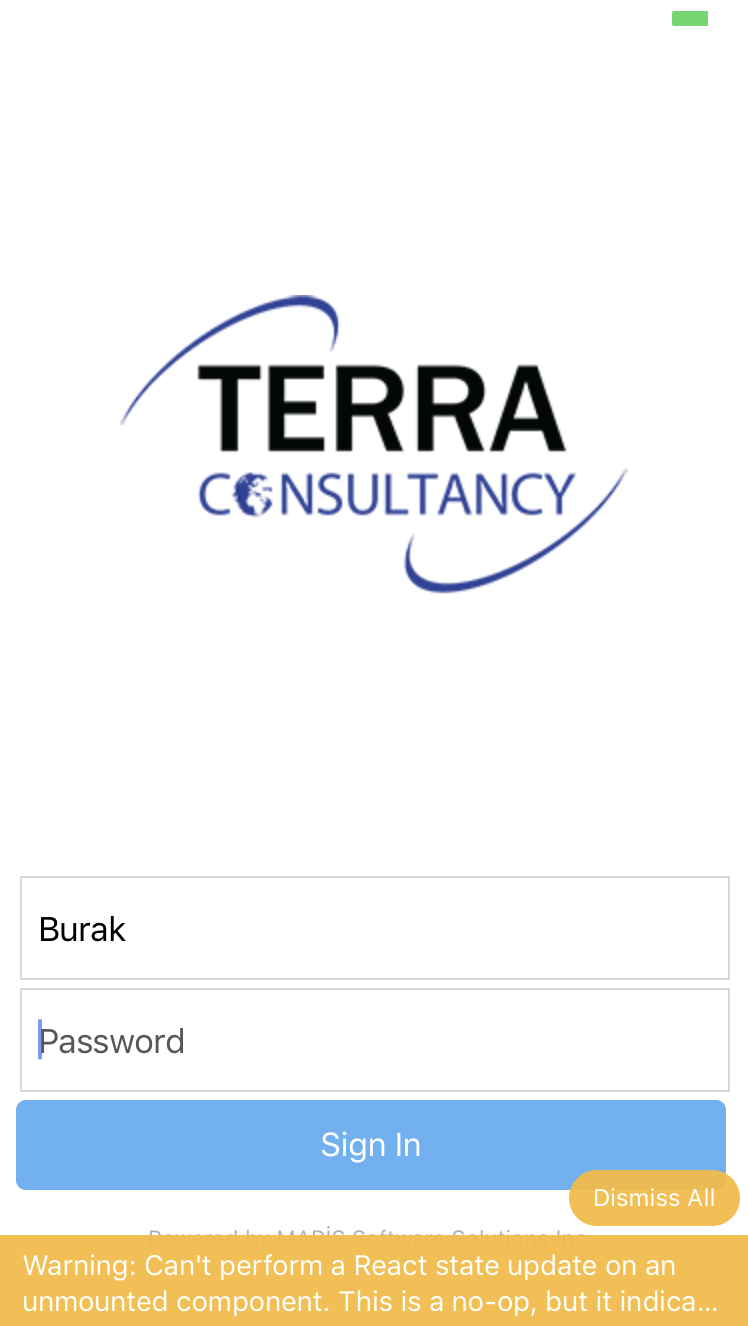
Setting focus on input controls throws following warning:
Warning: Can't perform a React state update on an unmounted component. This is a no-op, but it indicates a memory leak in your application. To fix, cancel all subscriptions and asynchronous tasks in %s.%s, the componentWillUnmount method,
in ToastContainer (at connectStyle.js:392)
in Styled(ToastContainer) (at Root.js:16)
in RCTView (at View.js:45)
in View (at Root.js:14)
in Root (at connectStyle.js:392)
in Styled(Root) (at App.js:62)
node, npm, react-native, react and native-base version, expo version if used, xcode version
"expo": "^34.0.4",
"native-base": "^2.13.5",
Steps to reproduce
I add Input control on the page then run it on both simulator and device and when the input gets focus warring is thrown.
My simple code is as follow:
}} />
{this.state.UserNameError &&
}
Is the bug present in both iOS and Android or in any one of them?
Both iOS and Android
Any other additional info which would help us debug the issue quicker.

 ismarosmanovic
All 12 comments
Fixed in 2.13.8
 sankhadeeproy007
on 11 Sep 2019
sankhadeeproy007
on 11 Sep 2019
I can confirm that the issue is gone after upgrading to 2.13.8
 xfyre
on 28 Sep 2019
xfyre
on 28 Sep 2019
I have still facing the same issue. Can anyone help me?
version:
"native-base": "^2.13.8",
 EdisonDevadoss
on 10 Oct 2019
EdisonDevadoss
on 10 Oct 2019
I am also having this issue when trying to implement the search bar functionality
"expo": "^35.0.0",
"expo-font": "~7.0.0",
"native-base": "^2.13.8",
"react": "16.8.3",
it appears to happen when the user first clicks in the .
Any help would be greatly appreciated.
Thank you.
  function SearchBar() {
    const memHandleClick = useCallback(event => {
      console.log(event);
    }, []);
    return (
      <Item>
        <Icon name='ios-search' />
        {didMount && (
          <Input
            placeholder='Search'
            onChangeText={event => memHandleClick(event)}
          />
        )}
      </Item>
    );
  };
<Header searchBar rounded>
    <SearchBar />
</Header>
UPDATE:
I found that this seems to happen when I have ejected the default theme and tried to use Material, Platform or Common theme. I am loading the fonts as recommended and wrapping the app with the StyleProvider as follows:
return (
      <StyleProvider style={getTheme(material)}>
        <Root>
          <AppContainer />
        </Root>
      </StyleProvider>
);
when I click on the in the search bar I get the " unmounted component." issue but if I remove <StyleProvider style={getTheme(material)}> it goes away.
Hope this might help getting to the bottom of the issue. Thanks!
2nd Update:
Sorry for all the updates but I just found out that if I move the
  if (!loading) {
    return (
      <Root>
        <StyleProvider style={getTheme(material)}>
          <AppContainer />
        </StyleProvider>
      </Root>
    );
  }
Just adding it here in case it helps someone else.
 TheBlinkOfAnEye
on 20 Oct 2019
TheBlinkOfAnEye
on 20 Oct 2019
I'm still facing the issue although my App.tsx looks like your second update
 Cristi6
on 19 Jan 2020
Cristi6
on 19 Jan 2020
 lucasklaassen
on 6 Mar 2020
lucasklaassen
on 6 Mar 2020
I can confirm this issue still exist on the "native-base": "^2.13.12"
Even after having only one Root Component, the issue still exists.
 Mavenic
on 11 Apr 2020
Mavenic
on 11 Apr 2020
Any idea how to make Toast work if you use transparentModal from react navigation?
If you don't put <Root> inside the new transparentModal, the Toast will not show, but if you put it, I also get this error.
 Aryk
on 22 Apr 2020
Aryk
on 22 Apr 2020
I'm also facing this issue on "native-base": "^2.13.14" even with just a single <Root>
"react": "16.13.1",
"react-native": "0.63.2",
 koiralakiran1
on 1 Oct 2020
koiralakiran1
on 1 Oct 2020
The error for me was
Warning: Can't perform a React state update on an unmounted component. This is a no-op, but it indicates a memory leak in your application. To fix, cancel all subscriptions and asynchronous tasks in the componentWillUnmount method.
    in ToastContainer (at connectStyle.js:392)
    in Styled(ToastContainer) (at Root.js:16)
    in RCTView (at View.js:34)
    in View (at Root.js:14)
    in Root (at connectStyle.js:392)
    in Styled(Root) (at WithToastRoot.tsx:9)
    in Unknown (at ComponentWrapper.js:42)
    in WrappedComponent (at renderApplication.js:45)
    in RCTView (at View.js:34)
    in View (at AppContainer.js:106)
    in RCTView (at View.js:34)
    in View (at AppContainer.js:132)
    in AppContainer (at renderApplication.js:39)
Looked into the code and I see this could be causing the issue https://github.com/GeekyAnts/NativeBase/blob/0315c117959bf19eae0f7c2a85e7faafa982f6e9/src/basic/ToastContainer.js#L60
  componentDidMount() {
    Keyboard.addListener('keyboardDidShow', this.keyboardDidShow);
    Keyboard.addListener('keyboardDidHide', this.keyboardDidHide);
  }
The listeners are added here but never removed on componentWillUnmount. I tried doing the following on my local instance of the package and its working fine for me.
  componentWillUnmount() {
    Keyboard.removeListener('keyboardDidShow', this.keyboardDidShow);
    Keyboard.removeListener('keyboardDidHide', this.keyboardDidHide);
  }
I'll be happy to create a pull request if someone from the team could review this change. :)
koiralakiran1
on 1 Oct 2020
Update:
Saw there's already an existing PR with the above mentioned changes
koiralakiran1
on 4 Oct 2020
Has anyone had time to review this? I've been running into this same issue.
 patrikrazem
on 29 Nov 2020
patrikrazem
on 29 Nov 2020
Related issues
 mcpracht
·
3Comments
mcpracht
·
3Comments
 elnygren
·
3Comments
elnygren
·
3Comments
 bsiddiqui
·
3Comments
bsiddiqui
·
3Comments
 natashache
·
3Comments
natashache
·
3Comments
 sihemhssine
·
3Comments
sihemhssine
·
3Comments
Most helpful comment
I have still facing the same issue. Can anyone help me?
version:
"native-base": "^2.13.8",