Nativebase: Header adds extra height or padding when used within SafeAreaView
I have gone through these following points
- [x] Check latest documentation: https://docs.nativebase.io/
- [x] Check for existing open/closed issues for a possible duplicate before creating a new issue: https://github.com/GeekyAnts/NativeBase/issues
- [x] Use the latest NativeBase release: https://github.com/GeekyAnts/NativeBase/releases
- [x] Check examples from NativeBase KitchenSink https://github.com/GeekyAnts/NativeBase-KitchenSink
- [x] For discussion purpose make use of NativeBase Slack: http://slack.nativebase.io/
- [x] For queries related to theme, check Theme Variables from Docs and live NativeBase Theme Editor http://nativebase.io/customizer/
Issue Description
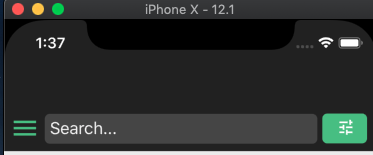
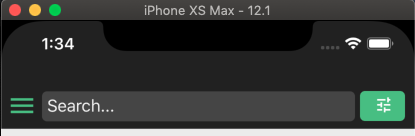
Using Header (from native base) within SafeAreaView (from react-navigation) looks fine on iPhone XS Max but adds excess padding/height for iPhone X
node, npm, react-native, react and native-base version, expo version if used, xcode version
"react-native": "0.59.6",
"react": "16.8.6",
"native-base": "2.12.1",
"react-navigation": "3.9.1",
xcode 10.1
Expected behaviour
I expect the header & safeareaview to look the same on iPhoneX & iPhone XS Max
Actual behaviour
Header and SafeAreaView look fine on iPhone XS Max but not on iPhone X
Steps to reproduce
import React, { PureComponent } from 'react';
import { Container, Header } from 'native-base';
import { SafeAreaView } from 'react-navigation';


class Screen extends PureComponent {
  render() {
    <SafeAreaView style={{ flex: 1 }}>
      <Container>
        <Header searchBar iosBarStyle="light-content" style={{ alignItems: 'center' }} />
      </Container>
    </SafeAreaView>;
  }
}
Is the bug present in both iOS and Android or in any one of them?
just iOS
Any other additional info which would help us debug the issue quicker.
 dres-cifuentes
All 8 comments
Have you tried without SafeAreaView? I faced this some time ago, and what I did was to use only Header, without the safe area component. Maybe works for you too if the scope is the same.
 italomlp
on 10 May 2019
italomlp
on 10 May 2019
I tried using Header without SafeAreaView but it didn't give me the style I wanted for iPhone XS Max. So what I ended up doing was adding a condition wrapper based on the deviceType. If it's an iPhoneXS MAX or XR then use SafeAreaView otherwise just render without the wrapper. Works for now but hoping to optimize it later.
Thanks for the tip!
dres-cifuentes
on 11 May 2019
have you got proper solution? I am facing same issue.
 ansarikhurshid786
on 8 Jul 2019
ansarikhurshid786
on 8 Jul 2019
I tried using Header without SafeAreaView but it didn't give me the style I wanted for iPhone XS Max. So what I ended up doing was adding a condition wrapper based on the deviceType. If it's an iPhoneXS MAX or XR then use SafeAreaView otherwise just render without the wrapper. Works for now but hoping to optimize it later.
Thanks for the tip!
can you share your logic ?
ansarikhurshid786
on 14 Jul 2019
Im seeing the same issue.
 jannikbuschke
on 28 Sep 2019
jannikbuschke
on 28 Sep 2019
Use forceInset={{ top: 'never' }} to remove the extra padding added to the header while keeping the safeView inset at the bottom.
  return (
      <SafeAreaView style={{flex: 1}} forceInset={{ top: 'never' }}>
        <Navigator/>
      </SafeAreaView>
  );
 ggola
on 25 Oct 2019
ggola
on 25 Oct 2019
Had the same issue, the space between the header and the notch was too big.
What worked for me was changing the default paddingTop on the native base Header component to 0.

 Charlicus
on 18 Feb 2020
Charlicus
on 18 Feb 2020
Im seeing the same issue.
 RP-joaosousa
on 31 May 2020
RP-joaosousa
on 31 May 2020
Related issues
 muthuraman007
·
3Comments
muthuraman007
·
3Comments
 natashache
·
3Comments
natashache
·
3Comments
 maphongba008
·
3Comments
maphongba008
·
3Comments
 inv2004
·
3Comments
inv2004
·
3Comments
 eggybot
·
3Comments
eggybot
·
3Comments
Most helpful comment
Im seeing the same issue.