Nativebase: Invariant Violation on debug mode
Issue Description
After updating my react-native from ^0.57.8 to ^0.58.5 my app is crashing only on debug mode and throwing following error :
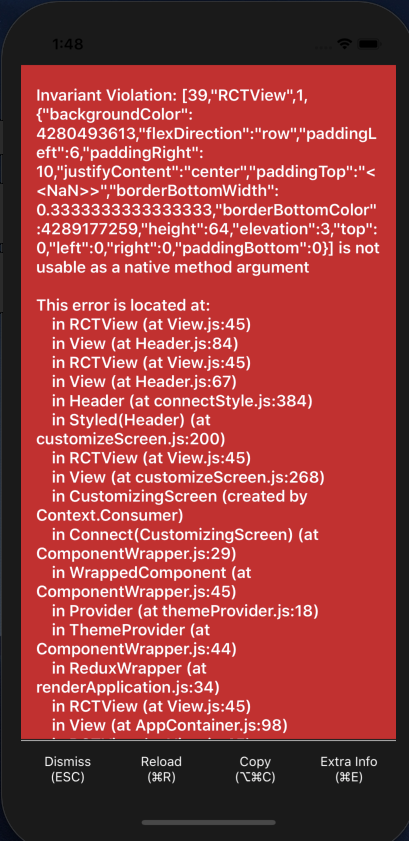
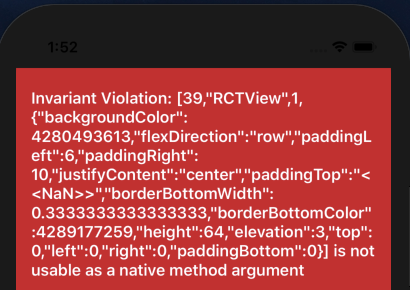
So by digging into my codes I found out that this error is caused by paddingTop styling which is applied to Header component and once I comment that line, the app doesn't crash but looks ugly 😅.
node, npm, react-native, react and native-base version, expo version if used, xcode version
node: v8.11.4
react-native: ^0.58.5
react: ^16.8.2
native-base: ^2.11.0
Expected behaviour

Actual behaviour
If I remove paddingTop from my header styling:

If I add paddingTop to my header styling:
Steps to reproduce
Try adding paddingTop:0 to your Header component and run your code in debug/staging mode.
Code snippet
render() {
return (
<Header style={styles.header} searchBar rounded>
  <Item>
    <Icon name="ios-search" />
    <Input
      returnKeyType="search"
      placeholder="Search"
    />
  </Item>
</Header>
)

const styles = StyleSheet.create({
  header: {
    backgroundColor: Colors.primary,
    height: 40,
    paddingTop: Platform.OS === 'ios' ? 0 : 30, //!!!! removing this line would fix the "Invariant Violation" error but the stying would be broken
    paddingBottom: Platform.OS === 'ios' ? 0 : 30,
  },
});
 el-lsan
All 17 comments
2587
 SupriyaKalghatgi
on 22 Feb 2019
SupriyaKalghatgi
on 22 Feb 2019
@SupriyaKalghatgi I don't think this is the same problem as #2587
I'm getting the same error, and just like @el-lsan I only see it when running on iPhone X and the paddingTop of Header is set to 0.
Digging a little into the Header code, I found some this bit that only applies to the paddingTop on iPhone X:
https://github.com/GeekyAnts/NativeBase/blob/master/src/basic/Header.js#L55
topPadder = (style.paddingTop ? style.paddingTop : style.padding) + InsetValues.topInset;
so, if we supply 0 as the user's paddingTop, that ternary is only checking for truthiness, so 0 makes it use the padding (which in my and @el-lsan 's cases is undefined). Then it tries to do undefined + InsetValues.topInset which is resulting in NaN.
This can be easily fixed by checking whether paddingTop is finite rather than truthy:
topPadder = (_.isFinite(style.paddingTop) ? style.paddingTop : style.padding) + InsetValues.topInset;
(or Number.isFinite if you don't want to use lodash there)
 tplorts
on 1 Mar 2019
tplorts
on 1 Mar 2019
@tplorts Thanks for digging into this and make the issue more clear.
I also checked #2587 and other related issues and still it was more like a bug to me.
But since this issue got closed, I ended up changing my component and removing header wrapper to avoid this bug.
Hopefully with the details you provided this issue get reopened again for an upcoming fix.
Cheers 🍻
el-lsan
on 2 Mar 2019
I want more details on this to fix
Did you try with latest release of NativeBase? If yes, what is the theme you injected in StyleProvider?
SupriyaKalghatgi
on 4 Mar 2019
@SupriyaKalghatgi Yes.
I am using "native-base": "^2.12.0", and material as my theme.
Here's my theme provider component:
import React from 'react';
import { Provider } from 'react-redux';
import { StyleProvider } from 'native-base';
import getTheme from '../../native-base-theme/components';
import material from '../../native-base-theme/variables/material';

const ThemeProvider = ({ store, children }) => (
  <Provider store={store}>
    <StyleProvider style={getTheme(material)}>
      {children}
    </StyleProvider>
  </Provider>
);

export default ThemeProvider;
I tried similar use case with iPhone X simulator, couldn't reproduce this issue
SupriyaKalghatgi
on 4 Mar 2019
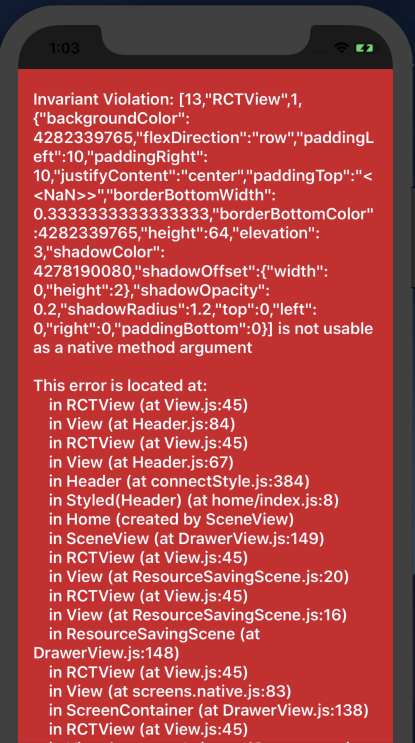
@SupriyaKalghatgi Please try this tree from my fork:
https://github.com/el-lsan/NativeBase-KitchenSink/tree/produce-2603
el-lsan
on 4 Mar 2019
I tried similar use case with iPhone X simulator, couldn't reproduce this issue
Be sure that in addition to using the iPhone X simulator, you are rendering a Header whose style contains paddingTop: 0. @el-lsan 's fork of the kitchen sink app has this so that should give you the error.
tplorts
on 5 Mar 2019
I tried similar use case with iPhone X simulator, couldn't reproduce this issue
This was wrt NativeBase KitchenSink
SupriyaKalghatgi
on 5 Mar 2019
@SupriyaKalghatgi why closed ?
el-lsan
on 6 Mar 2019
I must add the condition:
paddingTop: isIos ? -24 : 0
To bypass this error
On "native-base": "^2.12.1","react-native": "0.59.3"
 anhhh11
on 23 Apr 2019
anhhh11
on 23 Apr 2019
Still happening in react-native 0.59.5 and native-base 2.12.1. Its a simply wrong checking as mentioned by @tplorts
You can negative padding as mentioned by @anhhh11 for a workaround.
 idrakimuhamad
on 3 May 2019
idrakimuhamad
on 3 May 2019

Same problem on IOS.
"react-native": "0.59.9",
"react": "16.8.3",
"native-base": "^2.12.0",
Fixed by adding height property to the Header style.
 ilya-bmi
on 21 Jun 2019
ilya-bmi
on 21 Jun 2019
"react-native": "0.60.4",
"native-base": "^2.12.2",
I have this issue.
Nothing I have tried works around it.
 aidanw
on 24 Jul 2019
aidanw
on 24 Jul 2019
I have just removed headers for the moment, and will remove NativeBase from my solution going forwards. It has been more trouble than it is worth!
aidanw
on 27 Jul 2019
Setting the Height of the Header temporarily fix the problem
<Header noShadow hasTabs style={{elevation: 0,height: Platform.OS === 'ios' ? 90 : 50}}>
Hope it helps
https://github.com/GeekyAnts/NativeBase/issues/2837#issuecomment-517241556
 seunex
on 17 Aug 2019
seunex
on 17 Aug 2019
"react-native": "0.60.4",
"native-base": "^2.12.2",I have this issue.
Nothing I have tried works around it.
Quick fix:
https://github.com/GeekyAnts/NativeBase/issues/2889#issuecomment-530221294
 keshakishore
on 11 Sep 2019
keshakishore
on 11 Sep 2019
Related issues
 chetnadaffodil
·
3Comments
chetnadaffodil
·
3Comments
 elnygren
·
3Comments
elnygren
·
3Comments
 sihemhssine
·
3Comments
sihemhssine
·
3Comments
 kitsune7
·
3Comments
kitsune7
·
3Comments
 omerdn1
·
3Comments
omerdn1
·
3Comments
Most helpful comment
@SupriyaKalghatgi I don't think this is the same problem as #2587
I'm getting the same error, and just like @el-lsan I only see it when running on iPhone X and the
paddingTopof Header is set to0.Digging a little into the Header code, I found some this bit that only applies to the paddingTop on iPhone X:
https://github.com/GeekyAnts/NativeBase/blob/master/src/basic/Header.js#L55
so, if we supply 0 as the user's paddingTop, that ternary is only checking for truthiness, so 0 makes it use the padding (which in my and @el-lsan 's cases is undefined). Then it tries to do
undefined + InsetValues.topInsetwhich is resulting inNaN.This can be easily fixed by checking whether paddingTop is finite rather than truthy:
(or
Number.isFiniteif you don't want to use lodash there)