Nativebase: Ripple effect doesn't respect rounded button size
I have gone through these following points
- [x] Check latest documentation: https://docs.nativebase.io/
- [x] Check for existing open/closed issues for a possible duplicate before creating a new issue: https://github.com/GeekyAnts/NativeBase/issues
- [x] Use the latest NativeBase release: https://github.com/GeekyAnts/NativeBase/releases
- [x] Check examples from NativeBase KitchenSink https://github.com/GeekyAnts/NativeBase-KitchenSink
- [x] For discussion purpose make use of NativeBase Slack: http://slack.nativebase.io/
- [x] For queries related to theme, check Theme Variables from Docs and live NativeBase Theme Editor http://nativebase.io/customizer/
Issue Description
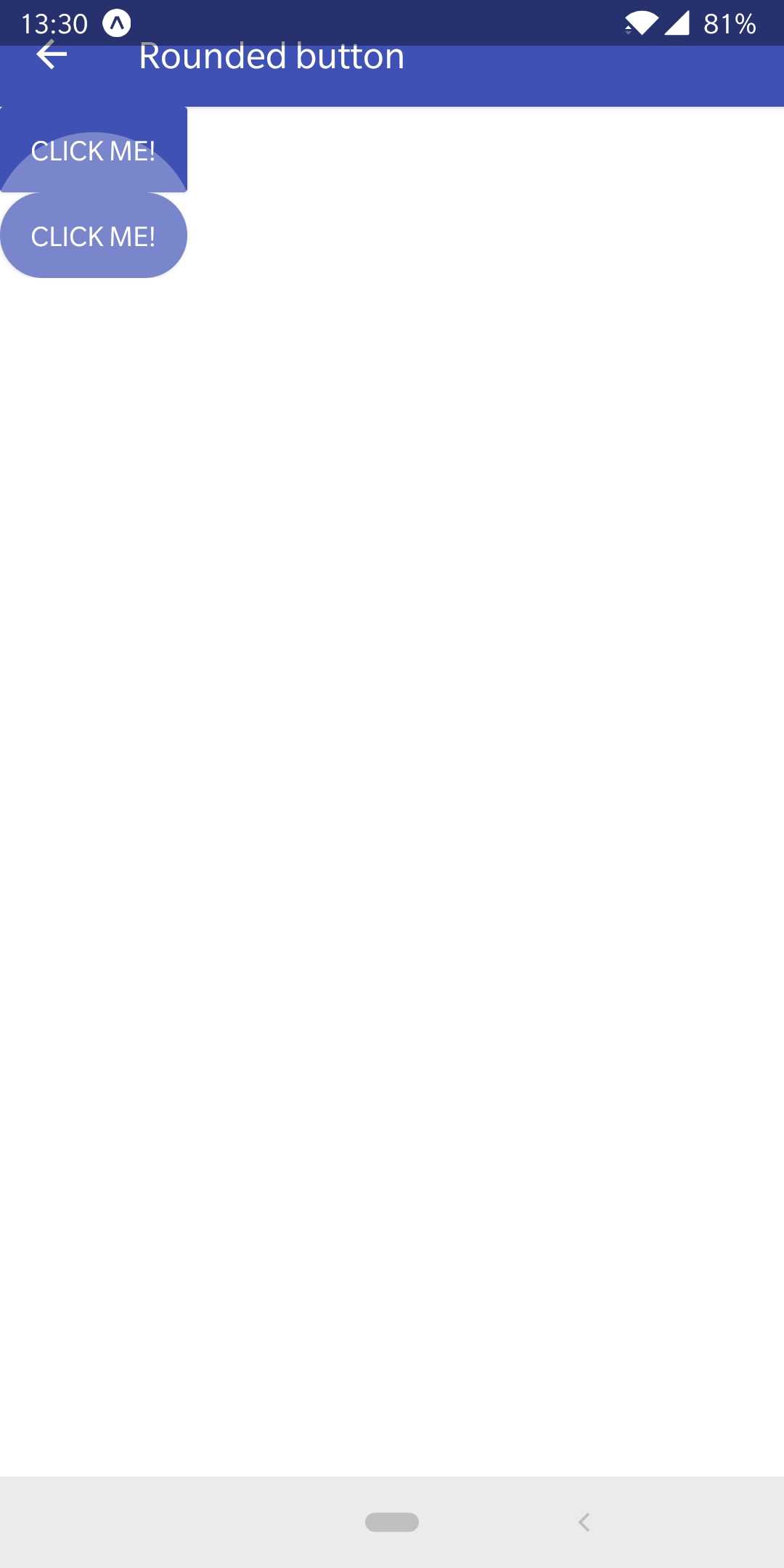
I saw you fixed #1207 and #1553, but the ripple effect is giant on large rounded buttons.
node, npm, react-native, react and native-base version, expo version if used, xcode version
Node v10.15.1
React Native v0.58.5
React v16.8.2
Native Base v2.11.0
Not using expo
XCode v10.1
Expected behaviour
The ripple should respect the button size.
Actual behaviour
The ripple goes completely off the button (only to the top).
Steps to reproduce
Code snippet
For the sake of this example, this component is the topmost component in my App (but the problem also happens if it's not).
import React from 'react'
import { Container, Content, Button, Text, Separator } from 'native-base'

export default () => (
  <Container>
    <Content>
      <Button full rounded onPress={f => f}>
        <Text>Test A</Text>
      </Button>
      <Separator />
      <Button full rounded onPress={f => f}>
        <Text>Test B</Text>
      </Button>
    </Content>
  </Container>
)
Screenshot

Note: if I click the first button, the problem doesn't happen, because the ripple goes off only to the top, never to the bottom.
Is the bug present in both iOS and Android or in any one of them?
Only Android (iOS doesn't have ripple effect).
Any other additional info which would help us debug the issue quicker.
Nope.
 buzinas
All 9 comments
I tested this on Android device with https://github.com/GeekyAnts/NativeBase-KitchenSink latest
Worked fine for rounded and full rounded
 SupriyaKalghatgi
on 21 Feb 2019
SupriyaKalghatgi
on 21 Feb 2019
@SupriyaKalghatgi this problem still exists. Could be because I'm on Android 9.
 andreialecu
on 26 Apr 2019
andreialecu
on 26 Apr 2019
not working!!!!!!!!!!!!!!!!!!!!!!!!!!!!!!!11
 EhsanSarshar
on 15 Jul 2019
EhsanSarshar
on 15 Jul 2019
not working for me as well
 ParitoshVaidya
on 23 Dec 2019
ParitoshVaidya
on 23 Dec 2019
@SupriyaKalghatgi This is still a bug. On Android. Maybe not on all devices.
I've created this snack and it works in the Appetize web Android emulator, but it doesn't work on my OnePlus 5T with Oxygen 9.0.9:
 jenskuhrjorgensen
on 15 Jan 2020
jenskuhrjorgensen
on 15 Jan 2020
I have the same issue, still looking for a solution.
 Cristi6
on 28 Jan 2020
Cristi6
on 28 Jan 2020
+1
 lyseiha
on 14 Jun 2020
lyseiha
on 14 Jun 2020
i found the solution
<View style={{overflow: 'hidden', borderRadius: 30}}>
<Button rounded/>
</View>
lyseiha
on 14 Jun 2020
@lyseiha Thank you for your answer, but I think it is more a hack than a solution. The <Button/> should itself be fixed so that your hack isn't necessary.
jenskuhrjorgensen
on 22 Jun 2020
Related issues
 georgemickael-b
·
3Comments
georgemickael-b
·
3Comments
 chetnadaffodil
·
3Comments
chetnadaffodil
·
3Comments
 mcpracht
·
3Comments
mcpracht
·
3Comments
 Bundas
·
3Comments
Bundas
·
3Comments
 muthuraman007
·
3Comments
muthuraman007
·
3Comments
Most helpful comment
I have the same issue, still looking for a solution.