Nativebase: Feather font renders wrong icon
I have gone through these following points
- [x] Check latest documentation: https://docs.nativebase.io/
- [x] Check for existing open/closed issues for a possible duplicate before creating a new issue: https://github.com/GeekyAnts/NativeBase/issues
- [x] Use the latest NativeBase release: https://github.com/GeekyAnts/NativeBase/releases
- [x] Check examples from NativeBase KitchenSink https://github.com/GeekyAnts/NativeBase-KitchenSink
- [x] For discussion purpose make use of NativeBase Slack: http://slack.nativebase.io/
- [x] For queries related to theme, check Theme Variables from Docs and live NativeBase Theme Editor http://nativebase.io/customizer/
Issue Description
node, npm, react-native, react and native-base version, expo version if used, xcode version
node: v8.12.0
npm: 6.4.1
yarn: v1.12.1
react-native: 0.57.8
react: 16.6.3
native-base: 2.9.4
expo: none
xcode: 10.1
Expected behaviour
If I want to use download, show download icon below:

Actual behaviour
But show facebook icon below:

Steps to reproduce
import { Icon } from 'native-base'

<Icon type="Feather" name="download" />
Is the bug present in both iOS and Android or in any one of them?
both iOS and Android reproduced.
Any other additional info which would help us debug the issue quicker.
Short answer:
Copy oblador/react-native-vector-icons's Fonts directory completely to GeekyAnts/NativeBase's Fonts directory.
Long consideration:
rnvi(react-native-vector-icon)'s glyph name stores in json file (example of Feather icon: https://github.com/oblador/react-native-vector-icons/blob/v6.1.0/glyphmaps/Feather.json#L87 ) .
For example, download is 59733, so rnvi lookup No: 59733 within Feather.ttf.
Needless to say, glyphmap json and font are paired.
But NativeBase is stored font files from sometimes rnvi, so it's paired relation is broken at some file (include in Feather.ttf and json).
This pics is Feather.ttf position 59733 in NativeBase and rnvi with Fontforge(Above is NativeBase, Below is rnvi):
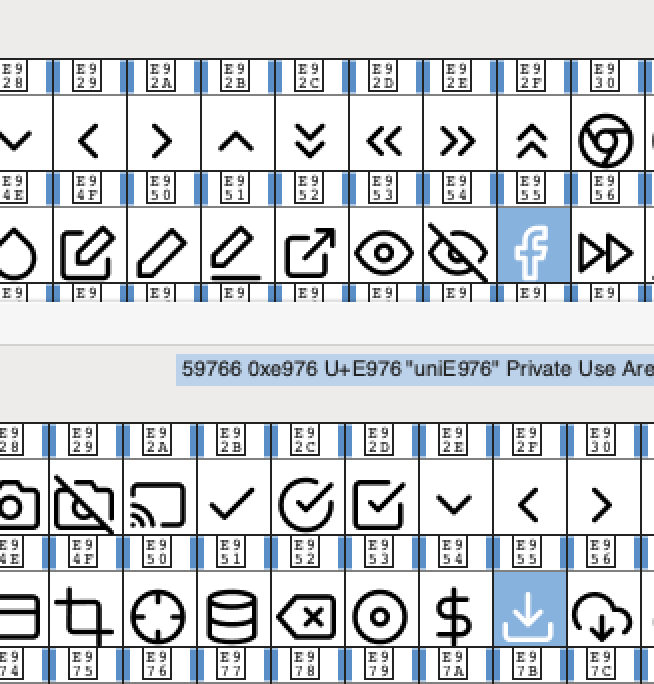
59733 (0xE955) is set as download in rnvi, but NativeBase Feather.ttf pointed facebook icon.
 keima
keima
All 11 comments
 SupriyaKalghatgi
on 18 Jan 2019
SupriyaKalghatgi
on 18 Jan 2019
@SupriyaKalghatgi
Why close this issue? #2453 is closed and locked.
Nothing is changed at 2 months since 2453 is posted.
Your team has any schedule to fix this issue?
keima
on 18 Jan 2019
+1
"dependencies": {
"@types/prop-types": "^15.5.8",
"@types/styled-components": "^4.1.4",
"axios": "^0.19.0-beta.1",
"global": "^4.3.2",
"knex": "^0.15.2",
"native-base": "^2.10.0",
"prop-types": "^15.6.2",
"react": "^16.6.0",
"react-native": "^0.57.4",
"react-native-device-info": "^0.24.3",
"react-native-easy-grid": "^0.2.0",
"react-native-firebase": "^5.2.1",
"react-native-uuid": "^1.4.9",
"react-native-vector-icons": "^6.2.0",
"react-navigation": "^2.18.2",
"realm": "~2.16.0",
"styled-components": "^4.1.3",
"styled-is": "^1.1.5"
}
same problem.
render wrong and all others
 shamilsun
on 27 Jan 2019
shamilsun
on 27 Jan 2019
issue with vector icons, fixed it
shamilsun
on 28 Jan 2019
@keima The issue is with react-native-vector-icons
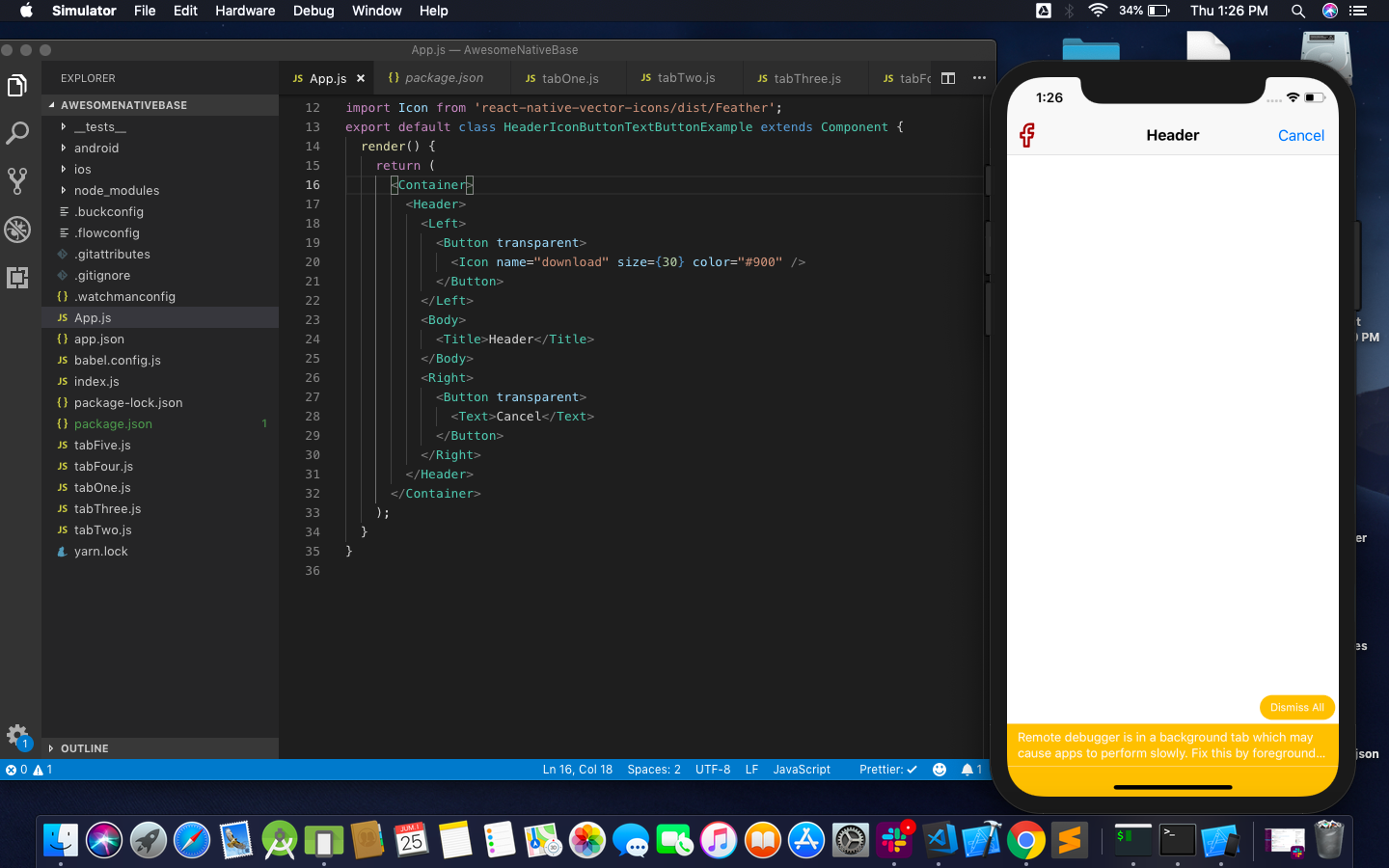
 suvenduchhatoi
on 31 Jan 2019
suvenduchhatoi
on 31 Jan 2019
It is explained on the troubleshooting section of react-native-vector-icons.
You should be able to fix it by running react-native link native-base or react-native link react-native-vector-icons, but the second may add the library twice on Android.
 alexsegura
on 3 Feb 2019
alexsegura
on 3 Feb 2019
@suvenduchhatoi
It's unclear in this screenshot which use native-base Fonts or rnvi's Fonts.
If your project use native-base Fonts, native-base has problem.
(please check react-native-vector-icons only and use rnvi's Font correctly.)
@alexsegura
Thanks for sharing link.
Currently, I use rnvi's font directly and NOT USING native-base fonts.
(Copy to android/src/main/assets and add in Xcode)
This problem is: Then run react-native link native-base , wrong (mismatching from rnvi json) fonts are linking.
keima
on 14 Feb 2019
Also, from what I understand, react-native-vector-icons are basically copied into native-base (here). I suppose some icon fonts are not synchronized with upstream.
alexsegura
on 14 Feb 2019
Try react-native link react-native-vector-icons
And follow the manual installation according to the vector icons documentation
https://github.com/oblador/react-native-vector-icons
This worked for me.
 marcelodesouza
on 26 Apr 2019
marcelodesouza
on 26 Apr 2019
same issue, native-base : 2.12.1
 Temkit
on 10 Jun 2019
Temkit
on 10 Jun 2019
I'll just throw this in here.
Hopefully it can help somebody at least as a temp fix.
The following solved the problem for me on IOS
I found some help here https://nativebase.io/docs/v0.5.13/getting-started
The docs made me look where is xCode bundling Fonts from.
Turns out, for me it was bundling node_modules/native-base/Fonts which had different mapping for some reason.
I solved it like this:
- Remove all .tff assets liked by native-base in xCode build phases
npm install react-native-vector-iconsreact-native link react-native-vector-iconspod installin ios folder- make sure that no .tff files are twice in the build phases in xCode
- run app from xCode
 zatloeri
on 8 Sep 2020
zatloeri
on 8 Sep 2020
Related issues
 muthuraman007
·
3Comments
muthuraman007
·
3Comments
 kitsune7
·
3Comments
kitsune7
·
3Comments
 mcpracht
·
3Comments
mcpracht
·
3Comments
 agersoncgps
·
3Comments
agersoncgps
·
3Comments
 maphongba008
·
3Comments
maphongba008
·
3Comments
Most helpful comment
@SupriyaKalghatgi
Why close this issue? #2453 is closed and locked.
Nothing is changed at 2 months since 2453 is posted.
Your team has any schedule to fix this issue?