Nativebase: Header and Footer on iPhone XR and XS Max wrong SafeArea
Issue Description
Header and Footer currently do not work on iPhone XR and XS Max as the SafeArea does seem to be wrong. iPhone X and XS works well.
node, npm, react-native, react and native-base version, expo version if used
React Native Environment Info:
System:
OS: macOS High Sierra 10.13.6
CPU: x64 Intel(R) Core(TM) i5-7360U CPU @ 2.30GHz
Memory: 25.59 MB / 8.00 GB
Shell: 3.2.57 - /bin/bash
Binaries:
Node: 8.11.3 - /usr/local/bin/node
npm: 5.6.0 - /usr/local/bin/npm
SDKs:
iOS SDK:
Platforms: iOS 12.0, macOS 10.14, tvOS 12.0, watchOS 5.0
IDEs:
Xcode: 10.0/10A255 - /usr/bin/xcodebuild
npmPackages:
react: 16.5.0 => 16.5.0
react-native: 0.57.0 => 0.57.0
npmGlobalPackages:
react-native-app-id: 0.0.5
react-native-cli: 2.0.1
"native-base": "^2.8.0",
Expected behaviour
Should respect correct SafeArea and display nicely.
Actual behaviour
Header and Footer are within SafeArea.
Steps to reproduce
- react-native init my app
- install nativebase
- add header and footer to app.js
- start with iPhone XR or XS Max
Is the bug present in both iOS and Android or in any one of them?
iOS only issue
Any other additional info which would help us debug the issue quicker.
maybe #2283 fixes it, so it should be merged and a release should be pushed to fix this.
 benzman81
All 23 comments
Any update on this? Still seems broken.
I can put together a PR to fix this if the one above doesn't but I'm not sure how quickly they're being merged.
 msnow345
on 27 Sep 2018
msnow345
on 27 Sep 2018
Also experiencing this issue, resorted to model-specific padding in the meantime (ew).
 adierker
on 29 Sep 2018
adierker
on 29 Sep 2018
I am also experiencing this issue on Iphone XS Max, but only with the header. seems like the height is wrong for this device. Tested both on emulator and real device.

 jorgebaralt
on 30 Sep 2018
jorgebaralt
on 30 Sep 2018
+1 i facing same issue, when iphoneX safearea is work.
 ducpt2
on 1 Oct 2018
ducpt2
on 1 Oct 2018
so what is solution to resolve now?
 hohien
on 4 Oct 2018
hohien
on 4 Oct 2018
any solution yet?
 kimkong88
on 5 Oct 2018
kimkong88
on 5 Oct 2018
See my comment https://github.com/GeekyAnts/NativeBase/pull/2283#issuecomment-428102438 it's quite easy to fix by yourself if you can't wait for the PR to be merged.
 alexisbronchart
on 10 Oct 2018
alexisbronchart
on 10 Oct 2018
@alexisbronchart when I add the changes on #2283 to my code (in node_modules and native base) for some reason it still does not work
jorgebaralt
on 15 Oct 2018
@jorgebaralt since this is a direct change in node_modules, did you change the main property in package.json to src/index.js to avoid using the transpiled code?
alexisbronchart
on 15 Oct 2018
@alexisbronchart follow your guild it working now :) Thanks alot.
ducpt2
on 22 Oct 2018
@jorgebaralt since this is a direct change in node_modules, did you change the
mainproperty inpackage.jsontosrc/index.jsto avoid using the transpiled code?
Hi could you explain me what is the action to do because I didn't get it and what happen in production ?
 ghost
on 8 Nov 2018
ghost
on 8 Nov 2018
Here's what I did to workaround this issue until the maintainers fix this.
- Made a component called
CommonHeaderthat wraps the native baseHeader - Added
react-native-device-infopackage -- needed for thehasNotch()andgetModel()functions - Added a helper function to see if the current device is one that happens to work correctly on native-base (2.8.1 as of this comment)
- Made the following helper function:
  nativeBaseDoesHeaderCorrectlyAlready() {
    if (!DeviceInfo.hasNotch()) {
      return true
    }
    const model = DeviceInfo.getModel()
    switch (model) {
      case "iPhone X":
      case "iPhone XS":
        return true
    }
    return false
  }
- Added a style function to add padding to top if it's one of the devices for which native-base 💩the 🛏
  getContainerStyles() {
    const defaultStyles = {
      backgroundColor: "#ffffff",
    }
    if (!this.nativeBaseDoesHeaderCorrectlyAlready()) {
      return {
        ...defaultStyles,
        paddingTop: 40,
        height: 100,
      }
    }
    return defaultStyles
  }
There's probably all sorts of issues with this, and devices this doesn't quite work on, but this is a temporary workaround for these specific devices (iPhone XR, XS Max)
I also don't like how it relies on DeviceInfo.getModel() -- it just feels hacky. But this is the world we temporarily live in 🤷♂️
Hopefully this works well for others. Works for my needs for now, but looking forward to a real fix!
 egold
on 20 Nov 2018
egold
on 20 Nov 2018
Released 2.9.2
 SupriyaKalghatgi
on 20 Dec 2018
SupriyaKalghatgi
on 20 Dec 2018
@SupriyaKalghatgi working now, thanks
benzman81
on 20 Dec 2018
It seems that this problem is back.
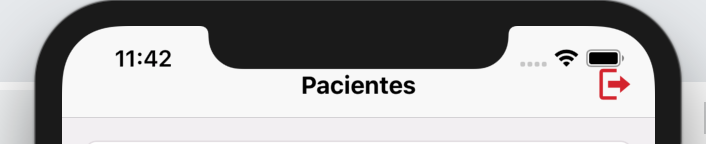
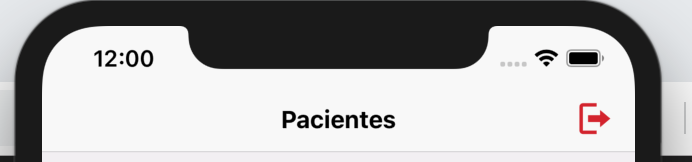
Device: Iphone XS Max
 lebreRafael
on 2 Jul 2019
lebreRafael
on 2 Jul 2019
It seems that this problem is back.
Device: Iphone XS Max
Facing same problem. It appeared between version 2.11.0 and 2.12.0.
 Hraph
on 6 Jul 2019
Hraph
on 6 Jul 2019
Reproduced the problem as well on the versions stated above. Reverted to 2.11.0 for now as 2.12.1 has the issue.
 andrewhamill
on 6 Jul 2019
andrewhamill
on 6 Jul 2019
I am also facing misalignment of header issue in iphone x
 ansarikhurshid786
on 8 Jul 2019
ansarikhurshid786
on 8 Jul 2019
@lebreRafael @Hraph @andrewhamill
I faced similar issue and then I realise that perhaps I need to eject and update theme. It seems like that there was some refactoring done in last versions.
node node_modules/native-base/ejectTheme.js
 RobertSasak
on 8 Jul 2019
RobertSasak
on 8 Jul 2019
@RobertSasak Thank's for sharing that! I will try it soon and tell here if it worked.
lebreRafael
on 8 Jul 2019
It worked!
lebreRafael
on 10 Jul 2019
I'm experiencing a similar issue with the footer. On iPhone Xr, it is pushed above a little bit while it works on iPhone 8.

 hossamnasser938
on 18 Jan 2020
hossamnasser938
on 18 Jan 2020
I have the same issue in iphone x and up
I have the screenshot in iphone 6 plus - react-native-modal for pop up

My code looks like this
<Modal isVisible={this.state.isModalVisible} backdropColor={'rgba(0,0,0,.4)'} backdropOpacity={1} animationIn={'zoomInDown'} animationOut={'zoomOutUp'}
        animationInTiming={1000} animationOutTiming={1000} backdropTransitionInTiming={1000} backdropTransitionOutTiming={1000}
        onBackdropPress={() => {
          this.closeModal();
        }}
        onRequestClose={() => {
          this.closeModal();
        }}
        style={{ justifyContent: 'center', zIndex: 2 }} >
        <Content  >

          {/* End of Header Modal */}
          <View style={{ flexDirection: 'row', alignItems: 'center', paddingVertical: 10, backgroundColor: '#3F71D7',paddingHorizontal: 20 }}>
            <View style={{ alignSelf: 'flex-start'}}>
             <Text style={{ fontSize: pRatioToFontSize() > 20 ? 20 : pRatioToFontSize(), color: 'white' }}>
              Filter Leads
                        </Text>

            </View>

            <Button transparent style={{ position: 'absolute', right: 0, marginRight: 20, }}
              onPress={() => {
                this.setState({ showFilterHeader: false }, () => {
                  this.closeModal();
                });
              }}>
              <Ionicons name='md-close' size={25} color='white' />
            </Button>

          </View>

          <Content style={{ backgroundColor: colors.WHITE, paddingHorizontal: 20 }} >
              <Text style={{ fontSize: 14, paddingTop: 6 }}>Filter By</Text>
              <Row>
                <Col size={50}>
                <ListItem style={{ marginLeft: 0, borderBottomWidth: 0 }}>
                  <CheckBox checked={this.state.checkBoxLeadStatus} onPress={(e) => this.checkBoxLeadStatus()} />
                  <Body>
                    <Text style={{ fontSize: 14 }}>Lead Status</Text>
                  </Body>
                </ListItem>
                <ListItem style={{ marginLeft: 0, borderBottomWidth: 0 }}>
                  <CheckBox checked={this.state.checkBoxLeadSource} onPress={(e) => this.checkBoxLeadSource()} />
                  <Body>
                    <Text style={{ fontSize: 14 }}>Lead Source</Text>
                  </Body>
                </ListItem>
                <ListItem style={{ marginLeft: 0, borderBottomWidth: 0 }}>
                  <CheckBox checked={this.state.checkBoxChooseDate} onPress={(e) => this.checkBoxChooseDate()} />
                  <Body>
                    <Text style={{ fontSize: 14 }}>Choose Date</Text>
                  </Body>
                </ListItem>
                </Col>

              <Col size={50}>
                <ListItem style={{ marginLeft: 0, borderBottomWidth: 0 }}>
                  <CheckBox checked={this.state.checkBoxRating} onPress={(e) => this.checkBoxRating()} />
                  <Body>
                    <Text style={{ fontSize: 14 }}>Rating</Text>
                  </Body>
                </ListItem>
                <ListItem style={{ marginLeft: 0, borderBottomWidth: 0 }}>
                  <CheckBox checked={this.state.checkBoxPriority} onPress={(e) => this.checkBoxPriority()} />
                  <Body>
                    <Text style={{ fontSize: 14 }}>Priority</Text>
                  </Body>
                </ListItem>
                <ListItem style={{ marginLeft: 0, borderBottomWidth: 0 }}>
                  <CheckBox checked={this.state.checkBoxTags} onPress={(e) => this.checkBoxTags()} />
                  <Body>
                    <Text style={{ fontSize: 14 }}>Tags</Text>
                  </Body>
                </ListItem>
              </Col>

              </Row>
            <View >
              <ListItem icon style={{ marginLeft: 0, borderBottomWidth: 0 }}>
                <Left>
                  <Text>Include Shared Leads</Text>
                </Left>
                <Body style={{ borderBottomWidth: 0}} />
                <Right style={{ borderBottomWidth: 0 }}>
                  <Switch value={this.state.sharedLead} onValueChange={() => this.setState({ sharedLead: !this.state.sharedLead})} />
                </Right>
              </ListItem>
            </View>
          </Content>
          <Footer >
            <FooterTab style={{ backgroundColor: "#FFF"}}>
              <Button light full
                onPress={() => {
                    console.log(Clear All)
                }}>
                <Text >
                  Clear All
                                </Text>
              </Button>
              <Button full
                style={{ backgroundColor: '#2ca84f', borderRadius: 0}}
                onPress={() => {
                  console.log(apply)
                }}>
                <Text style={{ color: 'white' }}>
                  Apply
                                </Text>
              </Button>
            </FooterTab>
          </Footer>
        </Content>
      </Modal>;
But in iphone x and up the footer height is not responsive or there's a big gap on the buttons
I hope someone help me on this sort of problem.

 michaelVictoriaDev
on 4 Mar 2020
michaelVictoriaDev
on 4 Mar 2020
Related issues
 chetnadaffodil
·
3Comments
chetnadaffodil
·
3Comments
 Bundas
·
3Comments
Bundas
·
3Comments
 natashache
·
3Comments
natashache
·
3Comments
natashache
·
3Comments
natashache
·
3Comments
 kitsune7
·
3Comments
kitsune7
·
3Comments
Most helpful comment
@jorgebaralt since this is a direct change in node_modules, did you change the
mainproperty inpackage.jsontosrc/index.jsto avoid using the transpiled code?